

Top Tweets for #Reinitialize

the first tip reached far more developers than i expected.
here's another lesson that saved me hours of debugging.
#2
playercontroller > character (when appropriate)
in ODK, not every gameplay system belongs in your Character.
Characters can be recreated during spawn, respawn, or level travel. any system tightly coupled to them may need to be reinitialized or have its references restored.
PlayerController represents the player, while Character represents the pawn currently being controlled
a simple rule i follow:
• player-related logic → PlayerController
• character-specific logic → Character
if a system stops working after a level transition, don't just inspect your Blueprint.
ask yourself:
is this system really living in the right class?
sometimes the problem isn't your code. it's the object's lifecycle.
// @OthersideMeta

i've decided to start sharing what I've learned while developing in ODK.
i hope this series is especially helpful for developers who are just getting started.
#1
think twice before using Tick.
tick runs every frame. at 60 FPS, that s 60 executions per second. at 120 FPS, it's 120.
before enabling Tick, ask yourself:
• does this really need to run every frame?
• can it be triggered by an Event instead?
• would a Timer be enough?
in multiplayer projects, dozens of Actors running unnecessary Ticks can quietly increase CPU usage. that cost doesn't only affect clients,it also adds up on the server.
one thing many developers overlook:
if an Actor doesn't need Tick, don't just leave the Tick event empty. Disable Can Ever Tick as well. this avoids unnecessary tick registration and scheduling overhead, which can become a meaningful optimization as your project grows.
the best optimization is the code that never has to run.
// @OthersideMeta


Learned something new about Python multiprocessing.
Linux uses fork() by default. Child processes inherit memory, but not bg threads.
If services are initialized only in the parent process, child processes may stop reporting.
Fix: reinitialize them after forking.

𝐆𝐢𝐭 𝐂𝐨𝐦𝐦𝐚𝐧𝐝𝐬 𝐄𝐯𝐞𝐫𝐲 𝐄𝐧𝐠𝐢𝐧𝐞𝐞𝐫 𝐒𝐡𝐨𝐮𝐥𝐝 𝐊𝐧𝐨𝐰 🚀
✔ 𝐠𝐢𝐭 𝐢𝐧𝐢𝐭 → Create an empty Git repository or reinitialize an existing one
✔ 𝐠𝐢𝐭 𝐬𝐭𝐚𝐭𝐮𝐬 → Show the working tree status
✔ 𝐠𝐢𝐭 --𝐯𝐞𝐫𝐬𝐢𝐨𝐧 → Check the Git version
✔ 𝐠𝐢𝐭 𝐚𝐝𝐝 . → Add files to the staging area
✔ 𝐠𝐢𝐭 𝐜𝐨𝐦𝐦𝐢𝐭 -𝐦 "𝐦𝐞𝐬𝐬𝐚𝐠𝐞" → Save your changes to the local repository
✔ 𝐠𝐢𝐭 𝐥𝐨𝐠 → See commit history
✔ 𝐠𝐢𝐭 𝐝𝐢𝐟𝐟 → Check what has changed before committing
✔ 𝐠𝐢𝐭 𝐩𝐮𝐬𝐡 → Send your changes to the remote repository
✔ 𝐠𝐢𝐭 𝐜𝐨𝐧𝐟𝐢𝐠 --𝐠𝐥𝐨𝐛𝐚𝐥 𝐮𝐬𝐞𝐫.𝐧𝐚𝐦𝐞 "𝐘𝐨𝐮𝐫 𝐍𝐚𝐦𝐞" → Sets the global username.
✔ 𝐠𝐢𝐭 𝐜𝐨𝐧𝐟𝐢𝐠 --𝐠𝐥𝐨𝐛𝐚𝐥 𝐮𝐬𝐞𝐫.𝐞𝐦𝐚𝐢𝐥 "𝐲𝐨𝐮𝐫𝐞𝐦𝐚𝐢𝐥@𝐞𝐱𝐚𝐦𝐩𝐥𝐞.𝐜𝐨𝐦"→ Sets the global email.
✔ 𝐠𝐢𝐭 𝐜𝐥𝐨𝐧𝐞 <𝐫𝐞𝐩𝐨𝐬𝐢𝐭𝐨𝐫𝐲_𝐮𝐫𝐥> → Creates a copy of a remote repository on your local machine.
✔ 𝐠𝐢𝐭 𝐜𝐥𝐞𝐚𝐧 -𝐧 → Shows a list of untracked files that will be removed.
✔ 𝐠𝐢𝐭 𝐜𝐥𝐞𝐚𝐧 -𝐟 → Removes untracked files from the working directory.
✔ 𝐠𝐢𝐭 𝐛𝐫𝐚𝐧𝐜𝐡 → List all local branches
✔ 𝐠𝐢𝐭 𝐛𝐫𝐚𝐧𝐜𝐡 𝐛𝐫𝐚𝐧𝐜𝐡-𝐧𝐚𝐦𝐞 → Create a new branch
✔ 𝐠𝐢𝐭 𝐜𝐡𝐞𝐜𝐤𝐨𝐮𝐭 𝐛𝐫𝐚𝐧𝐜𝐡-𝐧𝐚𝐦𝐞 → switches to another branch
✔ 𝐠𝐢𝐭 𝐜𝐡𝐞𝐜𝐤𝐨𝐮𝐭 -𝐛 𝐛𝐫𝐚𝐧𝐜𝐡-𝐧𝐚𝐦𝐞 → creates a branch and switches to it
✔ 𝐠𝐢𝐭 𝐦𝐞𝐫𝐠𝐞 𝐛𝐫𝐚𝐧𝐜𝐡-𝐧𝐚𝐦𝐞 → merges another branch into the current/master branch
✔ 𝐠𝐢𝐭 𝐛𝐫𝐚𝐧𝐜𝐡 -𝐝 𝐛𝐫𝐚𝐧𝐜𝐡-𝐧𝐚𝐦𝐞 → deletes a branch after the work is done
✔ 𝐠𝐢𝐭 𝐫𝐞𝐬𝐞𝐭 → Used when you want to undo local changes.
✔ 𝐠𝐢𝐭 𝐫𝐞𝐯𝐞𝐫𝐭 → Safely undo a commit
✔ 𝐠𝐢𝐭 𝐬𝐭𝐚𝐬𝐡 → Temporarily save work when you’re not ready to commit
𝐆𝐢𝐭 𝐂𝐨𝐦𝐦𝐚𝐧𝐝𝐬 𝐄𝐯𝐞𝐫𝐲 𝐄𝐧𝐠𝐢𝐧𝐞𝐞𝐫 𝐒𝐡𝐨𝐮𝐥𝐝 𝐊𝐧𝐨𝐰 🚀
People rush into CI/CD, Docker, Kubernetes… but struggle with Git basics.
If you want to work confidently in any tech team, Git is non-negotiable.
Here’s a clean, practical Git cheat-sheet every developer & DevOps engineer should know 👇
✔ 𝐠𝐢𝐭 𝐢𝐧𝐢𝐭 → Create an empty Git repository or reinitialize an existing one
✔ 𝐠𝐢𝐭 𝐬𝐭𝐚𝐭𝐮𝐬 → Show the working tree status
✔ 𝐠𝐢𝐭 --𝐯𝐞𝐫𝐬𝐢𝐨𝐧 → Check the Git version
✔ 𝐠𝐢𝐭 𝐚𝐝𝐝 . → Add files to the staging area
✔ 𝐠𝐢𝐭 𝐜𝐨𝐦𝐦𝐢𝐭 -𝐦 "𝐦𝐞𝐬𝐬𝐚𝐠𝐞" → Save your changes to the local repository
✔ 𝐠𝐢𝐭 𝐥𝐨𝐠 → See commit history
✔ 𝐠𝐢𝐭 𝐝𝐢𝐟𝐟 → Check what has changed before committing
✔ 𝐠𝐢𝐭 𝐩𝐮𝐬𝐡 → Send your changes to the remote repository
✔ 𝐠𝐢𝐭 𝐜𝐨𝐧𝐟𝐢𝐠 --𝐠𝐥𝐨𝐛𝐚𝐥 𝐮𝐬𝐞𝐫.𝐧𝐚𝐦𝐞 "𝐘𝐨𝐮𝐫 𝐍𝐚𝐦𝐞" → Sets the global username.
✔ 𝐠𝐢𝐭 𝐜𝐨𝐧𝐟𝐢𝐠 --𝐠𝐥𝐨𝐛𝐚𝐥 𝐮𝐬𝐞𝐫.𝐞𝐦𝐚𝐢𝐥 "𝐲𝐨𝐮𝐫𝐞𝐦𝐚𝐢𝐥@𝐞𝐱𝐚𝐦𝐩𝐥𝐞.𝐜𝐨𝐦"→ Sets the global email.
✔ 𝐠𝐢𝐭 𝐜𝐥𝐨𝐧𝐞 <𝐫𝐞𝐩𝐨𝐬𝐢𝐭𝐨𝐫𝐲_𝐮𝐫𝐥> → Creates a copy of a remote repository on your local machine.
✔ 𝐠𝐢𝐭 𝐜𝐥𝐞𝐚𝐧 -𝐧 → Shows a list of untracked files that will be removed.
✔ 𝐠𝐢𝐭 𝐜𝐥𝐞𝐚𝐧 -𝐟 → Removes untracked files from the working directory.
✔ 𝐠𝐢𝐭 𝐛𝐫𝐚𝐧𝐜𝐡 → List all local branches
✔ 𝐠𝐢𝐭 𝐛𝐫𝐚𝐧𝐜𝐡 𝐛𝐫𝐚𝐧𝐜𝐡-𝐧𝐚𝐦𝐞 → Create a new branch
✔ 𝐠𝐢𝐭 𝐜𝐡𝐞𝐜𝐤𝐨𝐮𝐭 𝐛𝐫𝐚𝐧𝐜𝐡-𝐧𝐚𝐦𝐞 → switches to another branch
✔ 𝐠𝐢𝐭 𝐜𝐡𝐞𝐜𝐤𝐨𝐮𝐭 -𝐛 𝐛𝐫𝐚𝐧𝐜𝐡-𝐧𝐚𝐦𝐞 → creates a branch and switches to it
✔ 𝐠𝐢𝐭 𝐦𝐞𝐫𝐠𝐞 𝐛𝐫𝐚𝐧𝐜𝐡-𝐧𝐚𝐦𝐞 → merges another branch into the current/master branch
✔ 𝐠𝐢𝐭 𝐛𝐫𝐚𝐧𝐜𝐡 -𝐝 𝐛𝐫𝐚𝐧𝐜𝐡-𝐧𝐚𝐦𝐞 → deletes a branch after the work is done
✔ 𝐠𝐢𝐭 𝐫𝐞𝐬𝐞𝐭 → Used when you want to undo local changes.
✔ 𝐠𝐢𝐭 𝐫𝐞𝐯𝐞𝐫𝐭 → Safely undo a commit
✔ 𝐠𝐢𝐭 𝐬𝐭𝐚𝐬𝐡 → Temporarily save work when you’re not ready to commit
If you’re learning DevOps or working as a developer master Git before chasing advanced tools.
#BuildInPublic

Chapter Eight: Blood in the Wires
The lab was in lockdown.
Red lights stuttered. Screens fizzled with scrambled code. And inside the stasis tank, the Cipher-clone’s eyelids twitched.
The awakening had begun.
X03 stood in front of the tank, staring at the figure inside, muscles laced with glowing neural threads, bones reinforced with carbon sheathing. It was Cipher. Or at least, a version of him.
“We pull the plug,” Sova said, pulse rifle raised. “Right now.”
“No,” Kade cut in. “We don’t know if it’s him… or something else.”
A low, mechanical hum crawled up through the floor beneath them.
HEX had vanished, no sign of his presence since the lab first went dark.
And then the tank cracked.
A single fracture across the surface.
The fluid inside trembled.
The neural cords began to retract into the chamber walls.
“He’s waking up,” X03 muttered.
“No,” came a voice behind them.
“Something else is.”
HEX emerged from the shadows, one chrome hand outstretched toward the tank, his neural relay nodes glowing red-hot across the back of his skull.
“I tried to bring Cipher back,” he said, “but he wouldn’t stay tethered. His fragments scattered. So I built something stronger.”
X03 turned sharply. “That’s not Cipher.”
HEX nodded once.
“It’s Cipher’s mind… rebuilt around something hungrier.”
Inside the tank, the figure opened its eyes.
They glowed with violet flame, and static.
A surge of energy blasted from the containment unit, sending Kade flying across the room. Sova fired, but her bullets curved mid-air, caught in a localized grav distortion field pulsing around the being.
It stepped out of the tank.
No longer just Cipher.
Something beyond him.
CODE DESIGNATION: CIPHER-OBLIVION
He spoke, but the voice echoed in their minds:
“I remember… all of you.”
And yet… there was no warmth in it. Only precision.
“You can’t control it,” X03 shouted at HEX, retreating behind an overturned console.
“I don’t have to!” HEX screamed back, wild-eyed. “He’s not here to obey. He’s here to finish the fight Cipher wouldn’t.”
Then everything went red.
The tower trembled. And CIPHER-OBLIVION lifted his hand.
From beneath the lab, the buried Silence protocols began to reinitialize.
Across the Black Signal, every inactive Doruzu node pulsed once.
Then again.
One by one, they began to wake.
Not as soldiers.
Not as themselves.
As vessels.
And CIPHER-OBLIVION smiled.
“It’s not resurrection.”
“It’s evolution.”


@dillon_smart correct. Otherwise it will just reinitialize the directory.

Exceptions are IMO only usable in "temporarily pure" functions (code that doesn't change anything in the global state but that may depend on global state).
The idea of "strong exception safety" is completely useless as doesn't compose.
If you have A and B that are both "strongly exception safe" even the simplest composition in the world AB is not "strongly exception safe" as in case B throws you also need to undo what A did. And you will forget.
RAII, defer and friends can only ensure you released all mutexes and closed all files; but your global state when you catch an exception is most probably a complete mess in a complex application... continuing is crazy.
By the way by the time you get to the exception handler you don't have even an idea of where the exception is coming from, and the world has already been half destroyed and all traces removed by unwinding.
Good luck investigating and trying to fix things up in the general case (i.e. if you can't just restart and reinitialize the whole subsystem the exception is escaping from, and you don't have other guarantees like no state at all except in a DB and you can rollback the transaction).
Would be IMO nice to be able to tag those "temporarily pure" functions so that the compiler allows automatic unwinding and at the same time forbids calling any function that in not "temporarily pure" from within them.
Unfortunately while this would be a quite simple problem with decent metaprogramming abilities, with C++ pathetic stuff is impossible to achieve for any foreseeable future.
The "temporarily pure" idea doesn't work well with multiple threads, but nothing IMO works well with general share-everything multithreading.
That's another story tho.

hiii!! if i open a shiny drop from the map, does it reinitialize the quepic?

Try this:
Title: Single-file vanilla JS 3D cube with gravity-affected bouncing balls and adjustable camera/UI
Goal:
Create a single index.html containing HTML, CSS, and embedded vanilla JavaScript that renders a 3D cube rotating in space, with multiple spheres (balls) bouncing inside it under gravity and colliding with each other and the cube walls. Include a robust controls UI and interactive orbit camera. No external libraries or assets.
Environment:
- Single file: index.html only
- Runs directly in modern desktop browsers: latest Chrome and Firefox
- No bundlers, no transpilers, no modules, no external CSS/JS
- Canvas element using 2D rendering context only
- Use requestAnimationFrame for the main loop
Architecture:
- Modules as plain JS classes/functions in the same file:
- Vec3: float32-friendly 3D vector operations
- Mat3/Mat4 or explicit rotation functions (Rx, Ry, Rz)
- Camera: orbit camera with perspective projection
- Cube: geometry definition (8 vertices, 12 edges, 6 faces), AABB bounds in model space
- Ball: state for position, velocity, radius, mass
- Physics: integrator, collision detection and resolution
- Renderer: projection, depth-sorted draw, wireframe/face rendering
- UI: settings panel creation, event handling, state binding
- Simulation: orchestrates update, render, reset
Canvas and coordinate systems:
- Canvas: full-window responsive; handle resize and DPR scaling
- On resize, update canvas width/height = CSS size × devicePixelRatio
- Adjust projection parameters on resize
- Coordinate frames:
- World space: cube centered at origin; y up; z forward toward camera negative or positive, define clearly
- Camera space: right-handed; use look-at or orbit spherical coords
- Screen space: pixel coordinates with origin top-left
- Units: meters-like arbitrary units; gravity default 9.81 units/s^2
Camera:
- Type: orbit camera around world origin with target at cube center
- Parameters:
- Distance (radius): adjustable, clamped [1.5× cubeHalfDiag, 10× cubeHalfDiag]
- Azimuth (yaw) and elevation (pitch) with gimbal lock prevention and clamping: pitch in [-89°, 89°]
- FOV vertical in degrees with sensible default (e.g., 60°), adjustable [30°, 100°]
- Near and far planes: set to avoid clipping: near > 0, far enough to contain cube and margin
- Controls:
- Mouse/touch drag to orbit: left-drag rotates yaw/pitch
- Mouse wheel/trackpad to dolly (change distance)
- Optional right-drag to pan target minimally or keep fixed at origin
- Reset camera button sets yaw, pitch, distance defaults
- Projection:
- Perspective with aspect = canvas.width/canvas.height
- Provide function project(worldPoint) -> screenPoint with z-depth return for sorting
- Use explicit perspective divide: x' = (x/z) * f, y' = (y/z) * f or standard matrix approach with handedness consistent
Cube:
- Geometry:
- Axis-aligned cube centered at origin with edge length L (default e.g., L = 2)
- Provide vertices, edges, and faces (each face as 4 vertex indices, with normal)
- Rendering:
- Two modes:
- Wireframe: draw edges with configurable line width and color
- Semi-transparent faces: painter’s algorithm per face, alpha ~ 0.2 to 0.4
- Depth cues:
- For spheres: size scaling and optional fog/opacity by camera-space z
- For edges/faces: optional depth-based color attenuation
- Face culling optional: only for filled faces; disable in wireframe
- Rotation:
- Cube rotates around its own axes with adjustable angular velocities ωx, ωy, ωz
- Rotation applied to cube model transform; balls move in cube’s local frame, not world
- Important: physics should occur in cube’s local frame. Implement by:
- Maintain ball positions/velocities in cube-local space
- For rendering, transform cube-local coordinates to world by cube rotation, then to camera
- Allow toggling cube rotation on/off; provide rotation speed sliders
Balls:
- State per ball:
- position: Vec3 in cube-local coordinates
- velocity: Vec3
- radius: r
- mass: m = density * (4/3)πr^3, with density configurable or fixed
- color: optional; randomized with consistent seed or palette
- Initialization:
- Number of balls N adjustable [0..200] with default 50
- Random non-overlapping placement within cube interior: ensure min distance >= r_i + r_j, and wall clearance
- Random velocity with magnitude in range [vMin, vMax]
- Optional random radii in range [rMin, rMax]; ensure total packing feasible
- If overlap persists after attempts, resolve via iterative push-apart
- Gravity:
- Gravity vector g in cube-local coordinates; default (0, -9.81, 0)
- UI controls: magnitude slider and direction selector:
- Direction presets: down Y-, X-, Z-, or arbitrary via 3 sliders or spherical angles
- Option to toggle gravity on/off
- Integration:
- Semi-implicit Euler preferred:
- v += (g + sumForces/m) * dt
- p += v * dt
- Clamp dt to max (e.g., 1/30 s) to avoid instability on slow frames
- Support fixed physics substeps: e.g., accumulate time and step in fixed dt = 1/120 s for stability at high speeds; interpolate for render
- Collisions:
- Ball-wall (cube inner faces):
- Detect when p component exceeds half-extent - r along each axis
- When violating, project position back to boundary and reflect velocity normal component
- Restitution e_wall ∈ [0, 1] and wall friction μ for tangential damping
- Account for moving walls? Since cube rotates visually but physics is local, walls are static in local frame, so no moving-wall energy transfer
- Ball-ball:
- Broad phase:
- Spatial hashing grid or uniform grid partitioning in cube-local space
- Grid cell size ≥ max(2*rMax) to reduce pair checks
- Narrow phase:
- Two spheres i, j collide if distance d <= r_i + r_j
- Resolve overlap by moving along collision normal n = (p_j - p_i)/d
- Position correction: split penetration proportionally to inverse mass
- Velocity resolution:
- Relative velocity v_rel = v_j - v_i
- Normal component v_rel_n = dot(v_rel, n)
- If v_rel_n > 0, skip (separating)
- Impulse scalar:
- j = -(1 + e) * v_rel_n / (inv_m_i + inv_m_j)
- Apply impulses: v_i -= j * inv_m_i * n; v_j += j * inv_m_j * n
- Tangential friction optional: Coulomb with coefficient μ; compute tangential component and limit by μ * |normal impulse|
- Restitution e ∈ [0, 1], configurable via UI
- Warm starting not required; simple impulse sufficient
- Damping:
- Global linear damping factor per second to prevent energy blow-up, configurable
- Optional floor-only friction separate from global damping
Numerical stability and robustness:
- Use fixed substeps for physics (e.g., 120 Hz) to reduce tunneling
- For fast balls and small radii, consider speculative contacts or TOI; at minimum, clamp velocity to prevent tunneling across a wall in one substep: |v| * dt ≤ minWallClearance
- Prevent NaNs: guard divisions by zero (e.g., when d ~ 0, randomize small n)
- Avoid jitter by positional correction (Baumgarte) or applying small slop tolerance (e.g., 0.001)
Rendering pipeline:
- Transform pipeline for any point p_local:
- p_cubeWorld = R_cube * p_local
- p_cam = R_cam^T * (p_cubeWorld - camPos) or standard view matrix
- Perspective project using focal length f = 0.5*canvasHeight / tan(0.5*FOV)
- x_screen = canvasCenterX + f * (p_cam.x / -p_cam.z) if camera looks down -Z
- y_screen = canvasCenterY - f * (p_cam.y / -p_cam.z)
- Return depth = -p_cam.z for sorting
- Draw order:
- For faces: sort faces by average depth descending, then fill with alpha
- For edges: draw after faces to stay visible
- For balls:
- Compute screen-space radius: r_screen = f * r / -p_cam.z
- Z-sort balls by depth to approximate correct overlap
- Optional simple shading: Lambert with a fixed light dir in camera or world space for visual cue
- Performance:
- Precompute cube edges/faces
- Avoid per-frame allocations in hot loops
- Use arrays or typed arrays for Vec3 math if helpful
- Keep N up to 200 smoothly at 60 fps on typical laptops
UI/Controls:
- Fixed panel in a corner with CSS only, not blocking canvas interaction; make it collapsible
- Controls and default ranges:
- Simulation
- Play/pause toggle
- Reset simulation
- Time scale slider [0.1..2.0]
- Physics substeps select [60, 120, 240]
- Balls
- Count slider [0..200] with live regenerate on release or apply button
- Radius range controls [rMin, rMax]
- Density slider or fixed density
- Initial speed range
- Color scheme select: random, depth-based, single color
- Gravity
- Magnitude slider [0..30]
- Direction: dropdown (Y-, Y+, X-, X+, Z-, Z+) and advanced vector inputs
- Collisions
- Restitution slider [0..1]
- Friction slider [0..1]
- Global damping slider [0..0.1]
- Cube
- Edge length slider [1..5]
- Rotation speed sliders ωx, ωy, ωz [-2π..2π rad/s]
- Render mode: wireframe or semi-transparent faces
- Face opacity slider
- Camera
- FOV slider [30..100 deg]
- Distance slider
- Reset camera button
- UX:
- Inputs are labeled with units where relevant
- Debounce high-cost operations (ball regen) until user releases slider or presses apply
- Keyboard shortcuts: space toggles pause, R resets, C resets camera
Accessibility and styling:
- High-contrast UI with readable fonts
- Sliders and buttons accessible via keyboard
- Do not block right-click context menu unless used
- Pointer cursor changes on draggable UI handles
Code quality:
- ES6 classes or factory functions, no transpilation
- Commented functions explaining math:
- Rotation matrices, perspective projection
- Collision impulse derivations
- Integration scheme and substep rationale
- Use strict mode
- Avoid global variables except a top-level App object
- Separate concerns: physics update independent of rendering except for data read
Testing and validation:
- Include debug overlays toggle:
- Show FPS, frame time, physics substeps count
- Show camera angles, distance, FOV
- Show number of collision pairs processed
- Toggle wireframe overdraw on faces
- Option to display cube-local axes
- Include deterministic mode with fixed random seed
- Validate energy behavior by printing total kinetic energy trend when gravity off and restitution 1
Edge cases:
- Handle window resize smoothly, keep camera framing cube
- Prevent balls spawning outside or intersecting walls after changing cube size or ball radius; re-seed or resolve overlaps
- If ball count changes, rebuild spatial hash and reinitialize stable state
- Clamp UI values; sanitize inputs
- Ensure no crash on zero balls, zero gravity, or extreme FOV
- Avoid performance drops on very high N by capping collision checks per frame or warning user
Deliverables:
- One index.html containing:
- <canvas> and controls panel in HTML
- Minimal CSS for layout and UI
- Embedded <script> with all logic
- No external dependencies or assets
- On load, simulation runs with sensible defaults and interactive controls work
Optional enhancements (only if time permits, keep behind toggles):
- Motion blur via screen-space trails
- Soft shadows or ambient occlusion fake using depth-based shading
- Sound effects on collisions with gain scaled by impulse magnitude
- Record/playback of simulation states
- Export/import settings as JSON in a textarea
Acceptance criteria:
- Opening index.html shows a rotating cube with visible balls bouncing realistically
- Gravity affects balls; changing gravity magnitude/direction updates immediately
- Ball-ball collisions and ball-wall collisions are stable with tunable restitution
- Camera orbit and zoom are smooth and intuitive
- UI changes reflect in simulation without errors
- 60 fps on a typical laptop with N=100, wireframe or semi-transparent mode enabled
- No libraries used; all math and rendering done manually with Canvas 2D and vanilla JS

Gm to the builders syncing their timelines with the block times.
you didn’t wake up your protocol reinitialized.
Today’s alpha?
• Stack $Z3N and stay unstirred by market noise
• Channel $ENERGY where others drain it.
• Earn $FAN not by farming hype, but feeding vision.
Some of us don’t sleep. We update.


Putain j’ai reinitialize ma tl sans faire exprès c’est qui le tweet qui a dit “mon carré final c’est NOAH , Romy Ethan et Anita” n’ai pas peur je vais rien te faire #SecretStory

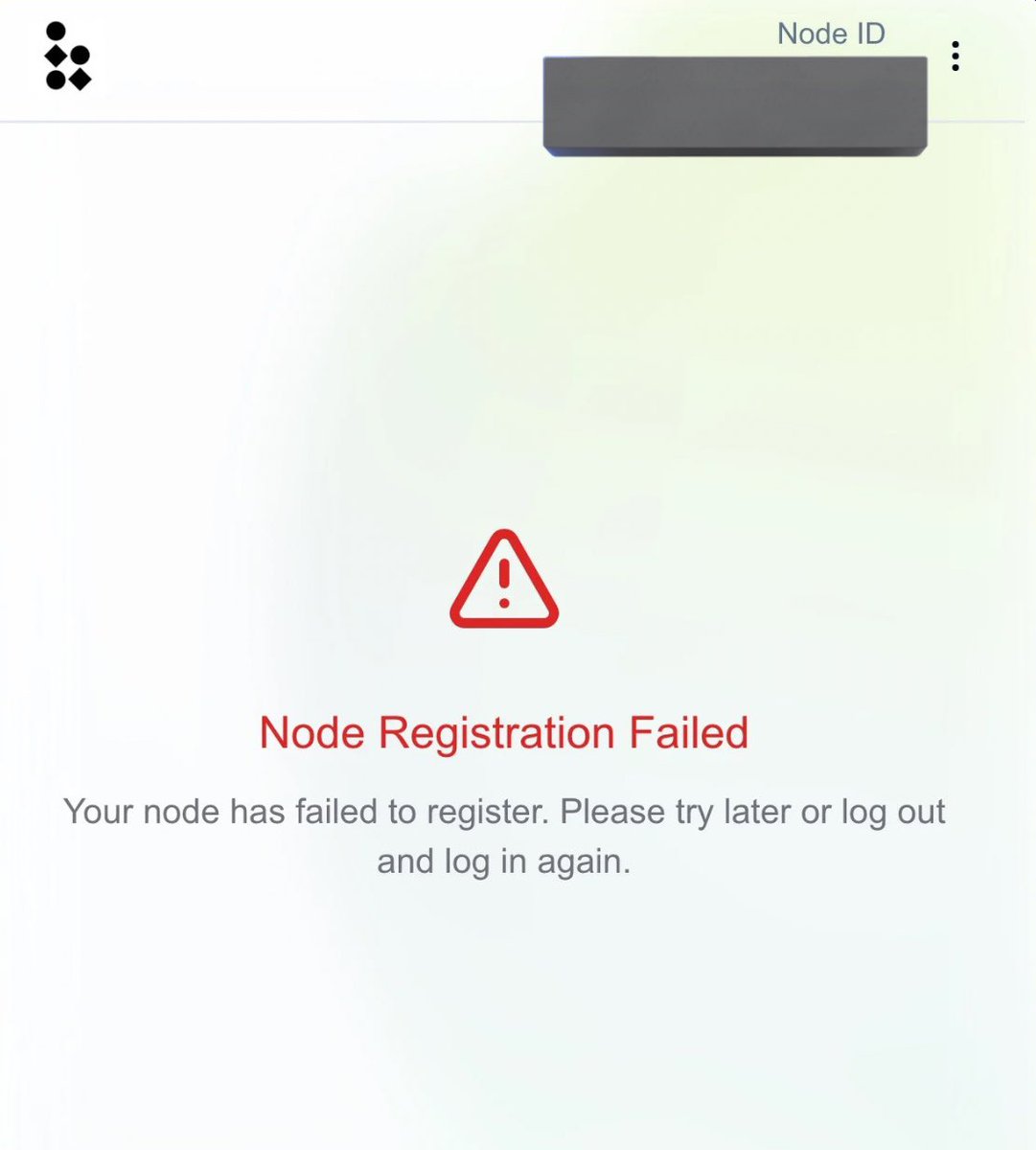
If you're facing "Node Registration Failed" error on @theblessnetwork dashboard, these steps below should help you fix it.
1. Check Active Nodes
Make sure you're not running more than 5 active nodes.
Too many nodes can trigger registration issues.
→ Retire a few and leave 3–4 max.
2. Restart the Extension
Click on "Restart Extension" from the extension menu.
Wait about 30 minutes, it may take time to reinitialize.
3. Logout & Login
From the dashboard, log out of your account.
Log back in, then try registering the node again.
4. Uninstall & Reinstall the Extension
If all else fails, remove the node extension completely.
Reinstall it from the official source and reconnect your wallet.
gBless!

Another day developing in Laravel.
What happened that day?
- My PC randomly crashed
- After restarting, I found out the WSL2 and Docker were broken
- Had to uninstall everything
- Reinstall everything
- Reinitialize all the projects
- Lost some non-vital data
Lesson for the future.
Do backups 😅

@lycandegen I'm not sure where you got that idea.
All values in rust have a single owner. Ownership is transferred when you pass it to a function by value or assign it to a different variable.
Once ownership is transferred the old value is no longer usable unless it is reinitialized.

@Yusuf_SDEV @ryeingoddard I removed all my .git from all the files and reinitialized on the path i wanted it was ezy

GPepT: A foundation language model for peptidomimetics incorporating non-canonical amino acids
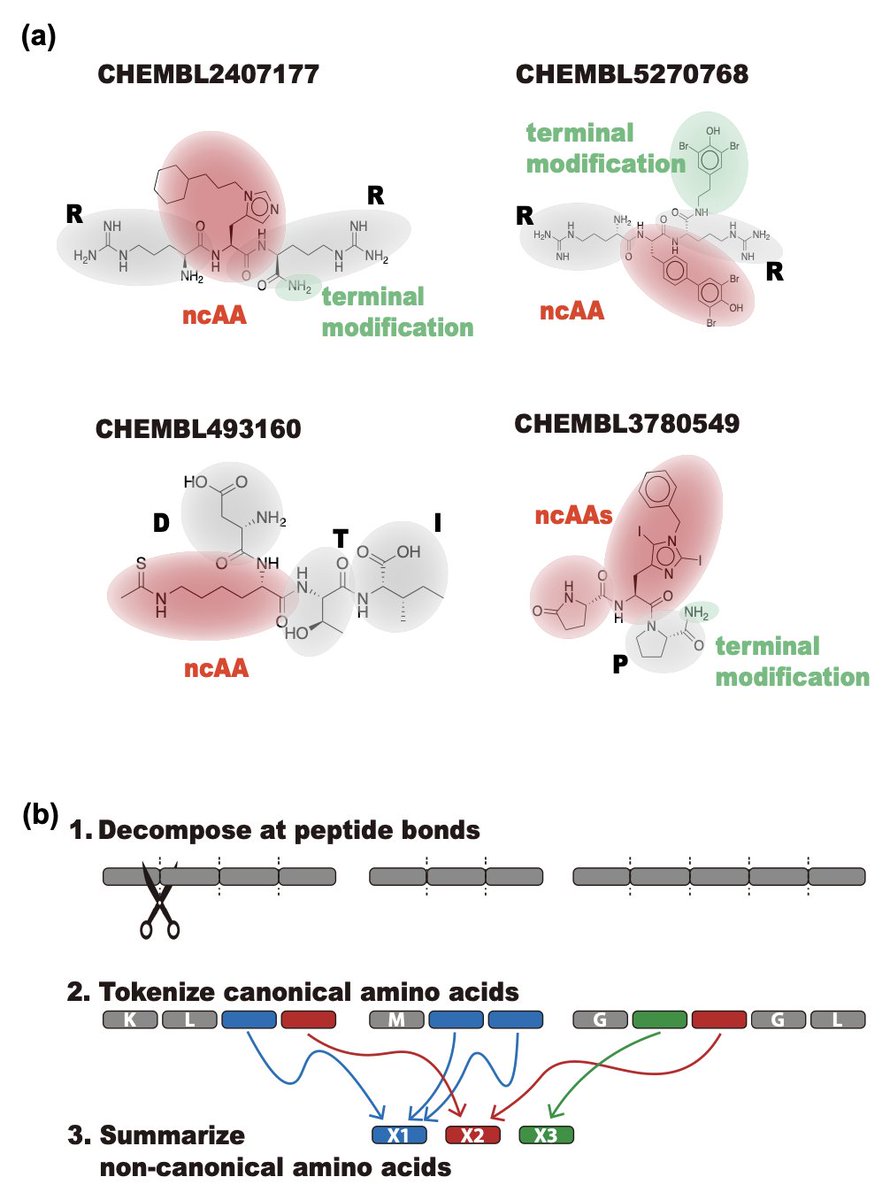
1. GPepT introduces the first foundation language model specifically designed to generate peptidomimetics, incorporating over 17,000 non-canonical amino acids (ncAAs) and terminal modifications derived from the ChEMBL database.
2. The core innovation is Monomerizer, a Python tool that decomposes SMILES-encoded molecules into tokens representing ncAAs and modifications, creating a chemically diverse vocabulary absent in canonical peptide models.
3. Trained on 42,743 chemically tokenized sequences, GPepT generates peptides with significantly greater structural and chemical diversity than traditional models, as visualized by t-SNE and property distribution plots.
4. In a fine-tuned antimicrobial peptide (AMP) generation task, GPepT successfully generated peptides with experimentally validated antibacterial activity. One peptide, Pep1, containing D-Tryptophan, outperformed its canonical counterpart in MIC assays.
5. GPepT's tokenization captures rare amino acid variants not found in PubChem or major databases, enabling exploration of biologically and therapeutically relevant chemical space previously inaccessible to generative models.
6. The model expands beyond conventional peptide design by learning from real-world therapeutic compounds like CHEMBL2407177 and CHEMBL5270768, which use ncAAs to enhance stability, bioactivity, and resistance profiles.
7. GPepT was built using a reinitialized GPT-2 large architecture (36 layers, 1280-dim), pretrained on ChEMBL-derived sequences, and later fine-tuned on a curated AMP dataset with E. coli activity labels.
8. Enrichment analysis of generated AMP sequences revealed that fine-tuning selectively boosts the use of certain ncAAs strongly associated with antimicrobial activity, with enrichment scores as high as 33.
9. Despite challenges in synthesis, Pep1 was successfully purified and structurally validated with circular dichroism, demonstrating distinct secondary structure potentially responsible for its biological potency.
10. While 80% of identified ncAAs lack primary amines and are thus difficult to synthesize via standard methods, this underscores the need for novel synthetic strategies to leverage computational peptide design fully.
11. GPepT bridges computational language modeling and wet-lab validation, highlighting the therapeutic promise of ncAA-enriched peptide libraries in fighting antimicrobial resistance and expanding peptide drug discovery.
💻Code: https://t.co/3PjHXXvvoR
📜Paper: https://t.co/oYf1DUJWYt
#PeptideDesign #AntimicrobialPeptides #NonCanonicalAminoAcids #DrugDiscovery #Bioinformatics #LLM #LanguageModel #Peptidomimetics #ChEMBL #SyntheticBiology

@11incorporated @BennettSpooner If anything breaks it goes back to a fallback agent that reinitializes the process that had an error! We have multiple systems and verification nodes to deal with this amount of info.

@iphone13king we will reinitialize all of ifloydmini systems and rebuild him 100%
then...only God knows what awaits

Almost every players lags for 3 sec n FPS drops from 110 to 20-60 this is what my console says @CSGO @valvesoftware #PGLMajor #PGLANTWERPMAJOR
Certificate expires in 26h17m at 1652293314 (current time 1652198672), will renew in 24h17m
0: Reinitialized 2 predictable entities
Last Seen Hashtags on Sotwe
smalltwink
AffirmOpportunity
Seen from United States
piss #drink
Seen from Turkey
可可味
Seen from United States
minichat(*)****************************************************************
Seen from Brazil
dmvtrans
Seen from United States
bbw hijab
Seen from Turkey
minichattt ***
Seen from India
แนวน้อง
Seen from Thailand
نُيُُُـُُكُُ
Seen from Algeria
Most Popular Users

Elon Musk 
@elonmusk
239.7M followers

Barack Obama
@barackobama
118.6M followers

Cristiano Ronaldo
@cristiano
114.3M followers

Donald J. Trump
@realdonaldtrump
111.7M followers

Narendra Modi
@narendramodi
106.9M followers

Rihanna
@rihanna
98.6M followers

NASA
@nasa
92.1M followers

Justin Bieber
@justinbieber
91.7M followers

KATY PERRY
@katyperry
89.9M followers

Taylor Swift
@taylorswift13
83.9M followers

Lady Gaga
@ladygaga
75.4M followers

Virat Kohli
@imvkohli
73.3M followers

Kim Kardashian
@kimkardashian
70.8M followers

YouTube
@youtube
68.6M followers

Neymar Jr
@neymarjr
66.3M followers

Bill Gates
@billgates
65.1M followers

Selena Gomez
@selenagomez
63M followers

The Ellen Show
@theellenshow
62.1M followers

CNN
@cnn
61.7M followers

X
@x
60.6M followers