

Top Tweets for #Sidebar


The market page we created for @PredictionEdge. The header shows the market title and the resolution date with a countdown. A probability chart with volume bars plots every candidate, and a sidebar lists each candidate’s probabilities.

The sidebar for @BoxBetio in two states. Top leagues are grouped by sport, with a live marker and an event count on each league. The Only Live toggle trims the list to leagues with matches on now.

The live betting section built for @BoxBetio. Players filter matches by sport and time window, and an Only Live toggle trims the league sidebar to what is on now. Hot combos suggest ready-made bets, with stake presets, total odds, and possible profit shown before Place Bet.


Finally .... looks like the rollout is wider than expected.
just upgraded to $20 plus and "your dot" showed up right away, no pro plan needed.
check your sidebar , they are moving fast .

Heads up, we’re starting to test dots with a small number of ChatGPT Plus users. Looking forward to the continued feedback as we expand and I’m recently seeing a lot more positives around how good the proactivity has been after many improvements.
We’re also bringing dots to all ChatGPT Business Standard users. Rollout will start today.

Show and tell: I run many Claude Code sessions in Orca and kept missing the one stuck on a permission prompt. I built Pitwall, a sidebar that shows each one live: who needs you (with the command), context %, cost, subagents, every tool call. Local, MIT.
https://t.co/4v8Q8FE4gU
The open game page from our work for BestOdds. Player props, best bets, and a cheat sheet sit under tabs for a single matchup. Prop cards show the line, odds, and a last-5 trend, and a sidebar lists season leaders.


We understand your concern. Please contact ME Pass Support by following these steps:
1. Log in to ME Pass.
2. Open the sidebar (swipe right or tap the menu in the top-left corner).
3. Tap Online Customer Service → Customer Service.
Important: Keep the chat open until you receive a response.
You can also contact Elsa_MetaEarth via our official Telegram group for assistance.

EnsoCode runs parallel coding agents from a local-first Electron workbench: pin three repos in the sidebar, give each task its own session, and agents work while diffs, terminals, and milestones land on a timeline you review. Approvals and turns stream to your phone over an end-to-end encrypted link, so stepping away doesn't kill the thread. It's TypeScript, and the phone companion is the piece that makes the desktop workbench actually leave the desk.
https://t.co/razDO7fcvj


Zyn is now on WhatsApp.
Plus and Pro: link your number in the app (WhatsApp in the sidebar), then send the code to the Zyntract number. Linking is live today.
Chat and drafting on WhatsApp are next.
Blog: https://t.co/tl9kNrCYwd

The live betting section built for @BoxBetio. Players filter matches by sport and time window, and an Only Live toggle trims the league sidebar to what is on now. Hot combos suggest ready-made bets, with stake presets, total odds, and possible profit shown before Place Bet.

Sidebar is Derrick Harmon the problem????

@ne0gi02 For the Arc-shaped hole: Phi has the vertical sidebar plus Spaces and Profiles, close to Arc's setup. And the AI switches off if you just want a browser.

3 cheques left + $300 budget = $100 per payday. No January regret. 🇨🇦
Canadian bi-weekly planner: https://t.co/f5Q93ggjjK (code STARTNOW = $2 off)
2) Reddit (r/budget)
Check the sidebar's self-promotion rules before posting. If links aren't allowed, drop the last line.
Title: The "divide by 26" trick that stopped annual bills from wrecking my budget
If you're paid bi-weekly, the bills that hurt most are usually the ones that don't come monthly: car insurance, the Costco membership, the kids' activity fees, holiday gifts, the vet.
What helps:
1. List every non-monthly expense for the year, with a rough amount for each.
2. Add them up and divide by 26 (the number of paydays in a normal year).
3. Move that amount into a separate savings account every payday, before you spend anything else.
Example: $2,600 a year in "surprise" costs comes to $100 per cheque. When the bill shows up, the money is already there.
Bonus: in a year with 27 paydays, that extra cheque can top up this fund, or go to your TFSA, instead of getting absorbed into everyday spending.
I made a printable Canadian bi-weekly planner with a page for exactly this, if anyone wants it: https://t.co/f5Q93ggjjK (free sample: https://t.co/acIqcorVVL)
3) Facebook budgeting group
Check the group's promo rules first.
Sunday money check-in ☕ (10 minutes, tops)
✔️ Check your account balance against what you planned
✔️ List the bills due before your next payday
✔️ Look at what's in the fridge before writing the grocery list, so nothing gets wasted
✔️ Set one small goal for the week, like a no-takeout Wednesday
Doing this every week makes a huge difference by December. If you like having it all on paper, I put together a Canadian bi-weekly budget planner. The free sample is here: https://t.co/acIqcorVVL
The fantasy football planner gets its weekly post later this week. If you'd like, I can post the X one to @bartbeforeyou for you. Just say the word.

Getting back on track, one week at a time. Putting my goals out here for accountability. 😄
This week's goals:
📚 Discrete Math: Finish Ch. 1
📖 Pak Studies: Complete Week 2
🛠 USTADJI: Improve mobile sidebar UX
🌐 Fix my portfolio
One update a day, even when I fall short. 💪

@buildinpublic on desktop i get an overflow on x wider than my screen, perhaps due to the new hero or sidebar section

I'm building StashDock, a free, open-source, local-first visual context library for AI.
Collect files, links, prompts, and writing rules, then find and combine what you need for any AI chat. Use it through the desktop app, ChatGPT sidebar, or MCP + Skills—and let AI help organize your collection too.
Getting ready for Product Hunt. Curious how others keep their context reusable across tools.
https://t.co/ZYZzXKxl7Q
https://t.co/thOjvSS3Wc

I’ve been refining an alerts dashboard, focusing on the small details that affect how the interface feels.
A few decisions I made:
• Toned down the sidebar search. Its border was drawing more attention than it needed to.
• Made the card styling more... More below 👇


It's looking good, but I think there's still some room for improvement:
Left Sidebar: The UX could be cleaner and more consistent. Make sure all text elements start at the same position, with consistent left alignment. Currently, some texts are centered while others are aligned to the right, making the sidebar feel unorganized.
Daily Contracts: If you can make the gradients more noticeably darker, Id say it would look better.
Aside from that, job well done bro, this ui is goated! ♥️

6/
Also in v1.8.0: the sidebar shows one agent-status line per split panel, Ctrl+Shift+C/V reaches the system clipboard on Wayland, and PTY writes run outside the registry lock. An offline CLI was a wish list. A live one is a steering wheel.

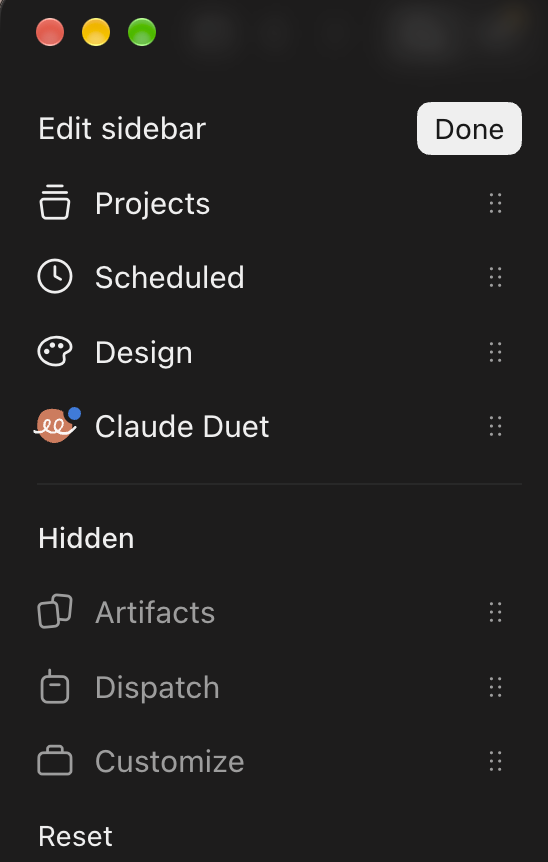
@ClaudeDevs only the 'chat' sidebar is editable. I'm not sure why but i'd like to have control over 'chat' and 'code' so i can add claude duet to it. ATM, i have to nav to chat to access claude duet as it is not available in my app store, and I find the extra 2 clicks long.
Also a shortcut to open it would be 🔥. @bcherny @lydiahallie

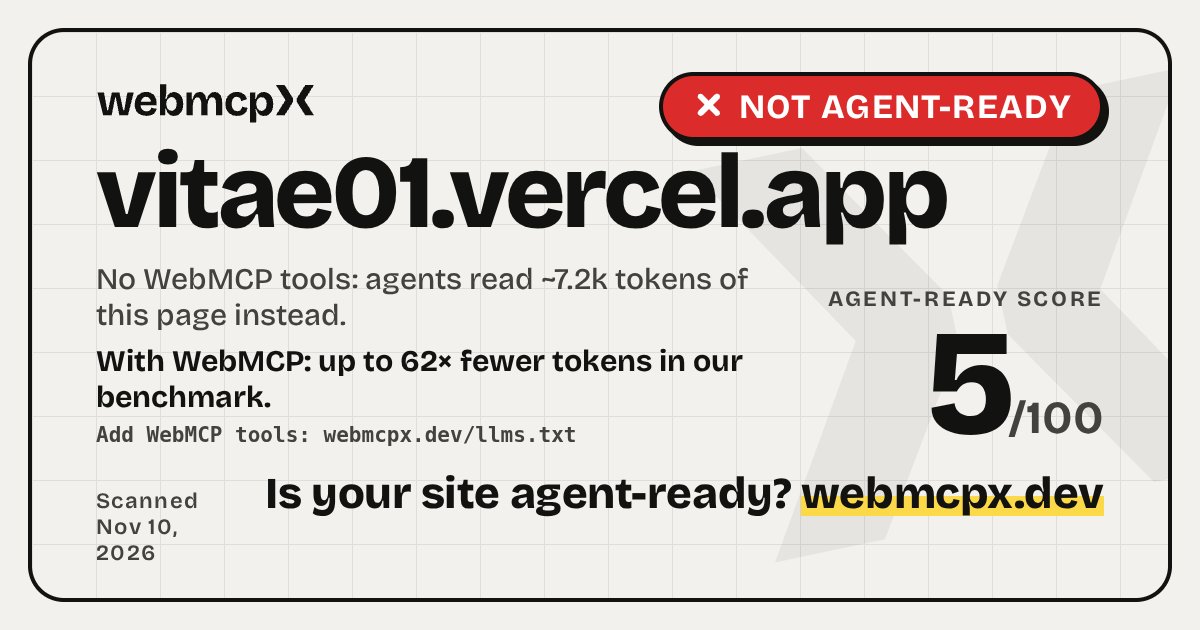
Opened the Aurora preview: the sidebar makes skills and experience easy to distinguish. Would you try a read-only WebMCP tool listing template layouts and sections, so agents can help pick one before signup?
We build webmcpx for this. Home scan: 5/100 for WebMCP integration, not resume or ATS quality.
https://t.co/nNCTCA0A6P

@thomasLe_e i need to ditch arc before december too, how does chrome left sidebar is? works similar to arc?

im getting used to chrome's left vertical sidebar feature
so ready to ditch my beloved Arc browser

FAIRY FLIGHT CLASS: for the time before it starts: start stretching > drink potion > let the stretching quest finish (if it glitches out tap the button twice) > go down the sidebar. you need to get 85 rings to max out your exp for this class. I will add a video when I find one

📍 Where Can You Find Staking?
Getting started is simple!
Visit 👉 https://t.co/WAOJzEHj3P
You can also access staking through Pharos Port:
🏠 Homepage → Stake PROS
🎯 Interact → Stake card
📌 Sidebar → Interact → Stake
Everything is accessible in one place!

@tobaohan1 Yeah, fair point Han. I'd try an off-white workspace first and keep the dark sidebar. That could soften the jump. Hard to judge how it feels over a few hours from a mockup though
Most Popular Users

Elon Musk 
@elonmusk
239.8M followers

Barack Obama
@barackobama
118.6M followers

Cristiano Ronaldo
@cristiano
114.3M followers

Donald J. Trump
@realdonaldtrump
111.7M followers

Narendra Modi
@narendramodi
106.9M followers

Rihanna
@rihanna
98.6M followers

NASA
@nasa
92.1M followers

Justin Bieber
@justinbieber
91.7M followers

KATY PERRY
@katyperry
89.9M followers

Taylor Swift
@taylorswift13
83.9M followers

Lady Gaga
@ladygaga
75.4M followers

Virat Kohli
@imvkohli
73.3M followers

Kim Kardashian
@kimkardashian
70.8M followers

YouTube
@youtube
68.6M followers

Neymar Jr
@neymarjr
66.3M followers

Bill Gates
@billgates
65.1M followers

Selena Gomez
@selenagomez
63M followers

The Ellen Show
@theellenshow
62.1M followers

CNN
@cnn
61.7M followers

X
@x
60.6M followers