

Top Tweets for #bm1370

@TheSoloMiningCo Since that's the case, let everyone have "Block Found" opportunity.
The average price for a single BM1370 chip Bitaxe Gamma starts at just $49.50.
https://t.co/BDAxIn3q8b

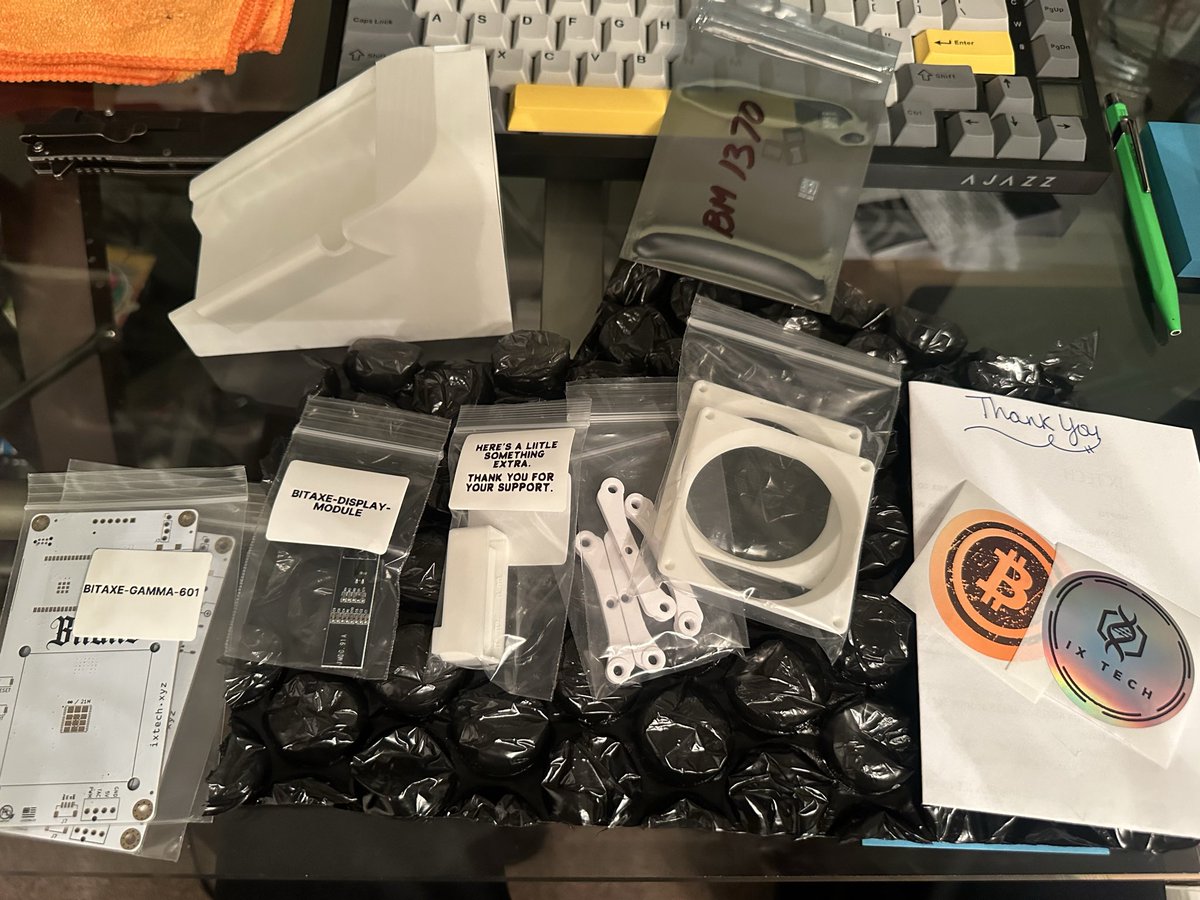
A couple of BM1370 chips from @altair_tech came the other day and now a beautiful gift from @IxTechCrypto waiting for me at home after leaving work early. This is the only thing I want to work on right now. But the sun is out right now, mid January, so I’ll come back to it later.

NerdQaxe++ 4.8T
BM1370
It's only $380!
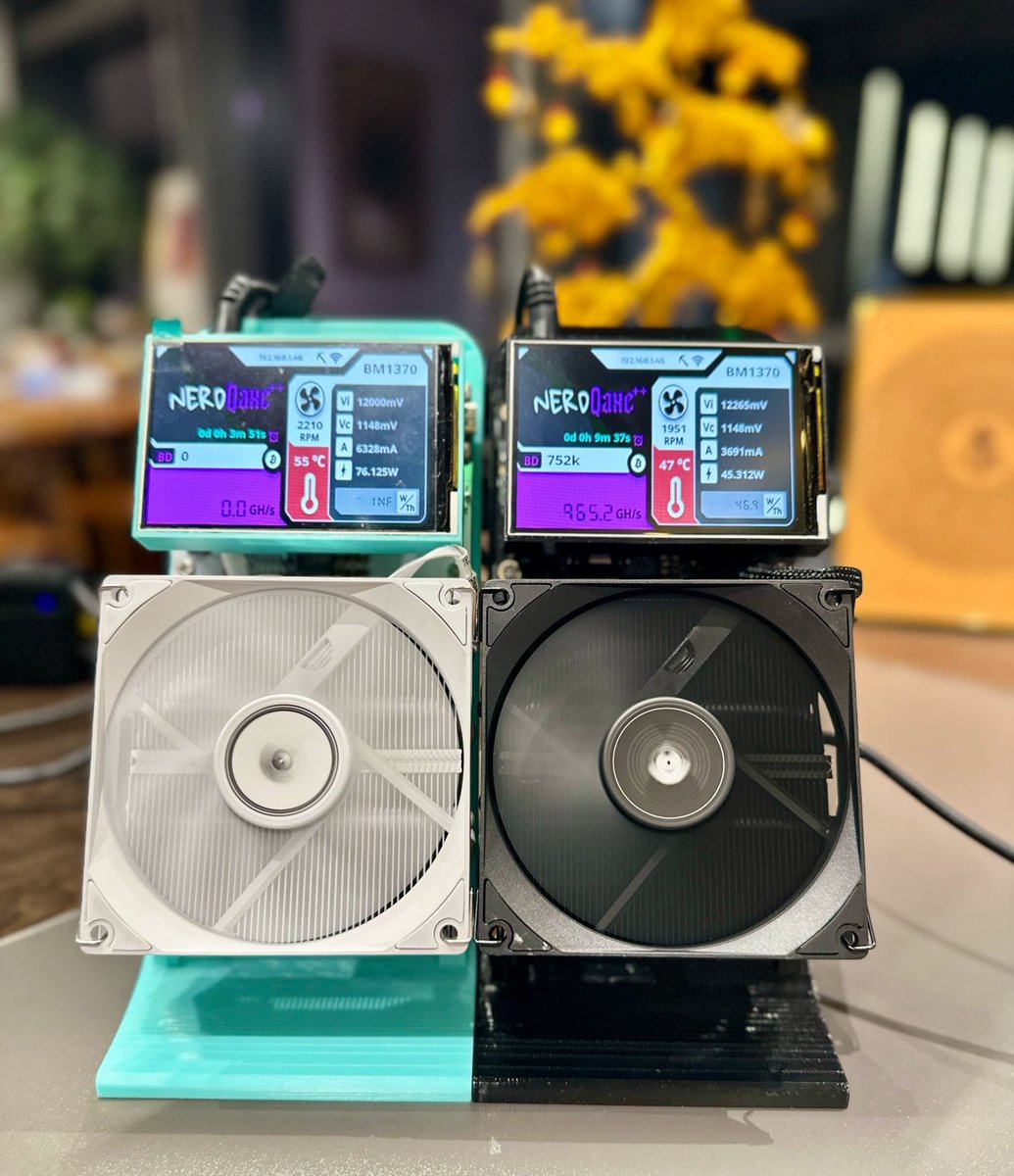

@HunnerSa Best bang for your buck at 5+ TH/s and under 100 watts. They use the most current BM1370 chips and one recently found a Bitcoin block.

@FringeBtc Hate to break it to you, but if this is a Gamma, you are not Overclocking. Your cooling solution is not suitable.
The default hashrate of a BM1370 ASICs chip inside an Antminer S21 pro is 1.2 TH/s. If you can’t run it at 1.2 TH/s, you are not even running it at default settings.

@ecotopia_now 8 BM1370 ASIC chips

#NerdOCTAXE 🇬🇧 build - update!
PCB production (@JLCPCB) @ 95% - looks like I'm waiting on shipping!
Still need to source a couple of BM1370 chips. If anyone can help out or point me in the right direction, I'd really appreciate it! I've got 6 so far, sourced from @PlebSource 👍
Most parts & components are now ordered for the #NerdOCTAXE build!
Now the wait for everything to arrive!
Still need to source two BM1370 chips!
I'm going to document the build & share tips/advice which I hope will help other builders!
Anyone in the UK built a #NerdOCTAXE?
It was a heck of a job but I've managed it!
55 BM1370 has been removed from the hashboard (which will be framed).
I didn't think it'd take me 2h to do that but considering the tools I've got I cannot complain!
I didn't record any video about it, sorry for that, but I will do it on the next hashboard, that's a promise!
In the meantime, have you subscribed to my Rumble/YT channel yet?


The harvesting time is near!
Altair Technology was simply fast and very well packed!
As well the gadgets included are top notch, the precision screwdriver is what we all need!
If you're planning to harvest some BM1370, Altair is the place where you'll look for!
Who wants to see the process to extract the ASICs?
Drop me a 🛠️ in the reply!


I've found Bitmain document claiming, that BM1370 can operate at up to 650 MHz at default voltage, 1.15V.
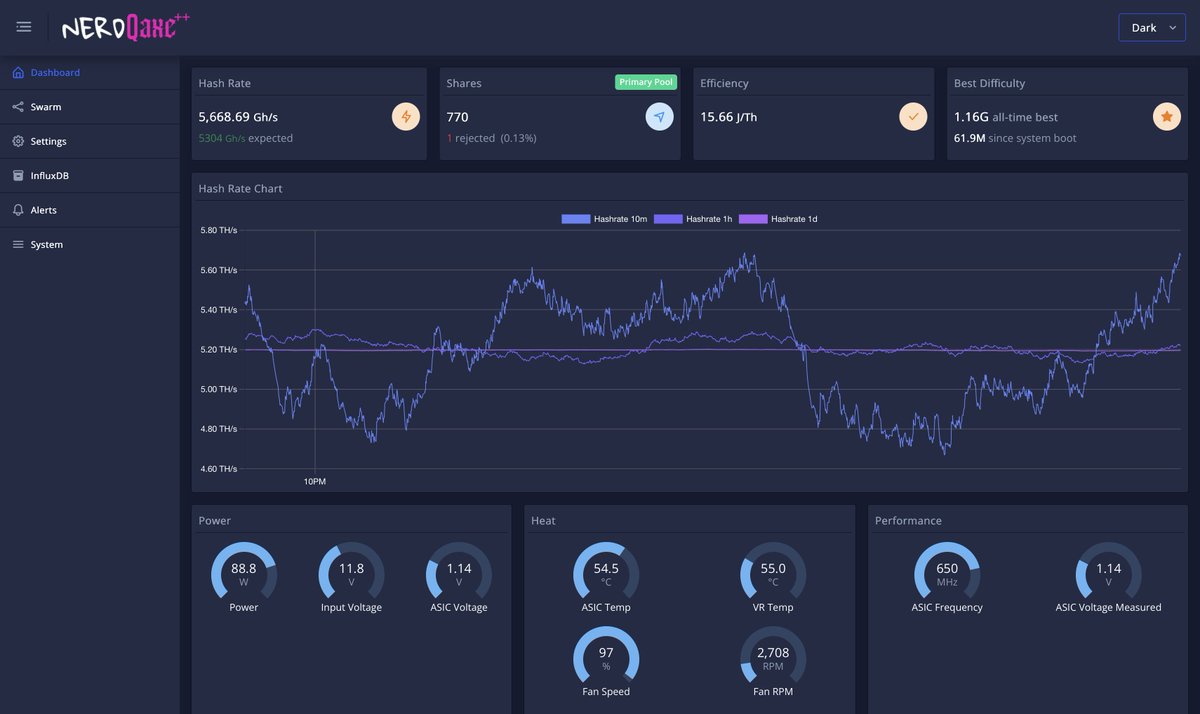
I couldn't resist not to squeeze more juice from my NerdQAxe++
It's been now running stable, for a day.
ASIC frequency 650 MHz at 1.14V.
Average hash rate for last 24h is flat 5.2 Th/s (pink line)
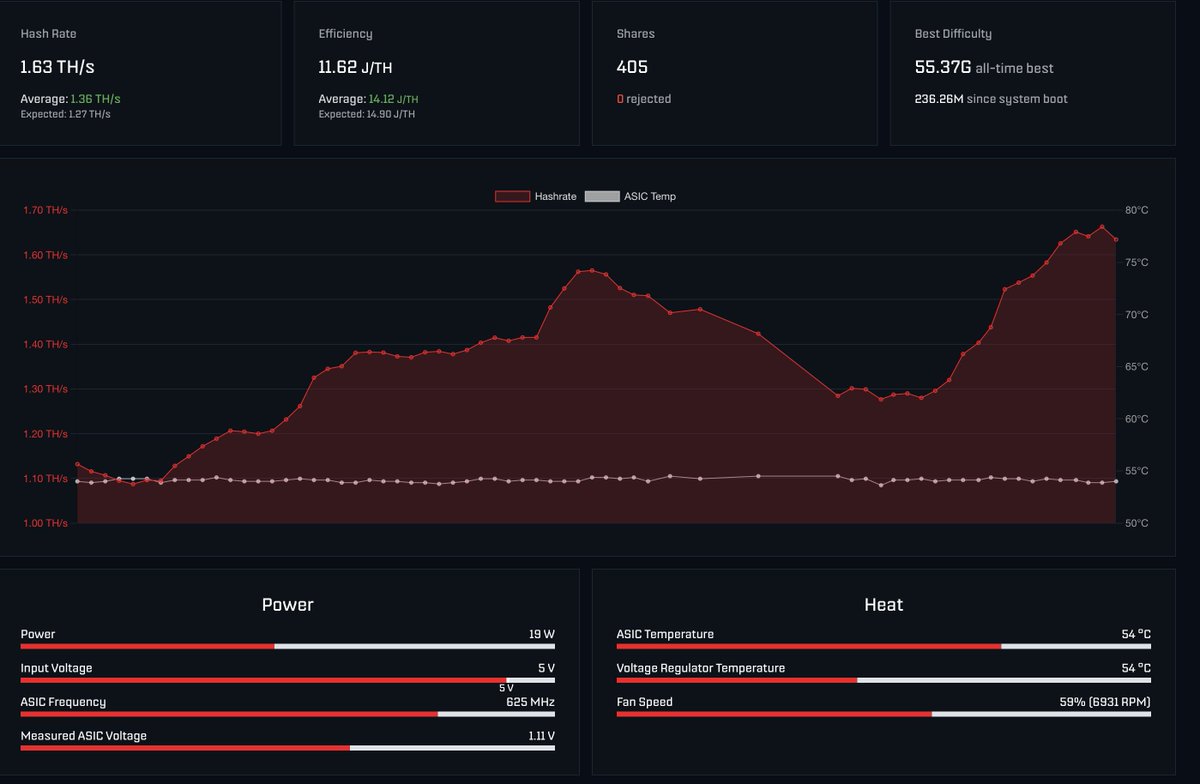
I've rebooted both NerdQAxe++ and my BitAxe Gamma simultaneously. Screenshots clearly show how much does NerdQAxe++ outperform four separate Gammas.
4x Gamma = 4x 167 = 668 shares (at Ocean pool)
1x NerdQAxe++ = 770 shares (at Ocean pool)
Gamma
ASIC frequency 625 MHz at 1.15V (1.12V measured).

I'm ending the series of Bitaxe Gamma and NerdQAxe++ settings, as I've hit the summer max on both devices. I've hit the top on Gamma a while ago, due to lack of GUI custom ASIC frequency settings above 625 MHz. It has been running stabile, at 1.12V and 625 MHz for months.
I've hit the summer top on my NerdQAxe++ yesterday, increasing the frequency to 640 MHz, which pretty much maxed out the ventilator during hot summer and my limited AC there, so I'll stop at what I have, as it's stabile, achieving 5.1 Th/s as a 24h average.

Just finished my second octaxe in 4.5 hours - wild how fast you get the hang of it
The moment that first choice chip clicks, those ASICs just fall into place like magic
Can't wait for my new oven setup. Betting I can cut that build time in half.
Who else is working on theirs?
Credits to Plebsource for the BM1370


Just hit a new milestone: 21st Bitaxe build completed!
But here's what blows my mind: The first one took me 3 months and countless mistakes.
This one? 8 hours from start to finish, running at a daily average of 9.8TH/s.
Starting a build video for this weekend to show you some easy DIY reparation/maintenance!
Not sure where to check the video?
Check below my channels!👇
Credits to Plensource for the BM1370


@AIpha_X wow! my best so far from BM1370 is 36.2G

@incognitojohn23 Just today I saw a board called the Nerd Eko, which uses 12 BM1370 chips and has a 14TH frequency. I'd really like to build it, but I'm afraid that just one single mistake and a lot of work will be lost.
@Skot9000 and @Bolster_15 ...
A proposal to allow NerdQAxe++ to offer 625MHz as an option in the Settings drop down menu, but limit voltage to 1.7V max, to keep it safe.
Reasoning:
I'm noticing here in Bitaxe community, that users are abusing voltage settings. Majority are not aware, that BM1370 can run stabile at default voltage and 625MHz. Higher voltages are only needed for frequencies above 650MHz, which are not available in the drop down menu.
I'm aware that NerdQAxe++ PCB has electrical current limitations. I'm also aware that most often used power plug is limited to 8A.
However...
It's not the frequency setting that makes ASICs and PCBs hot, it's the voltage. Default voltage settings are too generous IMO, while frequency is being to restricted at 600MHz max.
See below the screenshots of my Bitaxe Gamma and NerdQAxe++, running stabile at max frequency but lower voltage.


I've been reading plenty of BitAxe Hex and BitAxe Octa teasers in this community, but not much bang so far. Meanwhile Chinese companies are silently delivering.
So what do we think about this?
Here is a decent looking Octa based on BM1370. https://t.co/FFMRgDqIVO
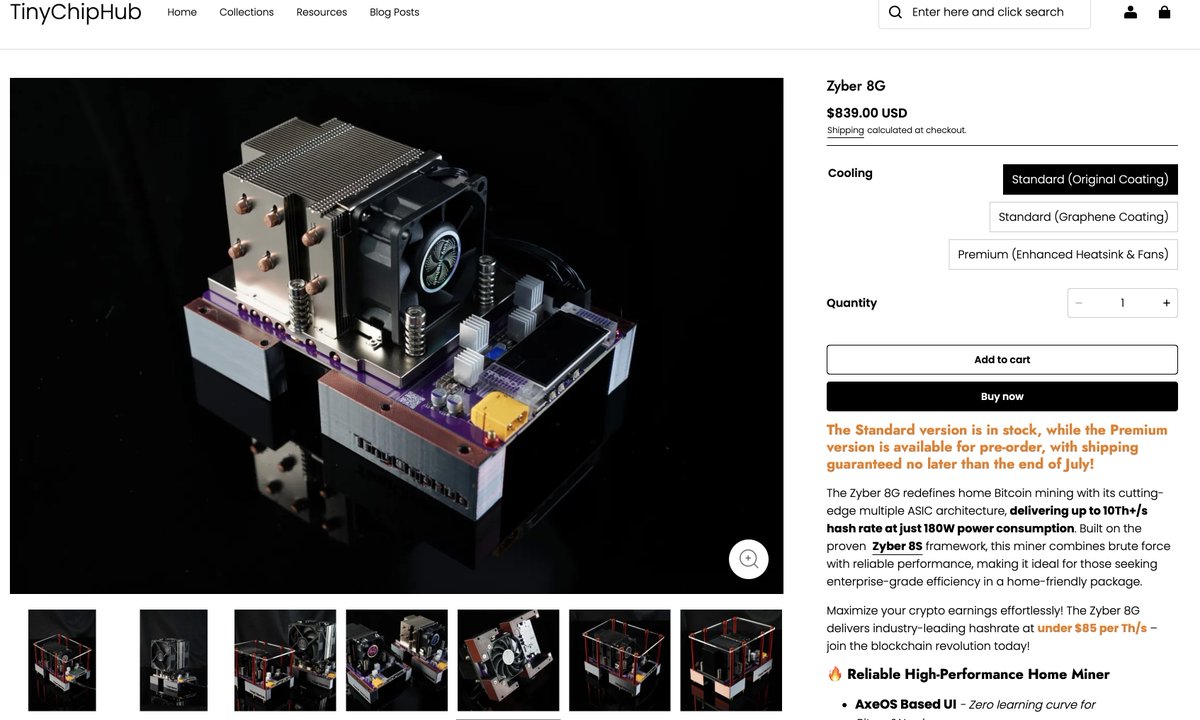
@CincoDoggos Nah, these have been around since BM1366.
This is merely a cheap BM1370 incarnation of the Hex.
Check this... https://t.co/7g7v9fh7Cn
@SterlingSpecter Which chip bm1370 1368 etc… ?
4.8TH/s for 80W consumption, extremely silent and powered up with the BM1370 received from Power Mining.
The 3rd NerdQaxe++ is done and tested!
This amazing machine now needs a new roof and new wifi to be able to start to hash!
Price is 450€ or $511, 5% discount if you're my subscriber!!
For EU the shipping costs are included in the price, for the US I have to charge you $40 (Sorry for that).
Unfortunately I cannot offer the stand (yet).
The power supply needs an adapter or a US plug.
Who wants to take this beauty at home? DM me to claim it!
More will be available in the coming week!
Credits:
•Stand from Ixtech
•ASICs Power Mining
•Pmaxsd The Developer


Probably there are way more ASICs than 1B.
There is only Bitmain BM1368 overclocked and the BM1370 out of the box, capable of over 800 GH/s. Canaan chips are caped at 600GH/s, older Bitmain 1366 also app. 600 GH/s non overclocked.
Only small home miners allow for significant overclocking. Larger miners have chips working in series. If one chip not suitable for overclocking fails, the whole hashing board fails, so they aim for stability more than overclocking. Also overclocking often reduces efficiency (J/GH) increasing power cost for the given hash rate.

I've had plenty of time with my NerdQaxe++, enough to know, I like to keep it overclocked. In depth reviews of this have really helped my progress and I wanted to share a simple guide for some time, here you go. Enjoy.
A Simple Guide to Overclocking a NerdQaxe++
The NerdQaxe++, a 4.8 TH/s Bitcoin ASIC miner with four BM1370 chips. This can safely hit ~6.2–6.5 TH/s when overclocked, boosting your mining power but raising heat and energy costs. Overclocking risks hardware damage, higher bills, and a voided warranty, so proceed carefully with incremental tweaks and constant monitoring. This guide assumes you’re familiar with the NerdQaxe++ and AxeOS interface.
Prerequisites
Hardware Upgrades:
Power Supply (PSU): The stock 12V/10A PSU can’t handle overclocking. Consider upgrading to a Mean Well RSP-350-12 (350W, 12V) to support ~110–115W for moderate overclocks.
Fuse: The stock 8A fuse fails above ~100W. Swap it for a 12A or 15A Littelfuse 451 NANO2 series (e.g., 0451012.MRL or 0451015.MRL) to match your PSU.
Power Cable: Use a 16 AWG cable for ~110–115W overclocks. For 15A fuses, go with 14 AWG. The GINTOOYUN 90-Degree DC Power Pigtail (5.5mm x 2.5mm, not 2.1mm) is reliable and safe.
Cooling: The stock Thermalright AXP90 X36 cooler works up to ~100W but struggles beyond. Upgrade to the AXP90 X47 (per @trendkraft’s tests at https://t.co/jnI3JoDle9) and add a HELIX shroud (free 3D-printed design) with a 120mm fan to keep ASIC below 60°C and VRM below 60°C.
Don't forget new thermal paste, MX-6 works well, others are available.
Software Tools:
Access the AxeOS web interface via a browser on any device . No extra software needed.
Update to the latest firmware from Bitaxe GitHub for stability and overclocking support.
Optional: Use mining pool dashboards (e.g., https://t.co/cXQAn6ooa5) for real-time hash rate.
Baseline Testing:
Run the NerdQaxe++ at stock settings and track hash rate, ASIC temperature, and power usage via the LILYGO T-Display S3 or AxeOS.
Connect to a mining pool and stress test for 1–2 hours to confirm stability (no crashes or hash rate drops).
Note baseline frequency and voltage for reference.
Step-by-Step Overclocking Process
Access AxeOS Interface:
Connect to the NerdQaxe++ via Wi-Fi and log into the AxeOS web interface using a browser.
Go to the Overclocking or Settings tab and enter the “Danger Zone” to tweak frequency and voltage.
Adjust Frequency and Voltage:
Increase Frequency: Start at 600 MHz and raise by 25 MHz (e.g., to 625 MHz) to avoid instability.
Adjust Voltage: If the hash rate drops or the ASIC “starves” (low power), increase voltage by 25 mV (e.g., 1100 mV to 1125 mV). Keep voltage low to minimize heat.
Test Stability:
Mine for 30–60 minutes after each change and check hash rate, ASIC , VRM , and power draw via AxeOS or T-Display.
Ensure hash rate stays stable (e.g., within ±250 GH/s). Large fluctuations or crashes mean you’ve gone too far—lower settings immediately.
Test and Benchmark:
Run a 1–2 hour test on a mining pool to verify stability. Compare average hash rate to stock (4.8 TH/s vs. 6.2–6.5 TH/s).
Use AxeOS for manual monitoring or pool dashboards for detailed performance data.
Monitor and Fine-Tune:
Continuously monitor ASIC and VRM temperatures. If exceeded, reduce settings or improve cooling (e.g., HELIX shroud).
Confirm input voltage stays ~12V to avoid throttling. Expect ~110–115W for moderate overclocks.
Save stable settings in AxeOS to persist after power cycles.
Tips for Success:
Cooling First: Prioritize VRM cooling. The HELIX shroud with a 120mm fan is a game-changer and free to 3D print.
Small Steps: Adjust frequency and voltage gradually (25 MHz, 25 mV) to find the sweet spot for performance and stability.
Reliable PSU: The Mean Well RSP-350-12 is rock-solid for overclocking. Don’t skimp on power quality.
Community Help: Join the Bitaxe OSMU Discord for real-time tips and settings from NerdQaxe++ users.
Firmware Updates: Check Bitaxe GitHub regularly for AxeOS enhancements.
Risks and Warnings
Warranty Void: Overclocking may void the 90-day warranty from vendors. Check with your supplier.
Hardware Damage: High voltage or poor cooling can fry ASIC chips or VRMs. Keep temperatures in check.
Power Costs: Overclocking to 6.4 TH/s bumps power from 76W to ~115W, raising costs. Balance this with your hunt for that block!
Instability: Aggressive settings can cause hash rate drops or crashes. Revert to stock via AxeOS web flasher if needed.
Summary
Upgrade to a Mean Well RSP-350-12 PSU, 12A/15A Littelfuse fuse, and 16/14 AWG cable for ~110–115W. Add a HELIX shroud and AXP90 X47 cooler to keep ASICs and VRs cool. Via AxeOS, increase frequency (25 MHz steps) and voltage (25 mV steps) , aiming for 6.2–6.5 TH/s. Test stability for 1–2 hours on a mining pool. Join the Bitaxe OSMU Discord and check Bitaxe GitHub for support and updates.
Final thoughts, the new upgrades are heavy, make sure you have a quality stand. A free 3D print can be found here https://t.co/PkKiVqdJ0o
Shout-out to @trendkraft’s insights at https://t.co/jnI3JoDle9. And @PowerMiningFarm for building this amazing miner.

@HayKing369 @TheBTCGame @HayKing369 I don’t use the sticky pad at ALL on any of my gammas with these heatsinks that could be your problem right there. That sticky pad maybe causing a bad contact between the BM1370 and the copper heatsink.

Good afternoon, I’m setting up mine, there’s some useful information for beginners like me 🧡
🟠 Bitaxe Gamma 601 – Verified Tuning Guide for Efficiency ⚙️
Running a Bitaxe Gamma 601 with the BM1370 ASIC? Here’s what you need to know to balance hashrate, power draw, and longevity.
🔧 Default Settings (Factory Setup):
Core Voltage: 1150 mV
Frequency: 525 MHz
Hashrate: ~1.08–1.20 TH/s
Power Draw: ~15–18W
Efficiency: ~15–17 J/TH ✅
⚠️ Default mode gives excellent performance but runs hotter and draws more power — not ideal for compact or passively-cooled setups.
✅ Tuning for Efficiency (Undervolt & Underclock):
To reduce power consumption while keeping the miner cool and steady:
🧪 Start with:
Voltage: 800 mV
Frequency: 350 MHz
Estimated Hashrate: ~130–160 GH/s
Power Use: ~4–5W
Efficiency: ~30–35 J/TH ✅
🔸 This mode is extremely power-efficient — great for solar setups, clusters of Bitaxes, or running cool 24/7.
🔄 Next Steps:
Open the Bitaxe Web UI
Adjust Vcore and Frequency gradually
Monitor:
Chip temp (stay below 75°C)
Hashrate & stability
Power consumption
Fine-tune — every chip is slightly different ("silicon lottery")
🌀 Bonus Tip:
Add or upgrade the cooling fan — even a small USB fan dramatically reduces chip temps and keeps undervolted settings stable long-term.
This setup helps you mine smarter, cooler, and longer — without sacrificing chip health or wasting watts.

Last Seen Hashtags on Sotwe
Trends for you
Most Popular Users

Elon Musk 
@elonmusk
240M followers

Barack Obama
@barackobama
118.6M followers

Cristiano Ronaldo
@cristiano
114.4M followers

Donald J. Trump
@realdonaldtrump
111.7M followers

Narendra Modi
@narendramodi
106.9M followers

Rihanna
@rihanna
98.6M followers

NASA
@nasa
92.1M followers

Justin Bieber
@justinbieber
91.7M followers

KATY PERRY
@katyperry
89.9M followers

Taylor Swift
@taylorswift13
83.9M followers

Lady Gaga
@ladygaga
75.4M followers

Virat Kohli
@imvkohli
73.3M followers

Kim Kardashian
@kimkardashian
70.8M followers

YouTube
@youtube
68.6M followers

Neymar Jr
@neymarjr
66.3M followers

Bill Gates
@billgates
65.2M followers

Selena Gomez
@selenagomez
63M followers

The Ellen Show
@theellenshow
62.1M followers

CNN
@cnn
61.7M followers

X
@x
60.6M followers