

Top Tweets for #googleauthenticator

@miiko2626 マジレスするとIT���からのアドバイスとしては…
パスワードを変更
二段階認証を設定(GoogleAuthenticatorってアプリ使う)
Twitterからログイン中のプログラムを全部ログオフ
特に、相手もログインしたらパスワード変更してもログインしたままになってるから、明示的にログオフさせるのが鉄則!!

🚀 Oohgle Authenticator: Building a Privacy-First Google Authenticator Alternative for HarmonyOS
(Working Progress)
#PureHarmony #OohgleAuthenticator #HarmonyOS #GoogleAuthenticator #Native #ArkUI #JS #ArkTS #OpenSource #OpenHarmony #Oniro
https://t.co/hex1amSyg1

Oohgle Authenticator - Working Progress
#HarmonyOS #OpenSource #ThirdParty #Client #GoogleAuthenticator #PureHarmony
https://t.co/hI8sslrkoJ
Oohgle Authenticator: The first global open source Google Authenticator third party focused client app launching globally on HarmonyOS and Oniro platforms in Q1 2026 - HarmonyOSHub
#GoogleAuthenticator #Client #ThirdParty #FOSS #HarmonyOS #Oniro #Global
https://t.co/fqZVqEY7jf

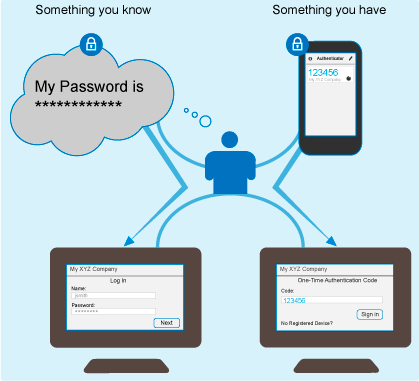
How Google Authenticator Works and How to Use It. You need to know. Google Authenticator is an app that generates verification codes for your online accounts. It works with the 2-Step Verification feature that adds an extra layer of security to your login process. You can use Google Authenticator to sign in to your Google account and other sites that support 2-Step Verification, such as #Facebook, #Amazon, and #YouTube. Google Authenticator does not need internet connection or mobile service to generate codes. It uses a secret key that is shared between your device and the site you are logging in to. The secret key is used to create a code based on the current time. The code changes every 30 seconds, so it is hard for hackers to guess or steal. To use #Google Authenticator, you need to download the app on your device and set it up with your account. You can follow these steps1 to turn on 2-Step Verification and set up Google Authenticator for your Google account. For other sites, you can check their settings or help pages to find out how to enable 2-Step Verification and use Google Authenticator. Google #Authenticator can also sync your codes across all your devices if you sign in to your Google account within the app. This way, you can access your codes from any device you use. You can also transfer your codes manually to a new device by scanning a QR code from your old device. Google Authenticator is a simple and secure way to protect your online accounts from unauthorized access. I hope this helps you understand Google Authenticator better. 😊 #GoogleAuthenticator #Authenticator #OAuth2 #Developer

#GoogleAuthenticator nihayet, iki faktörlü kodlar için hesap senkronizasyonunu ekliyor. Böylece, yeni bir telefon kurup hesabınıza giriş yaptığınızda, Authenticator kendi kurulum sürecini gerektirmeden çalışmaya hazır olacak.
#Google

Most Popular Users

Elon Musk 
@elonmusk
239.7M followers

Barack Obama
@barackobama
118.6M followers

Cristiano Ronaldo
@cristiano
114.3M followers

Donald J. Trump
@realdonaldtrump
111.7M followers

Narendra Modi
@narendramodi
106.9M followers

Rihanna
@rihanna
98.6M followers

NASA
@nasa
92.1M followers

Justin Bieber
@justinbieber
91.7M followers

KATY PERRY
@katyperry
89.9M followers

Taylor Swift
@taylorswift13
83.9M followers

Lady Gaga
@ladygaga
75.4M followers

Virat Kohli
@imvkohli
73.3M followers

Kim Kardashian
@kimkardashian
70.8M followers

YouTube
@youtube
68.6M followers

Neymar Jr
@neymarjr
66.3M followers

Bill Gates
@billgates
65.1M followers

Selena Gomez
@selenagomez
63M followers

The Ellen Show
@theellenshow
62.1M followers

CNN
@cnn
61.7M followers

X
@x
60.6M followers