

Top Tweets for #perfectitmasterclass

PerfectIt, by @IntelligentEdit, performs wildcard checks in the order in which you add them. If you need a new check to be performed before an existing check, first delete the existing check, then add the new one, then re-add the old one. #PerfectItMasterClass
@Ozeditor Tell me about it! Still finishing off my course series. Completed the dummy run of the penultimate session of #PerfectItMasterclass/#AdvancedWord4Editors on Wednesday. Thankfully, only a few minor tweaks needed and only one session left to trial.
Premièring tomorrow, 23 March, at 13:00 UTC, 14:00 CET, 15:00 CAT. See how my PerfectIt export tool can be used to create a plain-text version of your PerfectIt style sheet, and how it can be useful. #PerfectItMasterclass
https://t.co/75ouheD44e
PerfectIt users! My import tool finally works! See the magic in this video, in which I import 200 preferred spelling entries while I have lunch. Attend my #PerfectItMasterclass to get the template and the import tool. #amediting #perfectit #editing #xl8
https://t.co/16C24R6wym
I just tweaked my PerfectIt import tool so that it can also import instructions and wildcard descriptions. This means you can start preparing your stylesheets outside PerfectIt, import lists, etc. All #PerfectItMasterclass participants will receive the import tool.
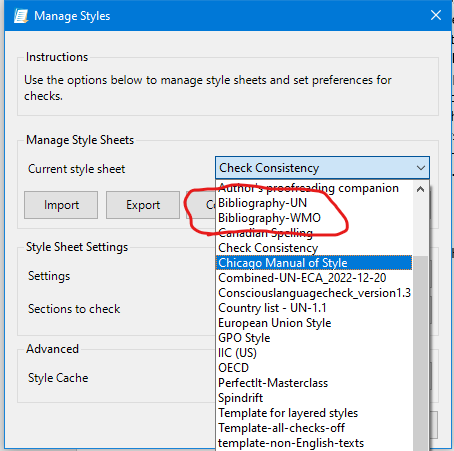
In the recent wildcards demo by @IntelligentEdit, James Harbeck gave examples for changing bibliography entries. I recently began creating a separate bibliography sheet for each client. When I spot an issue, I add a rule that would detect it in future. #PerfectItMasterclass
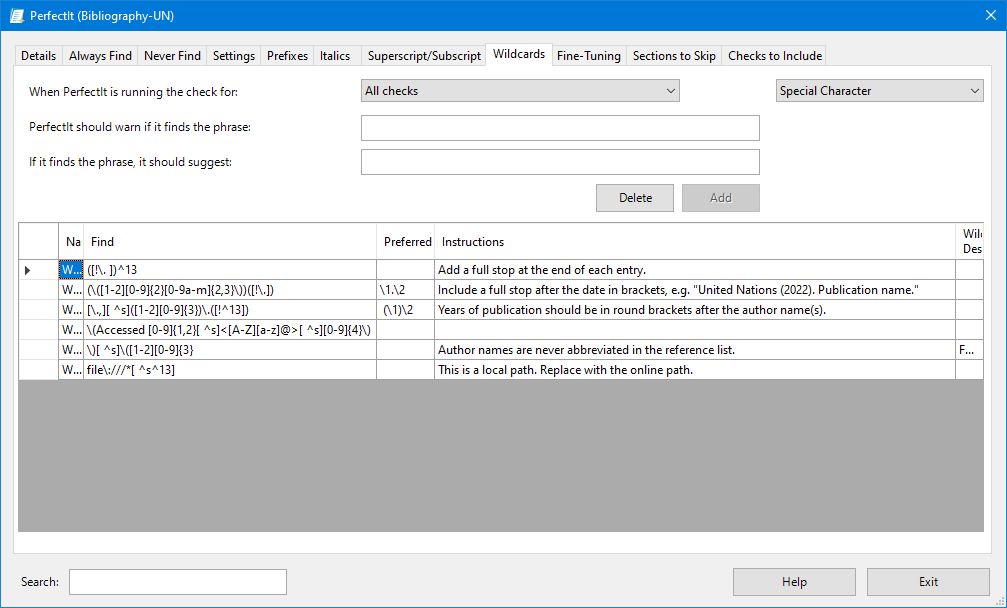
Designing a PerfectIt stylesheet for non-native speakers? Consider adding wildcard rules such as "<an [eE]eu" and "<an [uU]ni" so that they don't write things like "an European" and "an uniform". Don't forget to include an explanation. #PerfectItMasterclass
If PerfectIt flags something and you want to edit it manually, hit F6. When you're done editing, hit F6 again to move back to the side panel.
Follow #PerfectItMasterclass for more tips.
#PerfectIt, #ergonomics
@DonnaColeEditor @IntelligentEdit @NCETM It's great for enforcing style on equations. I use these 3 wildcard strings to enforce spaces around math operators:
([!^s ])([+–±×><≥≤=≈])([!^s ])
([!^s ])([+–±×><≥≤=≈])([^s ])
([^s ])([+–±×><≥≤=≈])([!^s ])
Replace all three with:
\1^s\2^\3
#PerfectItMasterclass
When you use track changes, "Read Aloud" correctly ignores deleted text but find/replace sees the deleted text. Discover more about how track changes works and how it interacts with other features in Word during my #PerfectItMasterclass, coming soon in 2023.
In the new year I'll be running a PerfectIt/Word masterclass. Each day until then I'm going to share some information on what to expect in the masterclass. I'll use the hashtag #PerfectItMasterclass so you can find them all easily. Number 1 in the tweet that follows.
Trends for you
Most Popular Users

Elon Musk 
@elonmusk
240.5M followers

Barack Obama
@barackobama
119.3M followers

Donald J. Trump
@realdonaldtrump
111.7M followers

Cristiano Ronaldo
@cristiano
110.3M followers

Narendra Modi
@narendramodi
107M followers

Rihanna
@rihanna
97.6M followers

NASA
@nasa
92.1M followers

Justin Bieber
@justinbieber
90.8M followers

KATY PERRY
@katyperry
87.5M followers

Taylor Swift
@taylorswift13
81.3M followers

Lady Gaga
@ladygaga
72.9M followers

Kim Kardashian
@kimkardashian
69.7M followers

Virat Kohli
@imvkohli
69.6M followers

YouTube
@youtube
68.7M followers

Bill Gates
@billgates
63.8M followers

The Ellen Show
@theellenshow
62.5M followers

Neymar Jr
@neymarjr
62.3M followers

CNN
@cnn
61.9M followers

X
@x
60.8M followers

Selena Gomez
@selenagomez
60.6M followers