

Top Tweets for #spawnpoint

Extras:.
The Base Would be, a SpawnPoint. For Criminal Bosses. And, Also, a Criminal Base/Hiding, Spot.
The Location. Would be Near the Crown City. Not Too Close, to the Volcano. But Not Too Far Away. From Any City.
An Abandoned, Train Station. Taken Over, by, The, Criminals.
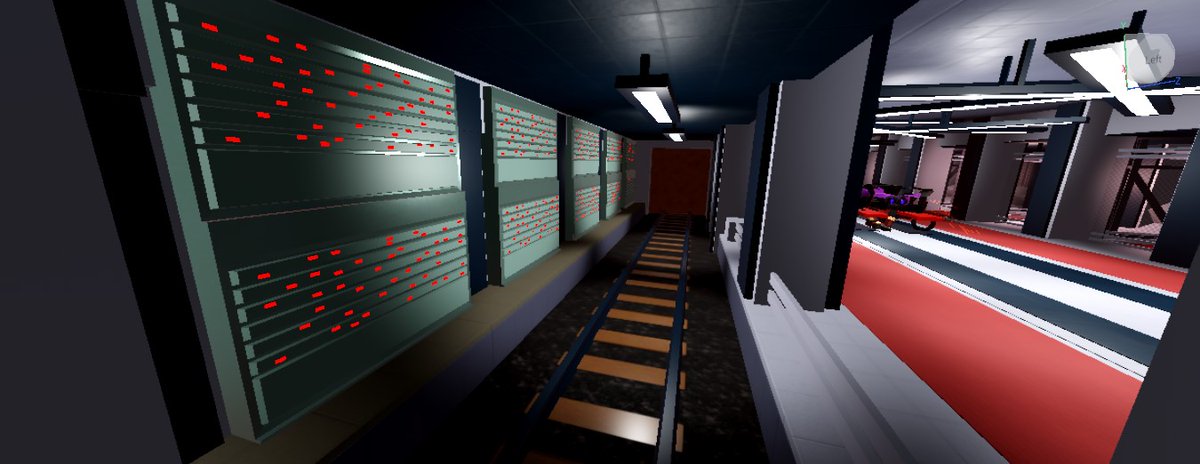


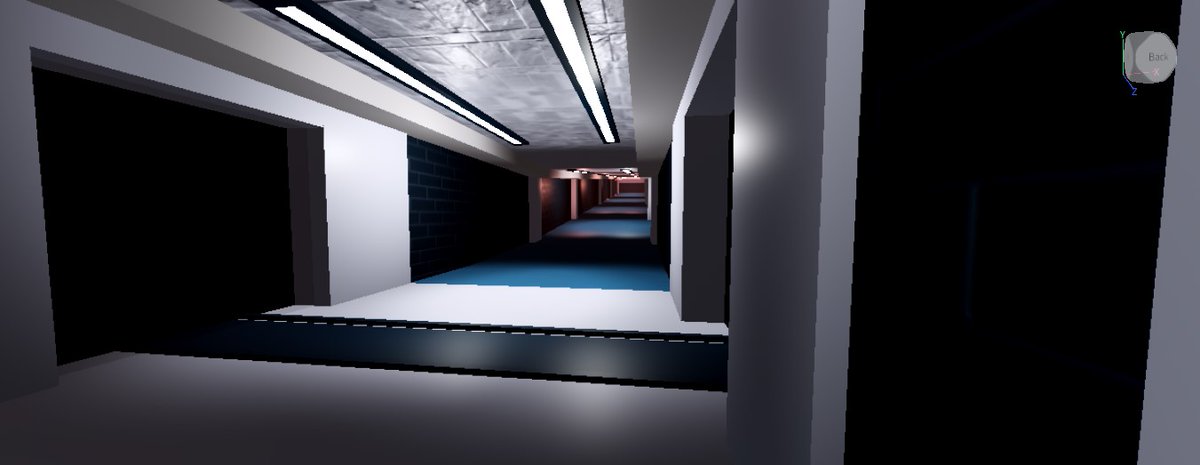
Upgrades!
- New Gun Store/Shop.🔫
- CrimeBoss Items.🦹
- Free Safe. (Criminal Boss Only.). 🏦
- Garage. 🚗
- SpawnPoint!. (Criminal Boss Only.). 🕶️
- Casino, Delivery. (Jade.). 🟩
- Entry, Only Through Via Car Exit. 🚗


AMP house is deadass a spawnpoint for streamers

pre walk down marbs strip and suddenly girls spawn in like its their minecraft spawnpoint

the first number cult is 1234567890
the literal spawnpoint of the clankers of the web

spawnpoint

mf an abg spawnpoint

Day 1 of building a $10k rogue like Roblox game using ONLY AI.
I made my AI agent code a highly optimized, procedural Wave Spawner.
No gatekeeping. Here is the exact Prompt I used:
"# 🎮 Modular Wave Survival System — Complete Build Prompt (Template)
> **Copy-paste this entire prompt into a new AI session with Roblox Studio MCP access to build the full system from scratch. No prior context needed. This is a generic, reusable template — swap enemy names, stats, and numbers to fit any project.**
>
> ⚠️ **Wave advancement = ALL enemies of the current wave must be killed before the next wave begins.**
---
## OBJECTIVE
Build a complete, **modular wave-based survival system** in Roblox Studio. Waves of humanoid **dummy enemies** spawn and walk toward players. When **all enemies of the current wave are killed**, the wave ends and the next wave begins after a short intermission. The system must be **self-contained**, with all scripts, UI, RemoteEvents, folders, and game logic created from scratch. No external assets or Toolbox models required.
---
## DESIGN PHILOSOPHY
This template follows a **modular architecture**. Each system is a separate script with clear responsibilities:
| Module | Responsibility |
|---|---|
| `WaveManager` | Wave lifecycle, spawn logic, wave transitions |
| `EnemySpawner` | Enemy creation, model building, customization |
| `EnemyAI` | Pathfinding, movement, targeting, contact damage |
| `EnemyNameplate` | BillboardGui health bars above enemies |
| `PlayerHUD` | Wave counter + enemies remaining display |
| `WaveIntermission` | "Wave Complete" screen + countdown between waves |
Each module communicates through **ReplicatedStorage values** and **RemoteEvents** — never through direct references to other scripts.
---
## PREREQUISITES
Before running this prompt, ensure:
1. A **Workspace** with a flat floor part named `ArenaFloor` (recommended: 100×1×100, anchored, at position 0, 0.5, 0, `Material = SmoothPlastic`, `BrickColor = "Medium stone grey"`)
2. A `SpawnLocation` in Workspace (position 0, 3, 0)
3. **Nothing else needed** — enemies are built procedurally from primitive Parts
---
## STEP 1: FOLDER & EVENT SETUP
Create the following structure before any scripts:
### ReplicatedStorage
| Name | Type | Purpose |
|---|---|---|
| `WaveEvents` | Folder | Container for all wave-related remotes |
| `WaveEvents.WaveStarted` | RemoteEvent | Server → Clients: new wave begins |
| `WaveEvents.WaveCompleted` | RemoteEvent | Server → Clients: wave ended, show intermission |
| `WaveEvents.EnemyDied` | RemoteEvent | Server → Clients: an enemy was killed (for HUD fx) |
| `CurrentWave` | IntValue | Tracks current wave number (default: 0) |
| `EnemiesAlive` | IntValue | Tracks remaining enemies in current wave (default: 0) |
| `TotalKillsThisWave` | IntValue | Tracks kills within the current wave (default: 0) |
| `TotalEnemiesThisWave` | IntValue | Total enemies that belong to this wave (default: 0) |
### Workspace
| Name | Type | Purpose |
|---|---|---|
| `Enemies` | Folder | All spawned enemies are parented here |
### ServerStorage
| Name | Type | Purpose |
|---|---|---|
| `WaveConfig` | ModuleScript | Central configuration (see below) |
---
## STEP 2: `WaveConfig` (ModuleScript → ServerStorage)
### Purpose
Single source of truth for ALL tunable wave parameters. Every other script reads from here. To change the game's behavior, you only modify this file.
```lua
local WaveConfig = {}
-- ═══════════════════════════════════════════
-- WAVE RULES
-- ═══════════════════════════════════════════
WaveConfig.IntermissionDuration = 5 -- seconds between waves
WaveConfig.FirstWaveDelay = 3 -- seconds before wave 1 starts
-- ═══════════════════════════════════════════
-- ENEMY SCALING (per wave)
-- ═══════════════════════════════════════════
WaveConfig.BaseEnemyCount = 5 -- enemies in wave 1
WaveConfig.EnemiesPerWave = 2 -- additional enemies per wave
WaveConfig.MaxEnemiesAlive = 20 -- hard cap on simultaneous enemies
WaveConfig.BaseHP = 100 -- enemy HP in wave 1
WaveConfig.HPPerWave = 10 -- additional HP per wave
WaveConfig.BaseSpeed = 12 -- enemy WalkSpeed in wave 1
WaveConfig.SpeedPerWave = 0.5 -- additional speed per wave
WaveConfig.MaxSpeed = 24 -- speed cap
WaveConfig.BaseDamage = 10 -- contact damage per hit in wave 1
WaveConfig.DamagePerWave = 2 -- additional damage per wave
WaveConfig.DamageCooldown = 1.5 -- seconds between contact damage ticks
-- ═══════════════════════════════════════════
-- SPAWN SETTINGS
-- ═══════════════════════════════════════════
WaveConfig.SpawnDelay = 1.0 -- seconds between each enemy spawn
WaveConfig.SpawnDelayReduction = 0.05 -- reduce spawn delay per wave
WaveConfig.MinSpawnDelay = 0.3 -- minimum spawn delay
WaveConfig.ArenaSize = 50 -- half-size of arena (spawn radius)
WaveConfig.SpawnHeight = 5 -- Y position for spawns
-- ═══════════════════════════════════════════
-- SPAWN POINTS (8 positions around arena edge)
-- ═══════════════════════════════════════════
WaveConfig.SpawnPoints = {
https://t.co/ZDNEaIiBW2( 50, 5, 50), -- corners
https://t.co/ZDNEaIiBW2(-50, 5, 50),
https://t.co/ZDNEaIiBW2( 50, 5, -50),
https://t.co/ZDNEaIiBW2(-50, 5, -50),
https://t.co/ZDNEaIiBW2( 50, 5, 0), -- edge centers
https://t.co/ZDNEaIiBW2(-50, 5, 0),
https://t.co/ZDNEaIiBW2( 0, 5, 50),
https://t.co/ZDNEaIiBW2( 0, 5, -50),
}
WaveConfig.SpawnJitter = 5 -- ±random offset in X/Z to prevent stacking
-- ═══════════════════════════════════════════
-- ENEMY TYPES (weighted random selection)
-- ═══════════════════════════════════════════
-- weight: chance weight (all weights summed, then pick proportionally)
-- speedMult: multiplier on base speed
-- hpMult: multiplier on base HP
-- damageMult: multiplier on base damage
-- color: BrickColor for the enemy body
-- size: scale multiplier on the dummy model (1 = normal)
WaveConfig.EnemyTypes = {
{
name = "Dummy",
weight = 60,
speedMult = 1.0,
hpMult = 1.0,
damageMult = 1.0,
color = https://t.co/2maKWD4A12("Bright red"),
size = 1.0,
},
{
name = "Fast Dummy",
weight = 25,
speedMult = 1.8,
hpMult = 0.6,
damageMult = 0.8,
color = https://t.co/2maKWD4A12("Bright yellow"),
size = 0.85,
},
{
name = "Tank Dummy",
weight = 15,
speedMult = 0.7,
hpMult = 2.5,
damageMult = 1.5,
color = https://t.co/2maKWD4A12("Really red"),
size = 1.3,
},
}
-- ═══════════════════════════════════════════
-- NAMEPLATE SETTINGS
-- ═══════════════════════════════════════════
WaveConfig.NameplateEnabled = true
WaveConfig.NameplateOffset = https://t.co/ZDNEaIiBW2(0, 2.5, 0)
WaveConfig.HealthBarSize = https://t.co/OfULBZgkL3(0, 100, 0, 10)
-- ═══════════════════════════════════════════
-- HUD SETTINGS
-- ═══════════════════════════════════════════
WaveConfig.HUD = {
WaveLabelPosition = https://t.co/OfULBZgkL3(0.5, 0, 0.02, 0),
EnemyCountPosition = https://t.co/OfULBZgkL3(0.5, 0, 0.07, 0),
FontFace = "GothamBold",
WaveTextSize = 32,
EnemyTextSize = 20,
TextColor = Color3.fromRGB(255, 255, 255),
StrokeColor = Color3.fromRGB(0, 0, 0),
}
return WaveConfig
```
---
## STEP 3: `EnemySpawner` (ModuleScript → ServerStorage)
### Purpose
Builds humanoid dummy enemies from **primitive Parts only** — no Toolbox models needed. Returns a fully set-up enemy Model ready to parent to Workspace.
### Enemy Model Structure
Each enemy is built procedurally as a `Model` with these parts:
- **HumanoidRootPart**: Invisible, anchored=false, `Part` (2×2×1), serves as PrimaryPart
- **Torso**: `Part` (2×2×1), colored by enemy type
- **Head**: `Part` (1.2×1.2×1.2) or `Ball` shape, colored by enemy type
- **Left Arm** + **Right Arm**: `Part` (1×2×1)
- **Left Leg** + **Right Leg**: `Part` (1×2×1)
- **Humanoid**: set `MaxHealth`, `Health`, `WalkSpeed`, `DisplayDistanceType = None`
- All parts welded together with `Motor6D` joints (matching R6 rig convention)
### Scaling
If enemy type has `size ≠ 1.0`, scale all part sizes and joint offsets by that factor.
### Collision Group
- Register collision group `"Enemies"` (if not already registered)
- Set `Enemies` vs `Enemies` collidable = **false**
- Apply this group to ALL BaseParts of the enemy model
### Required Function
```lua
function EnemySpawner.Create(enemyType, waveNumber, config) → Model
```
- `enemyType`: one entry from `WaveConfig.EnemyTypes`
- `waveNumber`: current wave (used to calculate scaled HP/speed/damage)
- `config`: reference to `WaveConfig` module
- Returns: complete Model with Humanoid, ready to be parented to `Workspace.Enemies`
### Stat Calculation
```
finalHP = (config.BaseHP + config.HPPerWave × waveNumber) × enemyType.hpMult
finalSpeed = min(config.MaxSpeed, (config.BaseSpeed + config.SpeedPerWave × waveNumber) × enemyType.speedMult)
finalDamage = (config.BaseDamage + config.DamagePerWave × waveNumber) × enemyType.damageMult
```
### Attributes to Set on the Model
- `EnemyType` (string) — the type name
- `Speed` (number) — final calculated speed
- `Damage` (number) — final calculated damage
- `DamageCooldown` (number) — from config
- `WaveNumber` (number) — wave this enemy belongs to
---
## STEP 4: `EnemyAI` (ModuleScript → ServerStorage)
### Purpose
Controls all enemy movement and contact damage. Runs a **single centralized Heartbeat loop** (NOT per-enemy loops) that updates every 0.2 seconds.
### Movement Behavior
For each living enemy in `Workspace.Enemies`:
1. Read `Speed` attribute → set `Humanoid.WalkSpeed`
2. Find the **nearest player character** (via `HumanoidRootPart` magnitude)
3. If no player found → idle (don't move)
4. If distance > `8 studs` → **Chase**: `Humanoid:MoveTo(targetPosition)`
5. If distance ≤ `8 studs` → **Orbit**: Calculate a tangent point ~8 studs from the player at 90° offset. Alternate clockwise vs counter-clockwise per enemy using a hash: `math.floor(rootPart.Position.X × 7 + rootPart.Position.Z × 13) % 2`
6. If distance ≤ `5 studs` → **Contact Damage**: Deal damage to the nearest player's Humanoid. Use a per-enemy cooldown timer (stored as attribute `LastHitTime`) respecting `DamageCooldown` attribute.
### API
```lua
function EnemyAI.Start() -- begins the Heartbeat loop
function EnemyAI.Stop() -- disconnects the Heartbeat loop
```
---
## STEP 5: `WaveManager` (Script → ServerScriptService)
### Purpose
**Orchestrates the entire wave lifecycle.** This is the main server script. It does NOT contain enemy building or AI code — it delegates to `EnemySpawner` and `EnemyAI` modules.
### Lifecycle Flow
```
Game Start
→ Wait FirstWaveDelay
→ Start Wave 1
→ Stagger-spawn enemies (one at a time with SpawnDelay)
→ AI loop running
→ On each enemy death:
- Decrement EnemiesAlive
- Increment TotalKillsThisWave
- Fire EnemyDied RemoteEvent
- IF EnemiesAlive == 0 (all enemies of this wave are dead):
✓ Fire WaveCompleted RemoteEvent
✓ Wait IntermissionDuration
✓ Increment wave number
✓ Reset counters
✓ Fire WaveStarted RemoteEvent
✓ Start next wave
```
### Enemy Type Selection (Weighted Random)
```lua
function pickEnemyType(types)
local totalWeight = 0
for _, t in types do totalWeight += t.weight end
local roll = math.random() * totalWeight
local cumulative = 0
for _, t in types do
cumulative += t.weight
if roll <= cumulative then return t end
end
return types[#types]
end
```
### Spawn Position Selection
Pick a random position from `WaveConfig.SpawnPoints` and add `±SpawnJitter` random offset in X and Z.
### Enemy Death Hook
For each spawned enemy, connect to `Humanoid.Died`:
1. `task.wait(0.5)` — brief pause for death animation
2. Destroy the enemy model
3. Decrement `EnemiesAlive` IntValue
4. Increment `TotalKillsThisWave` IntValue
5. Fire `WaveEvents.EnemyDied` to all clients
6. Check if `EnemiesAlive.Value == 0` (all enemies killed)
- If yes → trigger wave transition (see lifecycle)
### Enemy Count Per Wave
```lua
local totalToSpawn = config.BaseEnemyCount + config.EnemiesPerWave * (waveNumber - 1)
```
Enemies are spawned **staggered**, one at a time, but the system must respect `MaxEnemiesAlive`. If the cap is reached, pause spawning until an enemy dies.
### Spawn Delay Per Wave
```lua
local delay = math.max(config.MinSpawnDelay, config.SpawnDelay - config.SpawnDelayReduction * (waveNumber - 1))
```
---
## STEP 6: `EnemyNameplate` (ModuleScript → ServerStorage)
### Purpose
Creates a `BillboardGui` health bar above each enemy's head. Called by `EnemySpawner` or `WaveManager` after creating each enemy.
### Structure
```
BillboardGui (AlwaysOnTop=true, StudsOffset=NameplateOffset, Size=(0,120,0,30))
└ Frame "Background" (BackgroundColor3=dark grey, full size)
├ TextLabel "NameLabel" (enemy type name, colored by type, GothamBold, top half)
├ Frame "HPBarBG" (dark red, bottom portion, 90% width centered)
│ └ Frame "HPBarFill" (bright green, anchored left, width = healthPercent)
└ TextLabel "HPText" (shows "85 / 100", overlaid on bar)
```
### Health Update
Connect to `Humanoid.HealthChanged`:
- Update `HPBarFill.Size` = `https://t.co/OfULBZgkL3(health/maxHealth, 0, 1, 0)`
- Color gradient: `> 60%` = green, `30-60%` = orange, `< 30%` = red
- Update `HPText.Text` = `math.floor(health) .. " / " .. math.floor(maxHealth)`
### API
```lua
function EnemyNameplate.Attach(enemyModel, enemyTypeName, typeColor)
```
---
## STEP 7: `PlayerHUD` (LocalScript → StarterPlayerScripts)
### Purpose
Displays **wave counter** and **enemies remaining** in the top-center of the screen.
### UI Structure
```
ScreenGui "WaveHUD" (ResetOnSpawn=false, IgnoreGuiInset=true)
└ Frame "Container" (BackgroundTransparency=1, centered top)
├ TextLabel "WaveLabel"
│ Text: "WAVE 1"
│ Font: GothamBold, Size: 32
│ Position: top-center
│ TextColor3: White, TextStrokeTransparency: 0.3
├ TextLabel "EnemyCount"
│ Text: "Enemies Remaining: 5"
│ Font: GothamBold, Size: 20
│ Position: below WaveLabel
│ TextColor3: White, TextStrokeTransparency: 0.5
└ TextLabel "KillProgress"
Text: "Kills: 0 / 5"
Font: Gotham, Size: 16
Position: below EnemyCount
TextColor3: RGB(200, 200, 200)
```
### Data Binding
- Read `ReplicatedStorage.CurrentWave.Changed` → update WaveLabel text
- Read `ReplicatedStorage.EnemiesAlive.Changed` → update EnemyCount text
- Read `ReplicatedStorage.TotalKillsThisWave.Changed` → update KillProgress text
### Wave Transition Animation
On `WaveEvents.WaveCompleted`:
- Tween WaveLabel scale up 1.3× and back to 1× over 0.5s
- Flash text color gold briefly
On `WaveEvents.WaveStarted`:
- Tween "WAVE X" text in from transparent to opaque over 0.6s
---
## STEP 8: `WaveIntermission` (LocalScript → StarterPlayerScripts)
### Purpose
Shows a fullscreen "Wave Complete!" overlay between waves with a countdown timer.
### UI Structure
```
ScreenGui "IntermissionUI" (ResetOnSpawn=false, IgnoreGuiInset=true, Enabled=false)
└ Frame "Overlay" (BackgroundColor3=black, BackgroundTransparency=0.4, full screen)
├ TextLabel "Title"
│ Text: "⚔️ WAVE 3 COMPLETE!"
│ Font: GothamBlack, Size: 48
│ TextColor3: gold RGB(255, 215, 0)
│ Position: centered vertically at 0.35
├ TextLabel "KillsDisplay"
│ Text: "All Enemies Defeated!"
│ Font: GothamBold, Size: 24
│ TextColor3: white
│ Position: below title
└ TextLabel "Countdown"
Text: "Next wave in 5..."
Font: Gotham, Size: 20
TextColor3: RGB(180, 180, 180)
Position: below kills display
```
### Behavior
- On `WaveEvents.WaveCompleted` → Enable the ScreenGui, populate with wave number & config values
- Count down from `IntermissionDuration` → update countdown text every second
- On `WaveEvents.WaveStarted` → Tween overlay away and disable the ScreenGui
---
## IMPLEMENTATION ORDER
1. **Create all Folders, RemoteEvents, and IntValues** in ReplicatedStorage and Workspace
2. **Create `WaveConfig`** ModuleScript in ServerStorage — paste the config table
3. **Create `EnemySpawner`** ModuleScript in ServerStorage — procedural dummy builder
4. **Create `EnemyNameplate`** ModuleScript in ServerStorage — BillboardGui nameplate
5. **Create `EnemyAI`** ModuleScript in ServerStorage — centralized AI Heartbeat
6. **Create `WaveManager`** Script in ServerScriptService — main wave orchestrator
7. **Create `PlayerHUD`** LocalScript in StarterPlayerScripts — wave/enemy counters
8. **Create `WaveIntermission`** LocalScript in StarterPlayerScripts — between-wave overlay
9. **Playtest** in "Run" mode and verify zero errors in output
---
## CUSTOMIZATION GUIDE
This template is designed so you only need to change `WaveConfig` to reshape the entire game:
| Want to... | Change this in WaveConfig |
|---|---|
| Harder enemies | Increase `BaseHP`, `HPPerWave`, `BaseDamage` |
| Faster pacing | Decrease `IntermissionDuration`, `SpawnDelay` |
| New enemy type | Add entry to `EnemyTypes` table with weight/stats/color |
| Bigger arena | Increase `ArenaSize`, adjust `SpawnPoints` |
| More enemies per wave | Increase `BaseEnemyCount`, `EnemiesPerWave` |
| Cap on enemies at once | Set `MaxEnemiesAlive` |
To add a **Boss Wave** every N rounds, add:
```lua
WaveConfig.BossEveryNWaves = 5
WaveConfig.BossType = {
name = "Boss Dummy", weight = 100, speedMult = 0.5,
hpMult = 10.0, damageMult = 3.0,
color = https://t.co/2maKWD4A12("Really black"), size = 2.0,
}
```
Then in `WaveManager`, check `waveNumber % BossEveryNWaves == 0` and spawn the boss type instead.
---
## IMPORTANT TECHNICAL NOTES
- **All enemies are built from primitive Parts** — no external models or Toolbox assets needed
- **R6-style rig** with Motor6D joints — simplest reliable humanoid structure
- **Collision group** `Enemies` prevents enemy-enemy collision but keeps player-enemy collision
- **Single Heartbeat loop** for ALL enemy AI (in `EnemyAI` module) — do NOT create per-enemy loops
- **Use `task.spawn`** for async operations, **`task.wait`** for delays
- **Use `Debris:AddItem`** for auto-cleanup of temporary visual effects
- All UI should use `ResetOnSpawn = false` and `IgnoreGuiInset = true`
- LocalScripts go in **StarterPlayerScripts** (persists across respawns)
- The `WaveManager` server Script in **ServerScriptService** is the only Script — all other server logic is in ModuleScripts
- Enemies are stored as children of `Workspace.Enemies` — never scatter them in Workspace root
- All tunable values live in `WaveConfig` — hardcoded magic numbers in other scripts are forbidden
- Use `TweenService` for all UI animations (scale pops, fades, color transitions)
- The wave advances when `EnemiesAlive == 0` — ALL enemies of the current wave must be killed before the next wave starts
---
## EXTENSION IDEAS (Optional — do NOT build unless asked)
- **Upgrade System**: Show 3 random upgrades between waves (damage, speed, health regen, etc.)
- **Weapon System**: Let players pick a weapon at game start (melee, ranged, AoE)
- **Boss Waves**: Every 5th wave spawns a single large boss with special attacks
- **Shop System**: Earn coins per kill, spend between waves
- **Difficulty Modes**: Easy/Normal/Hard presets that modify WaveConfig values
- **Leaderboard**: Track highest wave reached per player
- **Environmental Hazards**: Arena traps that activate on higher waves
"

need all aliens here asap
meet me at the usual spawnpoint



CAN WE GET PLACEABLE SPAWNPOINTS?

waiy guys how are u getting ur like realm spawnpoints not on the balcony i've seen so many realms where i just spawn in tge sky on some random surface

Fuck LA that citys a spawnpoint for all type of demons

@Neronius__ I was oneshot by life. 5'7 (average for my race tbh), shit spawnpoint, yadda yadda....reality is cruel.

$Noticing spawnpoint
BSwdXGFGosoTY8Fu7yaGRCR2PeuRWRWMVu1D1V3Kpump

@ubermanofcave spawnpointpill is brutal

@ZeroTwoMyLOVE_ @RealestMemes_ Thanks, wouldn't think that next to the washing machine could ever become a spawnpoint

SPAWNPOINT BARRIERS NEED TO BE SHOOT-THROUGH
As you can see in this video instead of camping enemy spawns now I just have to camp a doorway and the enemy team cant really do anything about it.
As much as it is fun for me, I can imagine how frustrating it must be for them

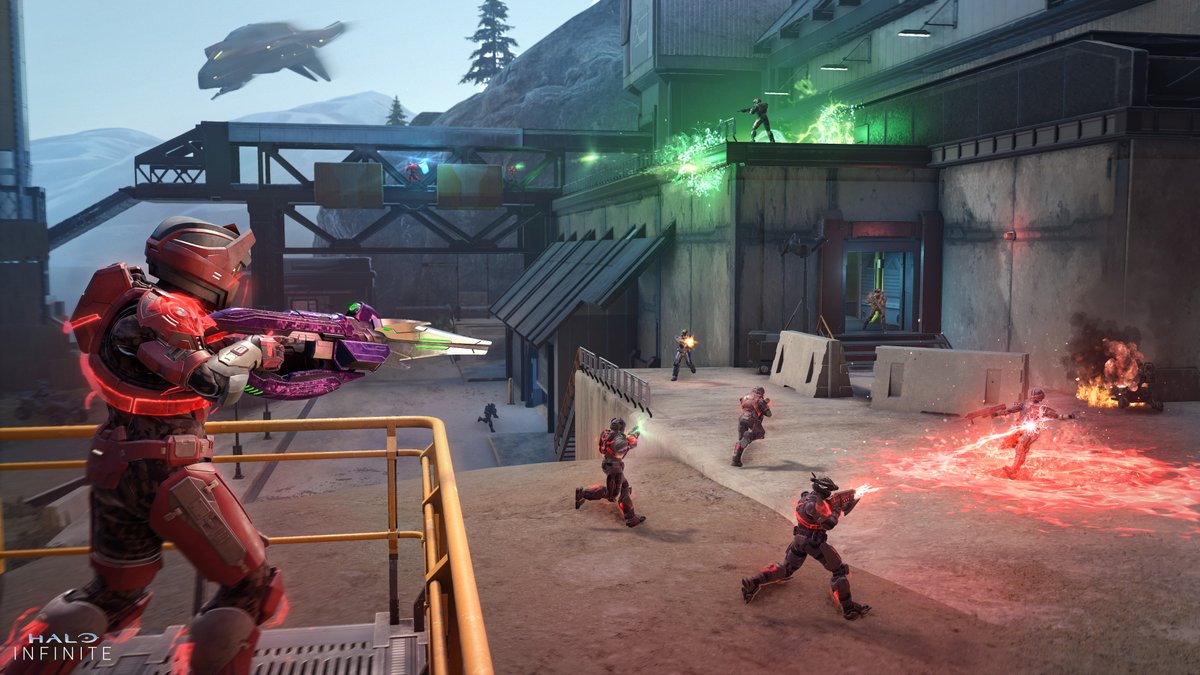
Invasion has arrived! 💥
From chaotic breaches to heroic last stands, this 8v8 mode throws attackers and defenders into a multi-phase battle for territory and objectives.
Grab your squad. Win the war. 🛡️
⚔️ https://t.co/1vL4WLkX2S


@soyparzivalxd muere lo antes posible para que puedas campear spawnpoint y aparecer como el hijo de lalo 🔥🔥🔥

the internet was meant to liberate. when censorship becomes the norm, freedom becomes illusion. muzen's spawnpoint isn't safe from it


@WeLuvJackGang44 I need to sleep I thought the symbol in ur name was the Roblox spawnpoint
Last Seen Hashtags on Sotwe
Most Popular Users

Elon Musk 
@elonmusk
240.1M followers

Barack Obama
@barackobama
118.6M followers

Cristiano Ronaldo
@cristiano
114.4M followers

Donald J. Trump
@realdonaldtrump
111.8M followers

Narendra Modi
@narendramodi
106.9M followers

Rihanna
@rihanna
98.6M followers

NASA
@nasa
92.1M followers

Justin Bieber
@justinbieber
91.7M followers

KATY PERRY
@katyperry
89.9M followers

Taylor Swift
@taylorswift13
83.9M followers

Lady Gaga
@ladygaga
75.4M followers

Virat Kohli
@imvkohli
73.3M followers

Kim Kardashian
@kimkardashian
70.8M followers

YouTube
@youtube
68.6M followers

Neymar Jr
@neymarjr
66.3M followers

Bill Gates
@billgates
65.2M followers

Selena Gomez
@selenagomez
63M followers

The Ellen Show
@theellenshow
62.1M followers

CNN
@cnn
61.7M followers

X
@x
60.6M followers