

Top Tweets for #versioncontrol

From browser canvas to production codebase! 🚀 Pushing prototypes straight to GitHub changes the game—locking in clean version control, instant rollbacks, and seamless CI/CD pipelines. #DesignKoro #WebDev #UIUX #VersionControl #GitHub #BuildInPublic #Frontend #TechInnovation

Anthropic just replaced Git with in-house version control: Scion, which is catered for ASDLC.
#AI #Agent #Anthropic #Git #VersionControl #ASDLC #Scion #SourceControl

New on our Engineering blog: Creating in-house source control.
In May, we merged around 2,500 code changes per day. In September, we merged more than 30,000 per day. As a result, we became bottlenecked by developer infrastructure built for human (rather than agent) scale.
Here, we share how we built a new version control system—and fully migrated our monorepo from git—in five months: https://t.co/wzNkwHs7IN

Bookmarked this for every junior dev I mentor 🔖
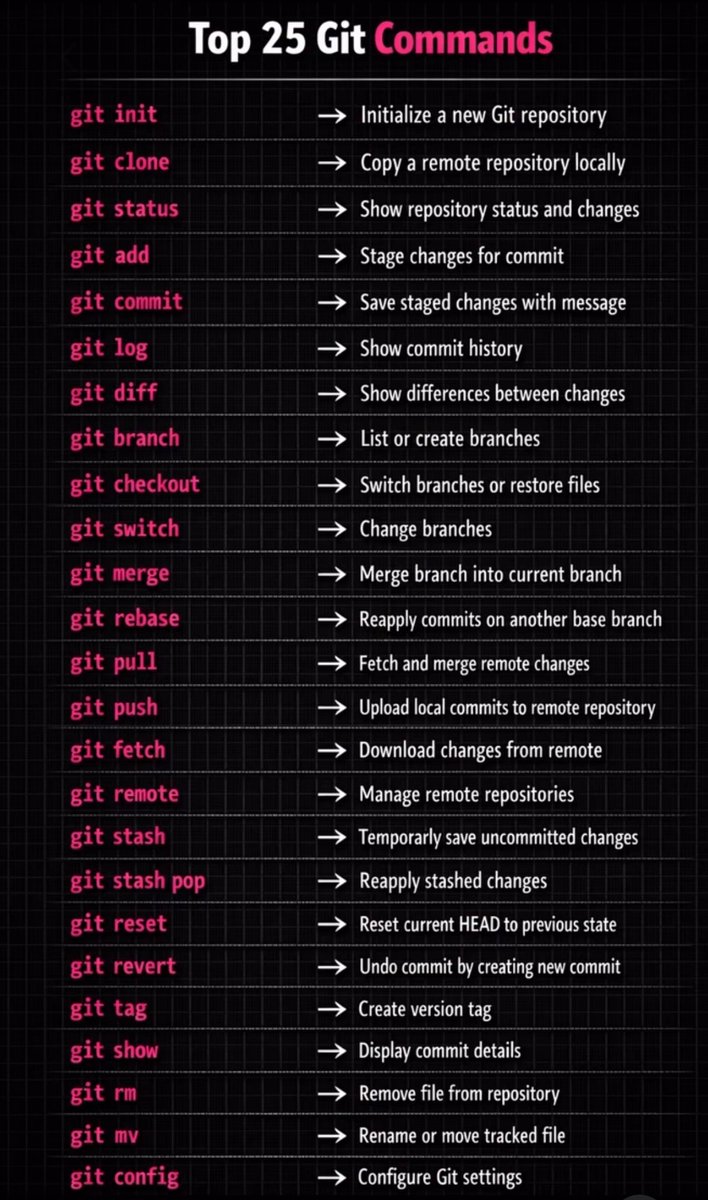
Top 25 Git commands that cover 95% of daily workflow:
→ init, clone, status, add, commit (basics)
→ branch, checkout, switch, merge, rebase (branching)
→ pull, push, fetch, remote (collaboration)
→ stash, stash pop (WIP management)
→ reset, revert (undoing mistakes)
→ tag, show, rm, mv, config (housekeeping)
Master these 25, and you’ll handle 95% of real-world Git workflows.
Save this 🔥
#Git #VersionControl #DevOps #SoftwareEngineering

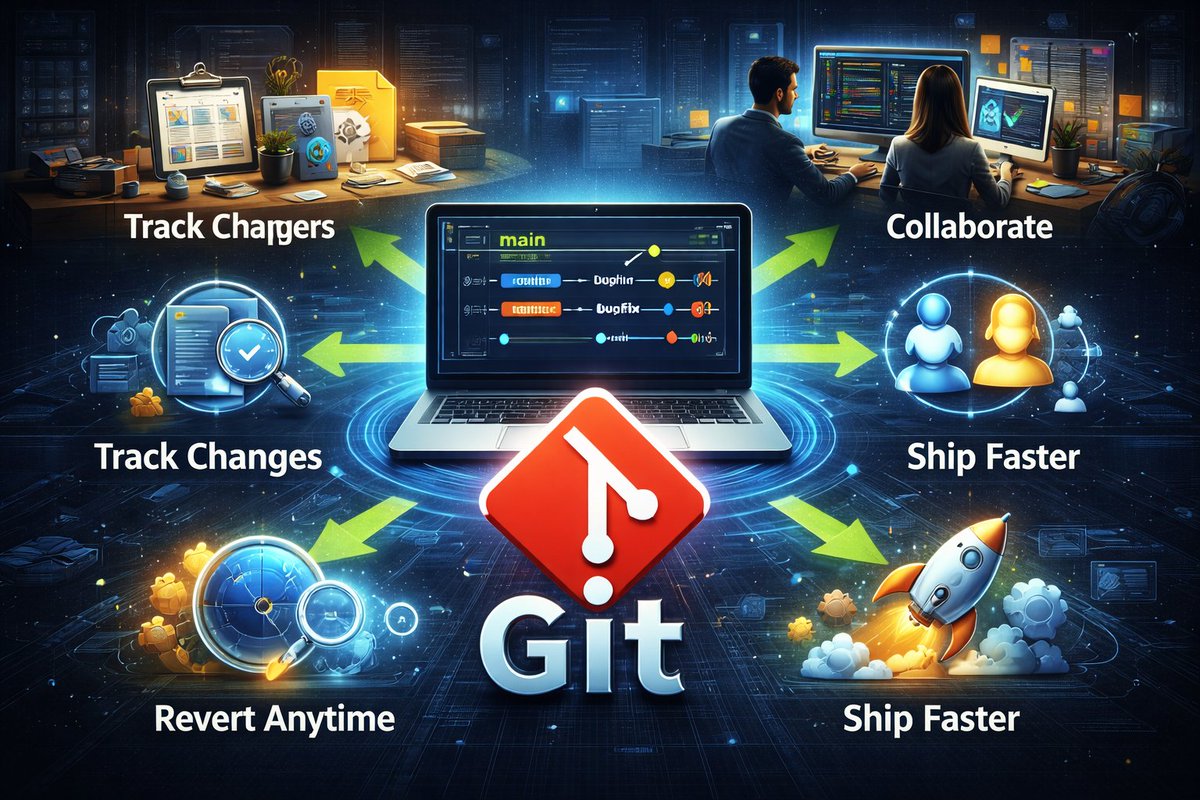
If you’re building anything in tech and NOT using version control… you’re gambling.
One mistake = everything breaks.
One overwrite = work gone.
Version control changes the game:
• Track every change you make
• Revert back anytime
• Collaborate without chaos
• Ship faster with confidence
This is how real builders work.
Start using Git.
Start thinking in versions.
#Developers #Git #VersionControl #BuildInPublic #Tech

📚 Read This Before Your Next git commit✋
Most developers write✍️
fix
update
changes
final
- You see the problem here? It does not answer the why.❌
- Git already shows what changed. Your commit message should explain the reason.
🔥 A Simple Structure You Can Follow
1️⃣ Short title (50–72 characters)
➜ Start with a verb
➜ Use imperative mood
➜ Be specific
💡example:
feat(validation): add email format validation
build(docker): optimise Dockerfile for better caching
ci(github-actions): add staging deployment workflow
Refactor Dockerfile to improve build cache
A Thread 🧵
#Git #DevOps #CleanCode #VersionControl #LearningInPublic #ksops #Linux
Image Credit goes to @_workchronicles

💥 If you're someone who writes everything inside a single Git commit message, then please don’t 🙂
⚡ Use a proper multi-line commit instead.
❌ Instead of:
git commit -m "Added login feature, implemented JWT authentication, added validation, fixed middleware bug"
✅ Do this:
git commit -m "Add login feature" \
-m "Implemented JWT authentication" \
-m "Added error handling"
or
✅ git commit
Git will open your default editor (e.g., Vim, Nano).
Then write
Add a login feature
- Implemented JWT authentication
- Added validation
- Fixed bug in middleware
☑️Clean title.
☑️Clear explanation. ☑️Readable history.
Your future self (and your team) will thank you.
#Git #DevOps #CleanCode #VersionControl #LearningInPublic #ksops #linux
💥 Stop breaking main. Start branching. 🚀
A branch is a separate timeline/path from the main timeline/path. The branch is independent, and whatever you do in that particular branch will not affect the other branch.
📌 Why do we need Branching?
📍 Without branching
- Everyone edits the same code
- High risk of breaking production
- Hard to experiment safely
- Messy history
📍 With branching
- Parallel development: Multiple features are built simultaneously by many members.
- Isolated work: Others changes won't affect yours
- Easier bug fixes: Bug is isolated to your branch, and fix issues in your own branch
#Git #VersionControl #DevTips #Programming #LearnInPublic
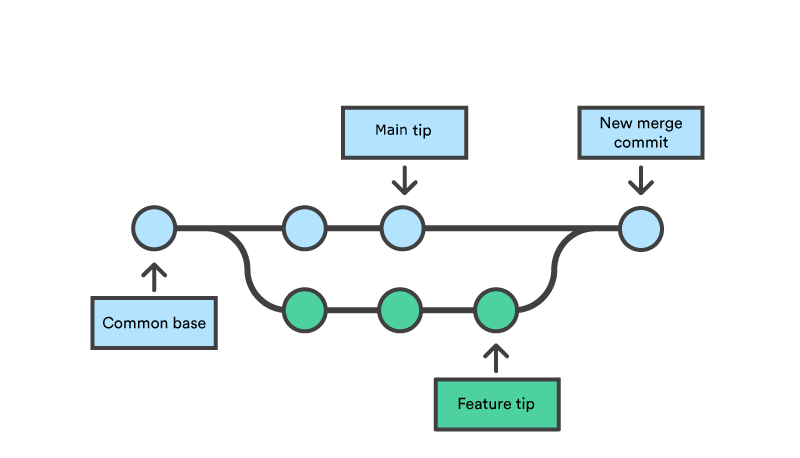
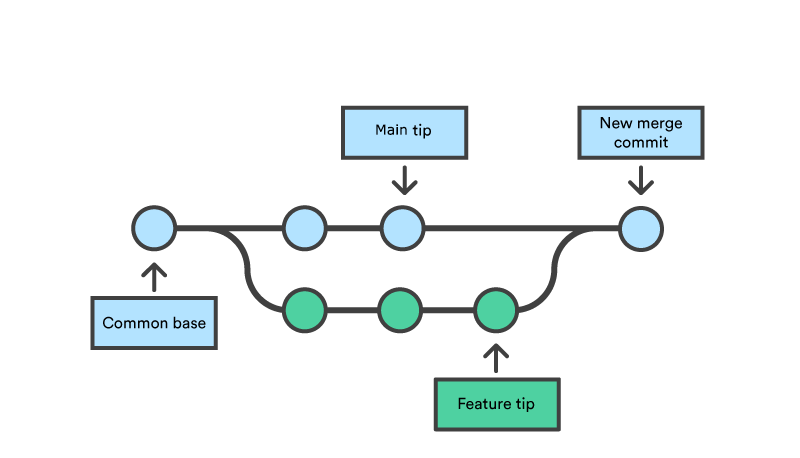
💥 Stop breaking main. Start branching. 🚀
A branch is a separate timeline/path from the main timeline/path. The branch is independent, and whatever you do in that particular branch will not affect the other branch.
📌 Why do we need Branching?
📍 Without branching
- Everyone edits the same code
- High risk of breaking production
- Hard to experiment safely
- Messy history
📍 With branching
- Parallel development: Multiple features are built simultaneously by many members.
- Isolated work: Others changes won't affect yours
- Easier bug fixes: Bug is isolated to your branch, and fix issues in your own branch
#Git #VersionControl #DevTips #Programming #LearnInPublic
Most Popular Users

Elon Musk 
@elonmusk
240M followers

Barack Obama
@barackobama
118.6M followers

Cristiano Ronaldo
@cristiano
114.4M followers

Donald J. Trump
@realdonaldtrump
111.7M followers

Narendra Modi
@narendramodi
106.9M followers

Rihanna
@rihanna
98.6M followers

NASA
@nasa
92.1M followers

Justin Bieber
@justinbieber
91.7M followers

KATY PERRY
@katyperry
89.9M followers

Taylor Swift
@taylorswift13
83.9M followers

Lady Gaga
@ladygaga
75.4M followers

Virat Kohli
@imvkohli
73.3M followers

Kim Kardashian
@kimkardashian
70.8M followers

YouTube
@youtube
68.6M followers

Neymar Jr
@neymarjr
66.3M followers

Bill Gates
@billgates
65.2M followers

Selena Gomez
@selenagomez
63M followers

The Ellen Show
@theellenshow
62.1M followers

CNN
@cnn
61.7M followers

X
@x
60.6M followers