To disable the driver and the service, open CMD as Admin and paste
reg add "HKLM\SYSTEM\CurrentControlSet\Services\amd3dvcache" /v Start /t REG_DWORD /d 4 /f && reg add "HKLM\SYSTEM\CurrentControlSet\Services\amd3dvcacheSvc" /v Start /t REG_DWORD /d 4 /f
You can revert the change by setting the values from 4 to 2.
A reboot is required.
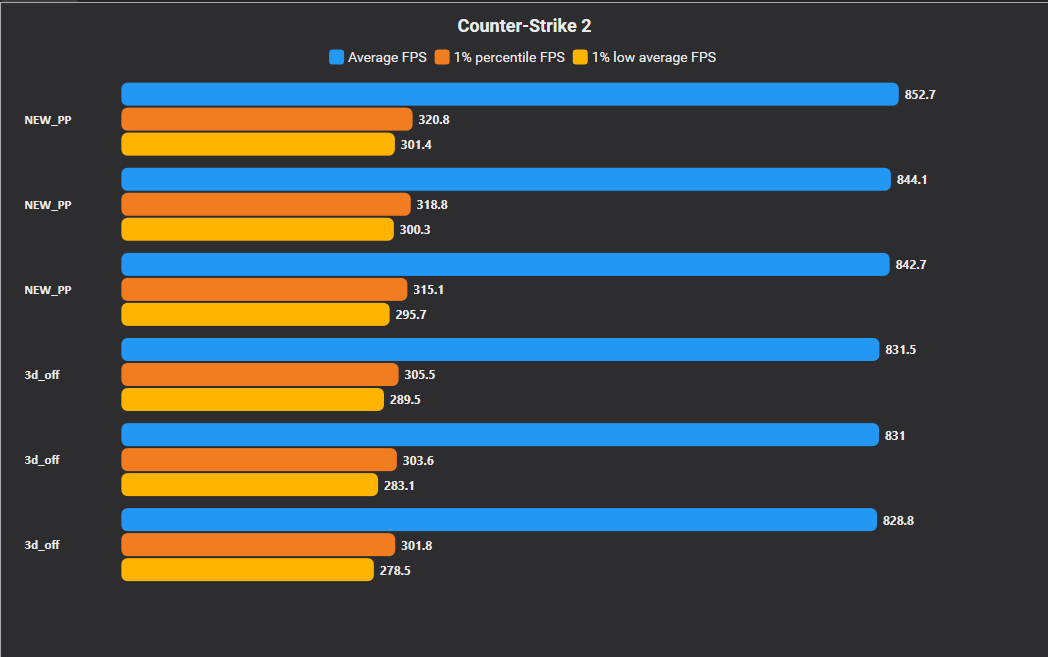
Disabling AMD's 3D V-Cache service and driver (on single-CCD X3D CPUs), combined with our latest Power Plan, can yield a performance increase, although it may be modest on some systems.
The difference is often more noticeable in overall smoothness and responsiveness than in benchmark metrics.
You will find our customized Power Plans for AMD and Intel, as well as our Power Plan Manager utility, in the first comment below.
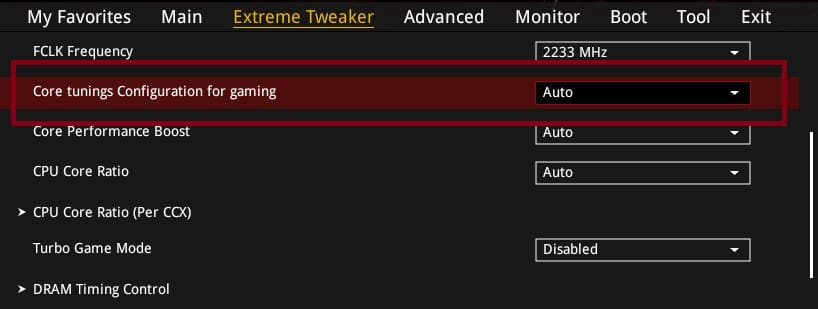
Free BIOS check for ASUS AM5 / Ryzen users:
Look for “Core Tuning Config for Gaming.”
Use "Level 2" in BIOS
This setting is designed around better gaming behavior / latency, and on newer BIOS versions it’s usually the direction you want versus older legacy behavior.
AM5 users: set Core Tuning Config to Level 2.
❌ Legacy = outdated launch behavior
❌ Level 1 = only looks good in fake benchmarks
✅ Level 2 = real-world gaming sweet spot
Kills micro-stutters, boosts 1% lows, AMD's stable default.
Set it and forget it.
📩DM me or Join my Discord for the best PC optimization
🚨 DISABLE THIS AMD CPU OPTION IMMEDIATELY IF YOU SEE IT
AI Cache Boost → OFF
7800X3D / 9800X3D / 9900X3D / 9950X3D = this is not for you.
What it actually does ↓
Forces FCLK to 2100MHz fixed OC
Built for AI/LLM workloads, not gaming
⚠️ If you have a tuned FCLK/EXPO profile, this overrides everything with a generic preset
💡 X3D performance = cache latency + memory stability — you want that under YOUR control, not an auto preset built for token throughput
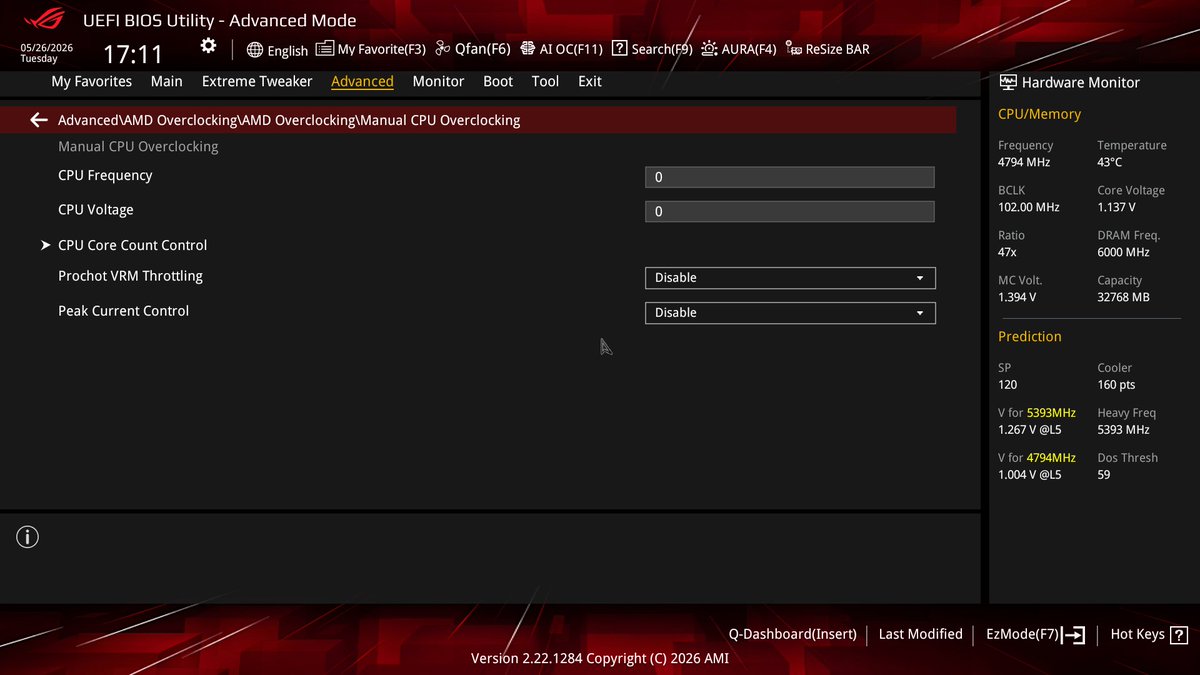
🚨 9800X3D OR HIGHER? DISABLE THESE 2 BIOS OPTIONS INSTANTLY
Advanced → AMD Overclocking → Manual CPU Overclocking
Prochot VRM Throttling → Disable
Peak Current Control → Disable
What they do ↓
⚠️ Prochot VRM Throttling = when your VRM gets hot, it throttles your CPU to protect itself,left enabled it can silently tank your performance mid-session without you even noticing
⚠️ Peak Current Control = limits how much current your CPU can pull during spikes,great for weak boards, terrible for performance on a ROG board that can handle it
→ Disable both → stop leaving FPS on the table
🔧 Want your rig optimized from scratch for YOUR system and not presets?
DM me or join my Discord Server to book now👇
A lot of gamers will install 30 random FPS tweaks…
but still browse the internet with no ad blocker.
Ads.
Trackers.
Popups.
Sketchy redirects.
Coin miners.
Use uBlock Origin.
The cleanest way to manage your NVIDIA GPU
PlasNV fully rebuilt from scratch
GPU Overclocking
Custom Fan Curve
NVIDIA Profile Imports
Hidden Driver Tweaks
free and built for all NVIDIA series GPUs
discord link in bio for download
Wanna hear footsteps from a mile away? Go to Audio and make sure your EQ settings are set to Crisp.
And don't forget to send it to that one friend who always can't hear enemies!
🚨TO ALL ASUS ROG CROSSHAIR OWNERS 🚨
Make sure you’re on BIOS 2201 (AGESA update), then go straight into BIOS, DRAM Timing Control and change this👇
UCLK DIV1 → run UCLK = MEMCLK
Crosshair Tweak Mode → Mode 1
This Update adds a new memory option under Extreme Tweaker👇
Crosshair Tweak Mode:
Mode 1 (daily)= safer / better compatibility
Mode 2 (benches) = more performance (mainly for select G.SKILL CL26 kits, 99xx-style training tweaks)
⚠️ if you’re not on that kind of kit / dual rank, don’t expect real changes
Stock RAM timings are built to work, not to be fast.
On X3D systems, memory latency can make a huge difference in how responsive the game feels.
EXPO is step one. These timings are the next and after that? Proper RAM Overclocking.
If you're on AM5 and not running DDR5 Nitro Mode, you're missing out on free performance.
Enable it, tune the RX/TX values + burst length, and watch your bandwidth and latency improve instantly.
No extra voltage. No risk. Just gains.
🌐 Website down below for the best PC optimization⬇️