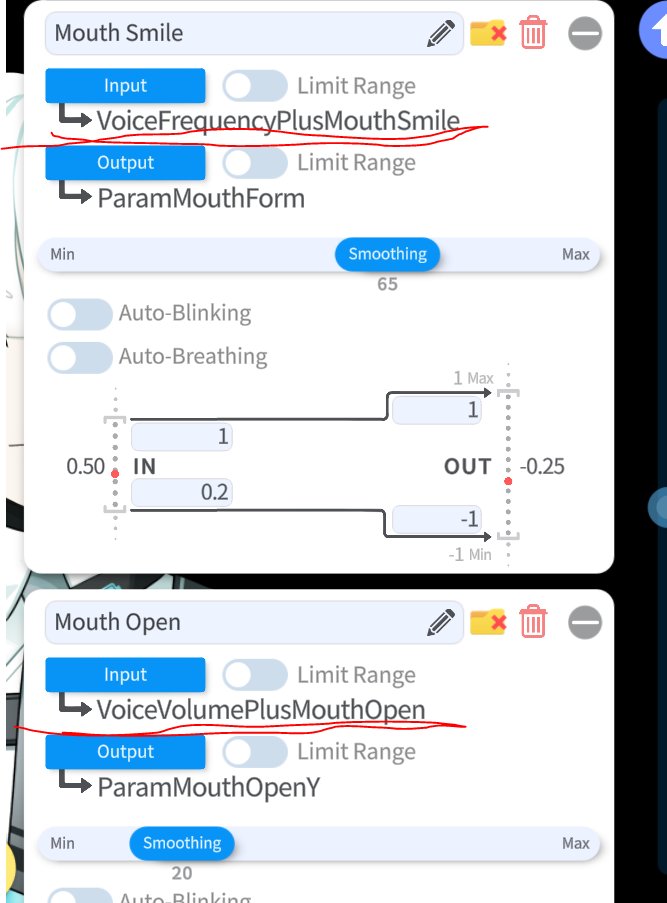
If you still want to use your tracking for the mouth movements PLUS the microphone lipsync, please use these input parameters instead:
👉 VoiceFrequencyPlusMouthSmile
👉 VoiceVolumePlusMouthOpen
every tutorial I see about the lipsync just completely ignores those parameters 😩
VTube Studio lip sync can be divided into Simple lip sync and Advanced lip sync.
Generally, the good point of Voice lipsync is Vtubers can keep their mouth motions even if the web comera can't track your face.
There are some differenece between these lip syncs.
Simple lip sync only has two input paraneters Voice Volume and Voice Frequency.
This lip sync ditects phonemes, but these phonemes (a, i, u, e, o) are integrated to these two parameters.
The good part is Vtubers easily set up the lip sync without editing the live2d model file, but this lip snync doesn't have each phoneme parameter so we aren't able to make detailed mouth motions.
Regarding advanced lip sync, this lip sync has many input parameters, param (a, i, u, e, o), Voice Volume, Voice Frepuency, and silence. and you can adjust what voice frepuency affects each phoneme parameter.
The good part of this lip sync can assign each input phoneme to each model mouth motion, but most of models don't have phoneme motions.
So if you want to use these phoneme parameters, you have to edit live2D model files to make each mouth shape for each phoneme.
Finally, I think Simple lip scync is enough for normal Vtuber streamer since the feature keeping mouth motions without the face tracking is the most important feature in lip sync. Therefore, whether the lip sync has detailed input parameters is not matter.
So You Wanna Learn DaVinci Resolve #5: SUBTITLES
Pretty important one for vtuber clipping! This one ended up super long so here's some timestamps:
1:01 Outline
2:01 Color-coding
4:06 Manual subbing vs auto-subbers
4:44 Duplicating
5:50 Pop in
7:07 Power bins