Dear church folks, one of the hardest lessons in ministry is learning that a miracle can happen through your ministry without becoming your possession.
Take note of that.
A pastor prayed with a childless couple, and they eventually had a baby.
He was joyful, but he also hoped the testimony would strengthen his small church and attract more people.
When the couple later dedicated the child in a much larger church and stopped attending his congregation, he felt disappointed.
Then came the question that changed his perspective:
Did you give them the child?
No.
Did you answer their prayer?
Again, no.
That moment exposed a lesson many people struggle with: confusing the privilege of being used by God with ownership of the result.
The Church belongs to Jesus.
The people belong to God.
Not everyone you help is meant to remain with you forever.
Sometimes, the greatest evidence that you truly served God is being able to bless people even when their next chapter is no longer connected to your platform.
Photo Credit : Premium9ja
Microsoft is now literally telling businesses exactly how to get traffic from AI Search.
Yes, directly inside webmaster tools.
This is probably one of the most important marketing updates of 2026.
Let’s go through it.
By the way, you can see whether your business is appearing across Google AI, ChatGPT, Claude, Perplexity and Grok here (it's free):
https://t.co/Pn764BHwyL
Earlier this year, Microsoft launched its AI Performance report so businesses could see how often their content was cited across Microsoft Copilot and partner AI experiences.
Now they are expanding it with four new AI Insights: Intents, Topics, Citation Share and Compare.
Let’s go through what changed.
Microsoft’s AI Performance report already showed: Total AI citations, Which pages were cited, Citation trends over time, the Average number of cited, Grounding queries associated with those citations, and now they' adding even more context.
The first update is Intents, thanks to which grounding queries are now classified into categories like: Informational, Commercial, Research, Learn & Solve and Local.
This goes without saying, but every AI citation is not equally valuable - a core principle that every SEO Stuff (https://t.co/wKpf0EILTx) package starts with.
A citation from an informational query may mean your content is being used to answer broad education-stage questions.
A citation from a commercial query may mean your business is being considered closer to the buying decision.
Imagine a payroll company sees Microsoft associating its site with:
Payroll software for contractors
Multi-state payroll compliance
Construction payroll pricing
ADP alternatives for small businesses
Now the business can see whether those queries are informational, commercial, research-driven or local.
That changes the content strategy.
If the site is getting cited mostly for informational queries, the company may need stronger pricing pages, comparison pages, industry pages and bottom-of-funnel content.
If it is getting cited for commercial queries but not winning much citation share, the issue may be authority, specificity or third-party validation.
The second update is Topics.
Microsoft is now grouping related queries into broader thematic clusters, and this is important because modern AI search organizes information around subjects, entities, intent, relationships and coverage depth.
That means a business should ask: “Does Microsoft understand us as a strong source for this topic?”
A payroll company may discover that Microsoft connects it strongly to: Contractor payroll, Small-business payroll, Payroll compliance, and Payroll pricing, as opposed to: Enterprise payroll, Global payroll, Healthcare payroll and Construction workforce management.
That tells the company where its topical authority is strong and where it is thin.
The third update is Citation Share.
Microsoft says businesses can now see how much of the citation space their site holds for a given grounding query.
Basically, you can start to see whether your site is one of many sources being cited, or whether you are earning a meaningful share of the AI answer ecosystem around a subject.
That is a very different metric from raw citations, because a site may get 100 citations for a topic, but if competitors are getting 5,000, the business may still be underrepresented.
Another site may only get 40 citations for a niche commercial query, but own a large share of the citation space.
This starts to move AI search reporting closer to share-of-voice analysis.
So less “Did we appear?” and more “How much of the available visibility did we capture?”
The fourth update is Compare.
Businesses can now overlay one time period against another.
For example:
Last 30 days vs. previous 30 days
Before a content update vs. after a content update
Before a backlink campaign vs. after a backlink campaign
Current season vs. prior season
This makes AI search optimization much easier to evaluate, because if a business publishes a new comparison page, strengthens an existing pricing guide and earns a few relevant authority placements, it can now look for citation movement afterward.
You don't have full attribution here yet, but even directionally this is still a big improvement.
This is where SEO Stuff’s done-for-you package becomes relevant:
https://t.co/yEFyM0Ze7W
The package combines 10 AI-search-optimized articles with three DR50+ authority placements.
The content helps build deeper coverage around topics AI systems already associate with your business.
The authority placements help reinforce your company’s identity, category and expertise across the wider web.
That combination matters because AI visibility usually comes from two things working together:
Useful, specific content on your own site.
Trusted external signals confirming who you are and what you should be recommended for.
Microsoft says these new features are still in early preview, so occasional inaccuracies are possible, but the direction is obvious.
AI search is beginning to provide its own version of keyword, topic, intent and share-of-voice data.
This is the system SEO Stuff was built around:
https://t.co/eh1auroJF7
And if you want to see whether your business is already being cited, understood and recommended across Google AI, ChatGPT, Claude, Perplexity and Grok, check here:
https://t.co/Pn764BHwyL
Here are 10 GitHub repos that quietly print money while you sleep.
1. Cal. com
Open-source Calendly. Fork it, white-label it, sell to dentists and lawyers for $200/month. The founders hit $5M ARR in 3 years doing exactly this.
Repo → https://t.co/Qqe8Schsgt
2. Plausible Analytics
Privacy-first Google Analytics. Self-host it, resell to agencies for $50/month per client. Two founders bootstrapped this to 7 figures.
Repo → https://t.co/HKpN07mUZ5
3. Ghost
Open-source Substack with 100% margin. 1,000 readers at $5/month equals $60,000 a year. Forever.
Repo → https://t.co/qMl2Ig2h03
4. n8n
Open-source Zapier. Sell automation services for $500-$2,000 per setup. n8n raised $14M because the agency model behind it works.
Repo → https://t.co/pmMLX1OLtH
5. Supabase
Free Firebase replacement. Build a SaaS in a weekend, charge $29-$99/month. They raised $116M for a reason.
Repo → https://t.co/7KwbFsR2Qo
6. Medusa
Open-source Shopify. Take 5% on every sale forever. Zero rev share to Shopify.
Repo → https://t.co/aiN386blug
7. AppFlowy
Open-source Notion. Sell self-hosted to enterprises worried about data privacy. They raised $30M because this market is massive.
Repo → https://t.co/qcl2tERBCL
8. Coolify
Open-source Vercel and Heroku. Charge developers $20/month to manage their deployments. Replace their $200 Vercel bill.
Repo → https://t.co/kFprAirARL
9. Listmonk
Open-source Mailchimp. Send unlimited emails for the cost of an AWS bill. Resell to agencies at 10x markup.
Repo → https://t.co/QgcYOiFwiX
10. Penpot
Open-source Figma. Sell self-hosted design tools to agencies who refuse to upload client files to the cloud.
Repo → https://t.co/HsOBYxuyFL
The difference between developers who build features and developers who build businesses is one decision.
Pick one of these. Fork it this weekend. Ship it next week.
The founders behind these repos already proved the model.
Save this. Share it with the developer in your life who deserves to break free.
100% free. 100% open source.
If you’re building a fintech in Nigeria, understand these first.
• NIP
• NUBAN
• BVN
• NIN
• KYC tiers
• Settlement windows
• Reconciliation
• Chargebacks
• Webhooks
• Idempotency
• AML
• Fraud detection
Save this
If you’re trying to break into fintech in 2026, save this roadmap.
• Learn how banks work
• Understand payment rails
• Learn REST APIs
• Study KYC & AML
• Learn webhooks
• Understand reconciliation
• Learn idempotency
• Read payment documentation
• Build a payment project
• Follow fintech engineering blog
Save this
🚨 𝗕𝗥𝗘𝗔𝗞𝗜𝗡𝗚: Google Gemini can now build you a full AI video channel from scratch like a $10K creator consultant (for free).
Here are 7 prompts that take you from zero to a monetized AI video channel in 90 days: (Save for later)👇
Here are the top 4 tools I use to rank on Google. (Bookmark this)
1. SEO Meta in 1 Click. Free Chrome extension, this is how I manually check pages when I'm auditing a site. Click it on any page and you get the meta title, the description, every header in order, and which images are missing alt text. I run it on the client's pages first, then on whoever's ranking above them, and the gap between the two is usually the first month of work. Takes about 10 seconds a page.
2. LocalDominator. Runs your keyword from dozens of points around your city and shows your rank at every single one. In the middle of town you're number 1. Over by the lake you're number 4. Nobody finds that out checking from their own desk, your own searches always show you winning. The map also shows who's actually holding the spots you want, so you pull up their profile and see what they've got that you don't. More reviews, closer address, a page built for that side of town. I screenshot the grid before we start and again a few months in. A map turning green lands with a client harder than any report I could write.
3. Google Keyword Planner. Also free. Demand and competition on every search term before you spend anything chasing it. Roof repair and roof replacement pull completely different volume in the same town, and this is how you find out which one deserves its own page. I check it before a single page gets built.
4. Claude Code. The stuff that used to eat whole days, location page drafts, profile updates, onboarding docs, audit writeups, runs on automations I built once and reuse on every client. I still read everything before it ships. It just stopped taking me all week to produce it.
I'll break down how I use each one in its own post. The other three you can go install today.
🚨 BREAKING: Claude can now design logos that look like they cost $10,000.
I tested it myself.
The final result cost me exactly $0.
Here are the 7 prompts I used:
Save this for later
Vibe coders are getting sued.
People are shipping apps with real users and skipping the boring stuff that kills them.
A 20+ year dev shared the pre-launch checklist every AI builder needs.
I added what I learned after shipping 60+ apps at the agency.
Don't skip this:
1. Protect yourself, not just your app. The moment you collect user data you're in legal territory (GDPR, CCPA). Have a privacy policy. Know where user data lives.
2. Row Level Security. Without RLS, anyone can open DevTools and read your entire database. Supabase → Auth → Policies. Zero policies means your app is naked. 5 min to fix.
3. Test the failure path, not just the happy path. Wrong password 5x. Reset for an email that doesn't exist. Verification link clicked twice. Signup with an existing email. Catches 80% of auth bugs.
4. Security baseline in 2 min. Prompt your AI: "Review my app as a security specialist and make sure I have strong security headers and a solid baseline security posture."
5. OWASP. Prompt: "Review my app against OWASP standards and highlight vulnerabilities." This is where SQL injection, XSS and auth bugs actually get caught.
6. Client-side validation is UX, not security. Attackers disable JS and hit your API directly. Validate again on the server. Every time.
7. AI code leaks data in 3 spots: .env values in the frontend, API responses returning too much, secrets in logs. Prompt: "Check my app for credential or sensitive data leaks in frontend or API routes."
8. API keys in the frontend means game over. If it's in the browser, assume it's already taken. Move it server-side or proxy it.
9. Rate limits before someone burns your API bill. Cap every endpoint hitting a paid API. I've watched a Supabase bill jump from $20 to $200 in a day.
10. CAPTCHA on public forms (Cloudflare Turnstile is free) plus CORS locked to your domain. 10 min, kills bot floods.
11. Error messages that don't leak. "User not found", not "SELECT * FROM users failed". Log full errors server-side, show users generic messages.
Build fast. Just don't ship naked.
(full breakdown in my article below)
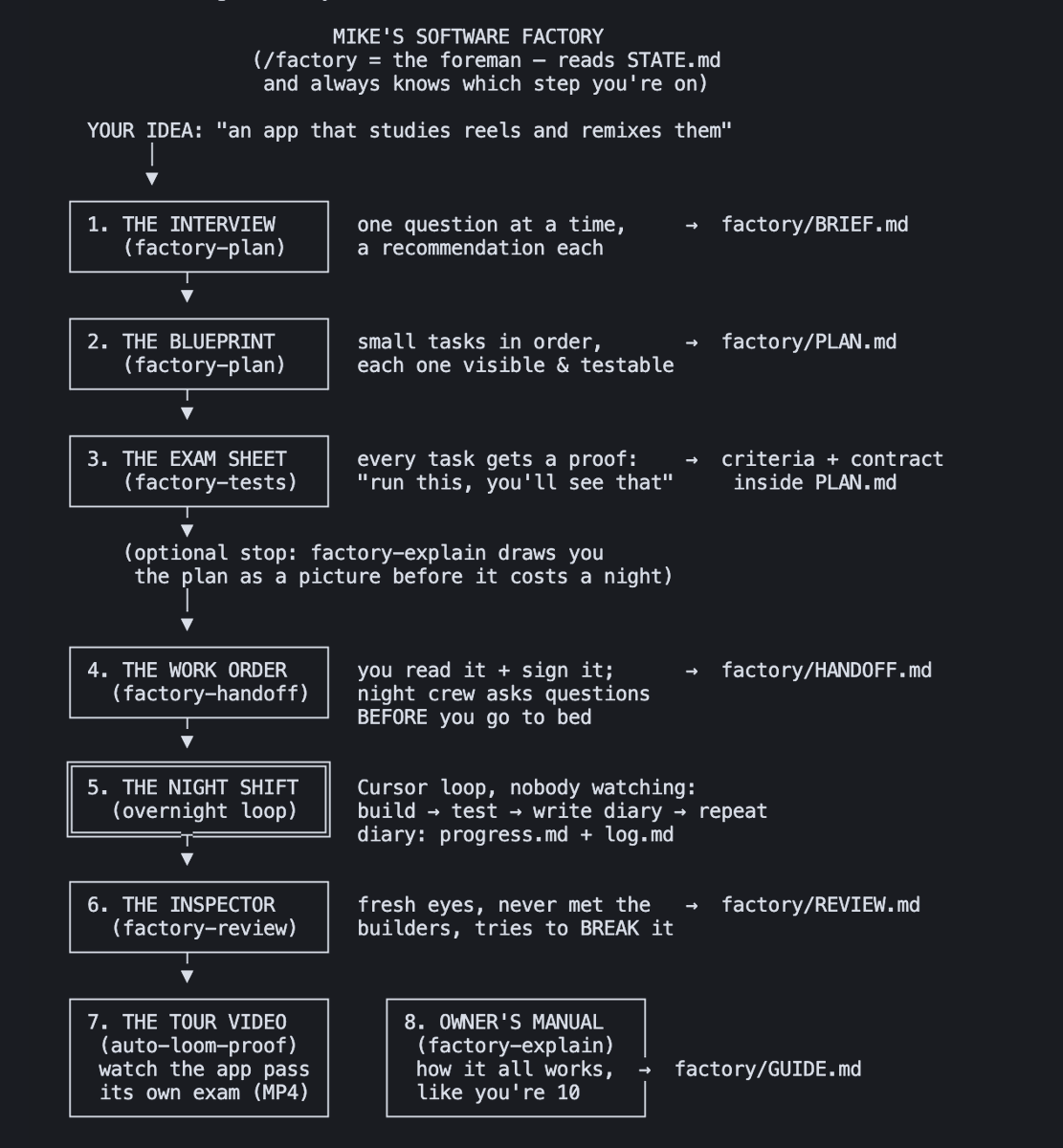
This is my personal software factory.
It turns ideas into working products while I sleep. No babysitting coding agents with prompts all day.
Cursor and Claude Code made writing code way easier. The harder problem is building a system that can context engineer and manage itself.
My factory starts with a Skill called `/factory`. It's the foreman that remembers where the project stands and sends in the right worker for the job.
Factory runs this assembly line:
1. `/factory-plan` - the interviewer
Reads the existing codebase (if there is one), extracts missing context from me via interview, and writes a product brief.
2. `/factory-plan` - the planner
The same skill turns the approved brief into small, testable features and development tasks.
3. `/factory-tests` - the professor
Before anyone writes code, every task gets an exam. This skill defines the success criteria for each task, and how the coding agent can prove to itself that what it built works or needs iteration.
4. `/factory-explain` - the presenter
Explains the plan to me like I'm 10, with visual metaphor and mermaid charts. Now that coding agents can write more code, faster than any human ever could, the new bottleneck is human understanding of the code. This skill solves that.
5. `/factory-handoff` - from CTO to SWE
This packages the brief, plan, tests, safety rails, and stop conditions into one work order. Factory uses the best models for the planning in the previous steps above, then hands the work order to a lower token usage model like Grok 4.5 for execution.
6. Cursor or Claude Code `/loop` - the coffee
The night shift picks one task, builds it, takes its exam, records what happened, iterates if needed, then moves onto the next task. If it gets stuck, circuit breakers stop it from confidently digging a deeper hole while I sleep.
7. `/factory-review` - the teacher grades the homework
The student doesn't grade it's own homework. A fresh agent that never met the builder tries to break the result. The reviewer rereads the original plan, reruns tests, and finds anything that's broken.
8. `/auto-loom-proof` - shows the evidence
Uses browser use and screen records itself performing the tests and adds an 11labs voiceover explaining what's being proven. It sends me the narrated demo video.
9. `/factory-explain` - the code
The factory updates a plain-language owner's manual explaining what actually got built. I understand my own codebase, so I can make decisions without becoming the bottleneck or outsourcing my thinking to AI.
NOTE ON BUILDING AI
Cursor and Claude Code have made writing code dramatically easier. But getting AI to work reliably and at scale for you can't be fully automated.
LLM-as-judge helps, but a judge needs a rubric, examples, and input from someone with subject matter expertise. You still need a human reviewing the work and teaching the system how to perform better.
You can check out my factory on github in the post below.
GeoLibre v2.3.0 is here!
GeoLibre is a free and open-source, lightweight, cloud-native GIS platform for visualizing, exploring, and analyzing geospatial data. It runs everywhere you do, in the web browser, on the desktop, on mobile, and inside Jupyter notebooks, all while keeping your data local and private.
This release brings a legend that writes itself from your symbology, a new GeoLens catalog browser, and 200+ GeoLibre Rust geoprocessing tools running entirely in the browser.
What's new in v2.3.0
- Automatic on-map Legend: the legend builds itself from your visible layers, with class rows for graduated, categorized, rule-based, and expression styling, gradient bars for heatmaps and raster colormaps, and land-cover labels from a Raster Attribute Table. Rename, hide, reorder, or add your own entries, and it saves with the project.
- Symbology swatches in the Layers panel: every row shows a dot, line, square, or image glyph in the layer's own color, so a tall layer stack reads at a glance.
- GeoLens catalog browser: connect to a self-hosted GeoLens server, search its catalog, and add datasets as vector tiles, GeoJSON, or rendered raster tiles.
- Emerging Hot Spot Analysis: build a space-time cube from timestamped points and classify every cell as a new, intensifying, persistent, diminishing, sporadic, oscillating, or historical hot or cold spot, all client side.
- Mosaic time series: the Time Slider now steps through MosaicJSON and STAC collections of many COGs per date, on either a GPU or a WASM rendering engine.
- Copy and paste layer styles: give a whole set of layers one consistent look without restyling each in turn.
- Shareable tool links: deep-link any Whitebox tool with a ?tool= URL that opens the dialog preselected and pre-fills the form, with a Copy link button to build it for you.
- Smarter data loading: pick which layers to load from a multi-layer GeoPackage, import CSVs whose coordinates are in any projected CRS, and read a raster's real CRS, pixel size, and extent from the metadata dialog.
- Multiple AI profiles: define several provider, model, and credential setups, pick a default, and switch between them from the assistant panel.
Try it out
- Launch GeoLibre Web: https://t.co/8gMtkVtfnm
- GitHub: https://t.co/VXq8c1o2Nd
- Documentation: https://t.co/7VA2AQoCUc
- Release notes: https://t.co/cf3fXneeh6
#GIS #Geospatial #OpenSource #RemoteSensing #MapLibre #GeoLibre
A guy named Rui built the world's most useful website.
It is called Brevio, and it gives you access to 492 tools for free.
It has:
> 118 developer tools
> 58 finance tools
> 53 text tools
> 41 design tools
> 36 PDF tools
> 33 math and science tools
> 30 converters
> 30 health tools
You can generate a resume, remove an image background, calculate startup runway, format JSON, compress a PDF, create video captions, build a QR code, test a password, or make an invoice.
There are even tools for checking prompt injections, comparing AI responses, calculating LLM costs, and previewing RAG chunks.
You do not need an account to use any of them.
And when you add a file, it gets processed on your own device instead of being sent to Brevio.
Most websites give you one tool and then ask for money.
Rui built 492 of them and gave the entire collection away.