🧵 AI is changing how we work, create, and build.
But the biggest advantage isn’t simply using AI.
It’s knowing how to use it better than yesterday.
Here are 10 things every AI & tech creator should focus on 👇
Typing might be becoming the slowest way to write.
With Typeless, you can just say what’s on your mind, explain the idea, and let AI turn the rough thought into polished words.
No staring at a blank page. No perfect prompts. Just talk, refine, and keep moving.
This feels like a much more natural way to write.
I gave AI a normal human problem.
Not a coding problem. Not a complicated business question.
Just something most people deal with but rarely know how to solve properly.
I asked ChatGPT to look at the situation from different perspectives, point out what I was missing, and give me a practical way forward.
The surprising part?
The answer wasn’t some crazy AI trick. It simply noticed a few things I hadn’t considered.
Sometimes the value of AI isn’t getting an answer faster.
It’s having something challenge the way you’re looking at the problem.
That’s when AI starts feeling less like a search box and more like a thinking partner.
The “no time to get the founder on camera” problem is more common than people admit.
Most teams end up skipping the launch video altogether and just posting screenshots.
The valuable part of this 0→1 workflow isn’t just the tool. It’s the process of deciding on one clear message you want viewers to remember, then uploading real product screenshots so the model works from your actual UI instead of inventing one. @Pexoai_offical
Once those two pieces are locked in, the avatar, voice, and editing workflow becomes genuinely useful.
Instead of another generic 40-second SaaS video, you get something that actually feels connected to the product you’re launching. 🔥
Building AI agents often means managing models, tools, servers, and other infrastructure separately.
DigitalOcean is simplifying that with Managed Agents, now in public preview.
You can run Claude Code, Codex CLI, OpenCode, LangGraph, or your own agents in isolated environments, with access to 75+ models and 16,000+ tools.
Everything runs through DigitalOcean, so there’s less setup and infrastructure to manage.
The first thing I’d try with Sol is turning a long email thread into a document that’s ready to review. I love that they’re focused on getting the work done. And nothing gets shared until I approve it.
Having the context and a draft in one place would make reviewing so much easier. That’s a thoughtful way to help with follow-through.
Check it out: https://t.co/IQk38HvCtD
AI influencer content is evolving beyond random clips. 🚀 With Seedance 2.5, consistent characters, smooth camera movement, and 30-second storytelling can turn simple ideas into engaging vlog experiences. APOB makes this workflow worth exploring. 🤖🎬
🚨 If Claude keeps telling you “usage limit reached,” you’re probably wasting your usage on inefficient workflows.
You don’t need to stop using Claude.
You need to make each message do more.
Here’s the playbook 👇
🧠 1. Plan before prompting
Combine related tasks instead of sending 10 tiny messages.
📦 2. Batch your requests
Instead of:
“Give me 1 hook.” → “Another.” → “Write the post.”
Ask:
“Give me 10 hooks, shortlist the strongest 3, then write the final post.”
📁 3. Use Projects
Keep recurring files, instructions and knowledge inside Projects instead of repeatedly uploading the same material. Claude says project content can be cached for reuse.
🔎 4. Don’t use Research/Web Search unnecessarily
If you don't need current information, avoid expensive tool usage.
⚡ 5. Match effort to the task
Simple rewrite? → Lower effort.
Deep research/coding? → Higher effort when needed.
🧹 6. Start fresh chats when conversations get huge
Long, complex conversations can consume more usage.
🎯 7. Give complete context upfront
Context + Goal + Input + Constraints + Output = fewer follow-ups.
📊 8. Watch your Usage dashboard
See how much of your session and weekly allowance you're consuming.
💳 9. If you genuinely need more
Paid users with eligible plans can use usage credits after reaching included limits.
The difference:
❌ Tiny prompts → endless follow-ups → limit
✅ Plan → Batch → Context → Execute → Review → Done
The goal isn't to use Claude less.
The goal is to make every Claude message work harder.
Save this. ♻️ Repost it for someone constantly hitting Claude's limit.
Follow @Origin_AI_01 for more Claude + AI workflows.
#Claude #ClaudeAI #AI #AITools #PromptEngineering #Productivity #AIAgents #ClaudeCode
AI influencer content is becoming more cinematic. 🎬 Seedance 2.5 combines character consistency, natural camera movement, and 30-second storytelling to turn simple concepts into engaging vlog-style videos. APOB makes the whole workflow even more exciting. 🚀🤖
Ai video didn't get harder. the workflow was just stuck in the past.
Prompt tools hand you a clip you can't control. A canvas hands you a project you can.
Dreamina 2.0 is canvas-first. the new way ai video is made.
#Dreamina#DreaminaPartner
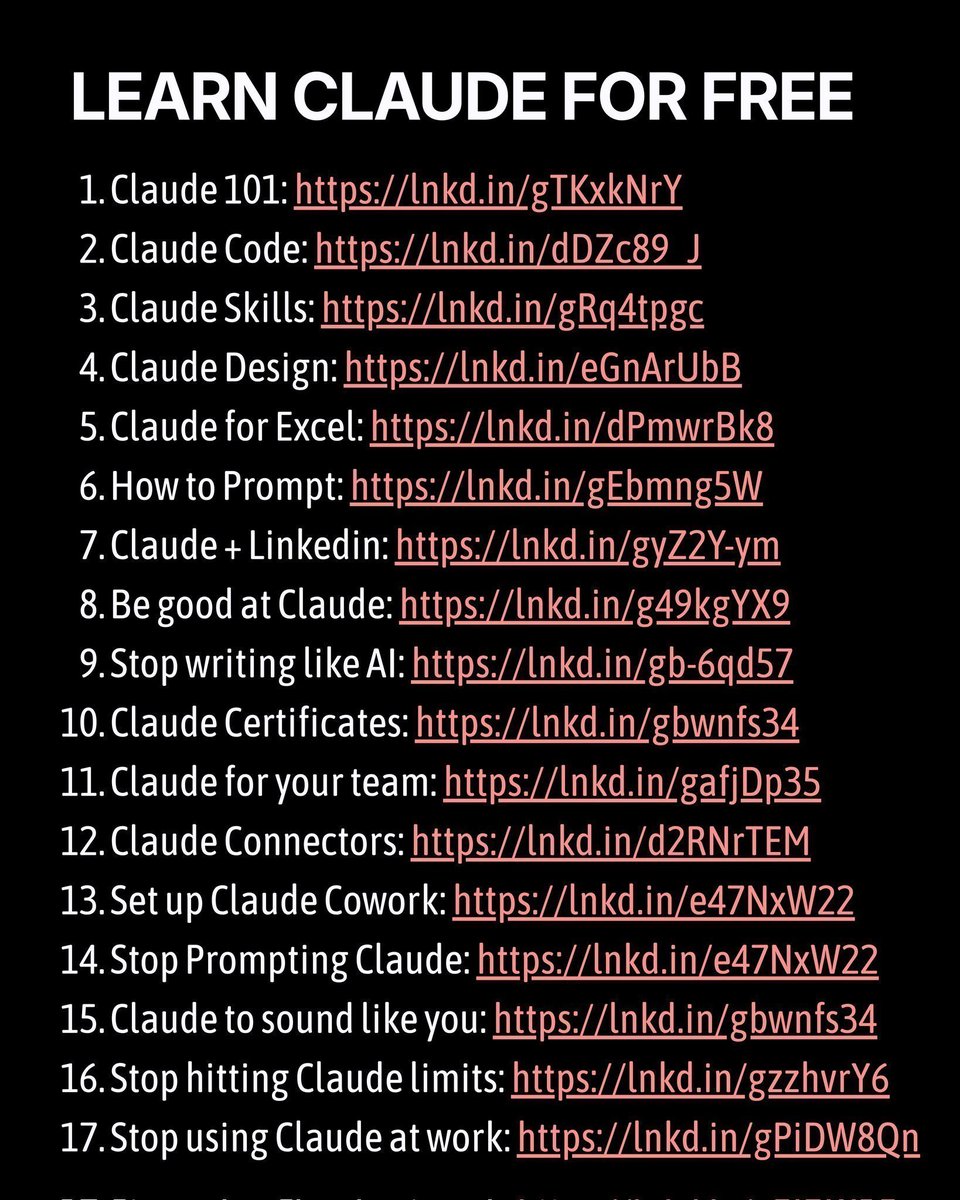
Stop paying for AI courses before you see what’s available for FREE.
I found 9 resources that can take you from AI beginner
→ AI builder:
→ OpenAI Academy
→ Claude for practical work
→ AI Agents fundamentals
→ Build & sell AI Agents
→ Gamma AI presentations
→ Google Veo
→ AWS Prompt Engineering
→ AI automation concepts
→ Sam Altman’s Solopreneurship Thesis
The goal isn’t to collect courses.
Learn → Build → Automate → Create → Improve.
Save this list.
Pick ONE resource today and start building.
Follow @mostofakamal00 for practical AI tools, workflows & resources. 🚀
The best part of building with AI is being able to experiment without constantly watching your credits.
Lovie is making that a lot easier:
~160M free tokens every month
20 providers
400+ models
1 API key
$0 to get started
That’s a lot of room to test, iterate, and actually get a V1 out the door.
I’d definitely keep this one bookmarked. 👀
#DreaminaMadeItViral@Dreamina_ai just updated its web experience and Canvas, and it’s out now.
What caught my attention is how many of its best AI video workflows and skills are now built into the experience, covering film, brand ads, viral social media scenes, and more.
I’m definitely opening a few workflows to see what I can make with them.
Seedance 2.5 30s Video is now live on APOB AI, helping creators produce trend-style AI clips with better movement, sharper scenes, and more room for a memorable payoff.
Create the next shareable AI moment.
Try it now: https://t.co/fFHXULHsMo
Prompt and Tutorial👇
Turning a GitHub project into a polished promo video usually takes a lot of planning, editing, and back-and-forth.
What stands out here is how @Pexoai_offical handles the whole process conversationally — from understanding the project and shaping the script to reviewing storyboards, generating the video, and making precise revisions with Mark to Fix.
The ability to refine specific parts without starting over makes the workflow feel much more practical.
A great example of how AI can turn a technical project into content that’s much easier for people to understand. 🚀
@Pexoai_offical
10/10 — 🚀 Keep learning.
The AI landscape will keep changing.
Tools will disappear. New models will emerge. Entire workflows will be redesigned.
The creators who stay curious will keep adapting.
AI isn’t just another trend.
It’s becoming part of how the digital world works.
Follow @JoyaExloresAi for more AI, tech, tools & practical insights. 🤖⚡
🧵 AI is changing how we work, create, and build.
But the biggest advantage isn’t simply using AI.
It’s knowing how to use it better than yesterday.
Here are 10 things every AI & tech creator should focus on 👇
9/10 — 🤝 Build relationships.
Talk to founders.
Connect with developers.
Engage with researchers.
Collaborate with other creators.
Your network can become one of your biggest learning resources.