Follow me for tech insights, tutorials, and updates! DevOps, Cloud, Cybersecurity, AI/ML, Programming, Networking, SysAdmins, stay ahead with practical guides.
10 GitHub repos that seem "illegal" but are perfectly legal
1. yt-dlp → https://t.co/Du6gdOc2IS
Downloads videos from any platform. YouTube Premium charges 16 dollars a month to do less
2. Ollama → https://t.co/8oehE5DxkW
Runs AI models on your laptop without paying for APIs. What costs many hundreds a month here comes out to 0
3. Fooocus → https://t.co/7u6sLDgPsR…
Generates images with Midjourney-quality on your GPU. Midjourney charges 30 dollars. This is unlimited and free
4. Whisper → https://t.co/PTqszvZoEe
Transcribes audio for free in 99 languages. Otter charges 20 dollars a month to do the same
5. Plausible → https://t.co/rhQT0OQOZm…
The open source alternative to Google Analytics. Companies pay thousands a year. Self-hosted costs 0
6. AppFlowy → https://t.co/yOq5CQTfPx…
The open source Notion. Notion charges 20 dollars per user. Here you get unlimited users on your server
7. Penpot → https://t.co/9mzjB05oJg
The open source alternative to Figma. Figma charges 16 dollars per editor. Penpot is self-hosted and free
8. n8n → https://t.co/y9LvCdMK01
The open source Zapier. Zapier Pro can cost hundreds a month. n8n runs unlimited automations
9. Cal .com → https://t.co/wzk3z4GrQH
The open source alternative to Calendly. Calendly Teams charges 16 dollars per user. This is free for personal use
10. Bitwarden → https://t.co/Ml0McwzxCB…
The open source alternative to 1Password. Most charge per user. Bitwarden has a very complete free version
All legal. All free. All open source
Save them all
Share it with that person who keeps paying for tools that have been free all this time and Must follow
@abir35627
for see more Ai content .
🚨iOS 27 launches later today
New features coming with the update:
- Siri AI (+ more Apple Intelligence Features)
- Refined Liquid Glass design
- Performance improvements
- iPhone Handoff
- Apple Cash bill splitting
- Hide your location in Find My
- Improved Photos app
- Smarter Safari
- Improved Mail search
- New Image Playground features
- Better Spotlight search
- New privacy and security features
- Improved AirDrop performance
- Better Wi-Fi and cellular switching
iOS 27 is mainly a performance focused update, aimed to improve various aspects of iOS
Welcome, John. “Hello” is a fitting start to a new era.
Apple’s next frontier is private, context-aware AI seamlessly integrated across its devices—making intelligence personal, secure, and nearly invisible.
Build the future, don’t just follow it. 🚀
@johnternus@iM4CH3T3 Welcome, John. ��Hello” is a fitting start to a new era.
Apple’s next frontier is private, context-aware AI seamlessly integrated across its devices - making intelligence personal, secure, and nearly invisible.
Build the future, don’t just follow it.
@oneuios I was going to install the iOS 27 dev beta and it showed ~10GB a few days ago. Today it’s ~20GB, even though I didn’t install anything. Maybe Apple repackaged it or switched to a full build for new installs.
@zollotech I was going to install the iOS 27 dev beta and it showed ~10GB a few days ago. Today it’s ~20GB, even though I didn’t install anything. Maybe Apple repackaged it or switched to a full build for new installs.??
🚨 LATEST: Claude maker Anthropic is calling for a global pause in AI development, warning that models are approaching the ability to self-improve without human intervention.
💡 Quick Linux Tip #1
Need to find which process is eating all your disk I/O right now?
Use:
$ iotop -o
It shows only the processes actively reading or writing to disk, updated in real time.
The -o flag filters out idle processes so you're not hunting through noise.
One glance tells you exactly which service is hammering your disk before your storage team calls you first.
Follow @tecmint for more #Linux tips
Day 5/100 of Learning System Design.
Content Delivery Networks (CDNs) – Edge Caching and Geo-Distribution.
Grab the System Design Ebook: https://t.co/1pR2xx1I3p
WHAT IS A CONTAINER?
A STEP-BY-STEP TUTORIAL
WHAT IS A CONTAINER
-> A container is a lightweight and isolated environment used to run applications
-> It packages application code, dependencies, libraries, and configurations together
-> Ensures applications run consistently across different systems
-> Containers are a core part of modern software development
WHY CONTAINERS ARE IMPORTANT
-> Eliminates “works on my machine” problems
-> Makes deployment faster and more reliable
-> Simplifies scaling applications
-> Provides consistency across development, testing, and production
WHAT A CONTAINER INCLUDES
-> Application code
-> Runtime environment
-> Libraries and dependencies
-> Environment variables
-> Configuration files
HOW CONTAINERS WORK
-> Containers run as isolated processes on the host operating system
-> Share the host OS kernel
-> Use namespaces for isolation
-> Use cgroups for resource management
-> Start quickly because no full operating system is required
CONTAINERS VS VIRTUAL MACHINES
-> CONTAINERS
-> Share host OS kernel
-> Lightweight and fast
-> Use fewer resources
-> VIRTUAL MACHINES
-> Include full guest operating system
-> Heavier and slower
-> Require more memory and CPU
KEY CHARACTERISTICS OF CONTAINERS
-> Lightweight
-> Portable
-> Fast startup time
-> Resource efficient
-> Isolated execution environment
-> Easy to scale
HOW CONTAINERS ARE CREATED
-> Developer writes a Dockerfile
-> Docker builds an image
-> Image is used to create containers
-> Containers run the application consistently anywhere
COMMON USE CASES OF CONTAINERS
-> Web applications
-> Microservices architecture
-> CI CD pipelines
-> Cloud-native applications
-> Development and testing environments
BENEFITS OF USING CONTAINERS
-> Faster application deployment
-> Consistent environments
-> Better resource utilization
-> Easier application management
-> Improved scalability
CONTAINER LIFECYCLE
-> CREATE
-> Container is prepared
-> START
-> Application begins execution
-> RUNNING
-> Container actively runs processes
-> STOP
-> Container execution ends
-> REMOVE
-> Container is deleted permanently
HOW CONTAINERS FIT INTO MODERN DEVELOPMENT
-> Widely used in DevOps workflows
-> Work seamlessly with Kubernetes
-> Support microservices deployment
-> Simplify cloud application management
QUICK TIP
-> A container is an isolated environment for running applications
-> Containers package everything an application needs
-> They are lightweight, portable, and efficient
-> Containers have transformed modern application deployment and scalability
LEARN DOCKER IN DEPTH
-> Grab the Docker Mastery eBook
-> https://t.co/sC9bTrAJWt
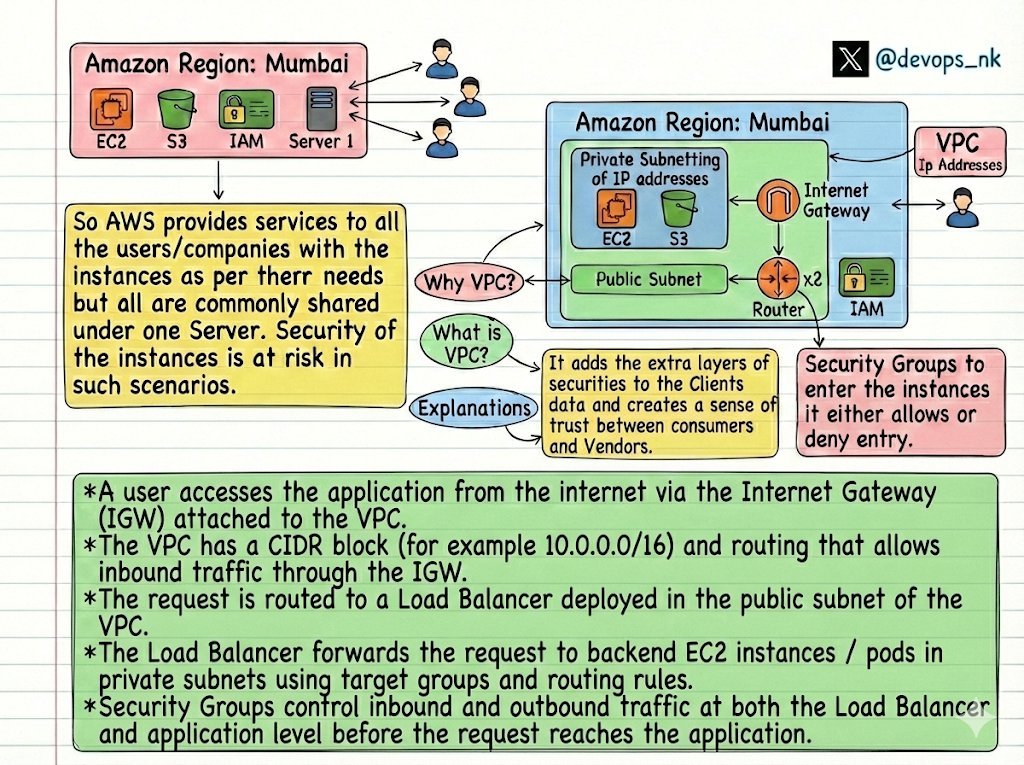
Understand AWS VPC
🟢 What is a VPC?
→ Amazon VPC (Virtual Private Cloud) is a logically isolated section of AWS where you define your own virtual network environment.
→ You can launch AWS resources (like EC2,S3) in a customized network.
→ You control IP range, subnets, route tables, gateways, and security settings.
🟢 AWS Network Communication
🌐 IntErnet Communication
→ Traffic enters/leaves the VPC via Internet Gateway (IGW) or NAT Gateway
→ Requires Public Subnet
→ Resources need Public IP / Elastic IP
→ Used for user-facing apps, APIs, websites
→ Exposed to the outside world (secured via SGs & NACLs)
🔐 IntrAnet (Private) Communication
→ Happens within AWS network
→ Uses Private IP addresses only
→ Implemented via:
- VPC Peering
- Private subnets
- VPC route tables
→ No Internet Gateway involved
→ Used for service-to-service, backend, internal traffic
→ Never exposed to the internet
Here is a handy DNS benchmark tool you can try for quick DNS speed test 😎👇
Find high-res pdf ebooks with all my networking infographics at https://t.co/amOqrOKcOO
#dns#networking#networkengineer#technology#techtips