Everyone keeps sharing the same AI tools… so here are 11 actually useful ones no one talks about.
1/ https://t.co/y0EgfpLwl8
– Auto-design slide
2/ https://t.co/g4vPEQzjSc
– Research + long-form writing
3/ https://t.co/v90prY06gy
– Deep AI search
4/ https://t.co/ej7wCgSBVs
– Turn long videos into clips
5/ Claid. ai
– Enhance product photos
6/ TaskMagic. com
– No-code task automation
7/ Typefully. com
– Write + schedule posts
8/ Looria. ai
– Find products
9/ https://t.co/NFw52OxuA8
– AI assistant for Mac
10/ Superhuman. com
– Speed up email
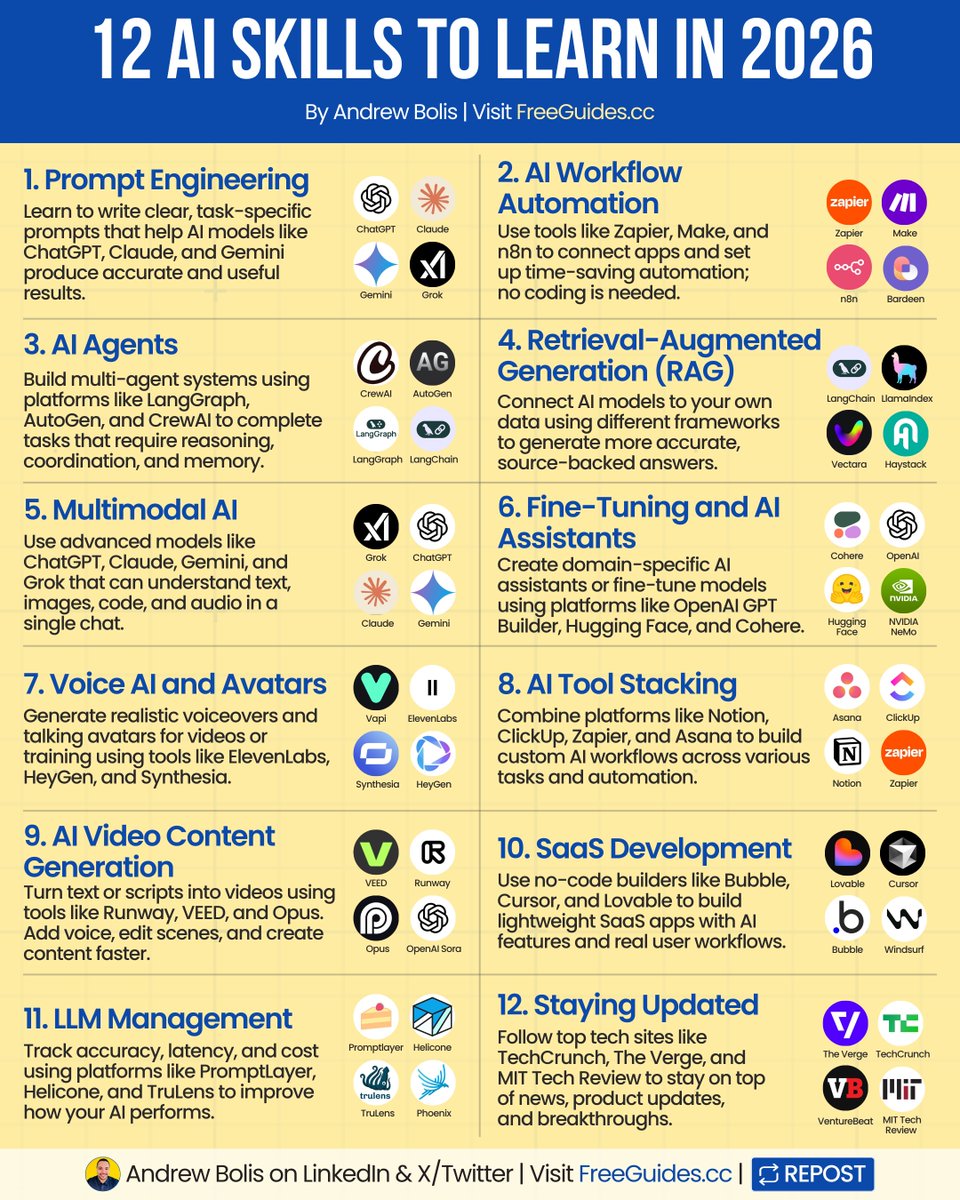
AI skills will be crucial for years to come.
Knowing how to use ChatGPT isn’t enough.
Learn these AI skills to future-proof your career:
(remember to 🔖 bookmark for later)
1. Prompt Engineering:
Write better instructions to help AI tools give you exactly what you need.
2. AI Workflow Automation:
Link different apps together to help you complete tasks automatically.
3. AI Agents:
Use AI systems that act like teammates to handle tasks together.
4. Retrieval Augmented Generation (RAG):
Link AI chatbots to your private files for more accurate answers.
5. Multimodal AI:
Use AI that understands pictures, sounds, and text all at once.
6. Fine-Tuning and AI Assistants:
Build custom AI models or assistants tailored to your needs.
7. Voice AI and Avatars:
Make realistic AI voices and avatars for videos and presentations.
8. AI Tool Stacking:
Use tools like Notion, Zapier, and ChatGPT together to work faster.
9. AI Video Content Generation:
Turn your ideas or blog posts into professional videos using AI.
10. SaaS Development:
Build small AI-powered apps using no-code tools.
11. LLM Management:
Keep track of how well your AI tools are working and their costs.
12. Stay Updated:
Follow top AI news sites to keep up with trends and new tools.
AI won’t replace you.
But someone with AI skills might.
📌 Learn 30 free AI tools in 30 days: https://t.co/7MJCwAPtaQ
👉 Follow me @AndrewBolis for more and 🔄 Repost this to help others learn AI
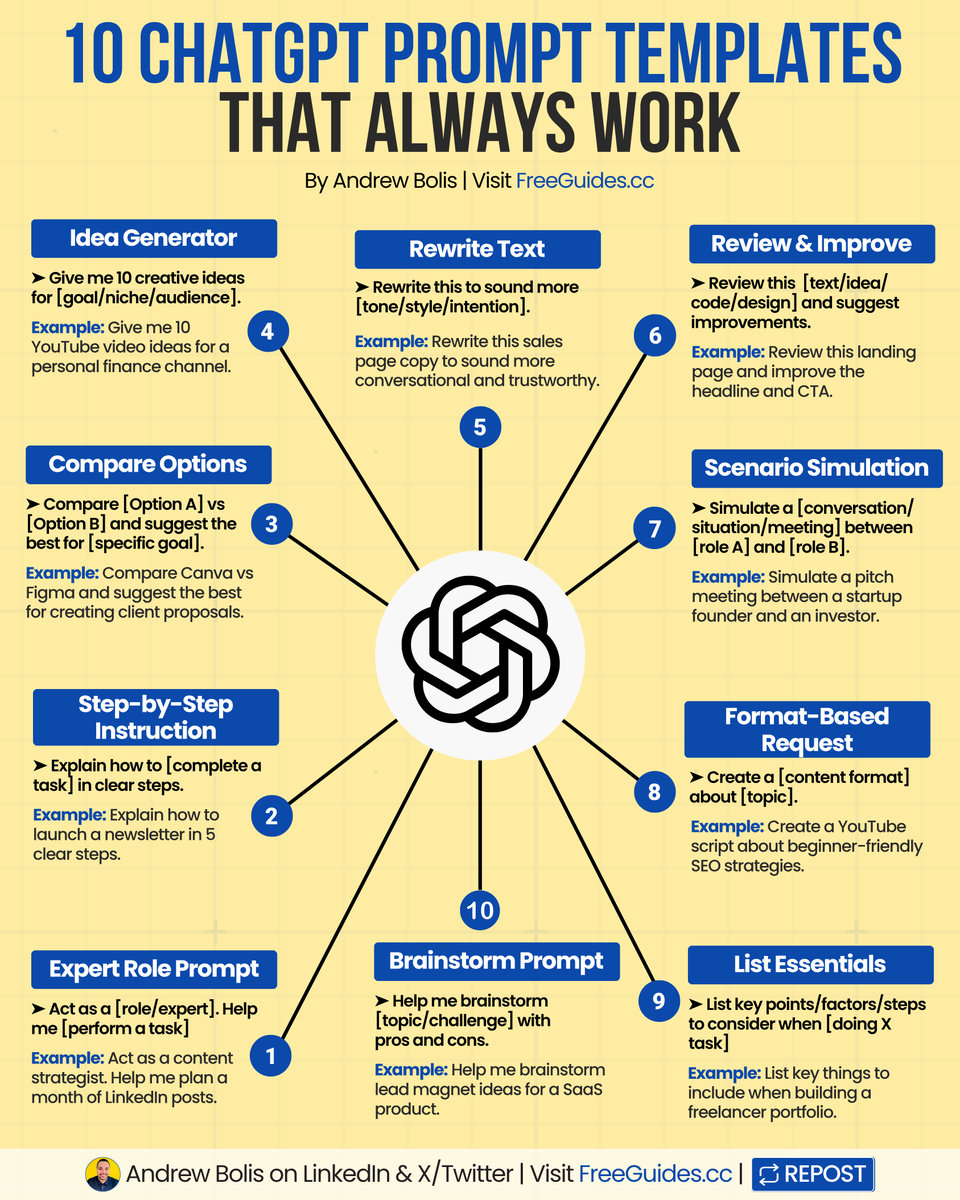
ChatGPT is smart, but only if you ask the right way.
10 prompt templates to get better results faster.
(🔖 bookmark this to improve your prompts)
1. Expert Role Prompt
Let ChatGPT act like an expert to guide your work.
2. Step-by-Step Instruction
Get clear, simple steps for any process or task.
3. Compare Options
Compare choices and get help deciding what’s best.
4. Idea Generator
Quickly generate tailored ideas for any goal or niche.
5. Rewrite Text
Improve tone, clarity, or style with one simple prompt.
6. Review & Improve
Get AI feedback to make your content stronger.
7. Scenario Simulation
Run realistic mock conversations or meetings.
8. Format-Based Request
Ask for content in a specific format, like posts or scripts.
9. List Essentials
Build useful checklists, outlines, or summaries instantly.
10. Brainstorm Prompt
Explore ideas with AI, including pros and cons.
Smarter prompts mean better results.
📌 Get Advanced ChatGPT Guide (free): https://t.co/kOBWfKrBaX
👉 Follow me @AndrewBolis for more and 🔄 Repost this to help others use AI
ChatGPT vs Gemini vs Claude vs Grok vs DeepSeek.
Each one has different strengths and use cases.
Some excel in multimodal creativity, others stand out in deep research, real-time updates or lower costs.
Choosing the right one helps you become truly effective with AI.
[ 🔖 bookmark this post for later ]
Here's your complete guide:
1. ChatGPT
The all-rounder AI is ideal for text, audio, video, code, and automation-focused tasks.
2. Gemini
Ideal for Google Workspace users, with deep integration across Gmail, Docs, Sheets, and Drive.
3. Claude
An AI built for safety, with long-context reasoning and strong accuracy in legal or policy-heavy work.
4. Grok
A real-time social AI for X/Twitter, delivering witty answers and keeping up with breaking news.
5. DeepSeek
An open-source powerhouse that’s cost-efficient, technically strong, and designed to scale.
Mastering AI goes beyond picking a single “best” model.
The key is matching the right tool to the right job.
Save this guide. Share it. Start with one use case.
📌 Get Advanced ChatGPT Guide (free): https://t.co/kOBWfKrBaX
👉 Follow me @AndrewBolis for more and 🔄 Repost this to help others use AI


![AndrewBolis's tweet photo. ChatGPT vs Gemini vs Claude vs Grok vs DeepSeek.
Each one has different strengths and use cases.
Some excel in multimodal creativity, others stand out in deep research, real-time updates or lower costs.
Choosing the right one helps you become truly effective with AI.
[ 🔖 bookmark this post for later ]
Here's your complete guide:
1. ChatGPT
The all-rounder AI is ideal for text, audio, video, code, and automation-focused tasks.
2. Gemini
Ideal for Google Workspace users, with deep integration across Gmail, Docs, Sheets, and Drive.
3. Claude
An AI built for safety, with long-context reasoning and strong accuracy in legal or policy-heavy work.
4. Grok
A real-time social AI for X/Twitter, delivering witty answers and keeping up with breaking news.
5. DeepSeek
An open-source powerhouse that’s cost-efficient, technically strong, and designed to scale.
Mastering AI goes beyond picking a single “best” model.
The key is matching the right tool to the right job.
Save this guide. Share it. Start with one use case.
📌 Get Advanced ChatGPT Guide (free): https://t.co/kOBWfKrBaX
👉 Follow me @AndrewBolis for more and 🔄 Repost this to help others use AI](https://pbs.twimg.com/media/HPW1RCNbIAAEyza.jpg)


