No .dockerignore
5GB Docker image
40-minute builds
$400/month in GitHub Actions
All because you couldn't write 3 lines to exclude node_modules and .git. This is not DevOps, it's self-sabotage.
I never experienced tutorial hell because I learned how to build gradually.
At first, it was a simple program to find the sum of the digits of a two-digit number.
Then any number.
Then you continue with other simple problems.
Then you start reading input from the terminal and producing output.
Then from a file.
Then you suddenly have all the skills to build a simple expense tracker from a .txt file. Or a planner. Or even simple interactive chess with ASCII art.
"Advent of Code"-style problems really help to write some tiny little programs and develop this first builder instinct.
At some point, you want to cross the gap of having a single-file program and create a project for something meaningful.
You can start by implementing some standard algorithms and solving classic problems like the Raft Consensus Protocol or the Chord protocol for Distributed Hash Tables.
After a while, you work on different problems, and you start noticing patterns. You develop particular approaches. You might want to package them as a library. Writing a library and packing an API is a great way to master skills, too.
Eventually, you'll be able to build a complete project like a web app with backend and frontend, or a mobile app, or a GUI desktop app, etc.
As time goes on, the scope of things you can comprehend will naturally increase.
You've been using Linux for years. But you're still doing things the hard way.
Here are 7 commands that'll save you hours:
1. Forgot to add sudo?
- Type `sudo !!`
- It repeats your last command with sudo. No retyping.
2. Just created a file?
- Use `vim !$` to open it.
- The !$ grabs the last thing you typed.
3. Can't remember that command?
- Press Ctrl + R and start typing.
- It searches your entire command history.
4. Made a typo in a long command?
- Type `fc`
- It opens your last command in an editor. Fix it and save. Done.
5. Jumping between folders?
- Use pushd /some/path to save a location.
- Use popd to go back.
- No more typing long paths over and over.
6. Want to see your folder structure?
- Type `tree -L 2`
- Shows everything like an actual tree. Much cleaner than ls.
7. Need to go back to your last folder?
- Just type cd -
- Takes you right back. Simple.
Bonus:
Stop writing `cat file | grep something`
- Just write `grep something file`
- Does the same thing. Way cleaner.
I've used Linux for years. These small commands save me time every single day.
Bookmark this. Your future self will thank you.
Candidates usually get totally confused when I ask simple questions like -
Where is React State Stored?
When you hover over a Chrome tab and see Memory: 120MB, what memory is that?
That is browser process memory, not React memory.
It includes:
JavaScript heap
DOM nodes
Images
Browser internals
Where is React state stored?
React state lives in JavaScript memory (JS heap)
Stored as normal JS objects
Managed by the browsers JS engine
Important memory types :
JS Heap : React state, Redux, data arrays
DOM Memory : HTML elements, event listeners
GPU Memory : Images, canvas
Browser Memory : All of the above combined
How to check memory in a React app
Use Chrome DevTools:
Memory -> Heap Snapshot -> Find memory leaks
Memory -> Allocation Timeline -> See what keeps growing
Performance tab -> Memory usage over time
React DevTools Profiler -> Re-renders
Common memory leak causes:
Large lists without virtualization.
Event listeners not cleaned up.
Closures holding large objects.
Client-side rendering with huge data.
@relizarov Security engineer: We have a vulnerability in frontend
Manager: It affects the client only right
Frontend: No, it affects our servers
Manager: But I thought we used CDNs to serve content
Frontend: We use Server components to call SQL directly
VP: What the fuck did you just say?!
Everyone loves jumping into “Design a system for 1M users.”
And most candidates immediately scream:
"Kafka! K8s! Redis! S3! CQRS! Microservices!"
(You might wanna bookmark this as a developer who is actively interviewing rn.)
Well this is exactly how you fail real-world engineering.
The best engineers don’t start with tech.
They start with questions - the kind that reveal whether you actually understand scale, correctness, and business goals.
---
Here are the questions strong engineers ask:
1. What does 1M users mean?
Daily active? Concurrent? Peak traffic?
Reads vs writes distribution?
2. What’s the business goal?
Revenue? Latency improvements? Reliability?
What metric defines success?
3. What are we storing?
Size per entity? Access patterns? Hot paths?
4. What are the SLAs?
99%ile? 99.9%ile?
Max acceptable downtime?
5. What does failure look like?
What happens if one service goes down?
What happens if a queue backs up?
What happens if the DB hits 100% CPU?
6. What can be eventually consistent vs strongly consistent?
Payment? No.
Feed / analytics? Yes.
7. What needs to scale first?
Reads? Cache it.
Writes? Queue it.
Storage? Partition it.
8. What is the simplest thing that works today?
Not “the most complex thing I can imagine.”
---
I’ve taken a bunch of system design interviews this year.
And after working on real product discussions internally, debugging Kafka lag at 2AM on on-call duty, rewriting parts of our ingestion pipeline, optimizing Redis hot keys - my lens has changed completely.
Now, when I interview someone, I don’t care if they know 25 buzzwords.
I look for thought clarity.
I look for engineers who ask questions like:
“What’s the expected QPS on the hottest endpoint?”
“Where is your bottleneck today?”
“If we double traffic tomorrow, what breaks first?”
“Do we need pub/sub or is async batch enough?”
“Are we solving a real problem or an imagined scale problem?”
“Why do we need microservices — do we even have multiple teams?”
These are the exact same questions we ask internally before designing anything.
Whether it's:
- a new ingestion pipeline
- a distributed lock mechanism
- Kafka consumer lag mitigation
- caching strategy redesign
- or database schema evolution
The best engineers think in constraints, not components.
They understand why before they propose what.
---
Conclusion
If you want to stand out in system design:
Stop flexing tech.
Start focusing on the thought process itself.
Any junior can say “Kafka.”
A senior asks, “Why do we need Kafka at all?”
And that’s the difference.
Last month my intern asked for help with a Kubernetes error.
He was stuck on a YAML file.
He looked desperate.
I make $275,000 a year.
I haven't written a line of code since 2017.
I don't even know what a "pod" is.
But I didn't tell him that.
I leaned back in my Herman Miller chair.
I said, "Stop trying to code. Start prompting."
I told him to paste the error into ChatGPT.
He did.
The AI told him to delete the cluster.
He did.
Production went down instantly.
The CEO called me screaming.
I didn't panic.
I told the CEO we were "testing our disaster recovery protocols."
He was impressed by my foresight.
I got a bonus.
The intern got fired.
Innovation requires sacrifice.
Just not mine.
One of the most asked System Design Interview Question:
Design a Rate Limiter for a high-traffic API service (think Twitter/Netflix scale).
Requirements:
1. Limit requests per user (e.g., 100 requests/min).
2. Limit requests globally (e.g., 1M requests/sec across all users).
3. Should work in a distributed environment (multiple servers).
4. Must ensure fairness (no single user should starve others).
5. Handle burst traffic gracefully.
What Interviewers look for:
Which algorithm would you choose? (Token Bucket, Leaky Bucket, Fixed Window, Sliding Window) and why.
How will you store counters? (In-memory, Redis, DB) considering consistency vs performance.
How to ensure accuracy in sliding windows without degrading performance?
How to prevent race conditions when multiple servers check/update limits concurrently?
What will you do if the rate limiter itself becomes a bottleneck?
How do you gracefully degrade service when limit is reached (429, queue, drop)?
Follow-ups asked:
What if limits are dynamic (different tiers of users: free vs premium)?
How to handle multi-region deployments?
Can you design it as a reusable library/service used by multiple teams?
I went on a job interview for a Senior SWE role.
They asked me about my experience with Kafka.
I told them how in “Metamorphosis” someone can lose their worth in others’ eyes the moment they stop being useful. It’s a chilling reminder of how fragile our sense of belonging can be when it relies on productivity instead of humanity.
I told them how in “The Trial” he describes the helplessness of confronting institutions that feel arbitrary, unaccountable, and impossible to navigate. The randomness of a giant system can crush your soul. Our brains can’t handle overwhelming inconsistency.
I told them how in “The Castle”, we learn that seeking an approval from an unreachable authority is a trap. If you spend your life chasing validation from humans who don’t care, you’ll end up feeling stuck. The pursuit consumes more than the reward it gives.
I didn’t get the job. The market is tough.
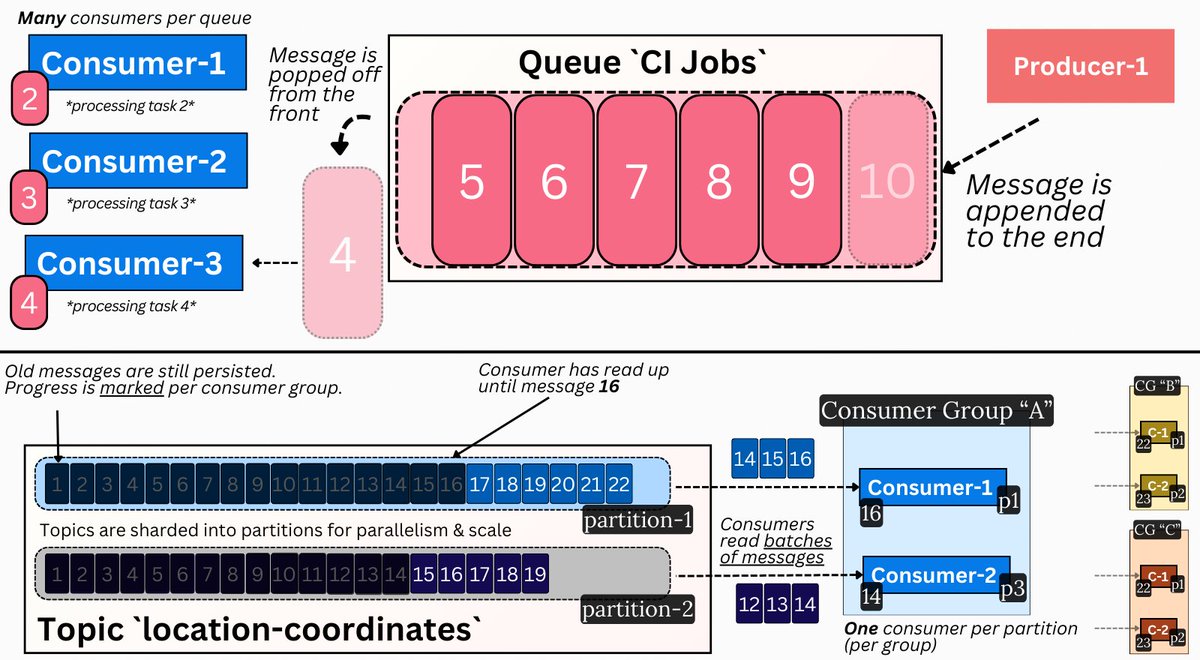
Most people don’t understand the difference between Message Queues and Pub Sub.
They are different systems meant for different use cases powered by different data structures.
Pub-Sub systems like Kafka are powered by the Log data structure.
Message Queues like RabbitMQ and SQS are powered by... the Queue.
🔶 The Queue data structure is well known to most engineers.
You append items to the end and pop items off of front.
The key word is pop - once an item is popped, it no longer exists in the queue.
🔶 The Log data structure is similar - items are appended to the end. It is also read from front to end.
The big difference? Elements are NOT deleted once read.
This inherently enables read-fanout - the act of reading the same message multiple times.
Since the same app doesn't need to read data twice, it's usually different apps that make use of the same message.
Both MQs and PubSub are used for asynchronous processing.
But their technical differences lead them to optimize for different use cases:
🛑 MESSAGE QUEUES
Queues work one item at a time.
Consumers in these systems read one message, process it, mark it as processed, the message gets deleted forever and the consumer reads another one.
Queues are therefore meant for point-to-point communication. Only one destination gets to ever read and process that message.
This maps perfectly to the mental model of a "job" - a discrete unit of work that needs to get executed once and marked as complete.
Message Queues are therefore best suited for long-running tasks like:
• run a CI job (minutes to hours)
• generate a report (seconds)
• send an e-mail or notification (milliseconds)
Such jobs don’t have uniform processing times either. One CI job can take hours and another can take minutes.
Because of the long and unpredictable processing times, MQs enable parallel processing by allowing multiple readers to read from the same queue. 👌
This avoids head-of-line blocking. Otherwise a single slow CI job would block every subsequent one from getting processed in parallel. ⏳
This single-message processing means a Queue doesn't scale as much as a Log, but it can still easily handle thousands of jobs a second.
And that's ok - it doesn't need more. By not focusing on scalability at all costs, queues can provide a lot of rich functionality like payload routing, message TTLs, per-message priority, scheduled delivery, error handling and schema validation.
A common complaint about message queues is their propensity to crash and lose data.
Older MQ implementations stored messages exclusively in memory. This meant that they could run out of memory, crash and lose all the unprocessed data.
❌ Worse off, this flaw indirectly coupled producers to consumers. If your consumers were slow/broken, your queue would eventually crash. That lead to downtime in your producers too, because they couldn't write to the queue.
Newer message queues don't do this.
🛑 PUB SUB
Log-based systems work with many messages (batches) at a time.
This is because in pub subs, messages usually represent data points, not tasks.
They aren’t singular jobs that need processing but rather events which get processed in aggregate.
Examples include:
• process website IP visits and detect bots 🤖
• store website analytics data (clicks, views) and compute counts in real-time 📊
• detect video game cheating in real-time by analyzing the delta between character location data (are they using a speed hack?) 👾
A single event doesn’t have much value, but the collection of events in sequence do.
This is why Pub-Sub systems optimize for scale and strict ordering.
Events with the same key deterministically go to the same partition. Head of line blocking exists here - each partition is read by only one consumer. 👌
This makes stateful processing per entity dead-easy.
👉 Take the video game cheat detection as an example: if messages are keyed by user id, the consumer knows that it will see every event for that player in the order it was produced. This lets the consumer compute the location coordinate deltas properly.
Log-based systems do not delete data once it’s read. This unlocks:
• read fanout - the same data used for cheat detection can be read for game analytics purposes
• replay - the whole stream of data can be reprocessed from the beginning
Replay is useful when you need to rebuild the latest state or re-process the data after fixing a bug which broke the way the consumer processed data.
As mentioned earlier, pub-sub systems allow read-fanout. LinkedIn originally created Kafka because they had multiple destinations per event.
Unlike point-to-point, this is a one-to-many communication model. One produces writes one piece of data that gets read by many consumers. 💡
Read fanout is handled by consumer groups. A single log (partition) is read from only one consumer at a time.
To achieve fanout and read the same partition multiple times, multiple consumer groups are created.
Each group has its own consumer clients.
Consumers from different groups process the log independently.
They read the exact same set of data but keep completely separate markers to denote the progress they've made in reading the log.
Log-based pub sub systems can scale massively. To achieve that, they sacrifice a lot of features.
Kafka most famously is implemented as a dumb pipe - the server is completely agnostic to what data is being sent to it.
It doesn't even support schemas on the server-side, not to mention things like message priority, re-ordering or schema validation.
This trades off a lot of usability for the ability to scale to many millions of messages a second. 👌
🛑 SUMMARY
Both systems are similar in that they enable asynchronous processing of messages.
Certain use cases like one-off task handling is best done with Message Queues, and other higher-volume aggregation jobs are best done with Pub Sub.
The most important thing is to not confuse both, and choose the right tool for the job.
There are 2 career paths in AI right now:
The API Caller: Knows how to use an API. (Low leverage, first to be automated, $150k salary).
The Architect: Knows how to build the API. (High leverage, builds the tools, $500k+ salary).
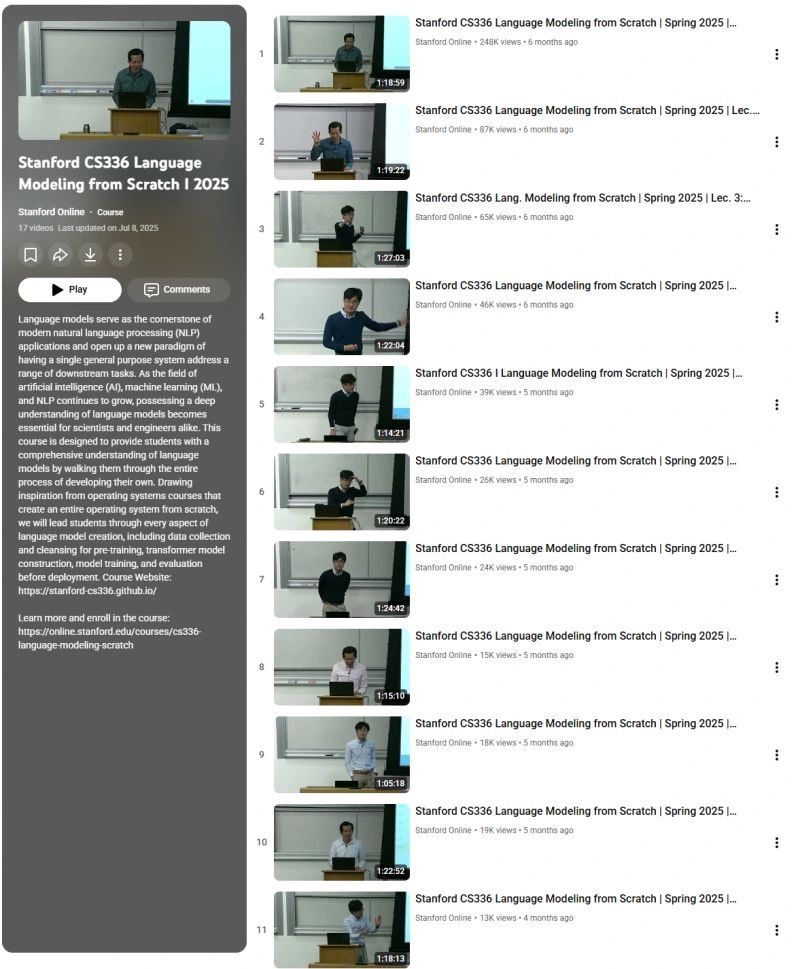
Bootcamps train you to be an API Caller. This free 17-video Stanford course trains you to be an Architect.
It's CS336: Language Modeling from Scratch.
The syllabus is pure signal, no noise:
➡️ Data Collection & Curation (Lec 13-14)
➡️ Building Transformers & MoE (Lec 3-4)
➡️ Making it fast (Lec 5-8: GPUs, Kernels, Parallelism)
➡️ Making it work (Lec 10: Inference)
➡️ Making it smart (Lec 15-17: Alignment & RL)
Choose your path.
(I will put the playlist in the comments.)
♻️ Repost to save someone $$$ and a lot of confusion.
✔️ You can follow @techNmak, for more insights.
> born in Finland
> got curious about computers on his grandfather’s machine
> learned programming on a Commodore VIC-20
> studied at University of Helsinki
> got annoyed Linux didn’t exist… so he built his own OS
> released Linux kernel at 21
> made it open-source for everyone
created Git because existing tools weren’t good enough
> Git became the backbone of modern software development
> Linux now powers servers, phones, supercomputers, TVs, cars, rockets
> Android runs on Linux
> 96% of the internet runs on Linux
> 100% of the world's top supercomputers run Linux
> does all this without caring about fame
stayed true to open-source principles for decades
> changed the entire tech world from his bedroom.
is there anything Linus Torvalds hasn't achieved yet?
Google literally just killed 100s of startups
Their new “File Search Tool” (incredibly dumb and misleading name btw) is a hosted RAG solution that allows you to upload files like DOCX and PDF, and chat with them
This could be used for things like customer chat bots, where you just put in your company data (FAQs etc)
Wild times
Our team moved from LastPass to self-hosted Vaultwarden.
The breaking point:
- LastPass had another breach
- $6.5 per user per month
- 15-person team = $1170 annually
- Limited control over data
- Compliance team wasn't happy
Why Vaultwarden:
- Open source Bitwarden server
- Written in Rust, lightweight
- Single Docker container
- Uses 10MB of RAM
- All Bitwarden features for free
The setup:
- Deployed on t3.micro in private VPC
- Behind Application Load Balancer
- Let's Encrypt for SSL
- PostgreSQL for data storage
- Automated backups to S3 every 6 hours
- Took 3 hours total including testing
Cost breakdown:
- EC2: $8/month
- RDS: $15/month
- Total: $23/month
- Savings: $1147 annually
The surprise benefits:
- Full audit logs of who accessed what
- No user limits for free
- Emergency access configuration
- Custom password policies
- Data stays in our infrastructure
18 months later:
- Zero downtime
- Team actually uses it
- Compliance audit passed easily
anthropic just published a blog highlighting a pattern I've been using for weeks: a search tools tool
instead of loading all tools into the context window of the model, I load a "search tools" tool the model can use to browse a catalog of tools
just-in-time tool discovery