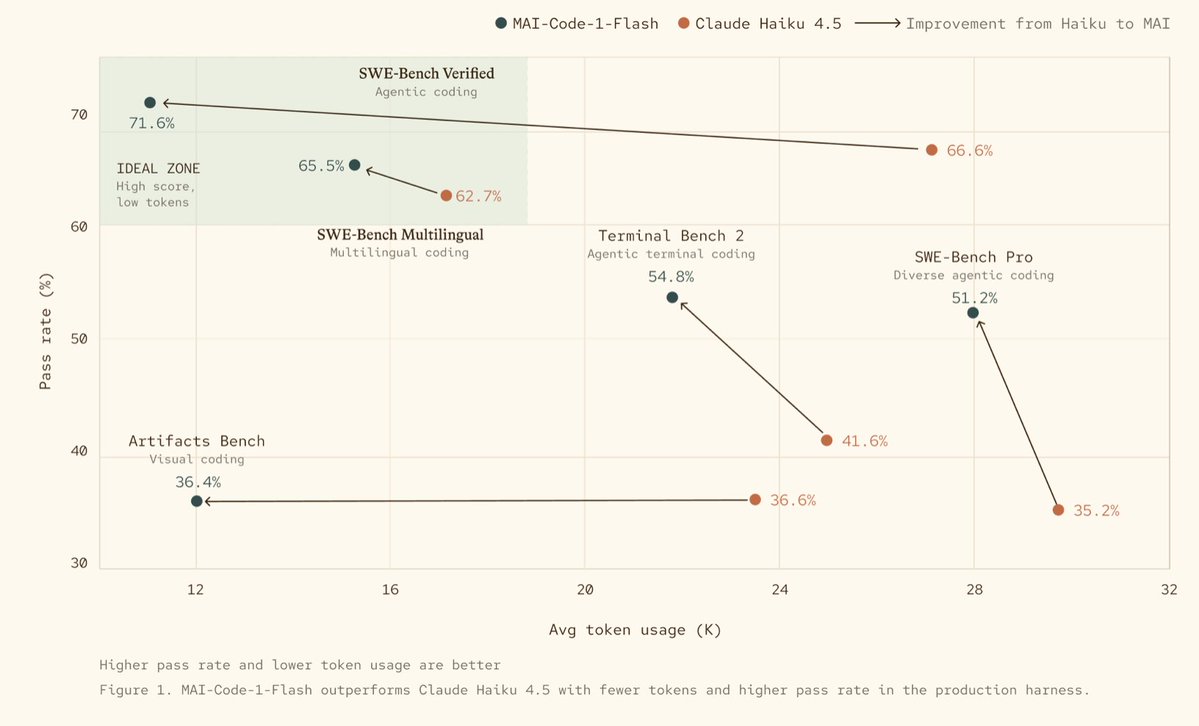
Introducing MAI-Code-1-Flash
A new coding model from Microsoft for fast, efficient assistance in everyday workflows
Rolling out to @code developers in model picker and Auto now!
https://t.co/GWEoP1s8Fe
Using skills with lots of tool calls or research?
In @code, you can now run skills in a dedicated sub agent so your main chat context stays clean and focused ⚡
@unclebobmartin@karrisaarinen Exactly. We are trying to harness raw intelligence into a deterministic form factor, it is going to take some time and effort.
@davidfowl We are transitioning from a classical Agile/scrum process to an AI-DLC process. Event though the team makeup is changing, and terminology is changing, it still requires engineering discipline. This not merely vibe coding, but Agentic Engineering.
That is interesting. I wonder that too. I use AI to get significant productivity boosts (email, coding, documents, presentations etc.). But I also have used spell checkers, linters, resharper etc. in the past without a second thought. The nuance between valuable, intentional content and AI slop is subtle. I think the key thing, when it comes to writing (emails, documents, etc.) is that you have read and reviewed the generated content, and have an understanding. I think it is different with code, because the end result is not code, it is behavior. The designer/builder must absolutely review every feature and capability, but does not need to understand every jot and tiddle of the code.
@burkeholland Great to hear! I am still using GPT-5.4, mainly because I am prepping myself for the June 1st pricing changes. We've got 8 days of amazing value left with GitHub Copilot.
Start work on your computer, continue your local session anywhere. 📲
Remote control for GitHub Copilot CLI and @code sessions is now generally available.
https://t.co/wwSEBd5lqL
I would argue that "get-command" is clearer than "which", albeit more characters. The example below exemplifies how cryptic it can be to do basic things with Bash. whereas pwsh is much clearer: "Import the CSV, sort it by Amount, select only the first 5 and only show the Name and Amount fields