2 months ago i gave a wake up call to engineers. Some thought i was gloating about tokenmaxxing. But the acceleration is real. I gave a glimpse into the factory we are building - since then the machine is full throttle.
I've just implemented Patrol: a self-improvement loop that slices the repo and looks for issues to fix. I got the idea from https://t.co/uab3Cxr6RI by @steipete, and with some tweaks I've fully integrated it into the Hive.
Local AI hardware = capacity × bandwidth × software stack
- Capacity tells you what fits
- Bandwidth tells you how hard the box can breathe
- The software stack tells you how much of the spec sheet you can actually cash out.
Hardware by Memory Bandwidth
- Mac Studio M3 Ultra: up to 512GB @ 819 GB/s
- RTX PRO 6000 Blackwell: 96GB @ 1792 GB/s
- RTX 5090: 32GB @ 1792 GB/s
- RTX 4090: 24GB @ 1008 GB/s
- RX 7900 XTX: 24GB @ 960 GB/s
- Radeon PRO W7900: 48GB @ 864 GB/s
- AMD Radeon AI PRO R9700: 32GB @ 640 GB/s
- Intel Arc Pro B65: 32GB @ ~608 GB/s
- Tenstorrent Wormhole n300: 24GB @ 576 GB/s
- Tenstorrent Blackhole p150: 32GB @ 512 GB/s + 800G
- MacBook Pro M5 Max: 460-614 GB/s
- MacBook Pro M5 Pro: 307 GB/s
- DGX Spark: 128GB @ 273 GB/s (coherent + CUDA)
- Mac mini M4 Pro: 273 GB/s
- Ryzen AI Max / Strix Halo: ~256 GB/s (~96GB usable GPU)
- MacBook Air M5: 153 GB/s
- Snapdragon X2 Elite: 152-228 GB/s
- Intel Lunar Lake: 136 GB/s
- Snapdragon X Elite: 135 GB/s
- Mac mini M4: 120 GB/s
- Arc Pro B60: 24GB @ ~456 GB/s
Verdict
- GPUs are still the bandwidth kings
- Apple wins: stupid amounts of memory, don’t want to shard across GPUs
- Apple loses: when raw tokens/sec & concurrency matter more
- DGX Spark: coherent memory + NVIDIA stack
- Strix Halo / Ryzen AI Max: first real x86 unified-memory contender
- Tenstorrent: fully OSS stack, excited to see this mature
Fitting ≠ serving
Even if it fits, you still pay for
- bandwidth during decode
- KV cache growth
- dequantization
- batching + concurrency
- scheduler quality
- framework overhead
The only mental model that matters:
1. What must fit?
2. What bandwidth tier do I need?
3. What software stack can actually deliver it?
In short:
- NVIDIA → fastest raw speed
- Apple Studio M3 Ultra → biggest one-box memory
- Strix Halo → first real x86 unified
- DGX Spark → coherent NVIDIA dev appliance
- AMD / Intel Arc → rising alternatives
- Tenstorrent → fully opensource stack
Do ask: “which bottleneck am I buying?”
Not: “which hardware is best?”
⚡️ TODAY: Billionaire Kevin O'Leary says the next big thing in crypto is whichever blockchain lands at least one S&P 500 company across all 11 sectors.
“That's going to be a game changer.”
“Press On”
When I was a child, the old man forced me to recite and memorize this speech
He wanted to mentally program us all
He carved it into the wall of his man-cave. Literally.
(He was an awesome dad)
Qwen 3.5 27B in NVFP4 w/ full context taking less than 20GB VRAM
You can basically run like 5 agents w/ full context on a single RTX PRO 6000 like this, and they'd be so fast
Tell me I didn't tell you this was gonna happen
Major areas where the financial system still needs an update:
1. Tokenization of real-world assets - Real estate, stocks, bonds, funds, etc. onchain for instant settlement, fractional ownership & massive distribution.
2. 24/7 Global trading - Pooled global liquidity, every asset, every person, with great leverage and capital efficiency.
3. Next-gen payments - Near-instant, low-cost global transfers using stablecoins, including for Agentic payments.
4. AI-powered risk, credit, compliance, and advice - Better decisions, less fraud, and broader access to capital. Everyone gets access to a great financial advisor.
5. Innovation friendly regulation - Move from one-size-fits-all to risk-based rules that encourage innovation and competition instead of stifling it.
6. Expanded access - Open protocols that reduce middlemen and self-custodial wallets to expand access to everyone with a smartphone.
7. Capital formation - Low cost and turnkey for anyone to raise money for a good idea, increasing the number of startups.
8. Sound money - A refuge from inflation, when discipline is lost in fiat money.
Jobs not done until we get these working for all.
Will require lots of tech innovation and policy work to get there.
Don’t know where to start with Local AI?
Read my Local LLMs From Zero to Hero series
It covers:
- Hardware
- Software
- Models Mechanics
- Everything else necessary
Needs no prior experience
Easy to understand for any background
Local / Opensource AI FTW
3090 vs 4090 vs 5090 vs pro 6000 for LLMs
> we care about compute FLOPS, memory bandwidth,
> VRAM, L2 cache, interconnect, and power/TDP
> memory bandwidth ≅ tokens/sec, or how fast you can move tokens/KV-cache (decode ceiling)
> 5090 and both PRO 6000s bring 1.8 TB/s GDDR7 lanes (nearly double 4090/3090)
> so expect up to 2x decode throughput when bandwidth is your wall
> L2 cache ≅ how quickly you hit L2 vs get stuck on DRAM (latency killer)
> RTX 3090, Ampere, comes with very small L2 (6 MB) while
> Ada/Blackwell’s massive L2 (72 MB 4090 → 96 MB 5090 → 128 MB PRO 6000)
> which slashes DRAM trips, keeps KV cache on-die, making it
> way faster for small-batch/greedy/agent chain workloads
> and big boosts for streaming/latency-sensitive inference
> compute FLOPS (FP16/BF16/FP8) ≅ how fast you can run matmuls (prefill/training speed)
> 5090 comes with 419 TFLOPS FP16 (838 FP8)
> while the PRO 6000’s variations come with
> 35% and 10% higher TFLOPS over the 5090
> PRO Workstation: 125 TFLOPS FP32 (≈504 FP16, ≈1.008 PFLOPS FP8)
> PRO Max-Q: 110 TFLOPS FP32 (≈439 FP16, ≈878 FP8)
> VRAM ≅ how much model + KV + batch fits on-GPU
> 96 GB VRAM on both PRO 6000s means KV-cache offload is easy
> multi-user 70B (FP4) chat, 32k+ context, and
> real throughput for big-batch or fine-tune
> interconnect = whether multi-GPU setups actually scale (NVLink vs PCIe), and how fast
> and NVLink is dead, except on 3090
> only the 3090 can do true dual-GPU mesh (112 GB/s NVLink)
> all others are PCIe-bound, and throttled in comparison to datacenter/HGX
> power/TDP ≅ whether you can sustain clocks, or just spike (PSU fried) or/and throttle
> 600W (PRO 6000 WS) and 575W (5090) means
> bring 1.5–2 kW PSU, 20A circuit, and lots of airflow
> Max-Q, at 96 GB, requires 300W but gets lower TFLOPS
> (making a dense 4-GPU boxes doable)
quick recap of the GPUs specs
RTX 3090 (Ampere GA102)
> 24 GB GDDR6X
> 936 GB/s bandwidth
> 6 MB L2 cache
> 142 TFLOPS FP16 tensor (285 sparse)
> PCIe 4.0 x16 + NVLink (112 GB/s, dual card only, the only consumer card with it)
> 350W TDP
RTX 4090 (Ada AD102)
> 24 GB GDDR6X
> 1.008 TB/s bandwidth
> 72 MB L2 cache
> 330 TFLOPS FP16 tensor
> 660 TFLOPS FP8 tensor
> PCIe 4.0 x16, no NVLink
> 450W TDP
RTX 5090 (Blackwell GB202 cut)
> 32 GB GDDR7
> 1.792 TB/s bandwidth
> 96 MB L2 cache (98 MB physical address space)
> 419 TFLOPS FP16 tensor
> 838 TFLOPS FP8 tensor
> PCIe 5.0 x16, no NVLink
> 575W TDP
RTX PRO 6000 (Workstation Edition, Blackwell)
> 96 GB GDDR7 (ECC)
> 1.792 TB/s bandwidth
> 128 MB L2 cache (full GB202 die)
> 125 TFLOPS FP32 → ≈504 FP16 → ≈1.008 PFLOPS FP8
> PCIe 5.0 x16
> 600W TDP
RTX PRO 6000 (Max-Q, Blackwell)
> 96 GB GDDR7 (ECC)
> 1.792 TB/s bandwidth
> 128 MB L2 cache
> 110 TFLOPS FP32 → ≈439 FP16 → ≈878 FP8
> PCIe 5.0 x16
> 300W TDP
so, what does all of that mean?
> 3090 with NVLink is the only consumer route to
> high-speed dual-GPU sync without going server/HGX
> but that comes with very small L2 cache, lower TFLOPS,
> and only 24 GB GDDR6X at 936 GB/s bandwidth per GPU
> 5090 (1.8 TB/s bandwidth + 96 MB L2) is for those who want
> sub-$2k single-GPU throughput, tokens/sec king, L2 cache monster
> PRO 6000 (WS or Max-Q) is for serving everything, 96 GB VRAM unlocks
> BIG SIZED models, with full context and no CPU offloading
for LLM inference
> 5090: king of single-GPU decode speed (1.8 TB/s bandwidth + 96 MB L2)
> PRO 6000 (WS/Max-Q): same bandwidth/L2, but 4x the VRAM; pick 600W (Workstation) or 300W (Max-Q)
> 3090: budget dual-GPU with NVLink, still wins for parallel inference if you need interconnect
> 4090: still a killer in terms of L2 cache, but 24 GB VRAM limits context/batch for larger models, and no NVLink
for LLM training
> 5090: best raw compute for $ spent + bandwidth + 32 GB VRAM
> PRO 6000: massive VRAM (96 GB) removes batch/context bottleneck
> Max-Q: “fit four in a box” special 96 GB at 300W per card, dense workstations are back
> dual 3090 (NVLink): still out-syncs PCIe-only pairs in some parallel/fine-tune jobs
remember
> decode = bandwidth (tokens/sec) + L2 (latency)
> prefill/training = compute FLOPS + VRAM
> scale up = interconnect (NVLink on 3090, else PCIe Gen5)
more on the Buy a GPU website later this week :)
i’m starting to really favor simple, eval driven prompts, especially for codex 5.5
“””
this is the desired end result.
{goal}
these conditions must be true in order to pass
{conditions}
“””
thats it. define a goal and a passing condition.
that’s it. it’s so easy now.
We got 100 years on this planet then you're dead forever
Yet you're too scared
Too scared to talk to that girl
To quit your job and do what you love
To start that business
To learn that new skill
To start that YT channel
To apply for that dream position
To DM that one person
100 years and you're going to spend it being a scared little kitty cat
Don't be that stone cold loser who lays on their death bed filled with regret
The most dangerous thing you can do right now is NOT use the latest AI tools. Period.
Every day a new company is laying off thousands of people who don't know how to use the most modern AI tools
If I were in the 9-5 world right now, this is every step I'd take:
1. Download Codex and build your first app. Learn how to implement a front end and database. AI can teach you all of this
2. Download OpenClaw or Hermes agent. Tell the agent about your entire life. Career, goals, and ambitions. Ask it what workflows it can implement to get you closer to those goals
3. Get Claude Design. Keep an eye out on X for visual language and designs you like. Feed this inspiration into Claude Design and get comfortable designing beautiful interfaces
4. Get the ChatGPT Pro plan. Feed GPT 5.5 Pro your hardest problems. Burn as many tokens as humanly possible with this model
5. Constantly look at your limits in all your AI plans. If you're ever above 50% on your limits, get angry that you're not burning enough tokens.
6. Learn how to use Claude Code side by side with Codex. Learn both their strengths. These are the only 2 coding tools that matter. Master these and you're golden
If you do these 6 things you are in excellent position to not only be safe in your career, but also dominate those that don't pick up these skills.
Paul Tudor Jones predicted the 1987 crash, made $100 million, then spent years trying to destroy this footage
you will watch him lose $6 million in one afternoon, sit in his chair and say "total devastation" then make it all back with 100% interest
This documentary will change how you think about risk forever
Bookmark & watch it. Then read the post below - $90 billion from being right just 54% of the time↓
Let me make local AI easy for you
Give Codex Cli the tweet below & tell it:
- Infer the right Inference Engine from your hardware + tweet content below
- Use uv+venv
- Pick the right kernels
- Tune flags, batching, KVCache, etc
- Optimize for your hardware & chosen model
Enjoy
Pretty incredible
You have to try the new '/goal' feature in Codex
It worked for over an hour and built me an entire complex extraction shooter video game
You give it a goal, then it works endlessly until the goal is complete. It's like a Ralph loop. Can run for days
If you enable the image gen skill before you run the goal, it will even generate ALL the assets for your game autonomously. I didn't manually create ANY of the assets you see in the video
Recommendations: enable the image gen skill, put on skip all permissions, and give the prompt as much detail as you can. It will accomplish ALL of it
This has to be the sickest way to build games/ long running app tasks ever
Ex-Tesla President just revealed Elon’s decision that changed everything...
Elon looked at their struggling online sales and asked one question:
"How many clicks does it take to buy a Domino's pizza?"
They pulled it up. 10 taps.
Tesla was at 64 clicks to buy a $120,000 car.
Elon's response:
"We are 64. Domino's is 10. Let's go to 10."
Then they ran the data on their 360,000 car configurations.
Customers were only buying two.
They cut it to two. Sales exploded.
The most expensive product in the room was the hardest to buy.
One comparison changed that forever.
You're using OpenClaw wrong if it's still one chat window.
Anyone running everything in one chat knows the feeling. Nothing runs in parallel. Code waits on research, research waits on ops, ops waits on whatever you started yesterday. And every topic switch contaminates the next.
Telegram supergroup topics fix this. Each topic is a separate conversation, and the agent treats each one as its own context. Give each topic a job (Code, Research, Ops, Content), point OpenClaw at the group, and you've got what's basically four agents running in parallel that never talk to each other.
Setup takes an afternoon. Here's how:
Step 1. Install clawddocs first.
openclaw skills install clawddocs
This pulls 200+ pages of OpenClaw docs into the agent's context. Without it, every config question becomes a guess.
Step 2. Create a Telegram supergroup. In Group Settings, turn on Topics.
Each topic is a fully separate conversation. The agent doesn't carry context between them, which is the whole reason this works. It's not multitasking, it's hard isolation.
Step 3. Name the topics after jobs, not the agent. Code, Research, Ops, Content. Whatever your actual workflow is.
Step 4. Add the bot to the group. Make it admin and give it the Manage Topics permission.
Then open [@]BotFather, run /setprivacy, pick your bot, and choose Disable. Without that, the bot only reads messages that start with /, which means it ignores almost everything you type in the topics.
Step 5. Open a chat with the bot and tell it to find every group it's been added to, then update openclaw.json with that list. The bot pulls the list from Telegram itself. From then on, OpenClaw sees every group and every topic inside.
Step 6. That's it. Open whichever topic you need, ask the question, get an answer that isn't contaminated by the other three lanes.
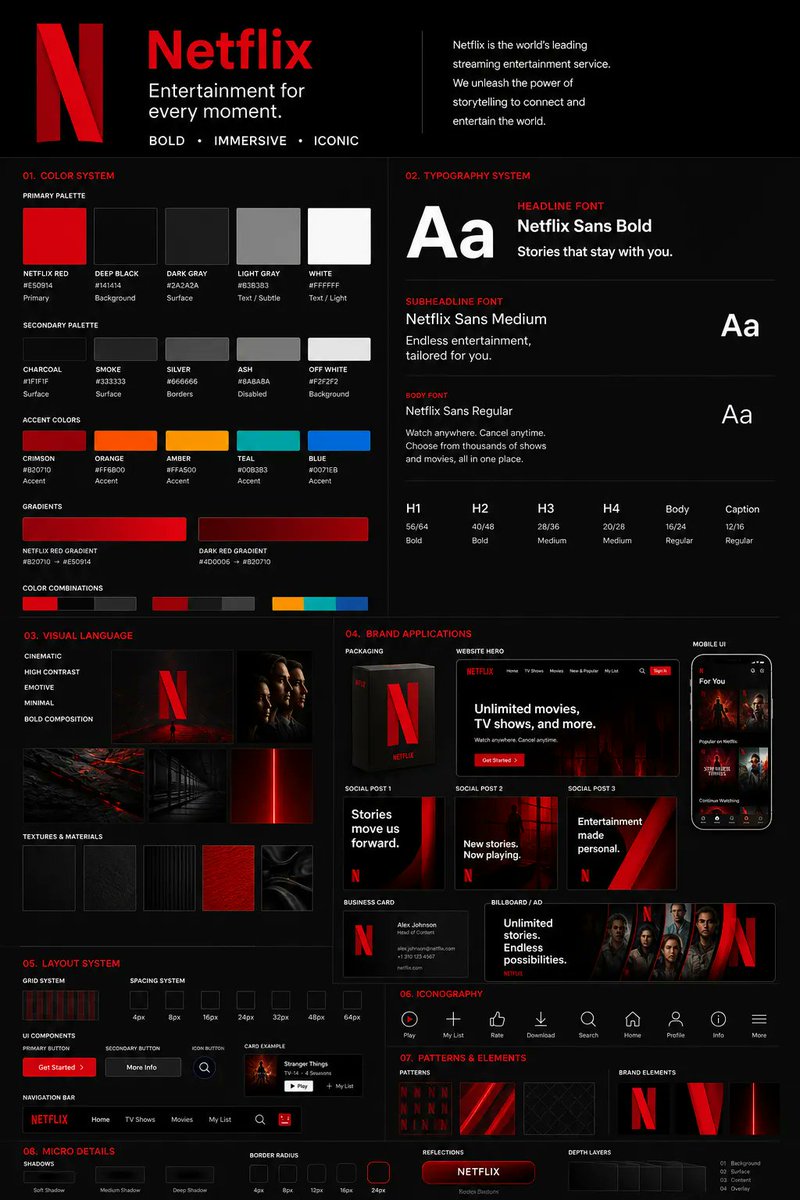
you can finally create brand kit with GPT Image 2 from a single logo to a complete agency-style brand guideline board.
with the right prompt sequence, you can go from a single visual reference to a complete agency-style brand guideline board that's 80–90% presentation-ready.
this SpaceX spec kit was built with:
- 1 logo/reference direction
- A sequence of prompts to expand and refine it
color systems, typography, UI blocks, icons, patterns, packaging, mobile screens, social posts, business cards, billboard mockups — all in one visual direction.
artifacts still show up in tiny text, but they're quick manual fixes.
zero to a full brand board: ~1 hour.
5–10 brand directions in a day.
want the prompts? Drop a comment ... happy to share the full breakdown.






![heyshrutimishra's tweet photo. You're using OpenClaw wrong if it's still one chat window.
Anyone running everything in one chat knows the feeling. Nothing runs in parallel. Code waits on research, research waits on ops, ops waits on whatever you started yesterday. And every topic switch contaminates the next.
Telegram supergroup topics fix this. Each topic is a separate conversation, and the agent treats each one as its own context. Give each topic a job (Code, Research, Ops, Content), point OpenClaw at the group, and you've got what's basically four agents running in parallel that never talk to each other.
Setup takes an afternoon. Here's how:
Step 1. Install clawddocs first.
openclaw skills install clawddocs
This pulls 200+ pages of OpenClaw docs into the agent's context. Without it, every config question becomes a guess.
Step 2. Create a Telegram supergroup. In Group Settings, turn on Topics.
Each topic is a fully separate conversation. The agent doesn't carry context between them, which is the whole reason this works. It's not multitasking, it's hard isolation.
Step 3. Name the topics after jobs, not the agent. Code, Research, Ops, Content. Whatever your actual workflow is.
Step 4. Add the bot to the group. Make it admin and give it the Manage Topics permission.
Then open [@]BotFather, run /setprivacy, pick your bot, and choose Disable. Without that, the bot only reads messages that start with /, which means it ignores almost everything you type in the topics.
Step 5. Open a chat with the bot and tell it to find every group it's been added to, then update openclaw.json with that list. The bot pulls the list from Telegram itself. From then on, OpenClaw sees every group and every topic inside.
Step 6. That's it. Open whichever topic you need, ask the question, get an answer that isn't contaminated by the other three lanes.](https://pbs.twimg.com/media/HHPwwRrb0AAj0vf.jpg)


