You are still writing AI prompts.
The best builders stopped months ago:
They design loops that do the work, check it, and improve while they sleep.
Boris Cherny, who built Claude Code: "I don't prompt Claude anymore. My job is to write loops."
Here is the 6-part loop I run (no code):
1. Write your standards once
- Run /init to create a CLAUDE.md file.
- Add your voice, rules and banned words.
- It loads on every single job.
Example: "/init Put my voice in CLAUDE.md: British English, no em dashes, my hooks."
2. Goal and a finish line
- State the outcome you actually want.
- Give it a rubric to score against.
- "Don't stop until it scores 95/100."
Example: "/goal Write a post, score it on my rubric, don't stop until it scores 95/100."
3. A team does the work
- Strategist picks the angle.
- Writer drafts the output.
- Designer lays it out.
Example: "/agents Make a team: strategist, writer, designer. One job each."
4. Add a checker (the eval)
- A separate agent scores each draft.
- Under 95, it fixes one thing and reruns.
- It never marks its own homework.
Example: "/agents Add a QA agent that scores each draft out of 100 and rejects under 95."
5. Let it remember
- Every correction becomes a rule.
- Saved to a lessons file for next time.
- It creates more like me each month.
Example: "/memory Save every correction as a rule, and reload them each run."
6. Put it on a schedule
- A Routine runs the whole loop.
- On the cloud, laptop closed.
- Wake up to finished drafts.
Example: "/schedule Run my content loop weekdays at 7am, leave drafts to review."
You already run half of this.
Close the loop. It improves without you.
I wrote everything in one free guide.
Grab it here
https://t.co/YhLRwAtaHw
Repost ♻️ to help someone in your network.
P.S. Still prompting, or building loops?
CODEX SKILL FOR FRONTENDS THAT DON’T LOOK
AI-GENERATED
@MengTo posted a killer breakdown on avoiding AI slop in landing pages.
I turned it into a Codex skill.
Point Codex at your landing page and it audits:
-> typography + letter spacing
-> fake-looking images
-> generic AI sections
-> weak visual hierarchy
-> mobile polish
-> missing human details
Install:
`npx --yes mengtofrontend@latest`
100% open source.
Link in bio.
made a new agent skill callled /docs-to-types.
@mattpocockuk's /grill-with-docs is excellent for getting domain language out of your head and into context docs, but those docs still rely on the next agent (running /to-prd or whatever) correctly parsing the intent and ambiguities inherent to prose.
/docs-to-types sits after grilling and before implementation, and attempts to disambiguate as much as possible from the md files and codify it into types before starting on implementation work.
it's my attempt to force clarity out of the context docs and into types, seams, adapters, errors, call stacks, etc, based on the agent workflows I've seen from @dillon_mulroy and others.
as a talk I watched earlier this week from @filipsodic said, "if you know it, the types should know it."
Hermes agent just left the terminal.
𝗛𝗲𝗿𝗺𝗲𝘀 𝗗𝗲𝘀𝗸𝘁𝗼𝗽 dropped yesterday. native app for macOS, Windows, and Linux.
for months Hermes was the agent that learned your projects, wrote its own skills, and built a model of who you are. all of it buried in terminal logs.
now it has a window.
the important part is that it's not a wrapper. it runs the same agent core, the same sessions, memory, and skills as the CLI.
you can start a task in the terminal and finish it in the app without anything resetting. the state is shared across every interface, not copied between them.
what the GUI actually adds:
→ streaming chat that shows live tool calls and inline reasoning instead of a spinner
→ a preview rail that renders pages, code, and images right beside the conversation
→ an artifacts panel that collects every file the agent has ever produced
→ remote gateway mode, so you can point the app at a VPS and run the heavy work elsewhere
→ skills, cron, profiles, and gateways managed point-and-click instead of through YAML
→ voice mode, drag-drop files, and inline image generation
remote gateway mode is the one worth slowing down on. the agent runs 24/7 on a $5 server while you control it from your laptop like a local app.
other agent UIs are chatboxes with a logo. this one shows the autonomy instead of hiding it, so you watch the skills load, the tools fire, and the artifacts pile up as it works.
it was teased in Jensen's GTC keynote. MIT licensed, local-first, no telemetry.
if you already run Hermes, download it and everything is already there. your chats, memory, and skills carry straight over.
i wrote a full masterclass on Hermes Agent that walks through the SOUL. md identity layer, the three-tier memory system, the self-evolving skills loop, and how to run three specialized agents 24/7.
desktop is the interface that finally does all of it justice.
the article is quoted below.
One of my favorite superpowers of agents is building classifiers. It’s insanely high leverage.
Before AI, you needed a year-round team:
- 3 ML engineers to build the models
- 3 ML infra engineers to scale them up
- 2 software engineers to integrate the parts
- 1 data scientist to analyze it
- 1 PM to manage the product
- 0.5 EM to hold it together
Now, in minutes, you can have an agent generate a markdown file that classifies inputs, then let agents run continuously against it.
Below is a Sentry error classifier I generated at @FactoryAI. But you can build this for almost anything: customer-reported bugs, backend traffic analysis, fraudulent payment activity.
Personal use cases too: categorizing credit card transactions, labeling emails, or organizing documents.
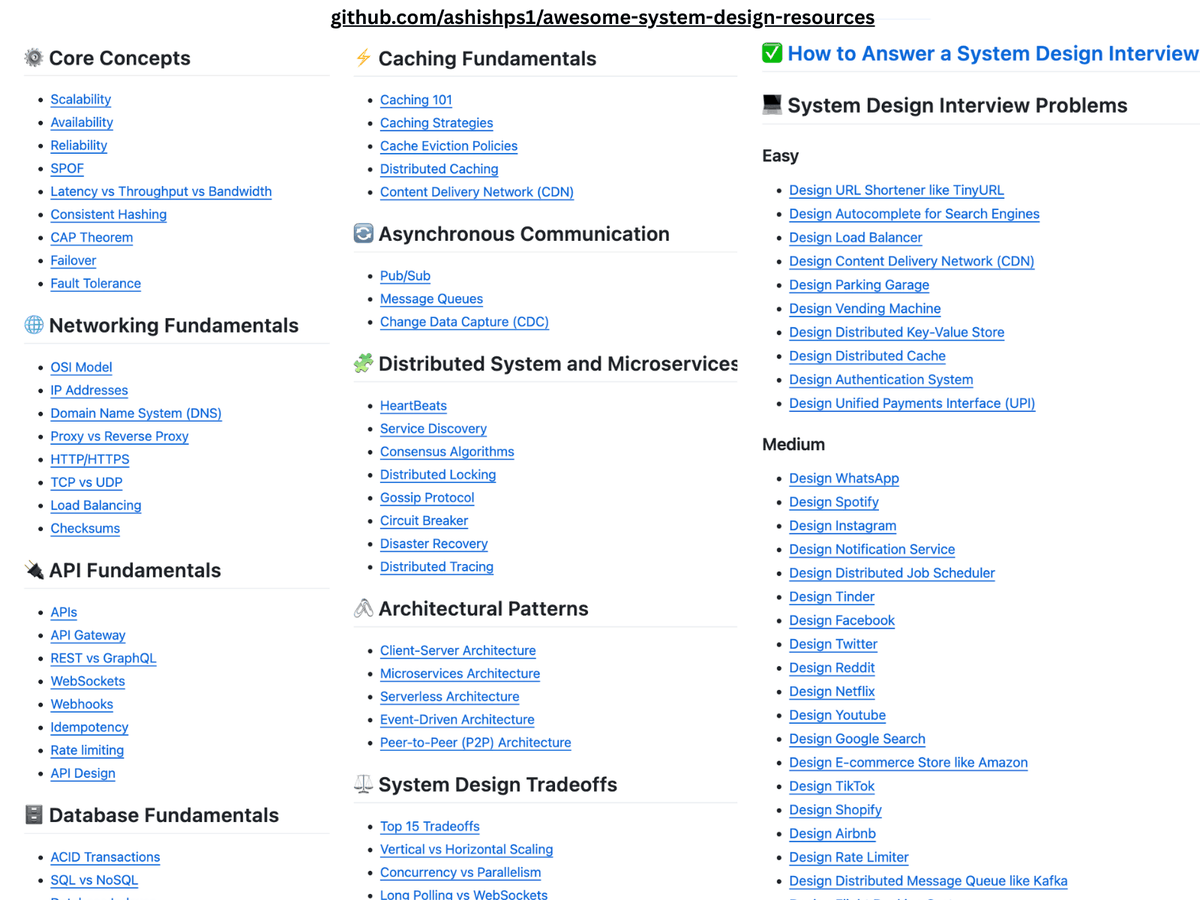
I created a Github repository to learn System Design, and I'm excited to share that it crossed 35k stars recently.
The repository contains a collection of resources to study:
- System Design Core Concepts
- Networking and API Fundamentals
- Database and Caching Fundamentals
- Distributed Systems, Microservies and Architectural Patterns
- System Design Tradeoffs
- 40+ interview problems categorized by difficulty level
Check it out here: https://t.co/pkVpi6LxSV
If you find the repo valuable, consider giving it a ⭐️ and share with others.
Thanks to everyone who has starred or forked the repository!
Yesterday, I wrote about how long-running agentic systems need to be more reliable, robust, and fault-tolerant; and today, let's dig deeper into how.
Fun fact - distributed workflows are one of those problems that almost every engineering team accidentally rebuilds.
We start with a cron job, a message queue, a database table for state, and some retry logic. Then failures show up. A worker crashes halfway through. A network call times out. A deployment kills an in-flight process. Suddenly, we are building state machines, recovery logic, idempotency layers, compensating actions, and observability around all of it.
I wrote an essay on Temporal, an open-source durable execution engine that encapsulates all this plumbing and makes it easy to build long-running workflows.
In this article, I break down how Temporal actually works under the hood - Workflows, Activities, event histories, replay, Signals, Child Workflows, retries, timeouts, and the determinism constraints.
These out-of-the-box features and guarantees are what make Temporal useful in long-running agentic systems where AI agents need state, retries, tool orchestration, and execution that survives failures.
If you are building long-running agents, Temporal would come in handy. Give it a read.