Freelancers are making $10,000 in a month💸
700. Fiverr
699. Toptal
698. Pangian
697. Remote
696. Upwork
695. Flexjobs......more
( 48 Hours only ⏰) Earn in DOLLARS
Simply Get The PDF :📕
1. Follow (so I will Dm)
2. Like & Repost
3. Cmnt "send"
#remote#remotework
@balajis I've criticized Telegram before for not being serious with encryption.
But (given the info available so far: the charge seems to be just being "unmoderated" and not giving up people's data), this looks very bad and worrying for the future of software and comms freedom in Europe.
"I thought I was the ideas guy and Gav does all the coding!"
When @gavofyork sat down with @VitalikButerin earlier today, a rapt audience was treated to two of Web3's greatest minds on stage together.
The full video from @EthPrague@Polkadot@ethereum
Polkadot's first block was produced four years ago today, and since then...
🔹 820M+ DOT Staked
🔹 25M DOT granted by the treasury
🔹 790K+ XCM messages sent
🔹 904 OpenGov proposals
🔹 50 Polkadot Parachains
HAPPY GENESIS DAY!
"Polkadot is designed for the future, more than any other Web3 tech stack I have ever encountered. And by building on Polkadot, it allows us essentially to build everywhere."
Behind the Code Ep. 1 drops tomorrow 6:00pm UTC on Polkadot's YouTube Channel 📺
Watch the trailer ⤵️
Mistakes of self taught devs
Lack of a structured plan
Tutorial hell
FOMO of "that magic tutorial"
Self doubt
Over emphasizing on theory
Tech cycles: don't be fazed by market cycles
https://t.co/Ddq4jz8GdF
Another great one by @kirat_tw
Which ones are you making?
#webdev#coding
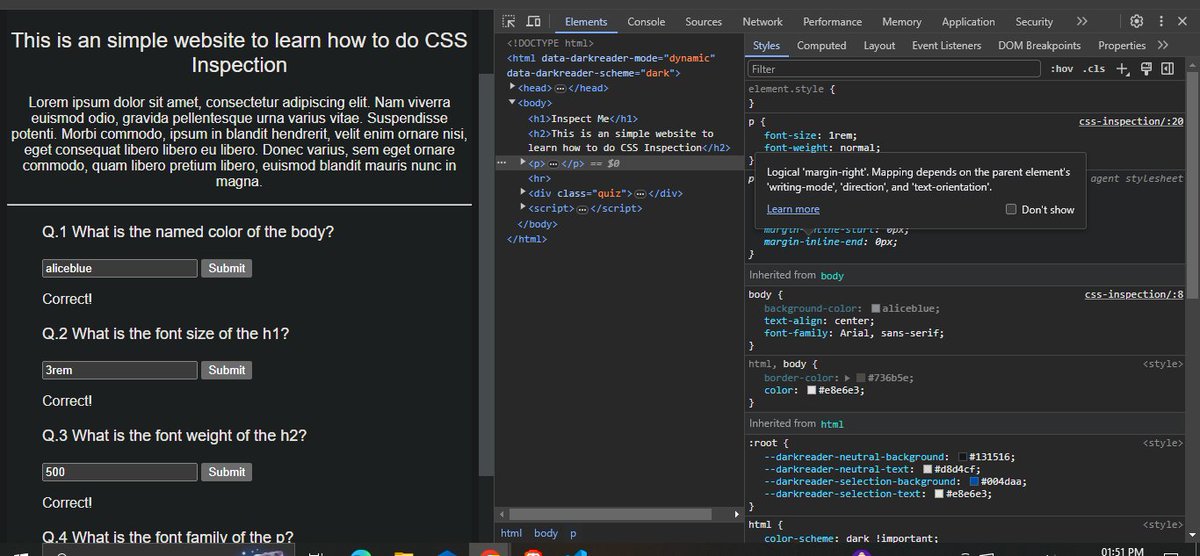
started taking a refresher on html, css and js from last week after a long break due to some issues.
Determine to complete this time.
Understood the importance of chrome developer tools today #learninpublic#FrontEndDeveloper#html#css#javascript
1/ Polkadot is proposing a major step in its scaling roadmap:
Asynchronous Backing
⚡ It's a major boost to parachain throughput, and enhances efficiency & scalability natively - without sacrificing trust assumptions and security.
Dive in 👇
📢 Are you ready to dive into the world of blockchain?
🎓Join @Polkadot Blockchain Academy to learn from industry experts and builders of core technology to become a part of the thriving Web3 community!
🚨 Applications are open now!
#PolkadotAcademy@rphmeier
How does DNS lookup work?
DNS lookup is the process of translating human-readable domain names like "www. example .com" into IP addresses like "172 .217 .22 .14". It's essentially how a web browser converts a URL into an IP address.
𝗧𝗼 𝗴𝗲𝘁 𝗮 𝗰𝗹𝗲𝗮𝗿 𝗽𝗶𝗰𝘁𝘂𝗿𝗲 𝗼𝗳 𝗵𝗼𝘄 𝗗𝗡𝗦 𝗹𝗼𝗼𝗸𝘂𝗽 𝘄𝗼𝗿𝗸𝘀, 𝗹𝗲𝘁'𝘀 𝘄𝗮𝗹𝗸 𝘁𝗵𝗿𝗼𝘂𝗴𝗵 𝘁𝗵𝗲 𝗽𝗿𝗼𝗰𝗲𝘀𝘀:
𝟭) 𝗨𝘀𝗲𝗿 𝗶𝗻𝗽𝘂𝘁
It all begins when you enter a URL into your web browser, such as "www. example .com".
𝟮) 𝗕𝗿𝗼𝘄𝘀𝗲𝗿 𝗰𝗮𝗰𝗵𝗲
Before involving DNS servers, the browser first looks in its own cache. If it already knows the IP address for the domain, then the process stops here.
𝟯) 𝗢𝗦 𝗰𝗮𝗰𝗵𝗲
If the browser doesn't have the IP address stored, the operating system's cache is then examined. The OS maintains its own cache of DNS lookups.
𝟰) 𝗥𝗲𝗰𝘂𝗿𝘀𝗶𝘃𝗲 𝗿𝗲𝘀𝗼𝗹𝘃𝗲𝗿
If the IP address cannot be retrieved via the OS cache, then the request is forwarded to the recursive resolver, which is typically managed by your internet service provider (ISP). To find the IP address, this server will act on behalf of the user.
𝟱) 𝗥𝗼𝗼𝘁 𝗗𝗡𝗦 𝘀𝗲𝗿𝘃𝗲𝗿
The recursive resolver first checks its cache. If it doesn't have the IP address, it then queries a root DNS server. Although the root server normally does not know the IP address for each domain, it knows where to direct the query next.
𝟲) 𝗧𝗼𝗽-𝗹𝗲𝘃𝗲𝗹 𝗱𝗼𝗺��𝗶𝗻 (𝗧𝗟𝗗) 𝘀𝗲𝗿𝘃𝗲𝗿
Based on the domain extension (such as .com, .net, or .org), the root server will direct the resolver to a TLD server. This server keeps track of which nameservers are responsible for handling domains under that TLD.
𝟳) 𝗗𝗼𝗺𝗮𝗶𝗻'𝘀 𝗻𝗮𝗺𝗲𝘀𝗲𝗿𝘃𝗲𝗿
From here the TLD server points the resolver to the authoritative nameserver for the specific domain (e.g., "example .com"). The IP address for the domain is known by this nameserver. This nameserver returns the IP address for the domain to the resolver.
𝟴) 𝗥𝗲𝘀𝗽𝗼𝗻𝘀𝗲 𝘁𝗼 𝗰𝗹𝗶𝗲𝗻𝘁
Now that the resolver has finally retrieved the IP address, it sends it back to the OS. The OS then sends the IP address to the browser.
𝟵) 𝗪𝗲𝗯𝘀𝗶𝘁𝗲 𝗮𝗰𝗰𝗲𝘀𝘀
We've reached the final stage, the browser has the IP address for the domain that we originally entered. The browser can now fetch the website by making a request to the web server associated with that IP address.
As we've seen, DNS lookup can be a quick process or it can involve several steps and components to locate the IP address. Caching is a key strategy for DNS lookup. It occurs at multiple levels throughout the process so that future requests for the same domain can be resolved more efficiently.