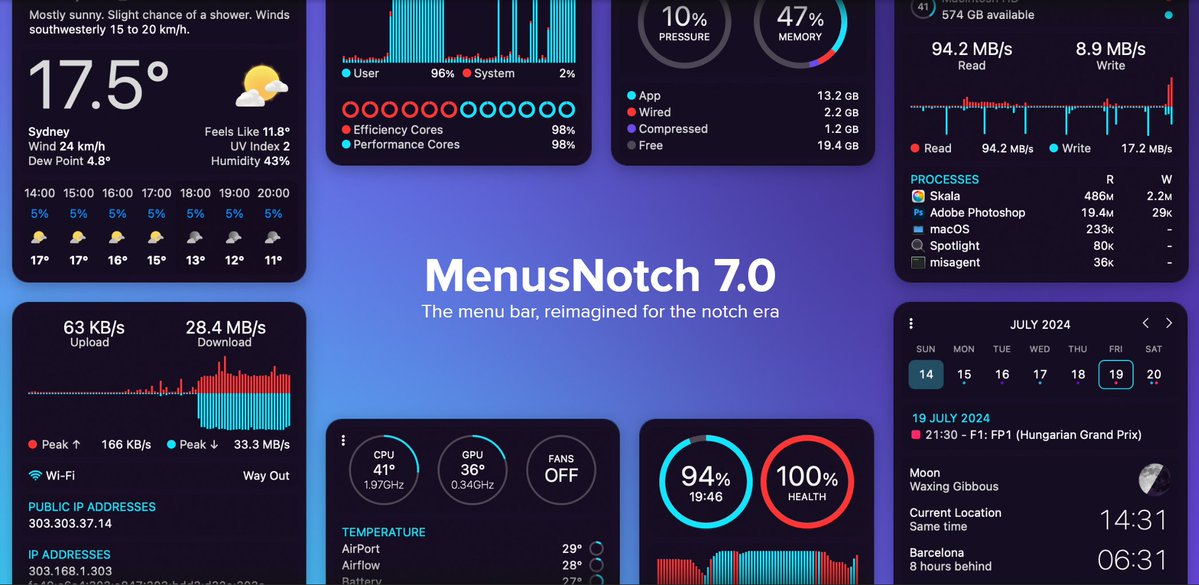
After years of work — MenusNotch 7 is here.
Everything is new:
• Completely redesigned interface
• Brand-new menu bar
• Combined mode
• Native sensors on Apple Silicon
Still the lightest and most efficient system monitor for macOS.
Quick tour of what’s changed 🧵
The menu bar, completely reimagined for the notch era.
New design. Stacked mode. Combined mode.
Apple Silicon sensors. Gradual fan control.
And still the lightest system monitor on macOS.
Years of work. Everything is new.
@saylor@Strategy You can watch that chart from your menu bar, by the way. 👀
MenusNotch tracks BTC alongside your CPU, memory and disks — always visible, never in the way. 📊
A look at the dropdown menus in MenusNotch 7:
☀️ Weather — hourly forecast, feels-like, UV, humidity
⚡️ CPU & GPU — live frequency, per-core load, top processes
🧠 Memory — pressure, breakdown, biggest consumers
💾 Disks — read/write throughput
All redesigned. All at a glance.
After years of work — MenusNotch 7 is here.
Everything is new:
• Completely redesigned interface
• Brand-new menu bar
• Combined mode
• Native sensors on Apple Silicon
Still the lightest and most efficient system monitor for macOS.
Quick tour of what’s changed 🧵
7/
More themes. More menu background colours. Hundreds of small refinements across every panel.And through all of it — still the lightest, most CPU-friendly system monitor on macOS. Monitoring your Mac shouldn’t slow it down.
5/
Fans now ramp up gradually instead of jumping between speeds. You get full control over the curve — quiet when you’re working, aggressive when you’re rendering. No more sudden jet-engine moments.
4/
Combined mode got a complete rebuild.Any item can now live in the menu bar with its own unique settings. The dropdown has more sections. It’s gone from “nice option” to the way most people will want to run MenusNotch.
3/
New items you can pin:• Wi-Fi network name
• GPU frames per second
• CPU frequency (Apple Silicon)
• A whole set of new sensors Frequency monitoring on Apple Silicon was one of the most requested features. It’s finally here.
2/
Start with the menu bar — the thing you look at a hundred times a day. New stacked mode puts labels and values on two lines, so you get more information in less space. Cleaner, denser, easier to scan at a glance.