Apache Spark 4.2 is here and brings the modern data and AI stack deeper into the engine.
📊 Governed metrics with metric views
🌐 Spark Connect + Arrow-first PySpark
🤖 Vector search, NEAREST BY, geospatial in SQL
⚡ Auto CDC, CHANGES queries, Real-Time Mode for PySpark
✅ Modernized Web UI, JDK 25, Data Source V2 improvements
🙌 1,900+ commits from 260+ contributors. Thank you to the Apache Spark community.
🔗 Read the full breakdown: https://t.co/y9o1rO5sTx
#ApacheSpark #PySpark #SparkSQL #MetricsViews
What is k8s (Kubernetes)?
k8s is a container orchestration system. It is used for container deployment and management. Its design is greatly impacted by Google’s internal system Borg.
A k8s cluster consists of a set of worker machines, called nodes, that run containerized applications. Every cluster has at least one worker node.
The worker node(s) host the Pods that are the components of the application workload. The control plane manages the worker nodes and the Pods in the cluster. In production environments, the control plane usually runs across multiple computers and a cluster usually runs multiple nodes, providing fault-tolerance and high availability.
🔹 Control Plane Components
1. API Server
The API server talks to all the components in the k8s cluster. All the operations on pods are executed by talking to the API server.
2. Scheduler
The scheduler watches the workloads on pods and assigns loads on newly created pods.
3. Controller Manager
The controller manager runs the controllers, including Node Controller, Job Controller, EndpointSlice Controller, and ServiceAccount Controller.
4. etcd
etcd is a key-value store used as Kubernetes' backing store for all cluster data.
🔹 Nodes
1. Pods
A pod is a group of containers and is the smallest unit that k8s administers. Pods have a single IP address applied to every container within the pod.
2. Kubelet
An agent that runs on each node in the cluster. It ensures containers are running in a Pod.
3. Kube Proxy
kube-proxy is a network proxy that runs on each node in your cluster. It routes traffic coming into a node from the service. It forwards requests for work to the correct containers.
--
Subscribe to our weekly newsletter to get a Free System Design PDF (158 pages): https://t.co/FIzCeaWsZV
A @QuarkusIO web app starts in 12 ms, minimal RAM usage, integrates AI, runs on Java 17+ with proper concurrency and throughput in ~10 lines of code and can run as is. no other files required.
https://t.co/u0RK9e1RsP
A poster every dev team should print and put on their desks/walls 💻
I regularly go over the 10 timeless commandments of egoless programming. It also aligns nicely with Ryan Holiday's book "Ego Is The Enemy" 📖
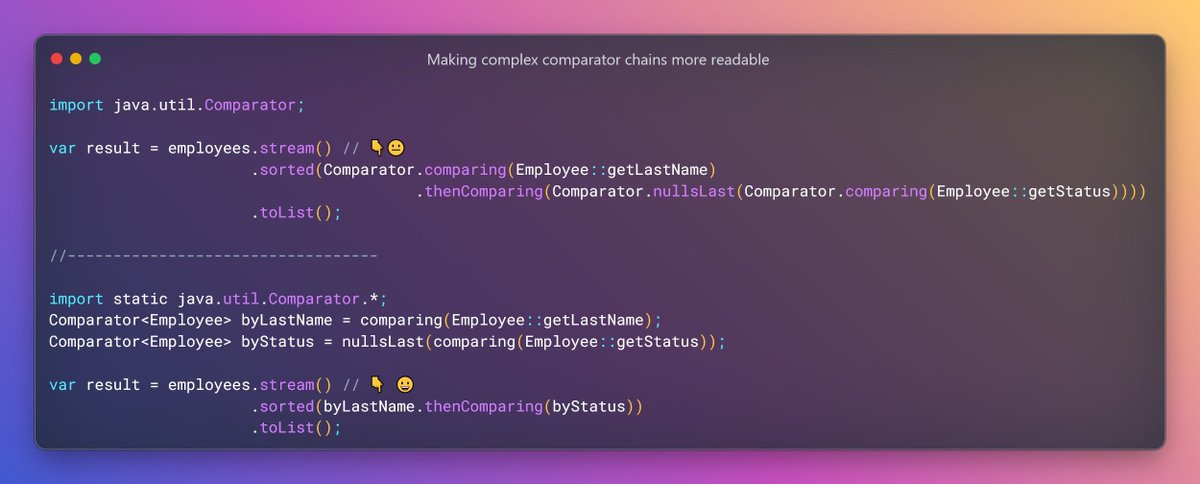
#Java Tip: to make big, complex Comparator chains more readable i like to assign the Comparators to variables which names start with "by". This way the call of sorted() get smaller and reads nicely almost like natural language. Additionally you can use static imports.
There are 3 cases when Clean Architecture is not the best choice.
Here's what they are:
- When you have a small, simple project
- When you are working on a tight deadline
- When you have limited resources or expertise
Clean Architecture is a popular architectural approach. It separates the business logic from implementation details. It also promotes a modular and scalable approach to software development. However, it's far from a silver bullet for complex systems.
Clean Architecture is not a one-size-fits-all solution.
There are certain situations where it's not the best choice.
1. 𝗪𝗵𝗲𝗻 𝘆𝗼𝘂 𝗵𝗮𝘃𝗲 𝗮 𝘀𝗺𝗮𝗹𝗹, 𝘀𝗶𝗺𝗽𝗹𝗲 𝗽𝗿𝗼𝗷𝗲𝗰𝘁
Clean Architecture is excellent for complex systems with many layers and components. If you have a small application, using the Clean Architecture is not worth it. It could add unnecessary complexity and overhead. And this will hinder your development process. You can have faster development speed with vertical slices, for example.
2. 𝗪𝗵𝗲𝗻 𝘆𝗼𝘂 𝗮𝗿𝗲 𝘄𝗼𝗿𝗸𝗶𝗻𝗴 𝗼𝗻 𝗮 𝘁𝗶𝗴𝗵𝘁 𝗱𝗲𝗮𝗱𝗹𝗶𝗻𝗲
Clean Architecture is not a quick or easy solution. You can think of it as an investment in the long run. It requires a decent amount of upfront boilerplate. But it helps if you have previous projects that you can reuse. There are better choices if you are working on a tight deadline or building a proof of concept.
3. 𝗪𝗵𝗲𝗻 𝘆𝗼𝘂 𝗵𝗮𝘃𝗲 𝗹𝗶𝗺𝗶𝘁𝗲𝗱 𝗿𝗲𝘀𝗼𝘂𝗿𝗰𝗲𝘀 𝗼𝗿 𝗲𝘅𝗽𝗲𝗿𝘁𝗶𝘀𝗲
Clean Architecture has a strict set of rules you need to follow. The main principle of Clean Architecture is dependency inversion. Outer layers can reference inner layers. Inner layers depend on abstractions. Outer layers implement these abstractions. Clean Architecture requires an understanding of software design principles and design patterns. If you are new to software development, you could overengineer Clean Architecture. I've seen this happen often.
Still, Clean Architecture is a powerful and valuable software architecture.
However, don't expect Clean Architecture to solve all your problems magically.
There are some situations where it's not the best choice.
So, analyze your project requirements before deciding to use the Clean Architecture.
If you've been following me for a while, you know I love Clean Architecture.
But it's important to be pragmatic and use the proper tool for the job.
P.S. If you liked this, consider joining The .NET Weekly - my newsletter with 35,000+ engineers that teaches you how to improve at .NET and software architecture.
Subscribe here → https://t.co/Yxh0ZalHJx
What are your thoughts on Clean Architecture?
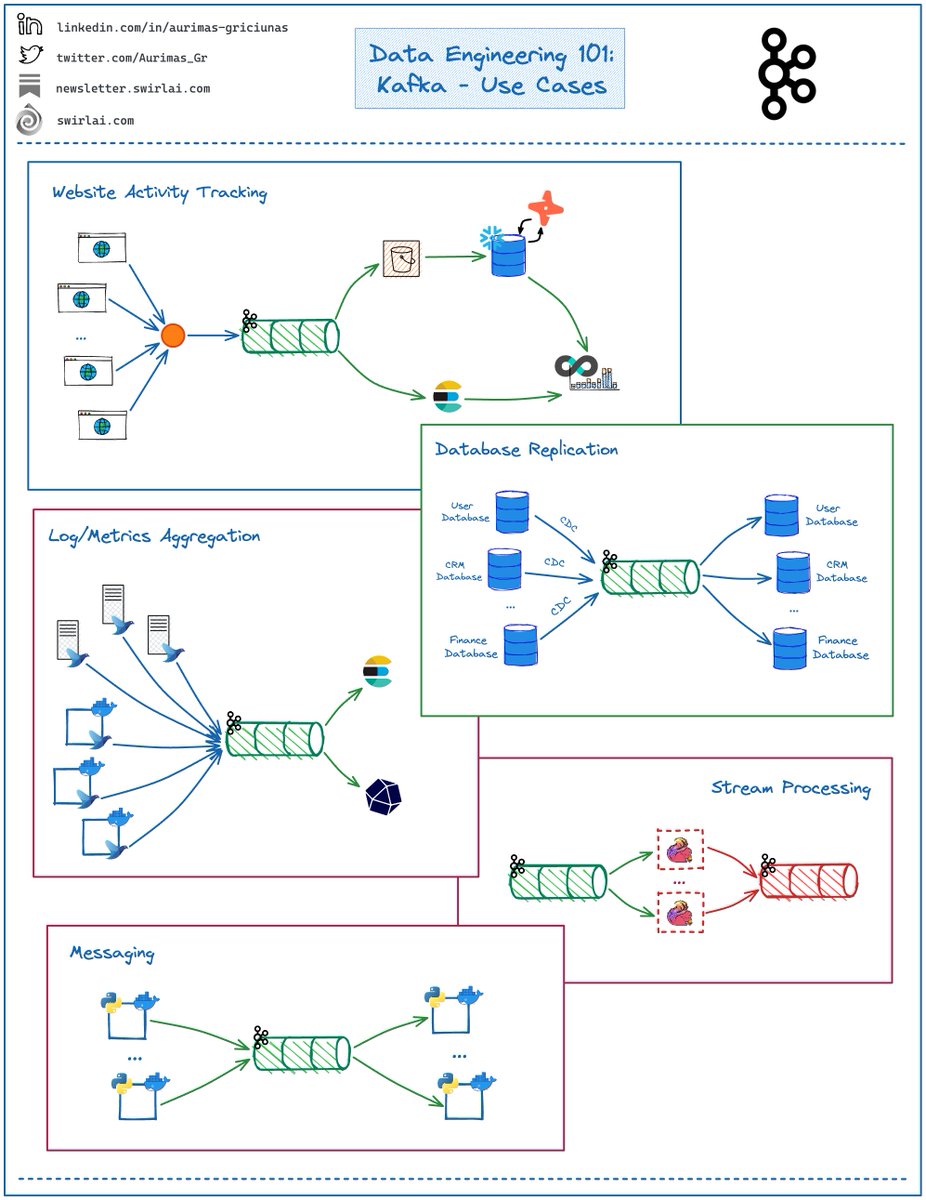
What are the most common 𝗨𝘀𝗲 𝗖𝗮𝘀𝗲𝘀 𝗳𝗼𝗿 𝗞𝗮𝗳𝗸𝗮?
We have covered lots of concepts around Kafka already. But what are the most common use cases for The System that you are very likely to run into as a Data Engineer?
𝗟𝗲𝘁’𝘀 𝘁𝗮𝗸𝗲 𝗮 𝗰𝗹𝗼𝘀𝗲𝗿 𝗹𝗼𝗼𝗸:
𝗪𝗲𝗯𝘀𝗶𝘁𝗲 𝗔𝗰𝘁𝗶𝘃𝗶𝘁𝘆 𝗧𝗿𝗮𝗰𝗸𝗶𝗻𝗴.
➡️ The Original use case for Kafka by LinkedIn.
➡️ Events happening in the website like page views, conversions etc. are sent via a Gateway and piped to Kafka Topics.
➡️ These events are forwarded to the downstream Analytical systems or processed in Real Time.
➡️ Kafka is used as an initial buffer as the Data amounts are usually big and Kafka guarantees no message loss due to its replication mechanisms.
𝗗𝗮𝘁𝗮𝗯𝗮𝘀𝗲 𝗥𝗲𝗽𝗹𝗶𝗰𝗮𝘁𝗶𝗼𝗻.
➡️ Database Commit log is piped to a Kafka topic.
➡️ The committed messages are executed against a new Database in the same order.
➡️ Database replica is created.
𝗟𝗼𝗴/𝗠𝗲𝘁𝗿𝗶𝗰𝘀 𝗔𝗴𝗴𝗿𝗲𝗴𝗮𝘁𝗶𝗼𝗻.
➡️ Kafka is used for centralized Log and Metrics collection.
➡️ Daemons like FluentD are deployed in servers or containers together with the Applications to be monitored.
➡️ Applications send their Logs/Metrics to the Daemons.
➡️ The Daemons pipe Logs/Metrics to a Kafka Topic.
➡️ Logs/Metrics are delivered downstream to storages like ElasticSearch or InfluxDB for Log/Metrics discovery respectively.
➡️ This is also how you would track your IoT Fleets.
𝗦𝘁𝗿𝗲𝗮𝗺 𝗣𝗿𝗼𝗰𝗲𝘀𝘀𝗶𝗻𝗴.
➡️ This is usually coupled with ingestion mechanisms already covered.
➡️ Instead of piping Data to a certain storage downstream we mount a Stream Processing Framework on top of Kafka Topics.
➡️ The Data is filtered, enriched and then piped to the downstream systems to be further used according to the use case.
���️ This is also where one would be running Machine Learning Models embedded into a Stream Processing Application.
𝗠𝗲𝘀𝘀𝗮𝗴𝗶𝗻𝗴.
➡️ Kafka can be used as a replacement for more traditional messaging brokers like RabbitMQ.
➡️ Kafka has better durability guarantees and is easier to configure for several separate Consumer Groups to consume from the same Topic.
❗️Having said this - always consider the complexity you are bringing with introduction of a Distributed System. Sometimes it is better to just use traditional frameworks.
--------
Follow me to upskill in #MLOps, #MachineLearning, #DataEngineering, #DataScience and overall #Data space.
Also hit 🔔to stay notified about new content.
𝗗𝗼𝗻’𝘁 𝗳𝗼𝗿𝗴𝗲𝘁 𝘁𝗼 𝗹𝗶𝗸𝗲 💙, 𝘀𝗵𝗮𝗿𝗲 𝗮𝗻𝗱 𝗰𝗼𝗺𝗺𝗲𝗻𝘁!
Join a growing community of Data Professionals by subscribing to my 𝗡𝗲𝘄𝘀𝗹𝗲𝘁𝘁𝗲𝗿.
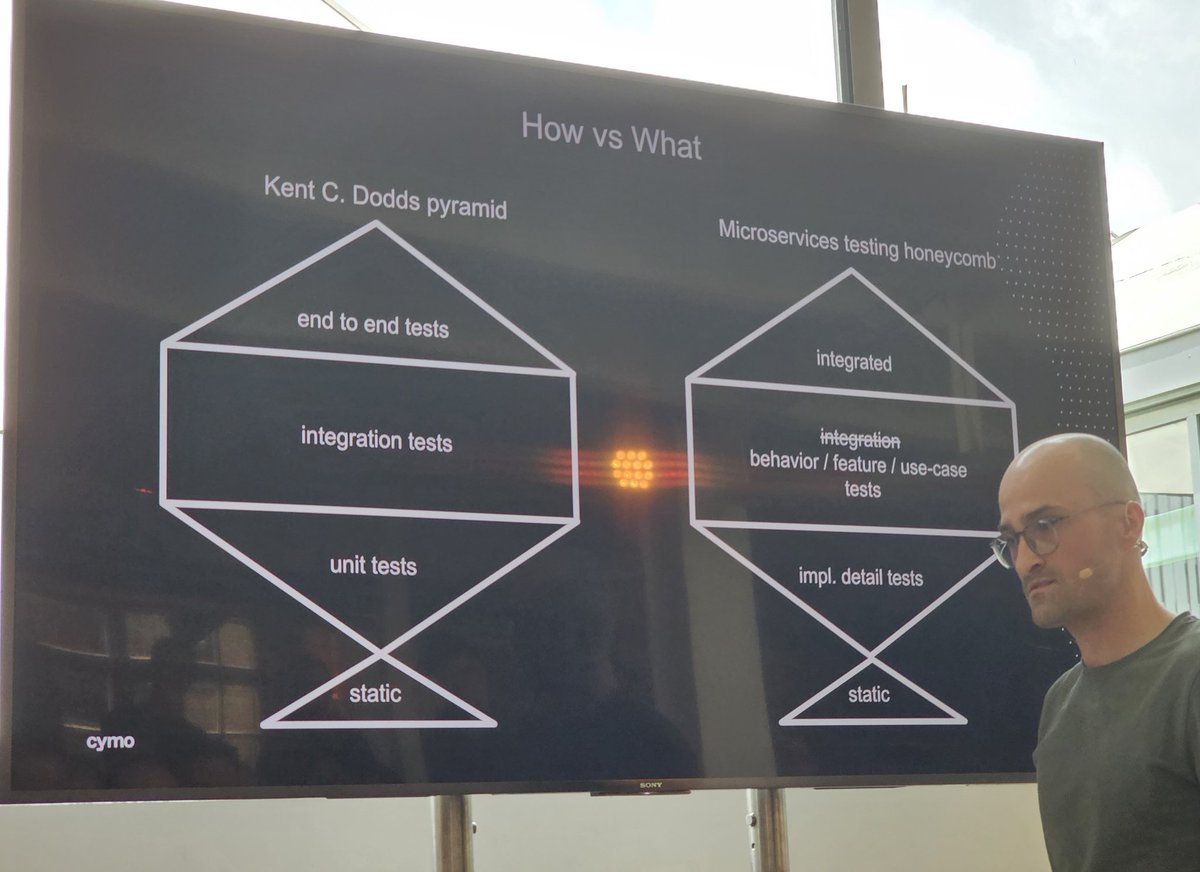
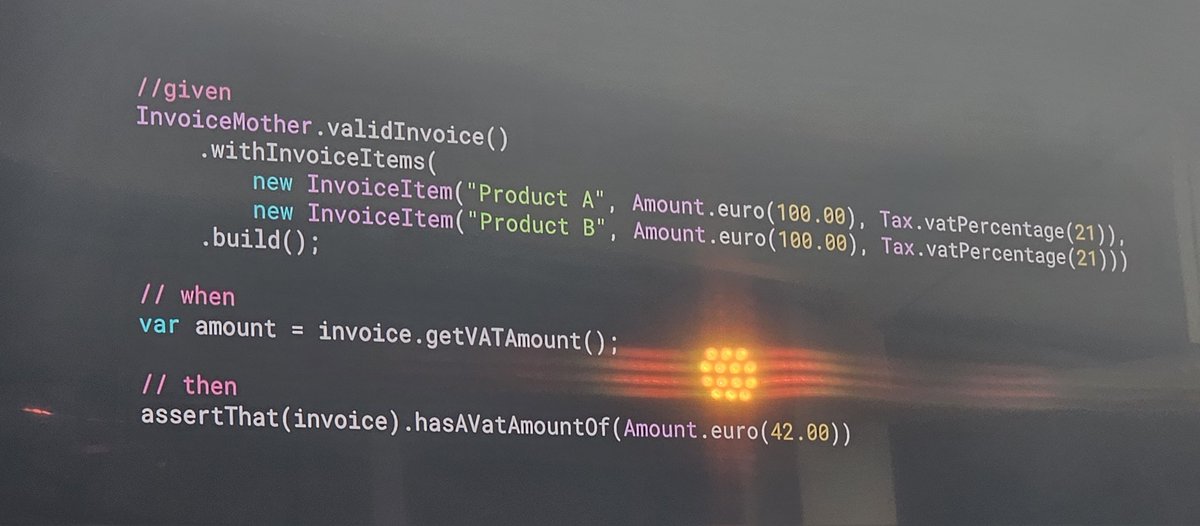
"Avoid IFs and Loops in your tests. These should be split into new tests." Interesting #VoxxedBrussels testing talk by @jonas_grgt
PineappleIsAnIllegalTopping_andShouldPreventTheCookFromAddingIt 😁
Loom vs Go vs Rust: How much memory do you need to run anywhere from 1 to 10 million concurrent tasks?
Great summary below, with some surprising findings (nice job, C#!).
https://t.co/7d14pmjsVs