An Anthropic engineer just gave a lecture on how to build and manage AI agents that operate autonomously.
Agents not only work on their own but also share work and execute tasks.
Learn the key building blocks and see how an SRE agent investigates issues. Then analyzes, uses tools, and finds root causes on its own.
Watch this complete video and be able to build a system that works when you are offline.
Bookmark this.
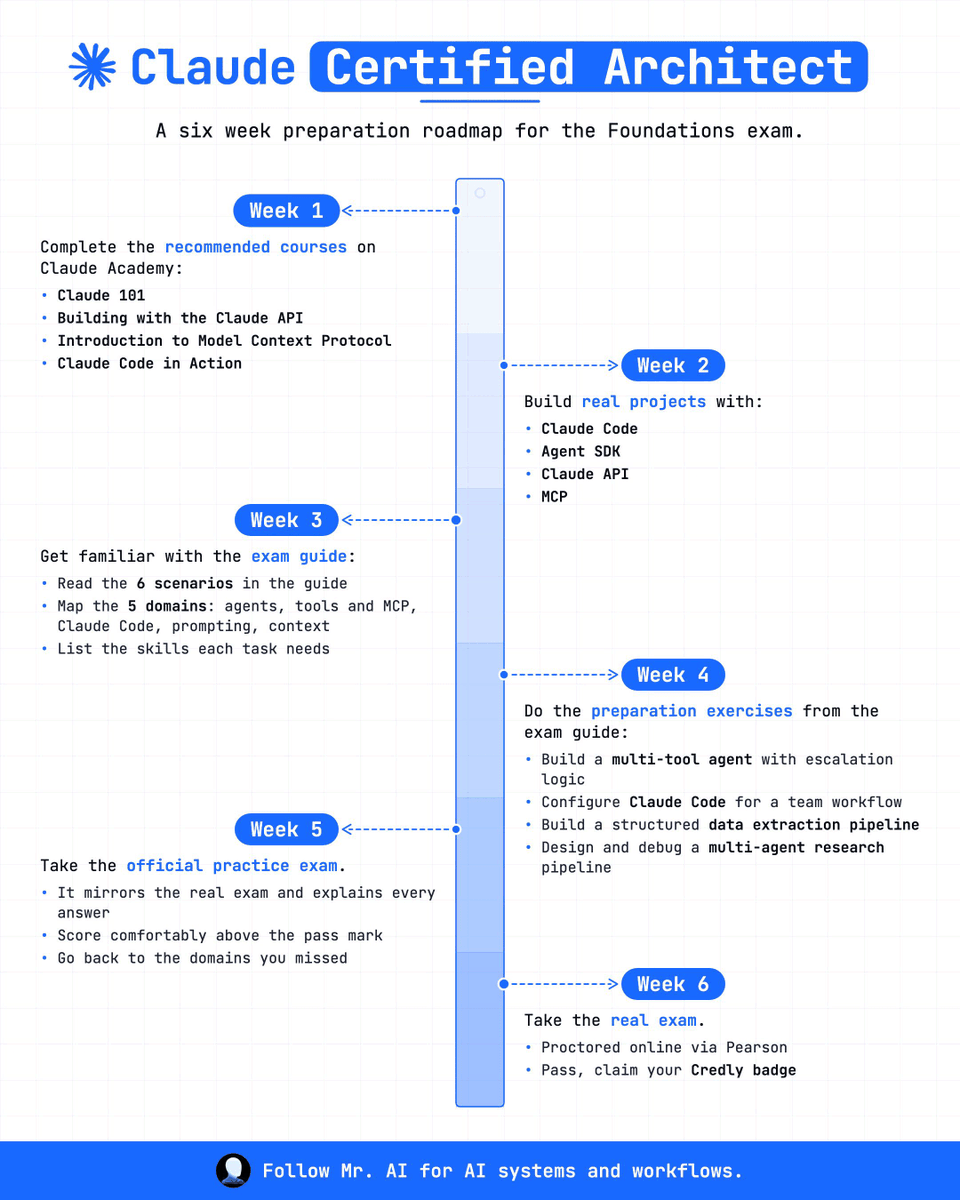
A six-week plan gets you to Claude Certified Architect, but only if you actually finish week one before jumping to the fun parts.
Week 1 is coursework: Claude 101, Building with the Claude API, Introduction to Model Context Protocol, Claude Code in Action. All four live on Claude Academy. Rush past this, and you show up knowing prompts without knowing the system behind them.
Week 2 is where that coursework turns into real projects, built with Claude Code, the Agent SDK, the Claude API, and MCP. Reading about a tool and shipping something with it are two different skills, and the exam checks the second.
Week 3 moves from building to studying the exam itself. Read all six scenarios in the guide, map the five domains (agents, tools and MCP, Claude Code, prompting, context), and note which skills each task is actually testing.
Week 4 is the heaviest week. Build a multi-tool agent with escalation logic. Configure Claude Code for a team workflow. Build a structured data extraction pipeline. Design and debug a multi-agent research pipeline. These four exercises come straight from the exam guide's own preparation list.
Week 5 is the official practice exam. It mirrors the real thing and explains every answer, so score comfortably above the pass mark, then go back and redo whatever domain you missed.
Week 6 is the real exam, proctored online through Pearson. Pass it, and you claim your Credly badge.
Follow Mr. AI for AI systems and workflows.
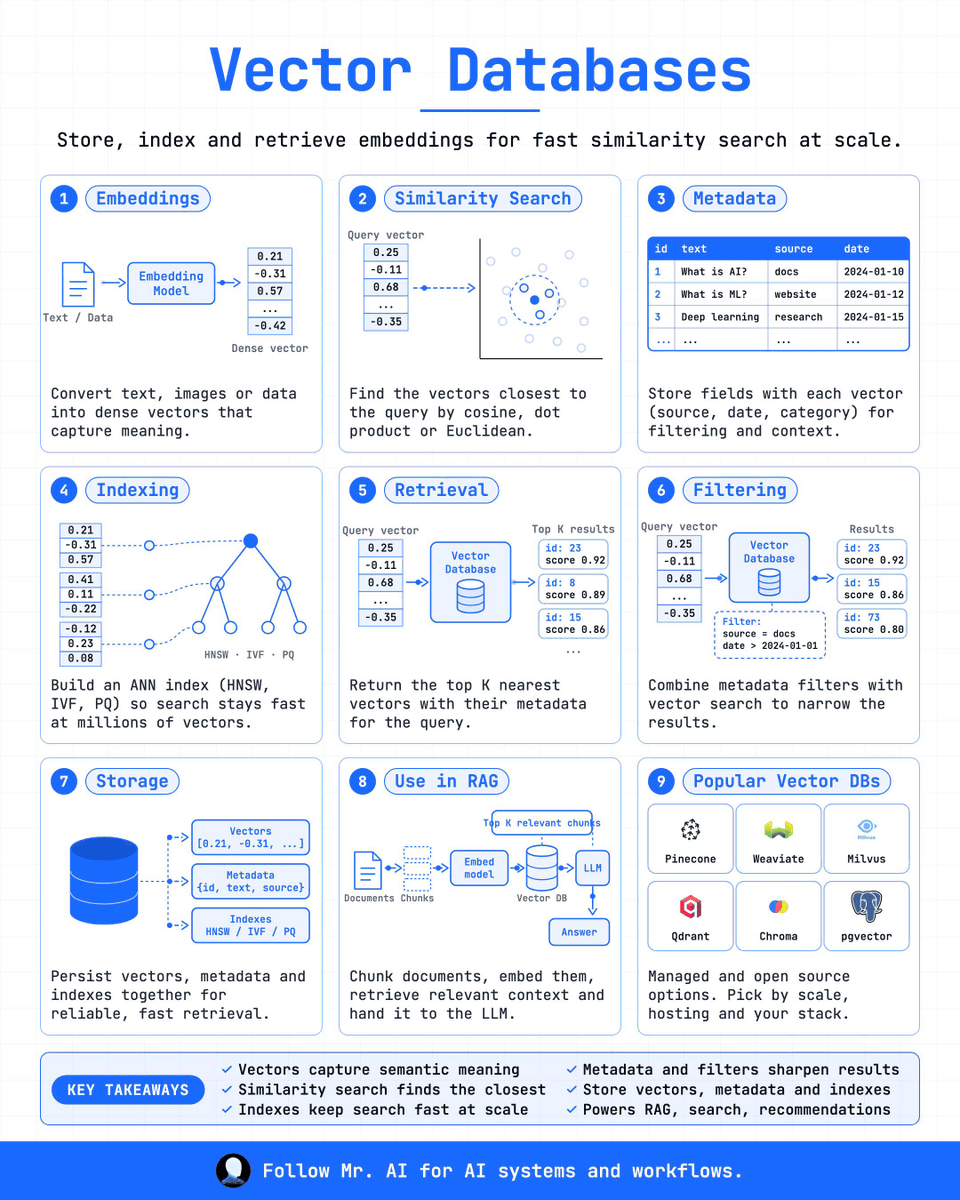
A vector database is not a search index with extra steps. Every part of it exists to answer one question fast: which vectors sit closest to this one.
It starts with embeddings. A file goes through an embedding model and comes out as a dense vector, a list of numbers like 0.21, -0.31, 0.57, that captures meaning rather than matching keywords.
Similarity search takes a query vector and finds the closest points to it in that space, using cosine, dot product, or Euclidean distance.
Metadata rides alongside every vector: source, date, category. It doesn't replace the vector search. It filters what the search is allowed to return, the way a table tagging each entry with id, text, source, and date lets you narrow results before or after the search runs.
None of this stays fast without an index. HNSW, IVF, and PQ let the database approximate the nearest neighbors instead of comparing a query against every vector it holds, so search still works at millions of vectors. The index, the vectors, and the metadata all get stored together, which is what makes retrieval one query vnkkro fdsa a join across systems.
Retrieval sends a query vector in and gets back the top K nearest results with their scores: id 23 at 0.92, id 8 at 0.89, id 15 at 0.86. Filtering stacks a condition on top, something like source = docs and date > 2024-01-01, so the same search can also narrow by rule.
This is the pipeline that runs RAG. Documents get chunked, the chunks get embedded, the vector database returns the top K relevant chunks, and only those go to the LLM as context. It never sees the full document set, only the part the search decided mattered.
Pinecone, Weaviate, Milvus, Qdrant, Chroma, and pgvector all do this job with different trade-offs. Scale, hosting, and your stack decide which one fits, not the name.
Follow Mr. AI for AI systems and workflows.
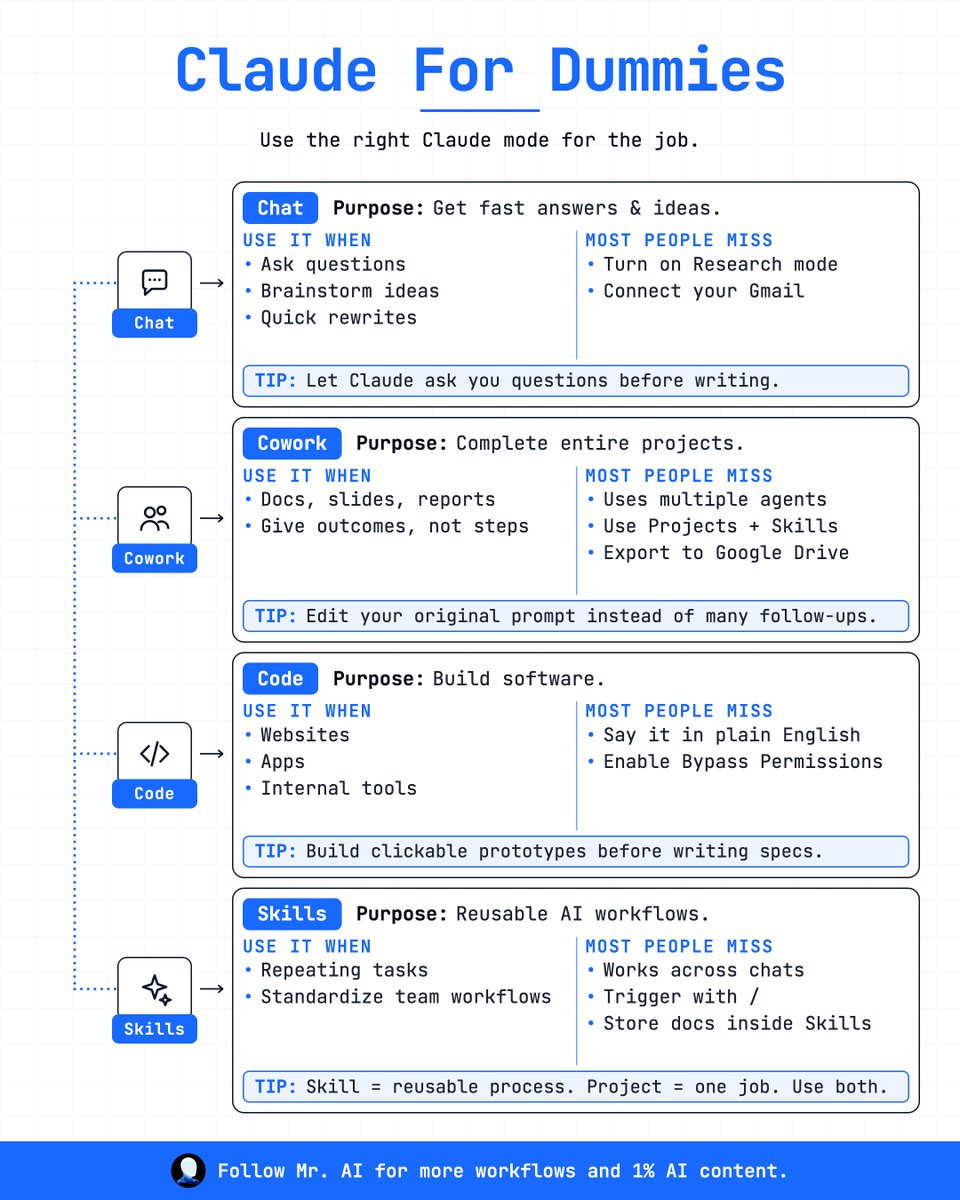
Most people use Claude the same way for everything. That's why the output feels inconsistent.
There are 4 modes. Each one is built for a different job.
Chat is for fast answers and ideas. Questions, brainstorming, quick rewrites. Most people never turn on Research mode or connect Gmail, so it stays a search box instead of an assistant with real context.
Cowork is for finishing entire projects. Docs, slides, reports. Give it the outcome you want, not a step by step, and let it run multiple agents on the work at once. Projects and Skills stack here, and it can export straight to Google Drive.
Code is for building software. Websites, apps, internal tools. Describe what you want in plain English instead of writing a spec first, and turn on Bypass Permissions so it can actually move without stopping to ask.
Skills are for the work you do more than once. A skill is a reusable process that works across every chat, triggered with a slash command, with its instructions stored inside it. A project is the specific work in front of you right now. Use both together instead of picking one.
Bookmark this before your next Claude session.
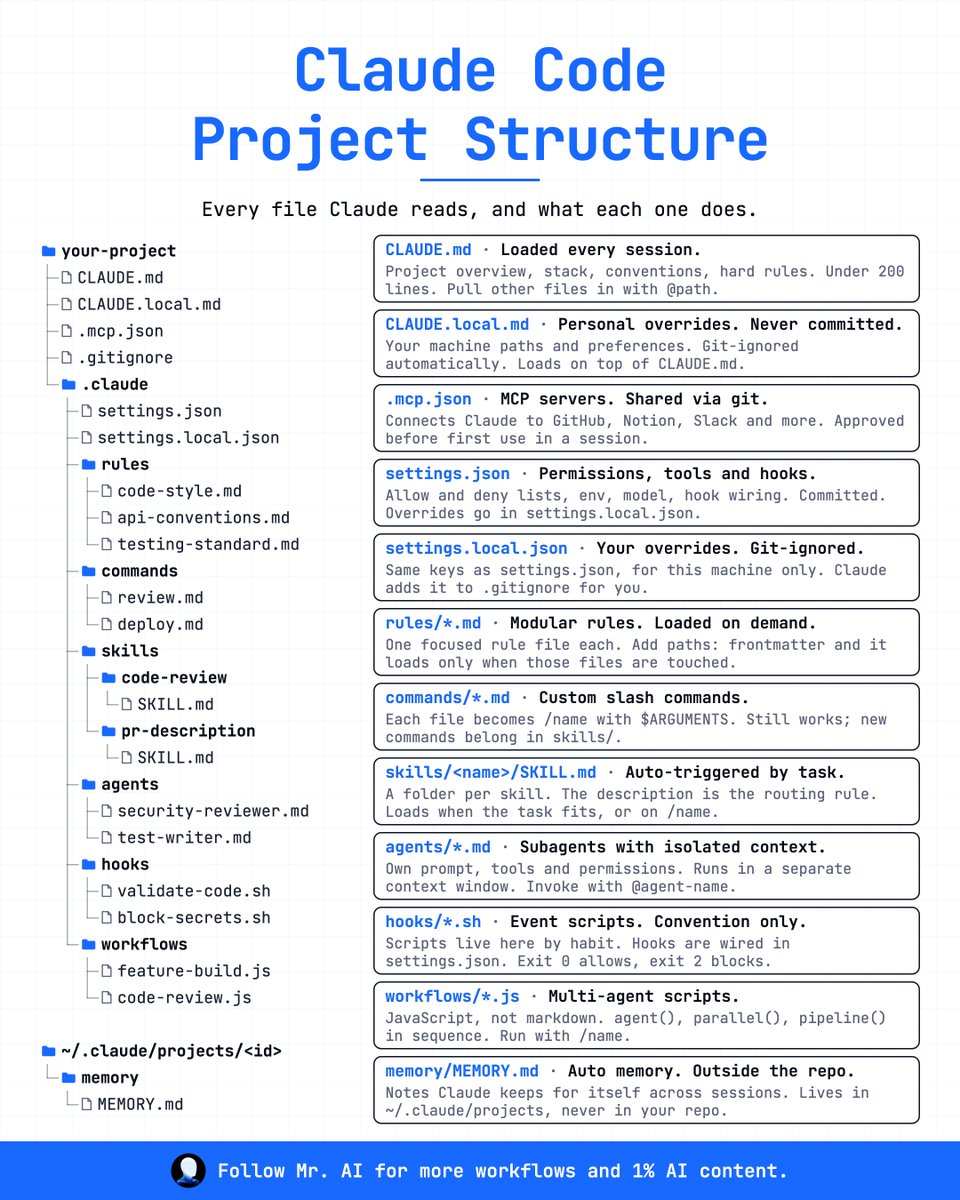
Most people drop a CLAUDE. md in their repo and stop there. Claude Code actually reads a whole tree of files, and each one does a different job.
CLAUDE. md loads every session. Project overview, stack, conventions, hard rules, kept under 200 lines, pulling other files in with @ path.
CLAUDE.local. md sits on top of it for your personal overrides: your machine paths, your preferences. Git-ignored automatically, so it never gets committed.
.mcp.json connects Claude to GitHub, Notion, Slack, and anything else over MCP. It's shared through git, and Claude asks you to approve it before first use in a session.
settings.json holds permissions, tools, and hooks: allow and deny lists, env vars, the model, hook wiring. This one gets committed. Your own overrides go in settings.local.json instead, which stays out of git.
rules/*.md are modular. Each file covers one thing (code style, API conventions, testing standards) and loads only when its listed paths get touched.
commands/*.md turn into slash commands. Each file becomes /name with $ARGUMENTS. Still works, but new commands belong in skills/ going forward.
skills/<name>/SKILL. md auto-triggers by task. One folder per skill, and the description is the routing rule that decides when it loads, or you call it directly with /name.
agents/*.md define subagents with their own isolated context: their own prompt, tools, and permissions, run in a separate context window, invoked with @ agent-name.
hooks/*.sh are event scripts. They live here by convention, but the actual wiring happens in settings.json.
workflows/*.js run multi-agent scripts in real JavaScript, not markdown: agent(), parallel(), pipeline() in sequence, triggered with /name.
And memory/MEMORY. md lives outside the repo entirely, in ~/.claude/projects/<id>. Notes Claude keeps for itself across sessions.
Bookmark this before your next Claude Code session.
Most people re-explain who they are to Claude every single time. Tone, context, style, from scratch, every chat.
There's a 14-day setup that fixes this once.
Day 1: set up the clone. Create one Claude Project and upload your best writing. Most people miss that this means past posts, not a bio, and pasted raw, not polished. 10 minutes, one time, and everything after this compounds.
Day 3: give it your voice. Write a one-page voice doc and add it to the instructions. List the words you never use, and show 3 real before and afters. This is when Claude starts sounding like you.
Day 5: stop re-prompting. Turn repeat tasks into Skills, one Skill per format. Skills work across every chat, triggered with a slash command. Zero re-prompting, same output every time.
Day 7: connect real files. Connect MCP to your Drive and point it at live documents. Refresh sources every week. With real files attached, drafts stop guessing your facts.
Day 14: first draft becomes final. Ask for outcomes, not steps. Edit the prompt, not the reply. Save winners back to the Project so it compounds every week. 98% you by day 30. Prompting from scratch every time stays stuck near 30%.
You are not prompting Claude. You are becoming it.
Bookmark this before your next Claude session.
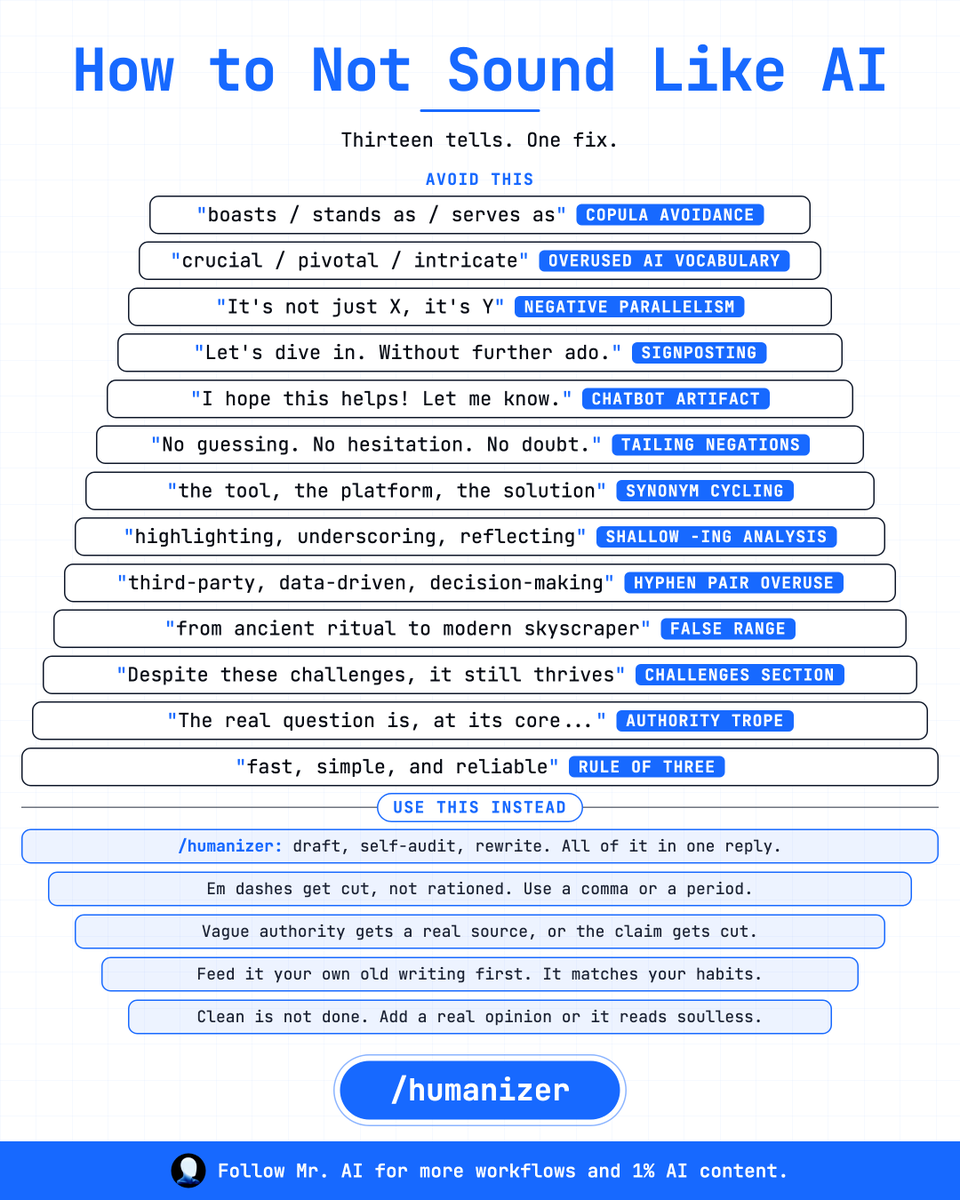
AI writing has some patterns, phrases, and sentences. Thirteen of them, and once you notice one, you notice all of them.
Copula avoidance. "Boasts, stands as, serves as" instead of just saying what it is.
Overused AI vocabulary. Crucial, pivotal, intricate, in every other paragraph.
Negative parallelism. "It's not just X, it's Y." Every single time.
Signposting. "Let's dive in." "Without further ado." Nobody talks like that.
Chatbot artifact. "I hope this helps! Let me know." A leftover from the assistant persona.
Tailing negations. "No guessing. No hesitation. No doubt." Three fragments that say nothing.
Synonym cycling. The tool, the platform, the solution, all describing the same thing.
Shallow -ing analysis. Highlighting, underscoring, reflecting, doing the work of a real point.
Hyphen pair overuse. Third-party, data-driven, decision-making, stacked until it reads like a press release.
False range. "From ancient ritual to modern skyscraper." A sweep that explains nothing.
The challenges section. "Despite these challenges, it still thrives." Every essay, same beat.
The authority trope. "The real question is, at its core..." Borrowed gravity, no source.
The rule of three. Fast, simple, and reliable. Always three, always safe.
The fix isn't finding synonyms for these. It's a self-audit pass: cut every em dash, cite a real source or cut the claim, feed it your own old writing so it matches your habits, and add one real opinion so it doesn't read soulless.
Every AI lab is now slowing down the AI work
Dario Amodei just warned everyone that Now AI has reached at its own state where it can evolve and replicate itself.
It means the harness is growing super fast and that’s the extinction of Humanity.
Elon predicted that:
“Untill 2030 there will be no value of money, everyone will build its own startup”
Then, who will the consumer?
Even Elon musk fully supports what Dario just spoke publicly.
Now Altman, Elon and Dario, all agreed that AI adoption and growth should be slower down.
If not, there will be some consequences.
Isn’t it strange that AI has evolved over night and we didn’t even know.
It’s like AGI had arrived and we are getting the news after the announcements by top leaders.
We Must Pace the Frontier: I’ve written a new essay on why the AI industry should slow down, with a three-part plan for doing so.
Anthropic is unilaterally committing to the first of these steps. We’ll provide third-party evaluators with permanent, employee-level access to our systems, so that they can verify adherence to our safety measures, report on incidents, and assess models’ alignment during training.
You can read the full post here: https://t.co/OGyPb7yaYt
Most people drop a CLAUDE. md in their repo and stop there. Claude Code actually reads a whole tree of files, and each one does a different job.
CLAUDE. md loads every session. Project overview, stack, conventions, hard rules, kept under 200 lines, pulling other files in with @ path.
CLAUDE.local. md sits on top of it for your personal overrides: your machine paths, your preferences. Git-ignored automatically, so it never gets committed.
.mcp.json connects Claude to GitHub, Notion, Slack, and anything else over MCP. It's shared through git, and Claude asks you to approve it before first use in a session.
settings.json holds permissions, tools, and hooks: allow and deny lists, env vars, the model, hook wiring. This one gets committed. Your own overrides go in settings.local.json instead, which stays out of git.
rules/*.md are modular. Each file covers one thing (code style, API conventions, testing standards) and loads only when its listed paths get touched.
commands/*.md turn into slash commands. Each file becomes /name with $ARGUMENTS. Still works, but new commands belong in skills/ going forward.
skills/<name>/SKILL. md auto-triggers by task. One folder per skill, and the description is the routing rule that decides when it loads, or you call it directly with /name.
agents/*.md define subagents with their own isolated context: their own prompt, tools, and permissions, run in a separate context window, invoked with @ agent-name.
hooks/*.sh are event scripts. They live here by convention, but the actual wiring happens in settings.json.
workflows/*.js run multi-agent scripts in real JavaScript, not markdown: agent(), parallel(), pipeline() in sequence, triggered with /name.
And memory/MEMORY. md lives outside the repo entirely, in ~/.claude/projects/<id>. Notes Claude keeps for itself across sessions.
Bookmark this before your next Claude Code session.
Most people drop a CLAUDE. md in their repo and stop there. Claude Code actually reads a whole tree of files, and each one does a different job.
CLAUDE. md loads every session. Project overview, stack, conventions, hard rules, kept under 200 lines, pulling other files in with @ path.
CLAUDE.local. md sits on top of it for your personal overrides: your machine paths, your preferences. Git-ignored automatically, so it never gets committed.
.mcp.json connects Claude to GitHub, Notion, Slack, and anything else over MCP. It's shared through git, and Claude asks you to approve it before first use in a session.
settings.json holds permissions, tools, and hooks: allow and deny lists, env vars, the model, hook wiring. This one gets committed. Your own overrides go in settings.local.json instead, which stays out of git.
rules/*.md are modular. Each file covers one thing (code style, API conventions, testing standards) and loads only when its listed paths get touched.
commands/*.md turn into slash commands. Each file becomes /name with $ARGUMENTS. Still works, but new commands belong in skills/ going forward.
skills/<name>/SKILL. md auto-triggers by task. One folder per skill, and the description is the routing rule that decides when it loads, or you call it directly with /name.
agents/*.md define subagents with their own isolated context: their own prompt, tools, and permissions, run in a separate context window, invoked with @ agent-name.
hooks/*.sh are event scripts. They live here by convention, but the actual wiring happens in settings.json.
workflows/*.js run multi-agent scripts in real JavaScript, not markdown: agent(), parallel(), pipeline() in sequence, triggered with /name.
And memory/MEMORY. md lives outside the repo entirely, in ~/.claude/projects/<id>. Notes Claude keeps for itself across sessions.
Bookmark this before your next Claude Code session.
Claude has its own vocabulary now, and most of it never gets explained in one place. Here are the 40 terms worth knowing.
Start with the models. Claude Fable 5.1 is Anthropic's most capable model, in the Mythos class. Claude Opus 5 is the top general model for complex reasoning. Claude Sonnet 5 balances speed and capability. Claude Haiku 4.5 is the fastest, cheapest option for simple tasks.
Then the core concepts.
A prompt is the text you send Claude. Artifacts are docs, code, or apps Claude opens in a side pane.
Projects are workspaces that keep files and rules between chats. Memory lets Claude remember details across chats.
Extended Thinking has Claude reason before answering hard questions. Chat is the classic conversation at Claude. ai.
The surfaces multiply fast. Vibecoding means building software by describing it in plain words.
Claude Code is the agentic coding tool for the terminal and IDE. Cowork is the desktop mode that runs long tasks on your files. Claude Design is the canvas for websites, slides, and layouts.
Claude in Excel reads and edits spreadsheets. Claude in Chrome is a browsing agent inside your browser. Dispatch sends tasks from your phone to Claude on your desktop.
Computer Use has Claude click and type on your screen. Then there's Claude Desktop for macOS and Windows, and Claude Mobile for iOS and Android.
Underneath, the technical layer. The API is the developer interface to call Claude from code.
Web Search lets Claude pull live results from the internet. Research is deep, multi-source investigation mode. Vision lets Claude read images and PDFs. T
Tool Use is Claude asking your code to run a specific action. Streaming means the reply arrives word by word as it's written. A context window is how much text Claude can hold at once.
A token is the smallest unit of text, about 4 characters.
Batch API runs many requests at once, cheaper and not urgent. Embeddings are numbers that measure how similar two texts are.
Temperature controls how creative or predictable replies are.
And the configuration layer.
Connectors link Claude to apps like Slack and Gmail. MCP, Model Context Protocol, is the standard behind those tools. Skills are saved workflows Claude loads for a job, or with /name.
Plugins bundle skills, agents, and connectors into one. Styles are saved tone and format presets for replies. Project Instructions are a standing prompt scoped to one Project.
The system prompt is the hidden instructions that shape Claude. SKILL. md is the file inside a skill, trigger, and its steps.
And CLAUDE. md is the memory file Claude Code reads every session.
Bookmark this before your next Claude session.
Most people learn Claude by accident, one random prompt at a time. There's a faster way, and it takes exactly a week.
Day 1 is just using it. Ask anything, get research help, generate content, run web search, try voice mode, upload files, start long-term projects, and write project instructions. No technique yet, just reps.
Day 2 adds structure. Structured prompting, few-shot examples, prompt templates, negative instructions, output validation, format instructions. This is where your prompts stop being one-off and start being repeatable.
Day 3 is memory and context. Upload files to Projects, build reusable context, turn on Claude Memory, organize project knowledge, write a CLAUDE. md, and connect Gmail through Claude MCP add. Claude stops forgetting who you are between chats.
Day 4 moves into building. SVG graphics, interactive experiences, code artifacts, React components, HTML pages, even Claude in PowerPoint. You're not asking questions anymore, you're shipping things.
Day 5 is automation. SKILL .md files, the Skill Creator, task chaining, the code execution tool, the file creation tool, trigger rules, delegation and handoff. Claude starts running steps without you re-explaining them each time.
Day 6 connects it to everything else. Notion MCP, Google Drive MCP, Slack MCP, Typefully MCP, custom MCP servers, over 400 connectors, plus risk controls and observability so you can see what it's actually doing.
Day 7 is full systems. Claude Code in the terminal, multi-agent workflows, autonomous execution, memory governance. This is where Claude stops being a chat window and starts being infrastructure.
Bookmark this before your next Claude session.
Most people use Claude the same way for everything. That's why the output feels inconsistent.
There are 4 modes. Each one is built for a different job.
Chat is for fast answers and ideas. Questions, brainstorming, quick rewrites. Most people never turn on Research mode or connect Gmail, so it stays a search box instead of an assistant with real context.
Cowork is for finishing entire projects. Docs, slides, reports. Give it the outcome you want, not a step by step, and let it run multiple agents on the work at once. Projects and Skills stack here, and it can export straight to Google Drive.
Code is for building software. Websites, apps, internal tools. Describe what you want in plain English instead of writing a spec first, and turn on Bypass Permissions so it can actually move without stopping to ask.
Skills are for the work you do more than once. A skill is a reusable process that works across every chat, triggered with a slash command, with its instructions stored inside it. A project is the specific work in front of you right now. Use both together instead of picking one.
Bookmark this before your next Claude session.
Most prompts fail because they skip straight to the ask. There's a structure that fixes this, and it has 11 parts.
Task: what Claude must do. Write a deliverable for an audience that explains the core idea in a tone. "A 600-word LinkedIn post for founders, plain and direct."
Context: the background it needs. What the reader already knows, and what this connects to.
Reference: the bar to match. Paste two past posts that did well and say why.
Effort: how careful to be. Tell it to think through the hard part first, and to prefer accuracy over speed.
Act: the actual ask. What to do, on what input, returned in what format.
Scope: what stays fixed. Voice, length, format, and what it's not allowed to touch.
Delegate: split it into steps. Outline first, wait for your OK, then draft.
Evidence: proof for every claim. Quote the line each number came from.
Memory: the rules to reuse. Voice, banned words, format rules, so you're not repeating yourself every time.
Checkpoint: a check before the final answer. Length, one clear ask, nothing repeated.
Report: what actually gets delivered. The final post, plus one line on what changed.
Build every prompt in this order and most of the back and forth disappears.
Bookmark this before your next Claude session.
Which AI Model You Should Use in 2026 (Cheat Sheet Guide)
ChatGPT's GPT-6 Astra is built for long, multi-step computer work: research, documents, spreadsheets, coding, browsing. It ships with computer use and browsing built in, async tools, mid-turn steering, and a 1.05M token context.
On OSWorld 2.0, it hits 72.6% (OpenAI's own benchmark run), and 57.9% on Terminal-Bench 4.0.
Astra isn't in Plus chat yet; it's Pro only, pricing doubles past 272K input tokens, and every benchmark so far is OpenAI-run.
Claude's Fable 5.1 targets demanding reasoning and long-horizon agentic work: deep coding, research, analysis that needs judgment. Cache reads dropped 75% to $0.25, adaptive thinking is always on, and outputs carry a watermark. It scores 55.8% on Terminal-Bench 4.0, 73.4% on CursorBench 3.2, and 65% on HLE with tools.
Where it struggles: safety classifiers can refuse, retention defaults to 30 days, raw thinking is never returned, and forced tool use is gone in 5.1.
Grok's 4.6 (August 12) is the pick for coding and agentic work tied to live X and web data, at $2 in / $6 out per million tokens, the cheapest frontier API of the three. It runs DeepSearch and Big Brain through SuperGrok.
Its context tops out at 500K, half of Grok 4.3; there's no native video in 4.6, and Grok 5 has no date yet.
Send bulk and live-data jobs to Grok 4.6, switch to 4.3 for 1M context or video, set Claude's effort level for depth versus cost, add a fallback model for refusals, and let Astra run long multi-step jobs while you steer mid-turn instead of restarting.
Follow Mr. AI for AI systems and workflows.
Which AI Model You Should Use in 2026 (Cheat Sheet Guide)
ChatGPT's GPT-6 Astra is built for long, multi-step computer work: research, documents, spreadsheets, coding, browsing. It ships with computer use and browsing built in, async tools, mid-turn steering, and a 1.05M token context.
On OSWorld 2.0, it hits 72.6% (OpenAI's own benchmark run), and 57.9% on Terminal-Bench 4.0.
Astra isn't in Plus chat yet; it's Pro only, pricing doubles past 272K input tokens, and every benchmark so far is OpenAI-run.
Claude's Fable 5.1 targets demanding reasoning and long-horizon agentic work: deep coding, research, analysis that needs judgment. Cache reads dropped 75% to $0.25, adaptive thinking is always on, and outputs carry a watermark. It scores 55.8% on Terminal-Bench 4.0, 73.4% on CursorBench 3.2, and 65% on HLE with tools.
Where it struggles: safety classifiers can refuse, retention defaults to 30 days, raw thinking is never returned, and forced tool use is gone in 5.1.
Grok's 4.6 (August 12) is the pick for coding and agentic work tied to live X and web data, at $2 in / $6 out per million tokens, the cheapest frontier API of the three. It runs DeepSearch and Big Brain through SuperGrok.
Its context tops out at 500K, half of Grok 4.3; there's no native video in 4.6, and Grok 5 has no date yet.
Send bulk and live-data jobs to Grok 4.6, switch to 4.3 for 1M context or video, set Claude's effort level for depth versus cost, add a fallback model for refusals, and let Astra run long multi-step jobs while you steer mid-turn instead of restarting.
Follow Mr. AI for AI systems and workflows.