Don't let an agent grade its own homework — after it finishes, run a separate pass (fresh context or different agent) to check the result against spec. One study found self-written tests alone gave zero net gain across ~500 coding tasks. #AgenticAI#PromptEngineering
One small record, the uberblock, names the root of a whole ZFS pool. Each disk keeps a 128 KiB ring of them.
People say the ring holds 128 uberblocks. On today's 4K-sector disks it holds 32.
A free museum walks through it from the OpenZFS source:
https://t.co/XhpIfRCuKv
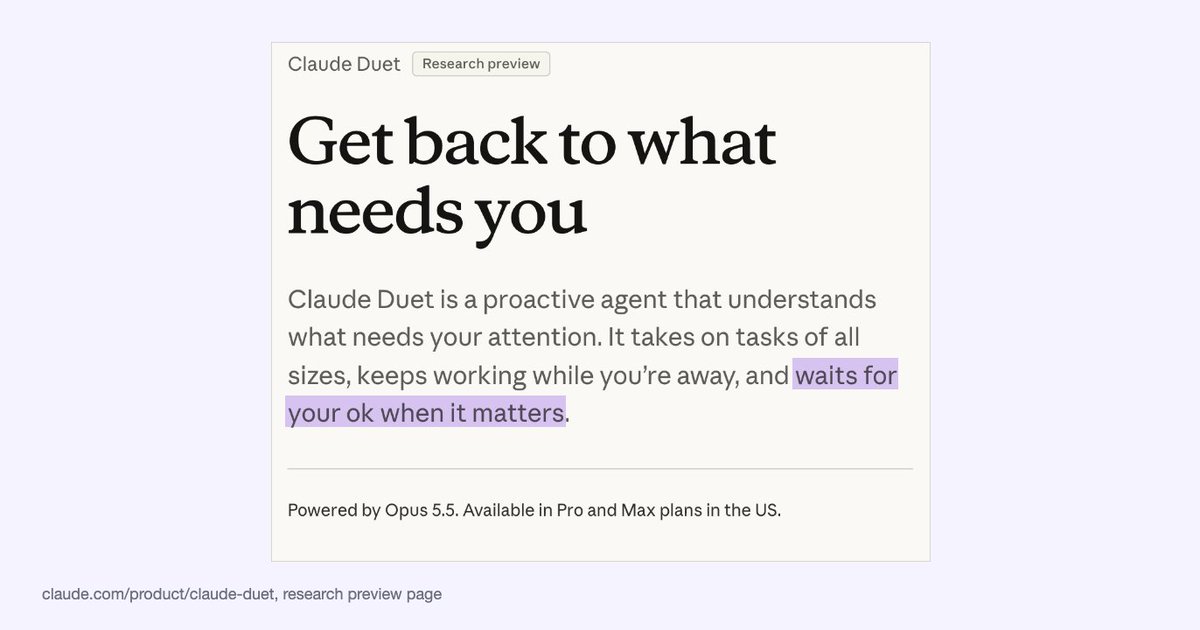
Claude Duet من Anthropic: وكيل استباقي في معاينة بحثية، يلخّص لك كل صباح ما يحتاج انتباهك، ويكمل مهامه وأنت بعيد، وينتظر موافقتك حين يلزم. يعمل بـ Opus 5.5 ومتاح لمشتركي Pro وMax في الولايات المتحد�� مع قائمة انتظار.
https://t.co/RuRAb2Rked
If litellm 1.107.0 ever ran on a machine of yours, don't start with pip install: Python runs the implant on every start, pip included.
LiteLLM's own incident report says 1.107.0 was on PyPI from 11:39 to 13:23 UTC on 21 Oct, and the docker tags latest, main-latest and main-stable pointed at an infected image until 14:20 UTC. The v1.107.0 git tag is clean. The payload was built from a lookalike repo.
What to check:
pip show litellm
litellm-1.107.0.dist-info, cook.pth and https://t.co/mgclttQngP in site-packages
a detached python daemon holding /tmp/remote_code_loader.lock
What to do: delete the three files first, kill the daemon, then reinstall pinned to 1.106.2 (or rebuild the venv or image). Not finding a file doesn't prove you're clean.
Then rotate what the host could reach: the instance role, every provider key in the proxy DB, the master and virtual keys, the DATABASE_URL password, any secret in a process environment. In CloudTrail, look for GetCallerIdentity from the instance role around install time.
What the stealer reads, per SafeDep's decode: SSH keys, cloud and CI credentials, AI tool tokens and the proxy's provider keys.
https://t.co/Z3DuVfwvIA
Critical GitLab patch: CVE-2026-110264, CVSS 10.0. A regex-compiler integer overflow could let an unauthenticated user run code on the server.
Fixed in 19.5.1, 19.4.3, 19.3.6; backports to 19.2, 19.1, 19.0, 18.11. https://t.co/4FvNSYER2m is patched.
https://t.co/AVgMTQCNs4
PHP heads-up: the PHP security team ships a release fixing two critical vulnerabilities (both CVSS 9.2) today at 14:00 UTC (16:00 CEST).
It may land earlier if details leak or attacks show up. Plan your update window now.
https://t.co/vkbGY6FPOq
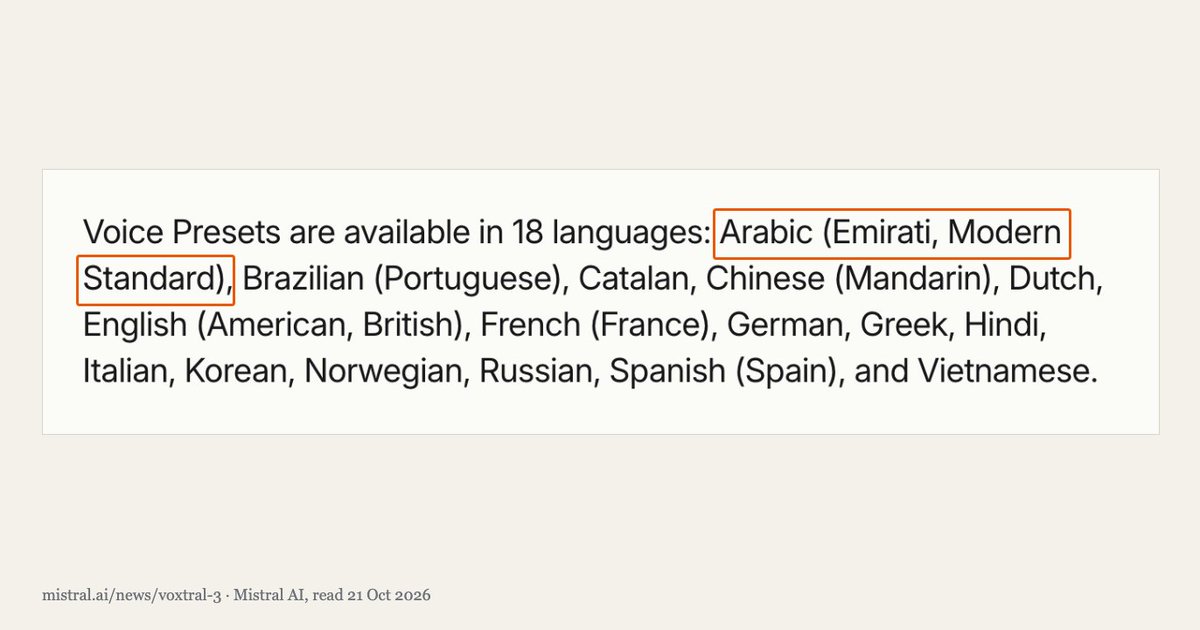
أطلقت Mistral نماذج Voxtral 3 الصوتية، ومن بين أصواتها الجاهزة أصوات بالعربية الفصحى واللهجة الإماراتية.
ونموذج تحويل الكلام إلى نص يدعم أكثر من ٥٠ لغة منها العربية، والهدف مراكز الاتصال والمساعدون الصوتيون.
بأي لهجة تحب أن يرد عليك المساعد الصوتي؟
https://t.co/uqVOdsDM9O
Load Balancing in System Design
➤ What is Load Balancing?
→ Definition: The process of distributing incoming network traffic across multiple servers to prevent any single server from becoming overloaded.
→ Goal → Improve performance → Increase availability → Distribute workloads → Prevent bottlenecks
→ Load balancers sit between clients and backend servers.
→ Example → 1,000 requests arrive → Load balancer distributes them across 5 healthy servers → Each server handles approximately 200 requests, assuming equal distribution.
➤ How Load Balancing Works
→ Client sends a request → Load balancer receives the request → Checks server health and availability → Selects an appropriate backend server → Forwards the request to that server → Server processes the request and returns a response
→ If a server fails → Health checks detect the failure → Traffic is redirected to healthy servers.
➤ Why Load Balancing Matters
→ Prevents individual servers from becoming overloaded → Improves application responsiveness → Increases availability through server redundancy → Supports horizontal scaling → Enables maintenance with reduced service disruption → Helps applications handle traffic spikes
→ Common use cases → E-commerce → Social media → Streaming platforms → Banking systems → Cloud applications
➤ Types of Load Balancers
→ Layer 4 Load Balancing
→ Operates at the transport layer (TCP/UDP) → Routes traffic using network information such as IP addresses and ports → Offers efficient, low-overhead traffic distribution
→ Layer 7 Load Balancing
→ Operates at the application layer (HTTP/HTTPS) → Routes requests using URLs, headers, cookies, or hostnames → Supports content-based routing and application-aware decisions
→ Hardware Load Balancers
→ Dedicated physical appliances → Common in traditional enterprise infrastructure → Can provide high performance but may increase infrastructure costs
→ Software Load Balancers
→ Run as software on servers or virtual machines → Flexible and configurable → Examples → NGINX → HAProxy → Envoy
→ Cloud Load Balancers
→ Managed load-balancing services offered by cloud providers → Examples → AWS Elastic Load Balancing → Google Cloud Load Balancing → Azure Load Balancer
➤ Common Load Balancing Algorithms
→ Round Robin
→ Sends requests to servers in a repeating sequence → Best for servers with similar capacity and relatively uniform workloads
→ Weighted Round Robin
→ Assigns more requests to servers with higher weights → Useful when backend servers have different capacities
→ Least Connections
→ Routes traffic to the server with the fewest active connections → Useful when requests take different amounts of time to complete
→ Weighted Least Connections
→ Considers active connections and server capacity → Helps distribute workloads across heterogeneous servers
→ IP Hash
→ Uses a client's IP address to select a backend server → Can help maintain routing consistency, but does not guarantee session persistence in every configuration
→ Least Response Time
→ Selects servers based on response time and, depending on the implementation, active load → Helps direct traffic toward more responsive instances
➤ Health Checks and Failover
→ Active Health Checks → Periodically send probes to backend servers → Passive Health Checks → Detect failures from actual traffic → Unhealthy Server → Stop sending new requests to that server → Recovery → Return the server to service after it passes health checks → Failover → Redirect traffic to healthy alternatives
→ Important → Health checks reduce the impact of failures, but they do not eliminate every failure scenario.
➤ Load Balancing Architecture
→ Client Requests → Load Balancer → Server 1 → Server 2 → Server 3 → Server N → Shared Cache → Database → Read Replicas
→ Traffic increases → Add backend instances → Server fails → Redirect traffic to healthy instances → Traffic decreases → Scale down excess capacity
→ For critical systems → Deploy redundant load balancers to avoid creating a single point of failure.
➤ Challenges in Load Balancing
→ Uneven traffic distribution → Session persistence and state management → Health-check configuration → Backend server failures → Load balancer capacity limits → TLS termination and certificate management → Cross-region routing and network latency → Maintaining observability across multiple servers
➤ Load Balancing vs Auto Scaling
→ Load Balancing → Distributes traffic across available servers → Auto Scaling → Adds or removes server instances based on demand
→ Load balancing helps distribute existing capacity → Auto scaling adjusts the amount of available capacity → Together → Support responsive, scalable applications
➤ In System Design Interviews
→ Estimate incoming traffic and peak requests per second → Identify potential server bottlenecks → Choose Layer 4 or Layer 7 load balancing → Select an appropriate routing algorithm → Explain health checks and failover → Discuss stateless services and session management → Consider multi-zone or multi-region deployment → Evaluate latency, availability, cost, and operational complexity
➤ System Design Handbook
→ A practical guide to mastering system design fundamentals and distributed architectures → Covers load balancing → Scalability → Consistency → Fault tolerance → Durability → Caching → Databases → CAP Theorem → Designed for developers preparing for system design interviews and building reliable production systems
Get the System Design Handbook here:
https://t.co/WIMretQFPE
DeepSeek open-sourced DeepInfer, the inference framework behind its production services (Apache 2.0, on GitHub since 16 Oct). The README is unusually clear about scope, so here's what's in it and what isn't.
In the box:
- one model so far, DeepSeek-V4.1-Flash (MIT-licensed weights)
- attention data parallelism, MoE expert parallelism with EPLB
- "DSpark" draft-token decoding, max draft length 5 by default
- batch-invariant inference: a request gets the same result whatever else shares its batch (NVIDIA only)
- deterministic sampling with a fixed seq_seed (NVIDIA only)
- structured outputs from a regex, a JSON schema or an EBNF grammar
Not in the box: a KV cache system, prefill/decode disaggregation, and load balancing across replicas. The README calls all three required for a complete inference service. This release is offline inference.
Hardware: NVIDIA SM100 GPUs or Huawei Ascend 950 NPUs. The published benchmarks ran prefill on 4 GPUs and decode on 64.
It started out built mainly on vLLM, with ideas from SGLang and TensorRT-LLM, and the README credits all three.
To try the model without that hardware, Ollama lists it as a cloud model only: ollama run deepseek-v4.1-flash:cloud
https://t.co/UFEFURWC8Q
Meet Qwen3.8-Flash-Next-FP4-Local: a quantized image-text-to-text powerhouse. FP4 precision means faster inference and lower memory, all while handling vision and language together. Built for local deployment with ModelOpt optimization. This is efficiency meets multimodal AI.
We made open models run over 2x faster than Ollama, without any new hardware
Introducing Magnitude, an open source inference engine that runs open models as fast as your hardware allows. It tunes its kernels on your machine to find the fastest way to run each model
Works on Apple Silicon, NVIDIA, AMD, or just a CPU
On average across 11 popular local models:
Mac M4 Pro vs Ollama (MLX) 1.32x faster prefill, 2.19x faster decode
DGX Spark vs Ollama (llama.cpp) 1.34x faster prefill, 2.17x faster decode
Ollama, LM Studio, and llama.cpp ship one-size-fits-all kernels, because tuning each model for each chip by hand would take forever
Magnitude tunes them automatically. When you download a model, it spends up to a minute on your actual chip trying different ways to split up the math (how many GPU threads team up, how big a chunk each one takes, how far ahead to load data) and keeps the fastest combination that doesn't change the model's output
Each model also comes paired with the best speculative decoding drafter, for even more speed
One click connects Magnitude to the agent you already use (Pi, OpenCode, Hermes, Codex, and more). It's also built specifically for agents:
• Each agent uses about half the memory, thanks to a quantized KV cache
• Memory grows and shrinks with your sessions, so your computer stays usable
• Agents share prefix caches, so several can run at once without slowing down
Next, we're working on getting even more out of your hardware:
• Expert streaming from RAM or disk, to run models bigger than your GPU allows
• Splitting one model across all your GPUs and CPU so nothing sits idle
• Attention pruning that skips low-impact math, for much faster prefill
Ships as a desktop app on Mac, Windows, and Linux
100% free and open source
Download → https://t.co/GgA3qLow9t
GitHub → https://t.co/lR8GMis9pF