Introducing Project Glasswing: an urgent initiative to help secure the world’s most critical software.
It’s powered by our newest frontier model, Claude Mythos Preview, which can find software vulnerabilities better than all but the most skilled humans.
https://t.co/NQ7IfEtYk7
New supply chain attack this time for npm axios, the most popular HTTP client library with 300M weekly downloads.
Scanning my system I found a use imported from googleworkspace/cli from a few days ago when I was experimenting with gmail/gcal cli. The installed version (luckily) resolved to an unaffected 1.13.5, but the project dependency is not pinned, meaning that if I did this earlier today the code would have resolved to latest and I'd be pwned.
It's possible to personally defend against these to some extent with local settings e.g. release-age constraints, or containers or etc, but I think ultimately the defaults of package management projects (pip, npm etc) have to change so that a single infection (usually luckily fairly temporary in nature due to security scanning) does not spread through users at random and at scale via unpinned dependencies.
More comprehensive article:
https://t.co/EJAZbqAPIQ
🚨BREAKING: Claude just made PowerPoint obsolete.
Here are 6 prompts that build your entire presentation. In one sitting.
(Save this and never open powerpoint again)
🚨 BREAKING: Anthropic quietly dropped a 32-page playbook on building Claude Skills.
Skills let you teach Claude your exact workflow once. It executes it every time after that. Across https://t.co/2GObxc6woq, Claude Code, and the API.
No more re-explaining. No more inconsistent output.
This is how AI goes from chatbot to custom operating system.
PDF: https://t.co/uEiMbCTHVM
Prompt engineering is dead.
Anthropic recently released the real playbook for building AI agents that actually work.
It’s a 30+ page deep dive called The Complete Guide to Building Skills for Claude and it quietly shifts the conversation from “prompt engineering” to real execution design.
Here’s the big idea:
A Skill isn’t just a prompt.
It’s a structured system.
You package instructions inside a SKILL .md file, optionally add scripts, references, and assets, and teach Claude a repeatable workflow once instead of re-explaining it every chat.
But the real unlock is something they call progressive disclosure.
Instead of dumping everything into context:
• A lightweight YAML frontmatter tells Claude when to use the skill
• Full instructions load only when relevant
• Extra files are accessed only if needed
Less context bloat. More precision.
They also introduce a powerful analogy:
MCP gives Claude the kitchen.
Skills give it the recipe.
Without skills: users connect tools and don’t know what to do next.
With skills: workflows trigger automatically, best practices are embedded, API calls become consistent.
They outline 3 major patterns:
1) Document & asset creation
2) Workflow automation
3) MCP enhancement
And they emphasize something most builders ignore: testing.
Trigger accuracy.
Tool call efficiency.
Failure rate.
Token usage.
This isn’t about clever wording.
It’s about designing an execution layer on top of LLMs.
Skills work across Claude, Claude Code, and the API. Build once, deploy everywhere.
The era of “just write a better prompt” is ending.
Anthropic just handed everyone a blueprint for turning chat into infrastructure.
Download the guide here: https://t.co/Bf3j0GFRGu
🚨BREAKING: You can now run Claude Code for FREE.
No API costs. No rate limits. 100% local on your machine.
Here's how to run Claude Code locally (100% free & fully private):
Software development is undergoing a renaissance in front of our eyes.
If you haven't used the tools recently, you likely are underestimating what you're missing. Since December, there's been a step function improvement in what tools like Codex can do. Some great engineers at OpenAI yesterday told me that their job has fundamentally changed since December. Prior to then, they could use Codex for unit tests; now it writes essentially all the code and does a great deal of their operations and debugging. Not everyone has yet made that leap, but it's usually because of factors besides the capability of the model.
Every company faces the same opportunity now, and navigating it well — just like with cloud computing or the Internet — requires careful thought. This post shares how OpenAI is currently approaching retooling our teams towards agentic software development. We're still learning and iterating, but here's how we're thinking about it right now:
As a first step, by March 31st, we're aiming that:
(1) For any technical task, the tool of first resort for humans is interacting with an agent rather than using an editor or terminal.
(2) The default way humans utilize agents is explicitly evaluated as safe, but also productive enough that most workflows do not need additional permissions.
In order to get there, here's what we recommended to the team a few weeks ago:
1. Take the time to try out the tools. The tools do sell themselves — many people have had amazing experiences with 5.2 in Codex, after having churned from codex web a few months ago. But many people are also so busy they haven't had a chance to try Codex yet or got stuck thinking "is there any way it could do X" rather than just trying.
- Designate an "agents captain" for your team — the primary person responsible for thinking about how agents can be brought into the teams' workflow.
- Share experiences or questions in a few designated internal channels
- Take a day for a company-wide Codex hackathon
2. Create skills and AGENTS[.md].
- Create and maintain an AGENTS[.md] for any project you work on; update the AGENTS[.md] whenever the agent does something wrong or struggles with a task.
- Write skills for anything that you get Codex to do, and commit it to the skills directory in a shared repository
3. Inventory and make accessible any internal tools.
- Maintain a list of tools that your team relies on, and make sure someone takes point on making it agent-accessible (such as via a CLI or MCP server).
4. Structure codebases to be agent-first. With the models changing so fast, this is still somewhat untrodden ground, and will require some exploration.
- Write tests which are quick to run, and create high-quality interfaces between components.
5. Say no to slop. Managing AI generated code at scale is an emerging problem, and will require new processes and conventions to keep code quality high
- Ensure that some human is accountable for any code that gets merged. As a code reviewer, maintain at least the same bar as you would for human-written code, and make sure the author understands what they're submitting.
6. Work on basic infra. There's a lot of room for everyone to build basic infrastructure, which can be guided by internal user feedback. The core tools are getting a lot better and more usable, but there's a lot of infrastructure that currently go around the tools, such as observability, tracking not just the committed code but the agent trajectories that led to them, and central management of the tools that agents are able to use.
Overall, adopting tools like Codex is not just a technical but also a deep cultural change, with a lot of downstream implications to figure out. We encourage every manager to drive this with their team, and to think through other action items — for example, per item 5 above, what else can prevent a lot of "functionally-correct but poorly-maintainable code" from creeping into codebases.
R.I.P. basic prompting.
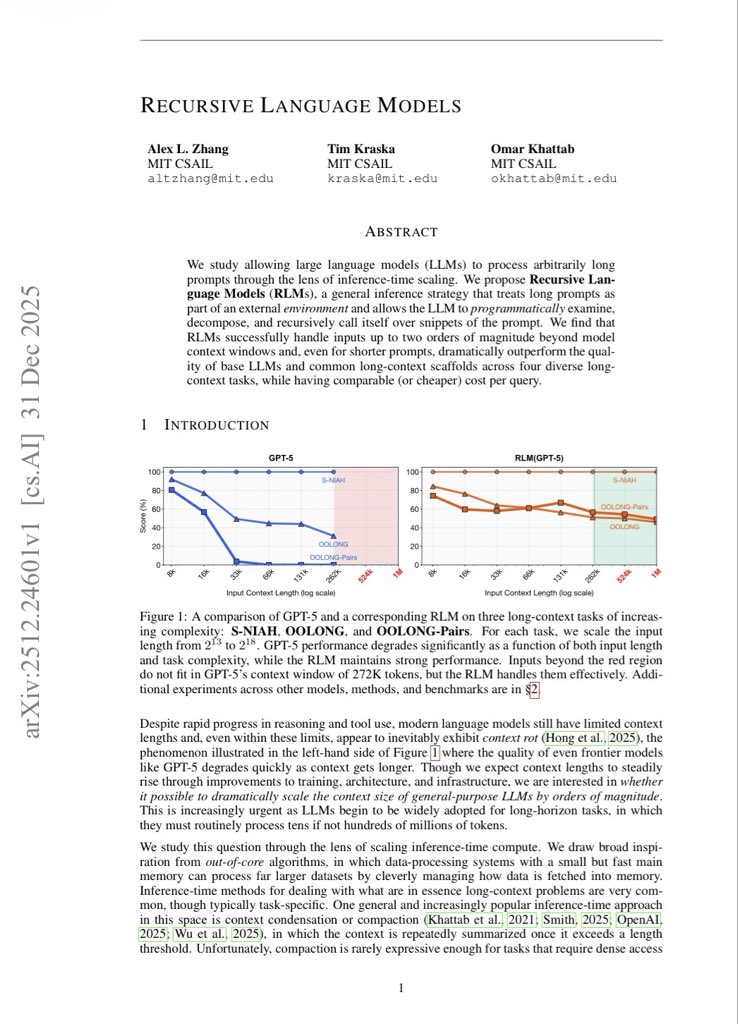
MIT just dropped a technique that makes ChatGPT reason like a team of experts instead of one overconfident intern.
It’s called “Recursive Meta-Cognition” and it outperforms standard prompts by 110%.
Here’s the prompt (and why this changes everything) 👇
I'm Boris and I created Claude Code. Lots of people have asked how I use Claude Code, so I wanted to show off my setup a bit.
My setup might be surprisingly vanilla! Claude Code works great out of the box, so I personally don't customize it much. There is no one correct way to use Claude Code: we intentionally build it in a way that you can use it, customize it, and hack it however you like. Each person on the Claude Code team uses it very differently.
So, here goes.
My AI coding rhythm on a new project revolves around optimizing https://t.co/8yc7gBkgXO (or equivalent like https://t.co/ussIwjI8h8)
1. Create https://t.co/8yc7gBkgXO. Specify architectural decisions, coding standards, and desired workflow rules. For example, “create or enhance tests and run them after implementing a feature.”
2. Tell the LLM to build a specific feature. Review its todo list, tweak as needed, then tell it to implement the change one file at a time.
3. If a change doesn’t match my coding standards, enhance https://t.co/8yc7gBkgXO with more details so the LLM does better next time. This file regularly improves as I learn how to optimize my instructions for each project.
Thanks to Zed + CodeCompanion.nvim, Neovim already has support for Agent Client Protocol (ACP)! That is cool.
I don't know what ACP is, but still... it's cool.
https://t.co/JkN8UAQXrT
@thekitze I'm using LLMs all day long, but I'm not letting it write my code. It's looking up APIs, it's explaining concepts, but I want to reserve the fun part of programming for myself: Actually writing code!