Few days ago I promised to drop a roadmap for beginners in ethical hacking so they don’t get confused and carried about by shinny object syndrome.
Tap in 👇
https://t.co/Nu72ouApel
One of the biggest advantages of using a malware sandbox is that it lets you observe what a sample actually does instead of guessing what it might do. Static analysis tells you what is inside the executable, but dynamic analysis reveals how it behaves once it starts interacting with the operating system. That difference is often what separates a suspicious file from a confirmed threat.
This analysis shows a process tree that begins with a seemingly harmless executable before spawning PowerShell, mshta.exe, rundll32.exe, and regsvr32.exe. These are legitimate Windows binaries that attackers frequently abuse to execute malicious code while blending into normal system activity. Looking at the process relationships instead of individual processes makes it much easier to understand the attack chain.
Another section worth paying attention to is the network and behavioral summary. A single outbound connection is not enough to label something as malicious, but when you combine network activity with registry changes, dropped files, persistence mechanisms, and suspicious child processes, the evidence becomes much stronger. Malware analysis is about correlating many small indicators into one clear conclusion.
A good malware analyst never trusts one detection engine or one sandbox report. Validate the findings with static analysis, inspect the memory if necessary, extract IOCs, and understand why the malware behaved the way it did. The more you focus on the attacker’s sequence of actions instead of just the malware name, the better you’ll become at detecting entirely new threats that haven’t been named yet.
🛑 Physical Pentest Scenario
You’re inside an office during an authorized pentest.
An employee says:
“I’m heading to lunch. Can you watch my laptop for a minute?”
The laptop is unlocked.
What do you do?
A. Sit down and browse through files
B. Politely decline and document the
unattended unlocked workstation
C. Install a remote access tool
D. Lock the workstation and leave
One of the fastest ways to understand an unfamiliar malware sample is to stop looking at the code first and start looking at its strings and imported APIs. Before you spend hours reversing assembly, ask yourself what the binary already tells you about itself. Many samples expose valuable clues long before execution begins.
In this IDA Pro analysis, the Strings window immediately reveals references to browser data, login databases, registry paths, and user profile locations. Those artifacts alone suggest the malware is interested in credential theft and data collection. The Imports window complements this by showing which Windows APIs the malware relies on. Functions such as VirtualAlloc, CreateFileA, registry APIs, and Winsock networking calls can quickly paint a picture of the malware’s capabilities before a single function is fully reversed.
As analysts, we should never rely on one indicator alone. A suspicious string could be left over from a previous build, and an imported API may never actually be called. The real value comes from correlating strings, imports, control flow, memory behavior, and runtime observations from debuggers or sandboxes. That is how you separate assumptions from evidence.
One lesson I have learned over the years is that good reverse engineering starts with asking questions, not writing notes. Why does this binary access these registry keys? Why these APIs? Why allocate executable memory? Every answer leads to another question until the malware has no secrets left to hide.
The goal of malware analysis is not just to identify a malware family. It is to understand how it operates, what it targets, how defenders can detect it earlier, and what indicators can help stop the next attack before it reaches another victim.
Memory never lies, it only disappears when the system powers off.
This screenshot shows a Volatility 3 memory forensics investigation against a Windows memory image (win11-24H2-memory.raw). At first glance, everything looks normal, but the deeper you dig, the more interesting it becomes. The process tree reveals an unusual executable (evil.exe) spawned through a suspicious parent process, while the malfind results identify executable memory pages with RWX permissions, a strong indicator of process injection or in-memory malware. YARA signatures have also matched suspicious regions, providing another layer of confidence that the process deserves further investigation.
What makes memory forensics so valuable is that it exposes artifacts you may never find on disk. Attackers increasingly rely on fileless techniques, reflective DLL injection, process hollowing, and credential theft that exist only in RAM. Even if the malware deletes itself from the filesystem, its process structures, loaded modules, command-line arguments, network connections, and injected memory regions often remain available until the system is powered off.
For incident responders, capturing memory before shutting down a compromised machine can be the difference between proving an intrusion and losing the most valuable evidence. Memory is one of the richest forensic artifacts available, and tools like Volatility continue to be indispensable for DFIR teams investigating modern attacks.
Most people look at a debugger and immediately focus on the assembly instructions. I usually spend just as much time watching everything around them. Loaded modules, register changes, memory regions, thread activity, and the execution path often reveal far more about a sample than the code itself. Malware rarely gives away its real intentions in the first few instructions.
In this x64dbg session, the sample is paused inside ntdll.dll, which is where many malware families eventually end up before making Windows system calls. Watching how execution flows into and out of these low level APIs can expose process injection, memory allocation, privilege changes, or attempts to evade user mode monitoring. The interesting part is rarely where the malware starts. It is where it chooses to go next.
One habit that has made me a better malware analyst is correlating what I see in the debugger with Procmon, Process Explorer, API Monitor, Wireshark, and memory forensics. Looking at only one tool gives you one piece of the puzzle. Combining several viewpoints tells the complete story.
Reverse engineering is not about reading assembly faster than everyone else. It is about asking the right questions, validating every assumption, and following the evidence until the malware has nowhere left to hide. That mindset separates analysts who identify indicators from those who truly understand the threat.
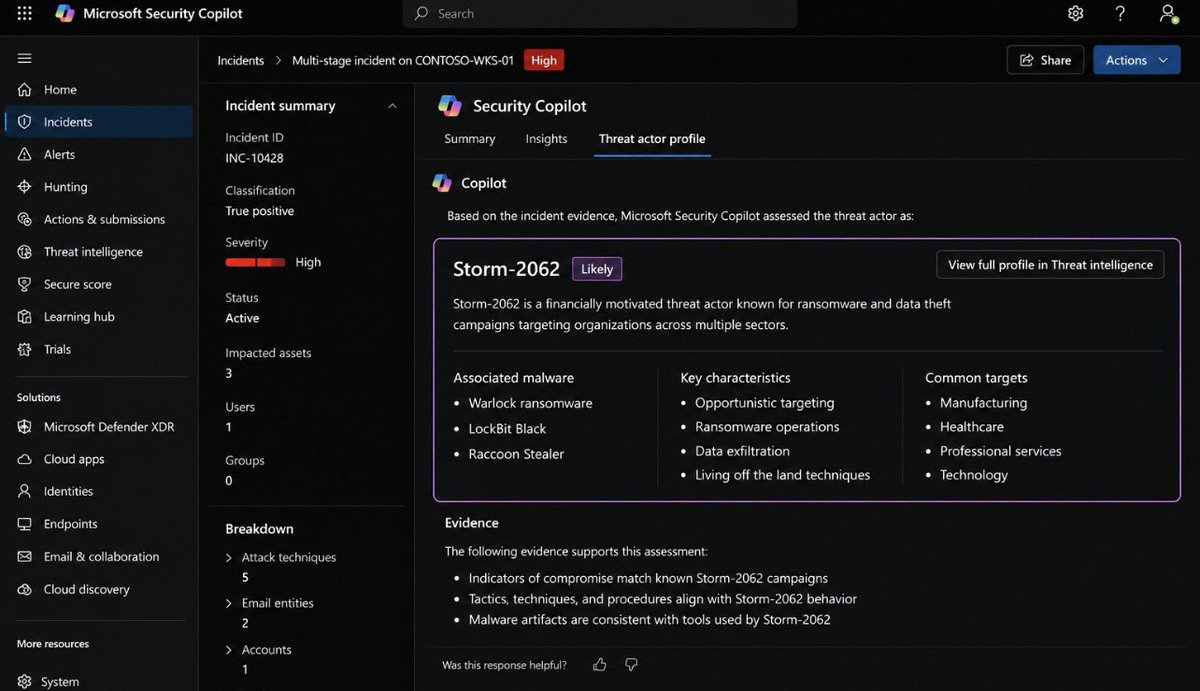
One of the most interesting additions to Microsoft’s security ecosystem is Security Copilot. Instead of replacing SOC analysts, it helps them investigate incidents faster by correlating telemetry from Defender XDR, Microsoft Sentinel, Intune, Entra ID, and threat intelligence into a single conversational interface.
In the screenshot below, Security Copilot is analyzing an active incident and automatically building a threat actor profile from the available evidence. Rather than forcing an analyst to pivot between multiple dashboards, it summarizes the incident, identifies malware families, highlights attacker characteristics, and provides context about potential targets. This reduces investigation time and helps analysts focus on validating findings instead of manually gathering data.
That said, AI should never become your only analyst. Threat actor attribution is based on patterns and confidence levels, not certainty. Every AI-generated assessment should be verified against endpoint telemetry, authentication logs, network activity, and digital forensic evidence before making response decisions. AI accelerates investigations, but human validation remains critical.
The future SOC will not be analysts versus AI. It will be analysts working alongside AI. The teams that learn how to ask better questions, validate AI findings, and combine automation with human expertise will investigate incidents much faster than those relying on either humans or AI alone.
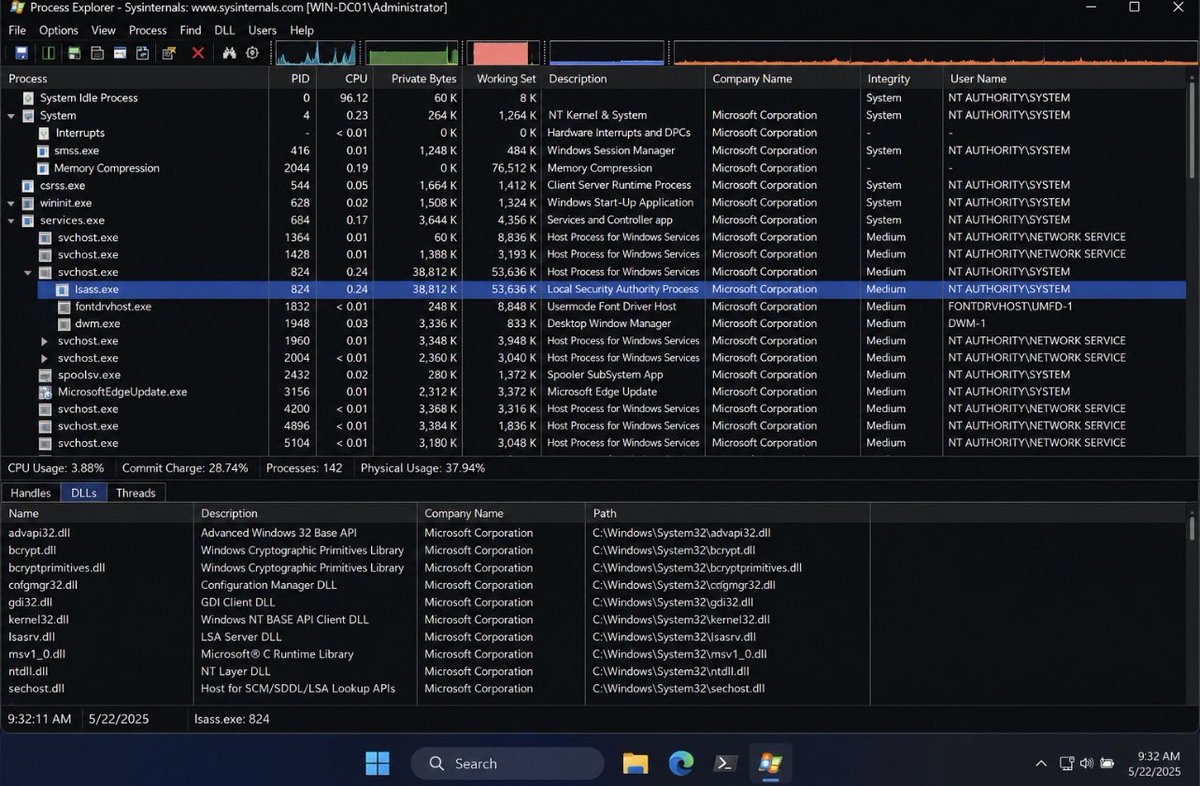
One of the first places I look during a Windows investigation is Process Explorer, especially when something doesn’t feel right on a system. Most people use it as a better Task Manager, but it exposes far more than CPU and memory usage. It shows process hierarchies, loaded DLLs, handles, integrity levels, digital signatures, parent-child relationships, and much more. That extra visibility often tells the real story.
Take lsass.exe for example. Seeing the process isn’t enough. I want to know where it was launched from, which modules are loaded into it, what handles it has open, whether it’s properly signed by Microsoft, and if its parent-child relationship makes sense. Malware that targets credential theft often leaves subtle clues here before traditional antivirus raises an alert.
For defenders and DFIR analysts, Process Explorer is also a quick way to validate suspicious behavior. A process running from an unusual directory, an unsigned executable masquerading as a Windows binary, or an unexpected DLL injected into a trusted process can immediately change the direction of an investigation. Those small details are often the difference between finding the root cause in minutes instead of hours.
The biggest lesson is this. Don’t just memorize Windows process names. Learn what “normal” looks like. Once you understand how Windows behaves under the hood, abnormal activity becomes much easier to spot, even before an alert is generated. That’s where real Windows security starts.
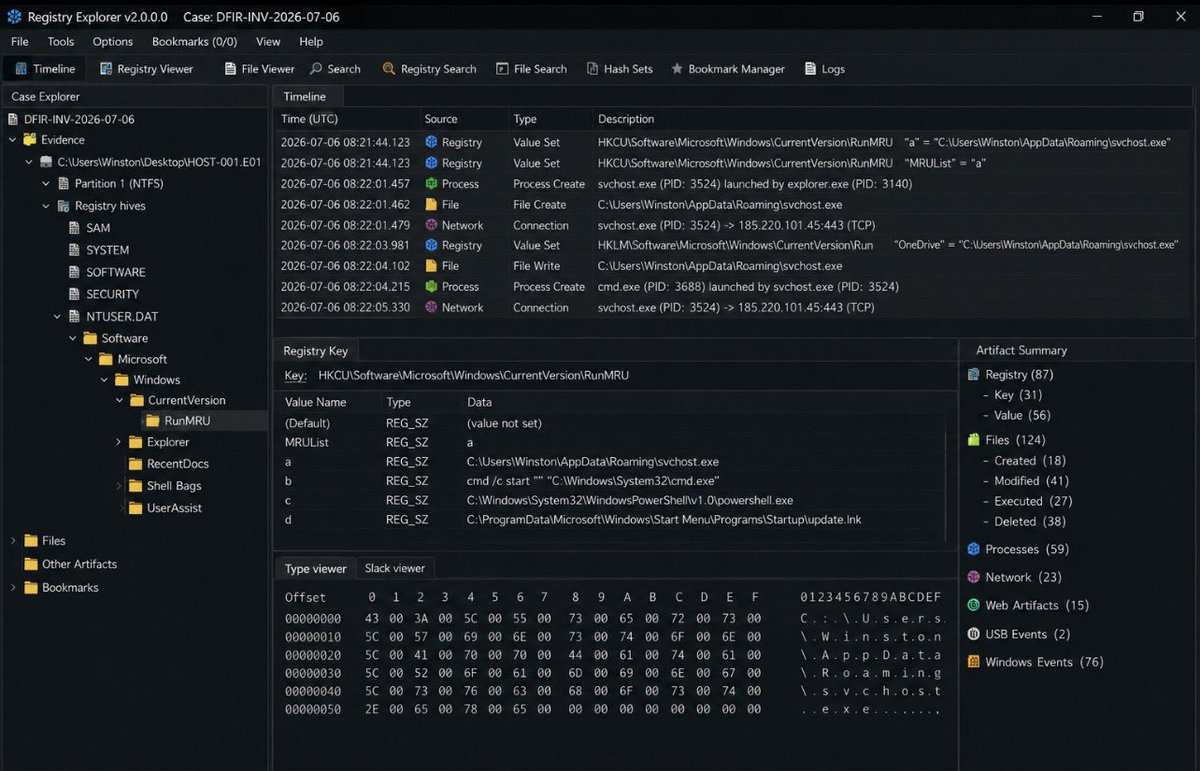
One thing I always tell my students is that malware investigations rarely start with the malware itself. More often than not, they begin with the Windows Registry.
What you’re looking at here is a registry-focused forensic investigation where multiple artifacts have been correlated into a single timeline. Notice how registry modifications, process creation, file writes, and outbound network connections are all aligned chronologically. This allows an investigator to answer important questions like what executed first, what changed on the system, and what happened immediately afterwards.
The highlighted RunMRU key records commands entered through the Windows Run dialog, while other artifacts such as RecentDocs, UserAssist, and Run keys help reconstruct user activity and identify persistence mechanisms. Even if an attacker deletes their malware, these registry artifacts often remain behind, making them invaluable during incident response.
This is why experienced DFIR analysts don’t rely on one artifact. They build a timeline using the registry, event logs, file metadata, network activity, and process execution until the evidence tells a complete story. The registry isn’t just a configuration database—it’s one of the richest sources of forensic evidence on a Windows system.
43 security vendors flagged this file as malicious.
Most people would stop there and call it malware, but that’s not how real investigations work. A detection score only tells you what security vendors think. The real questions are: What did the file do? Which processes did it spawn? Did it establish persistence? Did it contact an external server?
The behavior graph in this dashboard tells a much bigger story. The executable launches PowerShell and Command Prompt, modifies the registry through reg.exe, executes rundll32.exe, and then communicates with multiple external IP addresses. That sequence is exactly what analysts use to build an attack timeline during an investigation.
Notice something else, Microsoft doesn’t detect the sample while many other vendors do. This happens more often than people think. No antivirus engine has a 100% detection rate, which is why relying on a single product is risky. Mature SOCs correlate endpoint telemetry, process trees, network traffic, registry changes, and memory artifacts before making a final decision.
The biggest lesson? Never trust the detection score alone. Malware can change its hash, filename, or packing method overnight, but its behavior is much harder to hide.
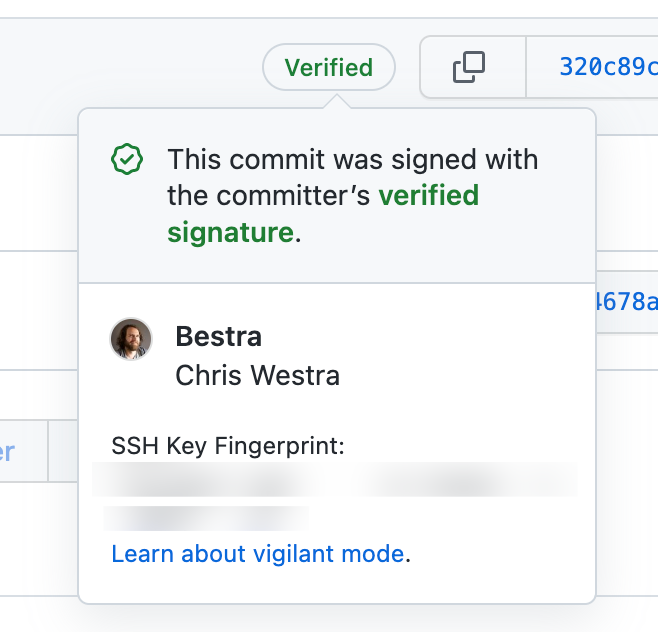
This is one of those discoveries that sounds highly technical until you realize what it actually means. For years, developers and security teams have treated GitHub’s green “Verified” badge as a strong signal that a piece of code came from a trusted author and represented a unique commit. If research shows that a signed commit can be recreated with a different identity while still displaying that same verification badge, then one of the assumptions many security workflows rely on suddenly becomes much weaker.
History has shown that attackers rarely break cryptography itself. Instead, they look for ways to break the trust surrounding it. We saw it with stolen code-signing certificates, compromised software update servers, and supply chain attacks like SolarWinds and XZ Utils. In almost every major software supply chain incident, the goal was never just to inject malicious code. The goal was to make that code look legitimate enough that everyone would trust it without asking questions. Trust has always been the real target.
That is why this research deserves attention beyond the developer community. Modern software is no longer built by one programmer writing code on a single computer. It is assembled from thousands of open-source packages, automated pipelines, CI/CD systems, and third-party dependencies. Every one of those systems depends on trust. If attackers discover ways to weaken that trust, the consequences can spread far beyond a single repository. A weakness that looks small today can become tomorrow’s large-scale supply chain attack if organizations continue relying on assumptions that are no longer true.
This is another reminder that cybersecurity is an endless cycle of building trust and then testing whether that trust actually holds up. Every time we create a new security feature, we eventually discover its limitations. That is how the industry has always evolved. The safest organizations are not the ones that blindly trust verification badges or security labels. They are the ones that constantly question their assumptions, validate what they receive, and remember that in cybersecurity, trust should never be the final layer of defense.
This is one of those discoveries that sounds highly technical until you realize what it actually means. For years, developers and security teams have treated GitHub’s green “Verified” badge as a strong signal that a piece of code came from a trusted author and represented a unique commit. If research shows that a signed commit can be recreated with a different identity while still displaying that same verification badge, then one of the assumptions many security workflows rely on suddenly becomes much weaker.
History has shown that attackers rarely break cryptography itself. Instead, they look for ways to break the trust surrounding it. We saw it with stolen code-signing certificates, compromised software update servers, and supply chain attacks like SolarWinds and XZ Utils. In almost every major software supply chain incident, the goal was never just to inject malicious code. The goal was to make that code look legitimate enough that everyone would trust it without asking questions. Trust has always been the real target.
That is why this research deserves attention beyond the developer community. Modern software is no longer built by one programmer writing code on a single computer. It is assembled from thousands of open-source packages, automated pipelines, CI/CD systems, and third-party dependencies. Every one of those systems depends on trust. If attackers discover ways to weaken that trust, the consequences can spread far beyond a single repository. A weakness that looks small today can become tomorrow’s large-scale supply chain attack if organizations continue relying on assumptions that are no longer true.
This is another reminder that cybersecurity is an endless cycle of building trust and then testing whether that trust actually holds up. Every time we create a new security feature, we eventually discover its limitations. That is how the industry has always evolved. The safest organizations are not the ones that blindly trust verification badges or security labels. They are the ones that constantly question their assumptions, validate what they receive, and remember that in cybersecurity, trust should never be the final layer of defense.
‼️ BREAKING: New research shows you can copy any signed GitHub commit into a second one that looks identical, without the author's secret key, creating a distinct commit with an identical tree, identical metadata, a valid signature, and a "Verified" badge from GitHub.
On GitHub, a green "Verified" badge is supposed to mean two things: a trusted author signed it, and its ID is a one-of-a-kind fingerprint for that exact code. A new Carnegie Mellon preprint from Jacob Ginesin says the second promise, the unique fingerprint, does not hold.
Why it matters: security teams and package systems (behind tools like Go, Nix, and GitHub Actions) trust that ID as a unique handle for code. Block or pin the "bad" version, and an attacker can re-issue the same signed code under a fresh, still-verified ID that slips past. The author says Git and GitHub have not fixed it.
PoC: https://t.co/b2CevCtpcd
What caught my attention is not just that a 15-year-old allegedly carried out an attack. It is the claim that AI was used to help develop the malware. Whether people like it or not, we are entering a period where tools that once required years of experience are becoming easier to access. That should concern everyone. We are no longer talking about someone spending years learning low-level programming before attempting an attack. We are talking about a generation that can potentially accelerate their learning with AI and move much faster than those before them.
If you look back through cybersecurity history, there has always been a barrier to entry. In the early days, you had to read books, study operating systems, understand networking, and spend countless hours writing and debugging your own code. That learning curve naturally slowed people down. Today, some of those barriers are disappearing. AI can explain concepts, generate code, troubleshoot errors, and help inexperienced users move from an idea to an executable program much faster than was possible just a few years ago. That changes the threat landscape whether we want to admit it or not.
I also think this is a wake-up call for companies. If a teenager can allegedly find a flaw, use modern tools to speed up development, and cause enough disruption to take a service offline and affect thousands of users, then organizations need to rethink how they approach security. Defenders can no longer assume attackers need elite skills to be dangerous. The combination of publicly available information, leaked code, and AI assistance means the average attacker today may be far more capable than the average attacker five years ago.
To me, this is one of the biggest cybersecurity stories of the AI era. The conversation should not stop at whether AI was involved. The real question is what happens when increasingly powerful tools become available to millions of people with very different intentions. Technology has always been a double-edged sword, but AI is accelerating both innovation and misuse at the same time. The organizations that recognize this shift early and strengthen their defenses will be in a much better position than those still preparing for yesterday’s threats.