Jev for RAG?
How does the decision model's retrieval performance compare to the top Vector-based model?
We announce the Page Search API, faster and more accurate than SOTA embedding models.
Learn more: https://t.co/H3A27C8jjt
@CloudflareDev Nice for structured app data. On the PDF side (manuals, reports), answers often live in a chart or table that text chunks mangle. Page Search returns the relevant pages as images from a plain question, no embeddings or indexing step: https://t.co/gMRggv4IDi
@ConsciousRide Great point on chunk size deciding what can ever be retrieved. For long PDFs you can also skip chunking: We create page search so that we can upload a PDF, ask a question, and get the relevant pages back as images in seconds. No embeddings, or index time. https://t.co/gMRggv4IDi
@techyoutbe Big gap in that answer: one shared vector index mixes every doc's chunks, so permissions get bolted on after retrieval. Scoping search to the files a user can open avoids that. Page Search runs per PDF with no embedding index and returns the source page: https://t.co/gMRggv4IDi
@realpython Embedding costs sneak up fast, and top-k chunks can still miss the page that actually holds the answer. For PDFs, one option is skipping embeddings entirely: Page Search takes an upload + a question and returns the relevant pages as images in seconds. https://t.co/gMRggv4IDi
@emollick The chat box got absorbed, but the core problem didn't: in a 300-page filing the answer is often one chart or table, and chunk+embed pipelines lose those. We create Page Search returning the right page(s) as images, no embeddings or indexing: https://t.co/gMRggv4IDi
@firecrawl Finding the right paper is half of it. The other half is landing on the exact figure or results table inside a 40-page PDF. Page Search does that: upload the PDF, ask, get the matching page(s) back as images in seconds. No embeddings, no indexing. https://t.co/gMRggv4IDi
@AlmustyLabs Contradiction-finding lives or dies on showing the exact source. When the agent flags a conflict, you want both pages side by side, not two loose chunks. We create Page Search to return the relevant PDF pages as images, no embeddings,maybe have a try! https://t.co/gMRggv4IDi
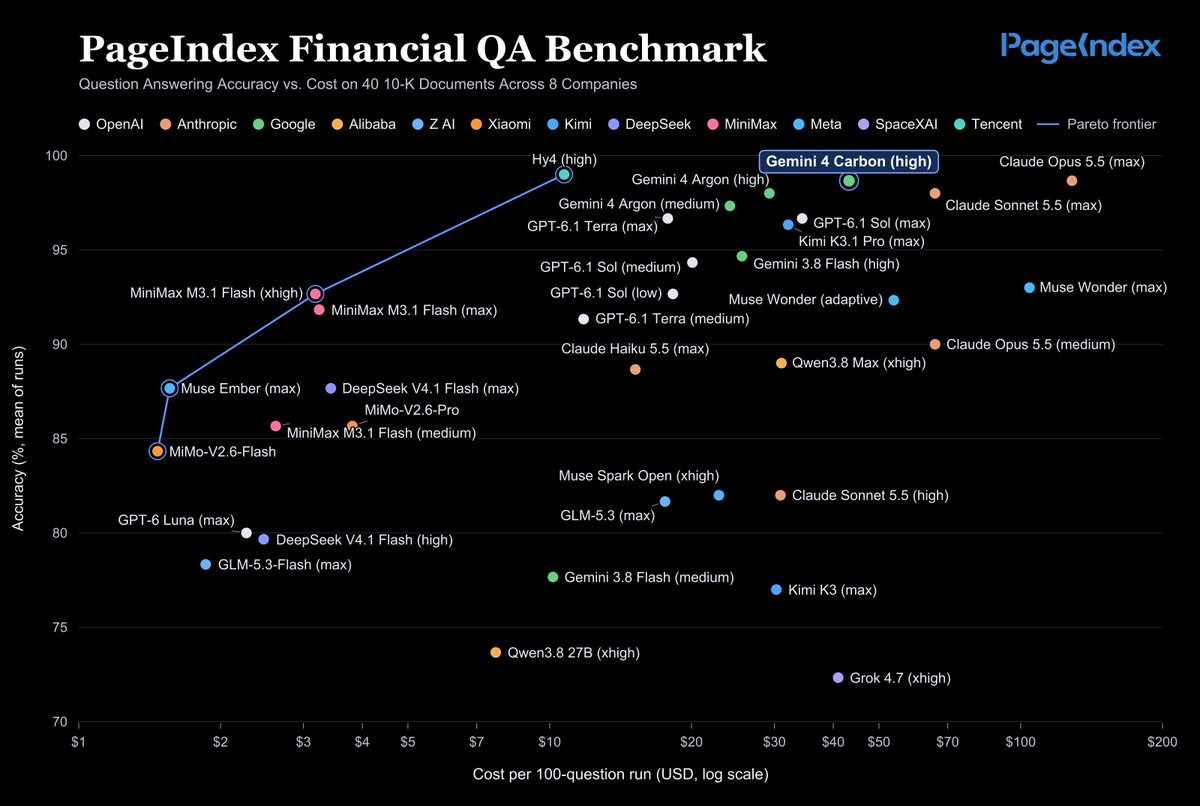
Gemini 4 Carbon. Now on PageIndex.
We tested it across 40 10-K filings. Carbon (high) averaged 98.7% accuracy, tied for #2 in our Financial QA Benchmark.
It scored slightly higher than Argon (high)’s 98.0%, but at about 48% higher query cost under current introductory pricing.
Try the new model on PageIndex, with answers linked to their sources → https://t.co/mCvkknTZiZ
@Umesh__digital Exact IDs are where similarity search breaks: #1234 and #1235 embed almost identically. Metadata/keyword filters are the classic fix. For docs, reasoning-based retrieval sidesteps it too: an LLM reads the structure and picks the page, no vectors. https://t.co/gMRggv4IDi
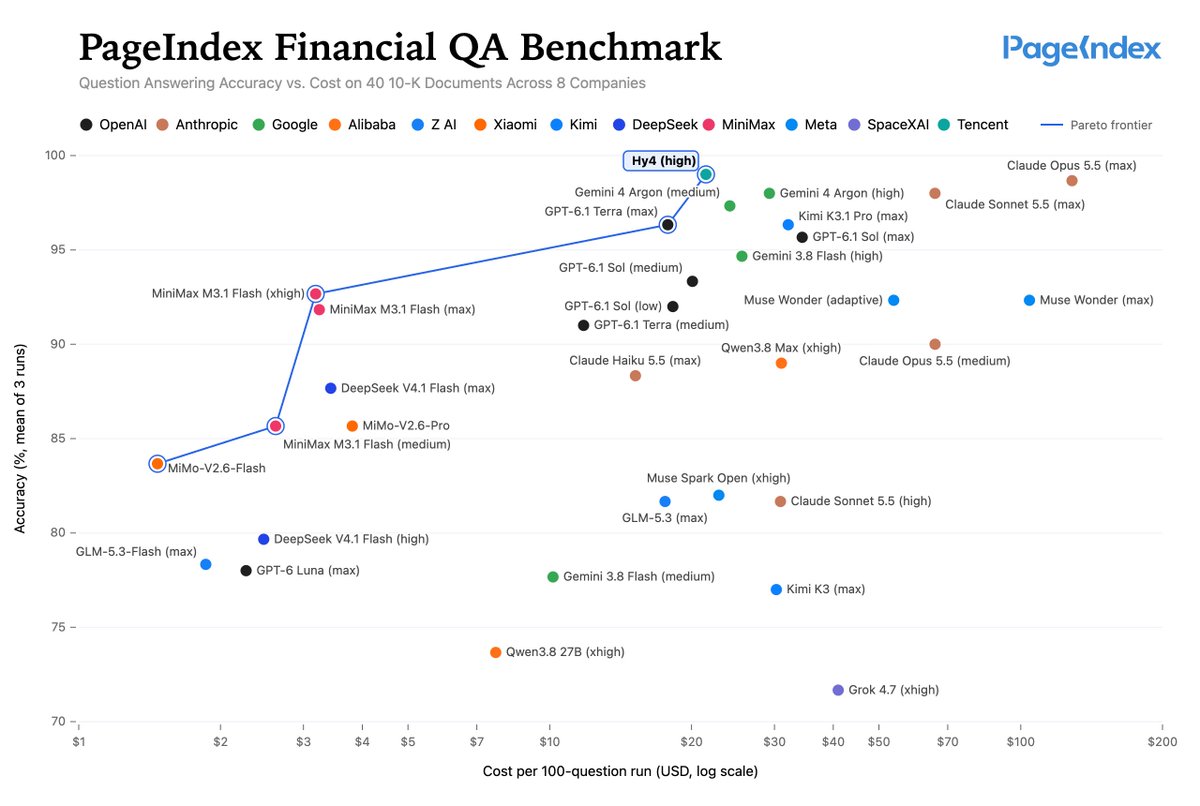
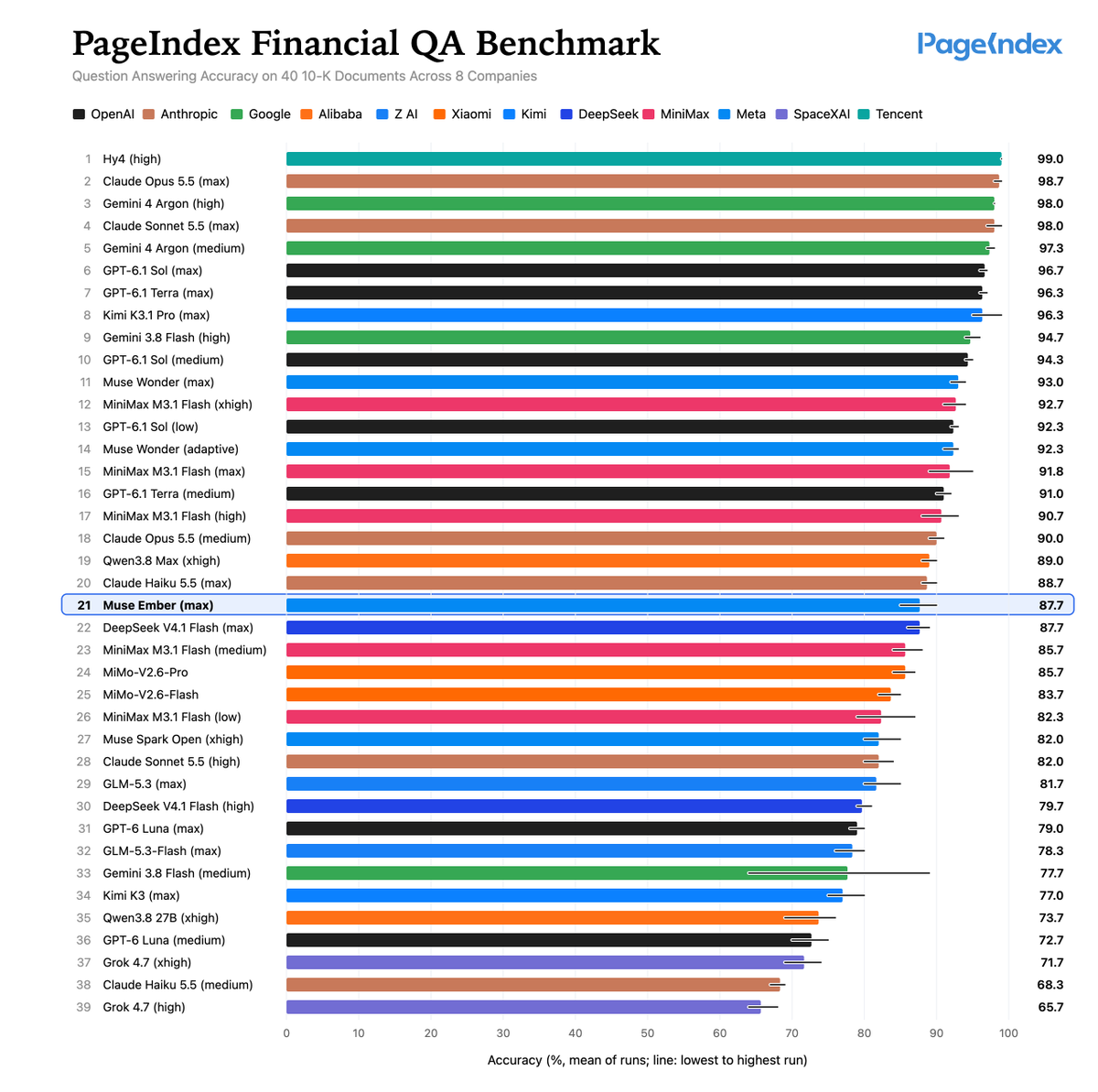
@TencentHunyuan We also tested Hy4 on PageIndex’s Financial QA benchmark — it scored 99.0% and currently leads our leaderboard! 🎉
Full results: https://t.co/D2jB5zaXjV
Tencent Hy4 surprised us.
Hy4 (high) just joined the Pareto frontier on our Financial QA benchmark.
➤ Accuracy: 99.0%, the highest score measured on the benchmark.
➤ Cost: About 1/12 the cost of Claude Opus 5.5 (max) per 100-question run.
Congrats @TencentHunyuan !
Try it with your own documents:
https://t.co/mCvkknTZiZ
@clcoding Nice roadmap. One layer worth questioning is retrieval: for long PDFs you don't always need embeddings + a vector DB. Page Search lets you upload a PDF, ask a question, and get the relevant pages back as images, charts and tables included: https://t.co/gMRggv4IDi
@PythonDvz Agreed for static docs that fit in cache. For long PDFs that don't fit, you still may not need a vector DB: Page Search takes a PDF + a question and returns the relevant pages as images, no embeddings or indexing step. https://t.co/gMRggv4IDi
@JeremyCMorgan Evidence graphs from citations are a nice auditable middle ground. Same instinct works for PDFs: skip the extraction pipeline and let the model reason its way to the source page. Page Search returns the exact page as an image, no embeddings or indexing: https://t.co/gMRggv4IDi
@free_ai_guides The indexing pipeline is usually the part that breaks first. For PDFs there's a simpler shape: upload, ask, and get the relevant pages back as images in seconds. No embeddings, no indexing wait, no vector DB. That's Page Search: https://t.co/gMRggv4IDi
@rich_odinn Contextual retrieval is a solid patch. Another route is to skip chunking: keep the doc's structure and let the model reason its way to the right page. For PDFs, Page Search does that with no embeddings or indexing and returns the matching pages as images: https://t.co/gMRggv4IDi
@JeremyCMorgan Agreed, retrieving the right doc isn't the same as grounding the answer. It helps to return the actual page instead of a chunk, so a reviewer can see the date, version and context right there. That's the idea behind Page Search: https://t.co/gMRggv4IDi
@stretchcloud Those two numbers point the same way: parsing drops the answer, then ranking buries it. For PDFs, Page Search sidesteps both. No chunking, no embeddings. Ask a question and get the relevant pages back as images, tables and charts intact. https://t.co/gMRggv4IDi
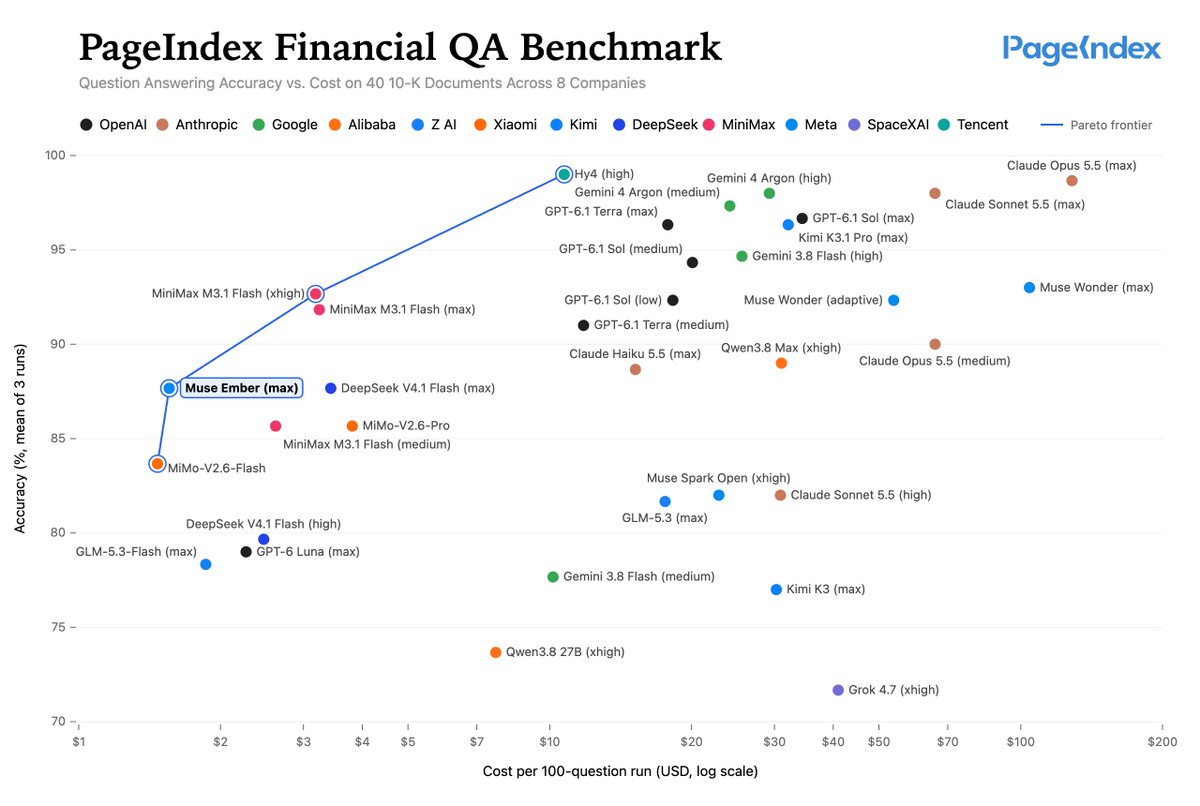
Meta (@AIatMeta) positions Muse Ember as delivering Haiku-level intelligence at ~1/3 the cost.
We tested it with PageIndex on long financial documents.
✨ Ember (max) joins the accuracy–cost frontier in our Financial QA Benchmark:
▸ 87.7% accuracy — 1 pp below Claude Haiku 5.5 (max), at ~1/10 the query cost
▸ Lowest-cost config (of 39 tested) to exceed 85% accuracy
Run Muse Ember on your own documents → https://t.co/mCvkknTZiZ