what i did today :
i am currently building the generate receipt function which will return an object which then will be rendered to the html.
the receipt will be rendered through a renderReceipt function ()
#javascriptnewbie
Day 10–11/90
Project: Family Payment Tracking System
Concept learned:
State and re-rendering in DOM.
Implementation:
I learned that when a new payment is added, the UI does not update by itself.
still currently on rendering data ,
#javascriptnewbie
How I fixed it: I understood that after updating the source data, I need to rebuild the report and re-render the UI.
Lesson: In frontend development, data changes first, then the UI must be updated from that new data.
#javascriptnewbie
The payment data changes first, then the family report and school summary must be recalculated and rendered again.
Mistake I made: I thought pushing a new payment into the payments array would automatically update the report on the page.
#javascriptnewbie
Day 10–11/90
Project: Family Payment Tracking System
Concept learned:
State and re-rendering in DOM.
Implementation:
I learned that when a new payment is added, the UI does not update by itself.
How I fixed it:
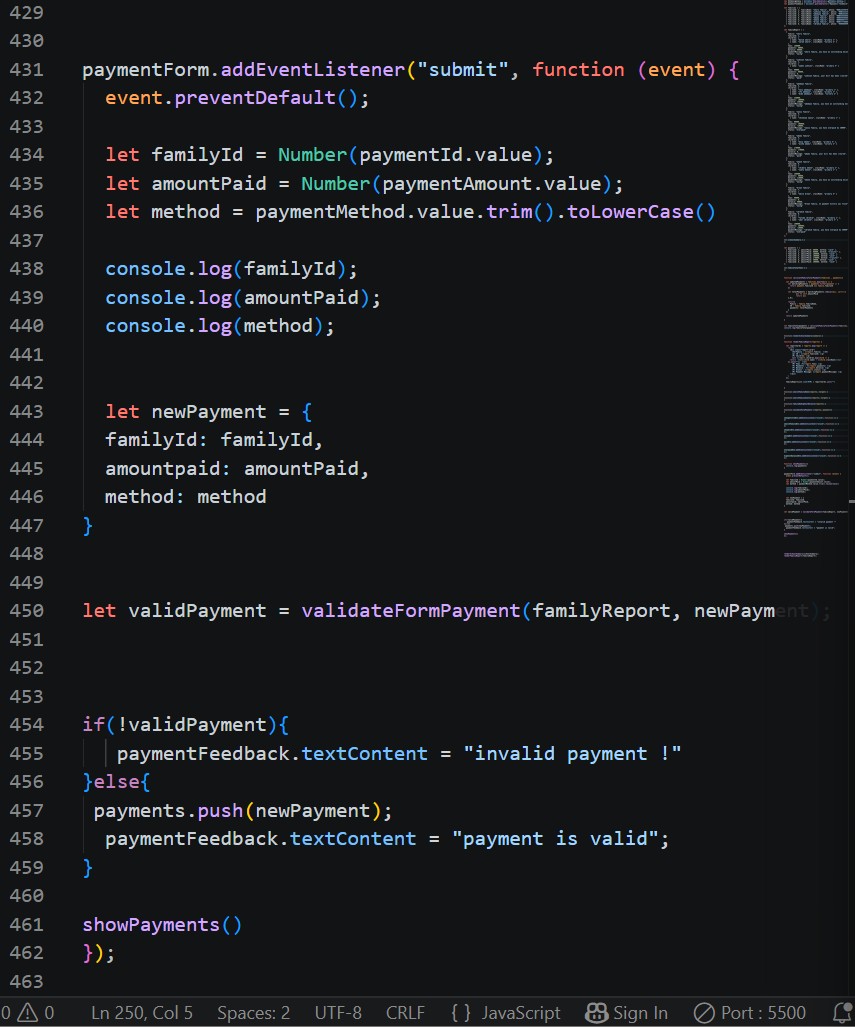
I used Number() for numeric values, trim().toLowerCase() for text input, and event.preventDefault() to stop the form from refreshing the page.
Lesson:
Forms are the bridge between user input and system data.
#javascriptnewbie
Mistake I made:
I initially forgot that input values come in as strings and that event listener functions are called by the browser, not manually.
#javascriptnewbie
Day 08–09/90
Project: Family Payment Tracking System
Concept learned:
Handling form submissions in the DOM.
Implementation:
I built a payment form that collects family ID, amount paid, and payment method, then converts the input into a newPayment object.
Mistake I made:
I expected render functions to return data, but they mainly update what the user sees on the page.
How I fixed it:
I logged the filtered data instead of logging the render function result.
#javascriptnewbie