🔴 El 90% NO sabe usar Google maps
Pone una dirección, le da a “Cómo llegar” y ya.
Maps tiene funciones que te ahorran tiempo, gasolina y sustos.
Estas son 8 que deberías conocer 👇
1.🔹If you want to zoom in and enlarge what's displayed on your computer screen:
- Windows: Press Ctrl, then +
- Mac: Press Cmd, then +
2.🔹If you want to zoom out and make things smaller:
- Windows: Ctrl + -
- Mac: Cmd + -
3.🔹If you want to return a webpage or document to its original zoom level:
- Windows: Ctrl + 0
- Mac: Cmd + 0
4.🔹If you want to find a particular word or phrase on a webpage or document:
- Windows: Ctrl + F
- Mac: Cmd + F
5.🔹If you want to undo something you just did:
- Windows: Ctrl + Z
- Mac: Cmd + Z
6.🔹If you want to redo something you previously undid:
- Windows: Ctrl + Y
- Mac: Cmd + Shift + Z
7.🔹If you want to select everything on a page or in a document instantly:
- Windows: Ctrl + A
- Mac: Cmd + A
8.🔹If you want to open a new browser window instantly:
- Windows: Ctrl + N
- Mac: Cmd + N
9.🔹If you want to open a new browser tab:
- Windows: Ctrl + T
- Mac: Cmd + T
10.🔹If you want to switch to the next browser tab:
- Windows: Ctrl + Tab
- Mac: Control + Tab
11.🔹If you want to reopen a browser window you just closed:
- Windows: Ctrl + Shift + N (Chrome and Edge)
- Mac: Cmd + Shift + N (Chrome and Edge)
12.🔹If you want to open your Downloads folder quickly:
- Windows: Win + R, then type "downloads"
- Mac: Option + Command + L
13.🔹If you want to switch between different windows of the same application:
- Windows: Alt + "
- Mac: Cmd + "
14.🔹If you want to close the current browser tab without touching your mouse:
- Windows: Ctrl + W
- Mac: Cmd + W
15.🔹If you want to refresh a webpage instantly:
- Windows: Ctrl + R
- Mac: Cmd + R
UK, it’s your turn! Experience THE FOUR: NO ONE FIGHTS ALONE with us
📍 UK Advance Screening: Dec 2
🎬 UK Cinemas: Dec 4
🇳🇬 Nigeria Cinemas: Dec 11
Get your tickets via the link in bio!
See you at the box office!
#TheFourNoOneFightsAlone#FunkeAkindeleFilm#FAAN
Let me put you through. These are the shortcuts most people never learn, and they will save you hours every week. All of these are for Windows laptops.
1. Win + V: Opens your clipboard history, so you can paste anything you copied earlier, not just the last item. It is off by default. Click "Turn on" the first time you use it.
2. Win + Shift + S: Lets you select any part of your screen and screenshot it. It copies to your clipboard, so you can paste it straight into a chat or document.
3. Ctrl + Shift + T: Reopens the tab you just closed by mistake in Chrome.
4. Ctrl + Shift + V: Pastes text as plain text, without the old formatting. It doesn't work in every app.
5. Ctrl + Shift + Esc: Opens Task Manager instantly. Use it to close any frozen app.
6. Win + Ctrl + Shift + B: Wakes your laptop when the screen is blank or black.
7. Win + . (full stop): Opens the emoji panel.
8. Win + H: Opens voice dictation. You speak and Windows types.
9. Win + Shift + R: Lets you select part of your screen and record it as a video. It saves as an MP4 in your Videos folder. Windows 11.
10. Win + P: Lets you choose a display mode when you connect a projector or TV.
11. Win + Ctrl + D: Creates a new virtual desktop. Win + Ctrl + Left or Right Arrow switches between them.
12. Ctrl + Backspace: Deletes a whole word to the left instead of one letter.
13. Ctrl + Shift + Left or Right Arrow: Selects text one word at a time.
14. F2: Renames the selected file or folder.
15. Ctrl + Shift + N: Creates a new folder instantly in File Explorer.
16. Ctrl + Shift + Delete: Opens "Clear browsing data" in Chrome.
17. Win + L: Locks your laptop the second you step away.
18. Shift + F3 (Word): Cycles selected text between lowercase, UPPERCASE and Capitalize Each Word.
19. Ctrl + ; (Excel): Inserts today's date. Ctrl + Shift + ; inserts the current time.
20. Alt + = (Excel): Adds up the selected numbers with AutoSum.
Save this. Most people will still reach for the mouse.
Um cachorrinho encontrou pessoas que lhe deram carinho, cuidado e uma nova chance. A transformação física e emocional dele é simplesmente emocionante! 🐶❤️
Wanted to share my CV and give you a few tips on how to better structure yours. Getting the job ultimately is left to chance, but you'll definitely be called into interview rooms.
This is for an AI project Lead role.
1. Simple is better. Both structure-wise and text-wise, keep it simple and neat. Psychologically, a well structured CV shows a well structured individual.
2. If you have a good amount of years of experience, no need adding months and days to dates, keep it simple. But there's no issue if you add it, just emphasizing number 1.
3. A favourite new area of my CVs these days is called "impact" just after professional profile. This is targeted at the job role itself because it's easy to get lost in the meat of details in each role. This is like a cover letter within your CV. Brief and to the point.
4. As much as possible, call out numbers. Quantifiable numbers. Your responsibilities without numbers is just a job description. "How many? How much?" should be what you should be answering.
5. Don't add every job you've done. In my CV below, I left out some jobs that don't matter to the role as advertised. It's easy to assume adding everything gives you more credibility, but that isn't usually the case.
Keep these and follow them in your CVs and you might just get some success in your job applications.
If you want us to work together on a technical project, also let me know.
You can import iPhones, laptops and other gadgets directly from China using websites like Taobao and Xianyu.
You can also import jewelry, home equipment and clothes from websites like Pinduoduo and 1688.
HERE ARE 15 CHINESE WEBSITES YOU CAN GET VERY CHEAP ITEMS FROM
1. Zhuanzhuan – https://t.co/aWEQbZdsu2
For second-hand smartphones, laptops, cameras, furniture, appliances and other pre-owned products.
2. Xianyu (Goofish) – https://t.co/7D9RUiAOD8
For fairly used iPhones, android, laptops, smartwatches, cameras, furniture, clothes and other second-hand items.
3. 1688 – https://t.co/pzz98IDtPH
For wholesale electronics, clothes, shoes, bags, kitchenware, beauty products and household accessories.
4. Taobao – https://t.co/zsKnLp2bpE
For phones, electronics, clothes, shoes, bags, kitchen utensils, furniture, toys and home decorations.
5. Pinduoduo – https://t.co/919Bi3EDnb
For discounted electronics, clothes, shoes, groceries, kitchenware and household essentials.
6. AliExpress – https://t.co/wLrq8swBJk
For smartphones, smartwatches, jewellery, clothing, shoes, bags, toys and home accessories.
7. Alibaba – https://t.co/PjBh9HjV9i
For bulk electronics, clothing, footwear, furniture, kitchen equipment, beauty products, cars and industrial supplies.
8. DHgate – https://t.co/jTbegvCr0E
For electronics, fashion items, shoes, bags, watches, accessories and other products.
9. Banggood – https://t.co/oI6HQ6LWv0
For smartphones, computers, smart gadgets, tools, home appliances and outdoor equipment.
10. JD – https://t.co/NlfeN5hSc6
For smartphones, laptops, branded electronics, home appliances, beauty products and household items.
11. Tmall – https://t.co/ejVDo3rRZY
For branded electronics, clothing, shoes, bags, cosmetics, skincare products and kitchen appliances.
12. Geekbuying – https://t.co/ltX4XhNP6n
For smartphones, tablets, smartwatches, computers, electric bikes and other tech products.
13. Suning – https://t.co/ak1R0mjq2u
For smartphones, laptops, televisions, refrigerators, kitchen appliances and household products.
14. Made-in-China – https://t.co/AKwEowPjag
For electronics, clothing, furniture, machinery, kitchen equipment, cars and building materials from manufacturers.
15. Vipshop – https://t.co/kDWsgOpmAf
For discounted branded clothing, shoes, bags, cosmetics, watches and household products.
IMPORTANT:
Not all these websites ship directly to Nigeria.
Some of them primarily serve the Chinese market, so you may need a reliable China-based buying agent or freight forwarder to purchase the items and ship them to Nigeria.
Some of these websites are also in Chinese language, so you may need a translator app.
Finally, always check the seller's reputation, product specifications, reviews and shipping costs before paying. Also note that some gadgets may be refurbished; it's your job to look well before you order. Or get someone who has better experience than you.
Stay informed.
And
Stay sharp! 🪒
Anytime you’re craving cake but don’t have 20k to order one… 😭
Just buy flour & enter the kitchen!
Save this easy homemade moist chocolate loaf cake recipe 👇🏼
Your family will love it! 😍
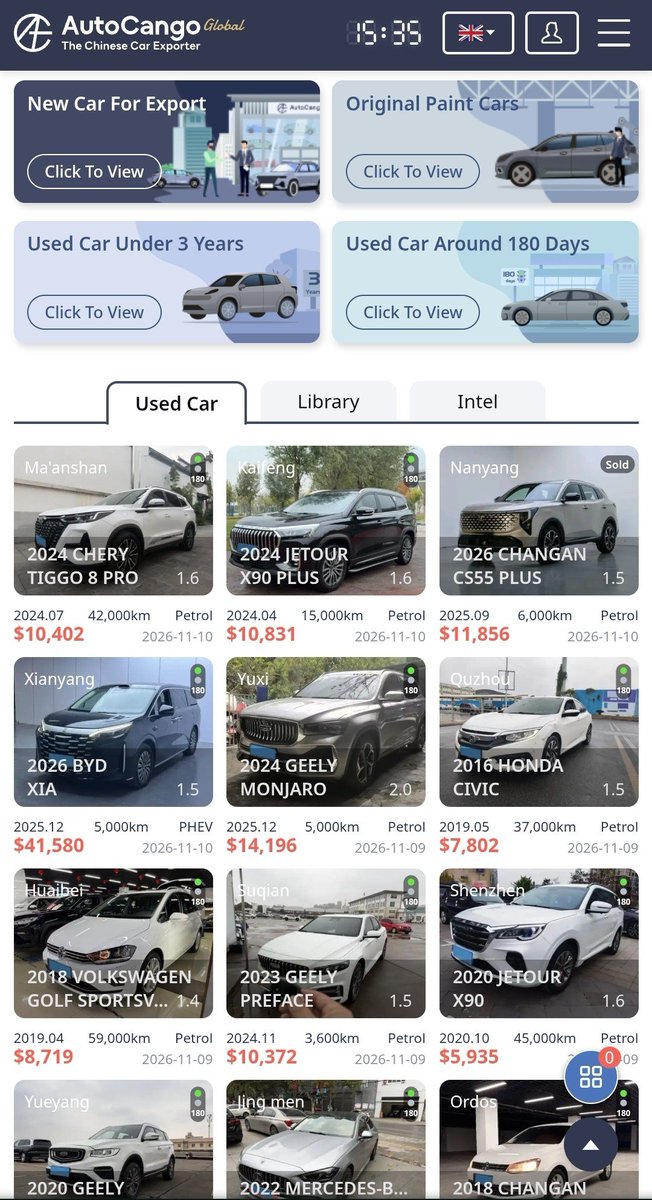
So I recently discovered websites where people have been silently Importing Cheap Cars Straight From China.
You may even be able to get cars for as low as ₦4 million, the same cars you might be buying for maybe ₦12 million in Nigeria. I'll share the websites below:
1. AutoCango (https://t.co/7JslfW34ow)
This platform allows you to choose whether you want to cars that were used within less than 3 years or around 180 days. You can check for different types of vehicles like Jetour, BYD, Honda, Geely, Mercedes Benz, and so on.
2. Guazi (https://t.co/omdzM63Ky1)
You can get used cars from here too, including Toyota, Volkswagen, BMW, Mercedes-Benz, Hyundai and several Chinese brands. They also offer auctions, and they indicate the grade of each used car.
3. Alibaba (https://t.co/tUU3gjeAP7)
You probably know Alibaba as a platform for buying wholesale goods from China. However, it also has vehicle suppliers and exporters. You can search for new or used vehicles, but it's better to look out for verified sellers specifically.
4. Made-in-China (https://t.co/n7KHb2eL5F)
This is another platform where you can find Chinese vehicle manufacturers, dealers and exporters. You can find both brand-new and used vehicles, including electric cars, SUVs, sedans and pickup trucks.
5. SellGoodCar (https://t.co/4mI8LOubeZ)
You can get both new and used cars from here too. I learnt they typically provide inspection reports, escrow payment arrangements and international shipping. You can find brands such as Toyota, BMW, BYD, Geely and Chery.
**************
Be careful when ordering, though. Make sure to vet properly. Do your due diligence.
It may be better to work with a sourcing agent who can help you inspect and make sure your order is shipped. The agent might just take some percentages as a service charge.
Stay informed
And
Stay sharp! 🪒
I’m begging you, NEVER upload your CV into ChatGPT and ask, “Can you fix my CV?”
You could be making a HUGE mistake that’s costing you job opportunities without even realising it.
Before you upload your CV again, Do this 👇