Tweet potential functionality enhancements to us. If they're feasible, the POPSI project (Peakvisor OPen Source Initiative) will get them implemented and share!
FIND THIS 3D MAP & OTHER NEW PEAKVISOR VIEWS HERE ON THE DROP DOWN TOOLBAR MENU UNDER 'EXPLORER': Look out for more updates on all the new PeakVisor views & features coming soon...delivered for the OSINV community through the POPSI Project.
WATCH PEAKVISOR'S NEW DYNAMIC 3D MAPPING VIEW: Responsive 'joystick' style 3D map models with place labels, contours to 10m, high resolution zoom. Use LEFT MOUSE to move location, RIGHT MOUSE to change viewing angles (vertical move changes pitch, horizontal move changes yaw).
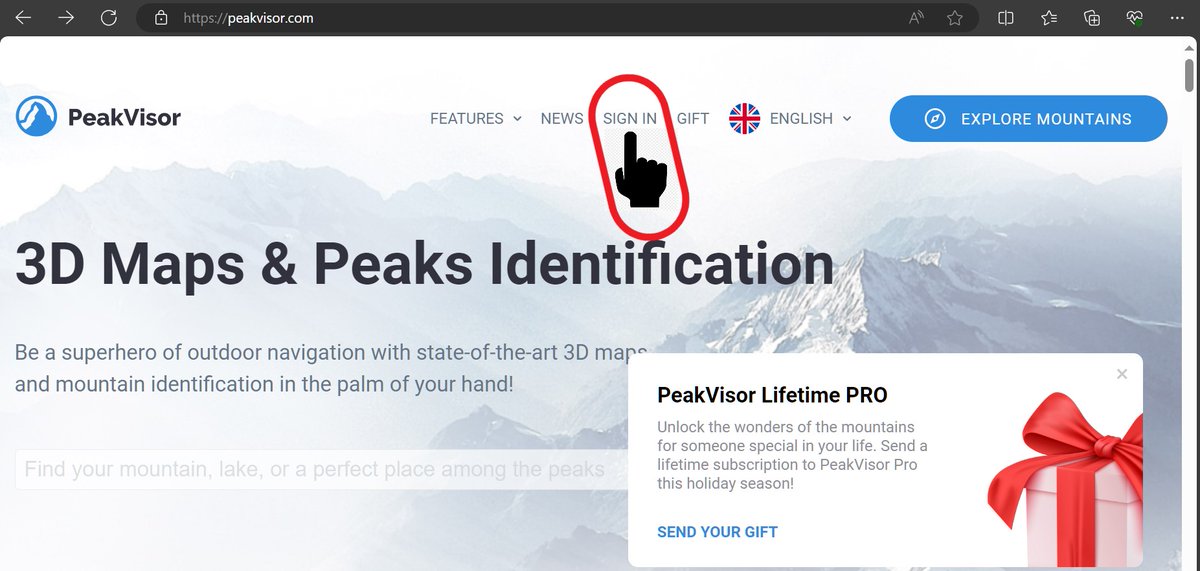
...because much new functionality is only accessible from the PROFILE option shown, which appears after Sign In. This is a technical requirement because PeakVisor needs an account to allow you to store research data personal to you, e.g. Locations, images &ser-defined paths👍
MAJOR NEW PEAKVISOR FUNCTIONALITY ACCESS NEEDS SIGN UP FOR AN ACCOUNT (FREE, OBVIOUSLY) SO PEAKVISOR CAN STORE YOUR OWN RESEARCH LOCATIONS & ROUTES FOR YOU SECURELY. Click the SIGN IN option on the PeakVisor landing page (shown in yellow highlight) to create your account...
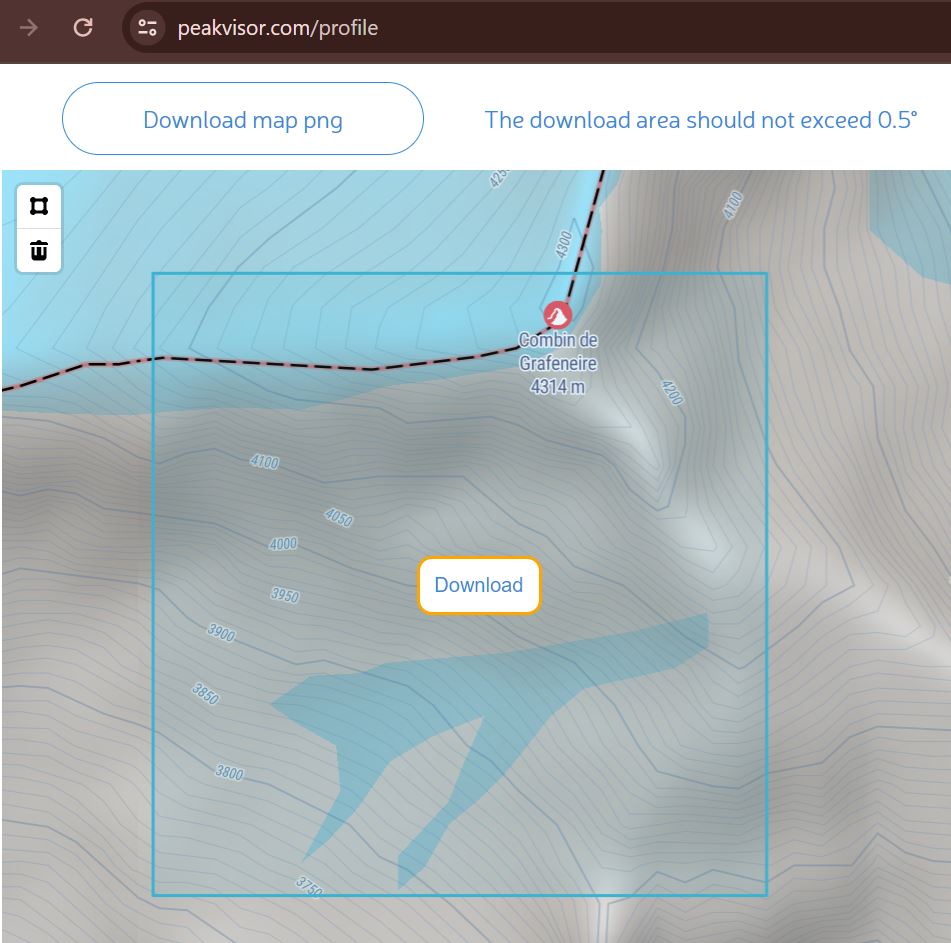
FIRST OF 2 NEW FEATURES NOW RELEASED FOR COMMUNITY TESTING: Elevation Data Download for an area up to 0.5 x 0.5 degrees on the map. Accessible to registered users from the Data tab on your Profile page. *.PNG is the current format. TELL US what other formats you would like to use
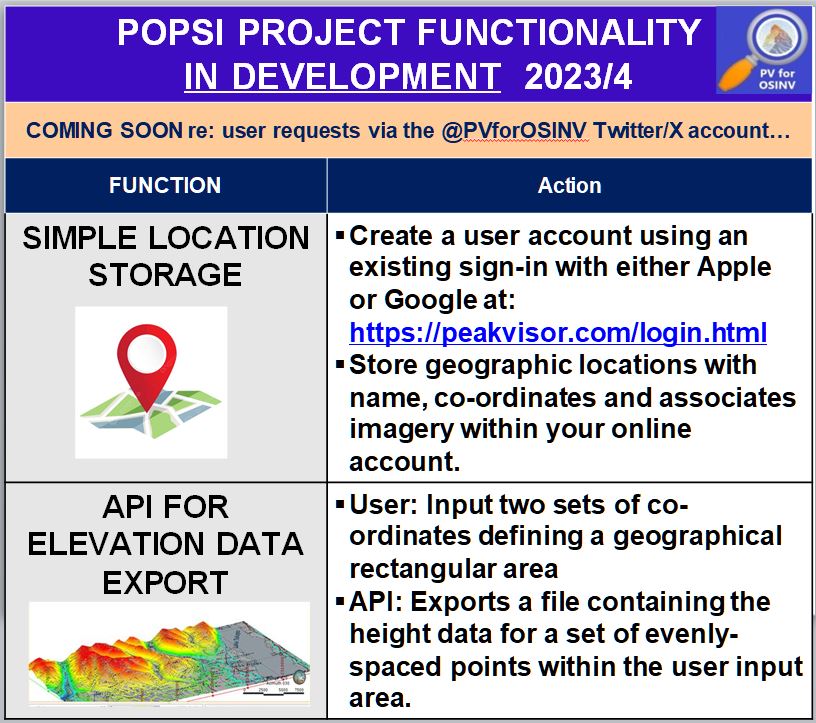
PREPARE FOR NEW FUNCTIONALITY IN 2024! Location saving & data export features are on their way & need a user account for storage. PeakVisor can only provide sign in via Google or Apple accounts (to reduce development workload). User profile setup is under SIGN IN shown below.
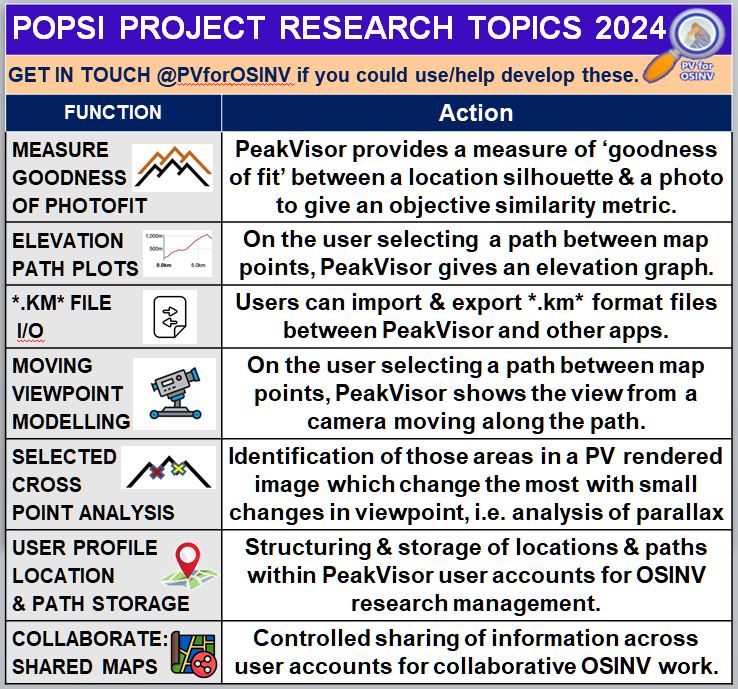
RIGHT NOW The POPSI project is working on two requests sent by OSINV researchers to this account. Watch this space for delivery and testing information!
Advanced training video just posted on Bellingcat's YouTube channel re multi-tool search strategies:
PEAKVISOR TUTORIAL VIDEO 2: USING PEAKVISOR IN GEOLOCATION. Sophie Tedling's 20th Oct 23 webinar for Bellingcat with links to handout PDF materials. https://t.co/SnEnxxkZOt
PEAKVISOR TUTORIAL VIDEO 1: DRIVING PEAKVISOR
Just posted on Bellingcat's YouTube channel, Sophie Tedling's 19th Oct 23 webinar for Bellingcat has just been published, with links to handout PDF materials. https://t.co/dPZcbLZYCK
SURVEY ON FUTURE FUNCTIONALITY: Following a suggestion from a webinar attendee, Do you think dynamic shadow mapping would be a useful feature for this OSINV version of PeakVisor? Take a look at these shadow map sites & let us know https://t.co/tOvzSLXsdw, https://t.co/iArxZfkL5i
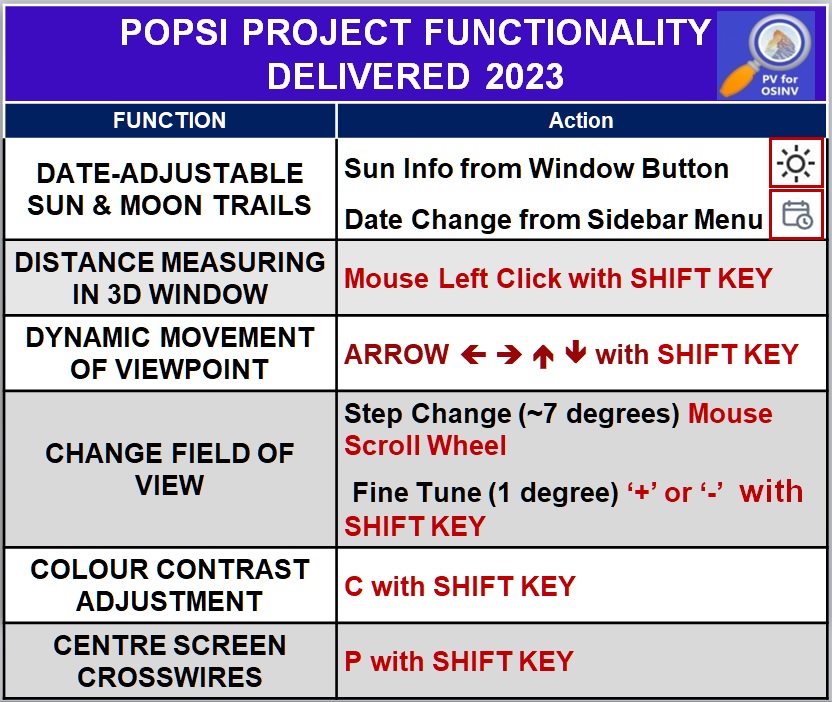
PeakVisor's SHIFT P function which generates cross hairs so you can accurately pinpoint the centre of the screen or a specific pixel in the panorama is now working again. Use it to measure the distance to the horizon or fix the angle of the sun in the sky for chronolocation.
@BizCandido So sorry for the delay in the videos being posted by Bellingcat - they were edited within a week of the webinars. We are working on the best way to make them available and will let everyone know as soon as this is sorted. Thank you for your patience.
Bellingcat is offering two WEBINARS on Thursday 19th October (HOW TO DRIVE PEAKVISOR) and Friday 20th October (HOW AND WHEN TO USE PEAKVISOR FOR GEOLOCATION) from 13:00 Amsterdam time. You need to register in order to be selected to attend on any day, as participants are vetted.
@BizCandido Hello I finished video editing notes & PDF handouts a week ago & the videos are in edit with Bellingcat Social Media team. If they are too overloaded then I will try an alternative distribution medium. Let me know how you'd like me to send the PDFs in the meantime, if required.S
REPAIR NOTICE: PeakVisor SHIFT P crosswires function - should produce screen-centred crosswires for precision work- is not working in Chrome/Firefox (one crosswire showing in Edge) after a 19/10/23 update. Repair work is ongoing, restoration will be notified here asap.
Applicants won’t be able to access the free webinars without completing the Sign Up form on the Bellingcat website here: https://t.co/qf6n7kmVKe. Those selected will be sent Zoom links for the webinar(s) of their choice.
FREE WEBINARS ON USING PEAKVISOR FOR OPEN SOURCE RESEARCH - Sign up with Bellingcat for Thursday 19TH and/or Friday 20TH October
Places are limited, attendees vetted, so apply here on the Bellingcat website with your email to be selected:
https://t.co/qf6n7kmVKe
PeakVisor already has an internal API to which the developers have committed to provide registered web access via any Google/Apple account. Parameter values such as the size of region for data downloads, number of downloads, etc. will be set by considering technical limitations.
NEW FUNCTIONALITY REQUEST ref X23091 from PV user @GFLocating's to make PeakVisor elevation data available to download for a user-specified area was tabled & agreed at todays POPSI Development Meeting, and its implementation will be prioritised & scheduled in the POPSI Workplan✅