How To Learn Claude ✳️
Everything you need to know about Claude.
━━━━━━━━━━━━━━━━━━━
1. Chat
🔺https://t.co/drIZsiqxmG
The starting point. Ask anything, write anything, analyse anything: drafts, research, strategy, legal review, thinking out loud.
✅BEST FOR:
Everyone. If you use the internet, you should be using this.
━━━━━━━━━━━━━━��━━━━
2. Reasoning
🔺Extended Thinking
Claude works through a problem step by step before answering. Use it for complex decisions where a quick answer isn't good enough.
✅BEST FOR:
●Founders and analysts stress-testing a big decision, a deal, or a financial model.
━━━━━━━━━━━━━━━━━━━
3. Developer
🔺API
Access Claude directly to build products, automate workflows and run Claude inside your own tools.
✅BEST FOR:
Developers and technical teams building AI-powered products or internal tools.
━━━━━━━━━━━━━━━━━━━
4. Build
🔺Artifacts
Claude builds interactive files, dashboards, trackers and tools directly in the chat. Live outputs you can use, edit and download.
✅BEST FOR:
Anyone who needs a working deliverable, a budget calculator, a tracker, a planner, anything non-text based.
━━━━━━━━━━━━━━━━━━━
5. Automation
🔺Cowork
A desktop tool that reads your actual files and creates real documents, Excel, Word, PDF, directly into your folder.
✅BEST FOR:
Ops managers and executive assistants handling high volumes of documents daily.
━━━━━━━━━━━━━━━━━━━
6. Coding
🔺Claude Code
A command line tool for agentic coding. Claude reads your codebase, writes code, runs tests and ships changes autonomously.
✅BEST FOR:
Developers and technical founders who want to move faster without sacrificing quality.
━━━━━━━━━━━━━━━━━━━
7. Browser
🔺Claude in Chrome
A browsing agent that operates inside Chrome. Claude searches, reads pages and completes web tasks on your behalf.
✅BEST FOR:
Researchers and strategists who spend hours manually pulling information from the web.
━━━━━━━━━━━━━━━━━━━
8. Instructions
🔺Skills
Reusable instruction packs that auto-load for specific tasks. Claude knows your tone, rules and workflow without you having to explain them every session.
✅BEST FOR:
Marketing leads and brand managers who need Claude to write consistently in a specific voice.
━━━━━━━━━━━━━━━━━━━
9. Integrations
🔺Connectors
Link Slack, Google Drive, Notion and 50+ tools. Claude searches them mid-chat, no uploading, no screenshots.
✅BEST FOR:
Teams working across multiple platforms who want one place to find everything.
━━━━━━━━━━━━━━━━━━━
10. Context
🔺Projects
Save your files and instructions once. Every new chat inside that Project picks up exactly where you left off.
✅BEST FOR:
Anyone doing recurring work: content teams, legal, finance, client servicing.
━���━━━━━━━━━━━━━━━━━
❤️ Like
🔁 Retweet
🔖 Bookmark
Follow👤
@Dua Fatima
for more such posts
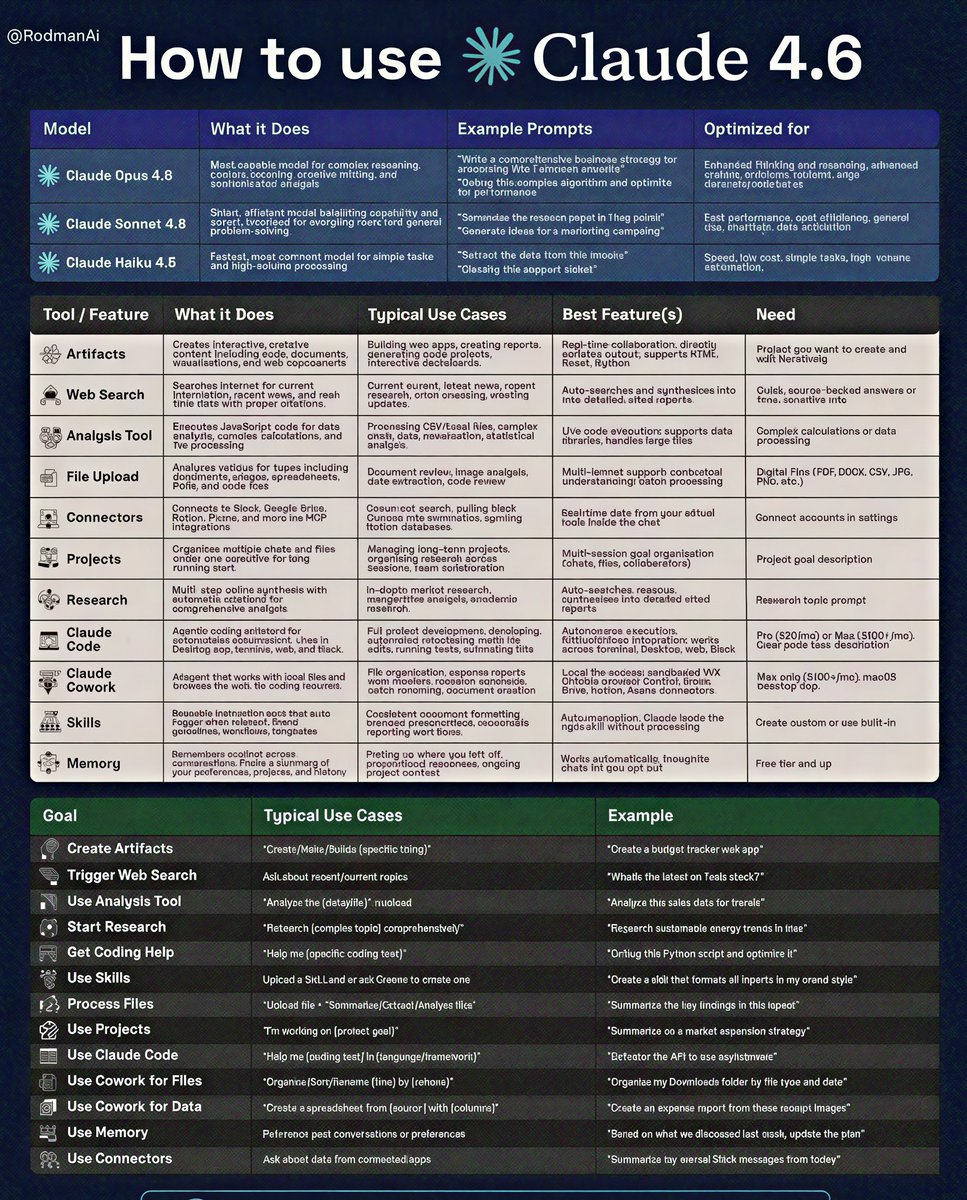
I replaced ChatGPT with Claude 4.6.
And the productivity jump was insane.
Here’s the complete Claude 4.6 guide (models + tools + prompts) most people don’t know 🧵👇
If you use AI for productivity, coding, research, or content, this will save you hours.
🔎 THE MODELS
1️⃣ Claude Opus 4.6
Best for: complex reasoning, deep research, advanced coding
Use when the problem actually requires thinking.
2️⃣ Claude Sonnet 4.6
Best for: writing, editing, summaries, daily AI tasks
Fast + powerful = the perfect everyday model.
3️⃣ Claude Haiku 4.5
Best for: quick answers, automation, high-volume tasks
Built for speed and efficiency.
🧰 THE MOST POWERFUL CLAUDE TOOLS
4️⃣ Artifacts
Build apps, dashboards, and documents directly inside chat.
5️⃣ Web Search
Real-time internet search with citations.
6️⃣ Analysis Tool
Run calculations, analyze CSVs, generate charts.
7️⃣ File Upload
Upload PDFs, images, docs → Claude summarizes & extracts insights.
8️⃣ Connectors
Integrate Slack, Google Drive, Notion, Figma.
9️⃣ Projects
Organize long-term work and multi-session AI tasks.
🔬 ADVANCED FEATURES
🔟 Research Mode
Deep multi-step research with synthesis.
1️⃣1️⃣ Claude Code
AI coding agent that builds and refactors repositories.
1️⃣2️⃣ Claude Cowork
Agent assistant for non-technical users.
1️⃣3️⃣ Skills
Reusable prompts that auto-trigger workflows.
1️⃣4️⃣ Memory
Claude remembers your projects and context.
⚡ PROMPT PATTERNS THAT WORK
Files → “Summarize this report”
Search → “Latest news on Tesla stock?”
Code → “Help me debug this Python script”
Data → “Analyze this CSV and find trends”
Research → “Research AI trends in healthcare”
Most people treat AI like a chatbot.
But Claude works best as an AI productivity system.
Bookmark this 🔖
#AI #ClaudeAI #ArtificialIntelligence #AITools #AIProductivity
1000 Powerful Claude Prompts🤯
For builders, developers & creators.
I spent weeks compiling the most practical prompts for:
• Coding & debugging
• AI workflows
• Research & analysis
• Automation
• Content creation
• Productivity systems
These prompts can replace hours of manual work.
To celebrate finishing this prompt book,
I’m giving it away to a few people here.
How to get access:
Follow MUST (so I can dm)
Repost + Like
Comment 'Prompt
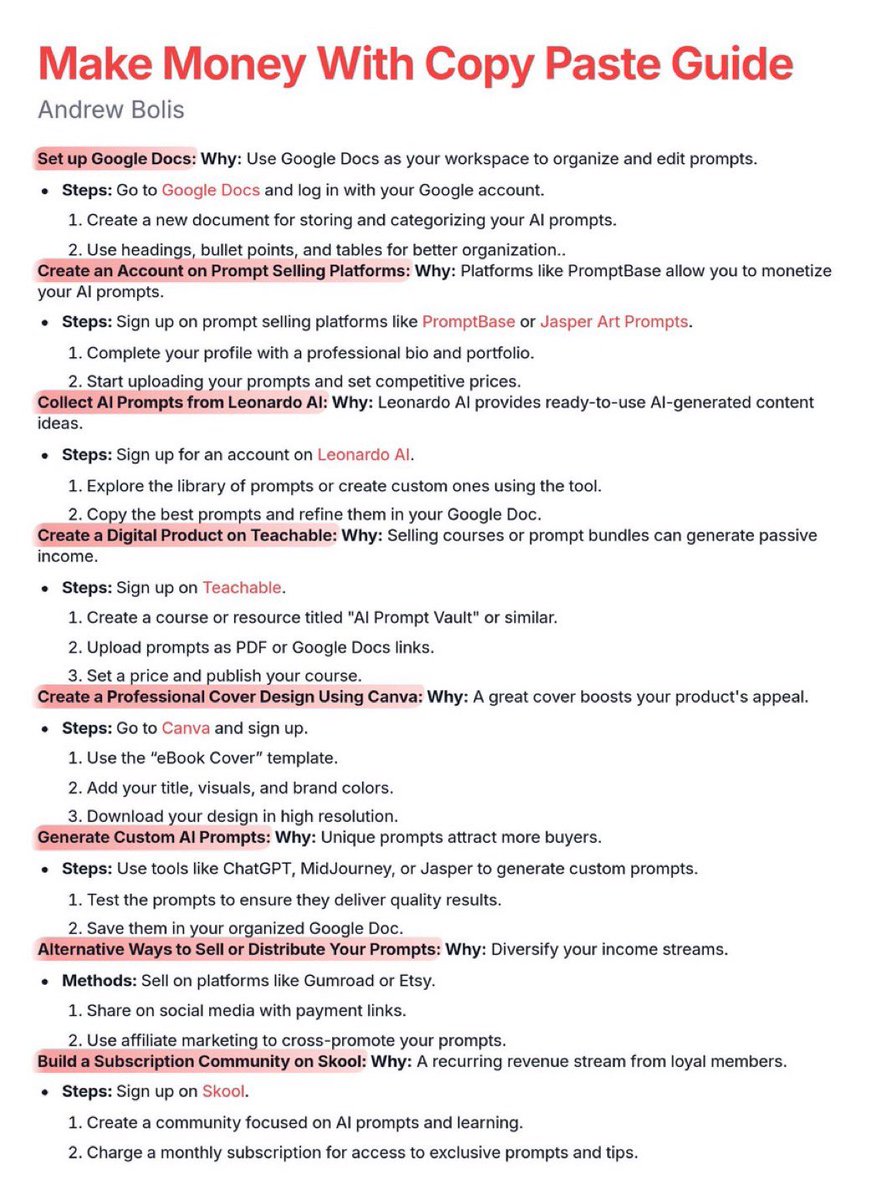
20-year-olds are making $369 every day with copy-paste work.
Usually, I'd charge $99 for this proven guide, but today I'm giving it away 100% FREE.
Like + Comment "Copy" and I'll send you my beginner to advanced guide for FREE.
Must follow me to get DM. FREE for 24 hrs only.
TOP 11 FREE AI COURSES TO TRY IN 2026:
1. Foundation of Prompt Engineering
👉 https://t.co/weZ45qK43p
2. Retrieval Augmented Generation
👉 https://t.co/HQKar13J63
3. AI Essential Courses
👉 https://t.co/1HlwfVm1Xp
4. Intro to Generative AI
👉 https://t.co/3fZKGPqD2L
5. Intro to Responsible AI
👉https://t.co/OT7PVzu6gr
6. LLMOps
👉 https://t.co/X0yxONgOtx
7. CS50 Introduction to AI with Python
👉 https://t.co/B92pKQ5fvU
8. Introduction to AI
👉 https://t.co/ry9kEwMcoC
9. Academy Resources
👉 https://t.co/4KZxV8N2iD
10. A Practical Guide to Building Agents
👉 https://t.co/ZxF8WcPOND
11. Prompt Engineering for ChatGPT
👉 https://t.co/Y0L0ExmBBD