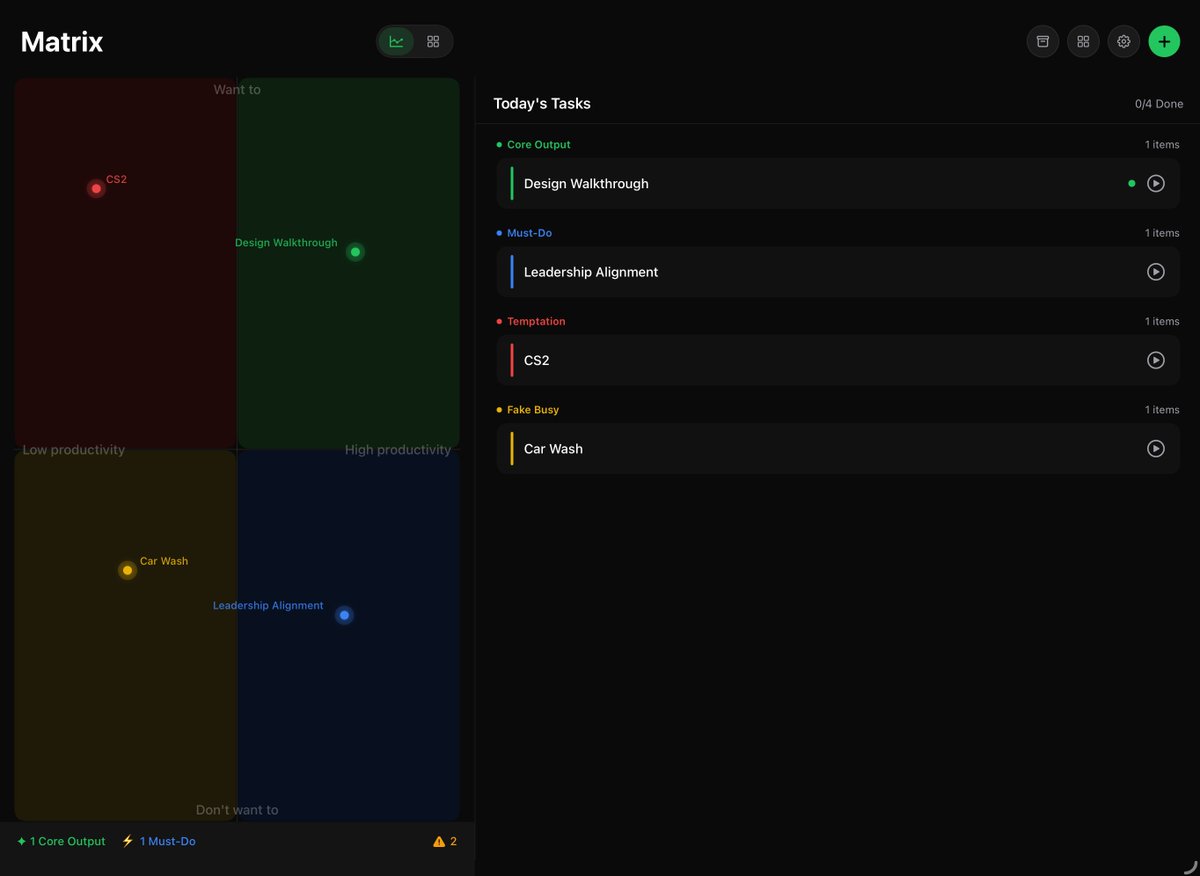
Through this app, I can clearly see where my daily tasks are distributed. It shows whether I'm actually being productive. If I'm not being productive, it's definitely not because Forza Horizon 6 is too much fun.🐶🤣
Too many to-dos, too little time?
Inspired by @Casey https://t.co/ePav0d6leL
MatrixDo sorts your tasks into four quadrants and helps you focus.
🎯Low Productivity ➡️ High Productivity
🧠Don’t want to ➡️ Want to
User Guide:
1. Create a task and place it in a quadrant.
2. Click the task will start a Pomodoro timer, long-pressing it allows you to mark it as complete or edit it.
3. You can view all the core deliverables on the Output Wall.
📱iPhone & iPad supported! The first 50 users to reply to this post will receive a Redeem Code! Try it now!
https://t.co/LPSCTXnraN
More new features are on the way. If you have any suggestions or feedback, feel free to leave a comment or message us directly.
@sgnoogle I believe this is part of our exploration, but we still have a long way to go to present information in a truly efficient and concise way. Stay tuned for the near future.
@Yungshineegga This new version is basically the major part of Stage 1. We push this App to a new level and a more solid foundation. As for the Stage 2, let’s say a peak of the future I guess.
Essential Space just got a major update!
1/ With new For You and Library pages, it is now more organised and easier to navigate, bringing important information to the surface faster.
Since it's a huge upgrade to the whole App, we have to make sure there's no serious issue and gradually expand the rollout. Over the past year, Essential Space has basically maintained two regular updates per month and one major feature upgrade per month. This update will lay a solid foundation for our future plans, so we really appreciate your patience and continued support along the way.