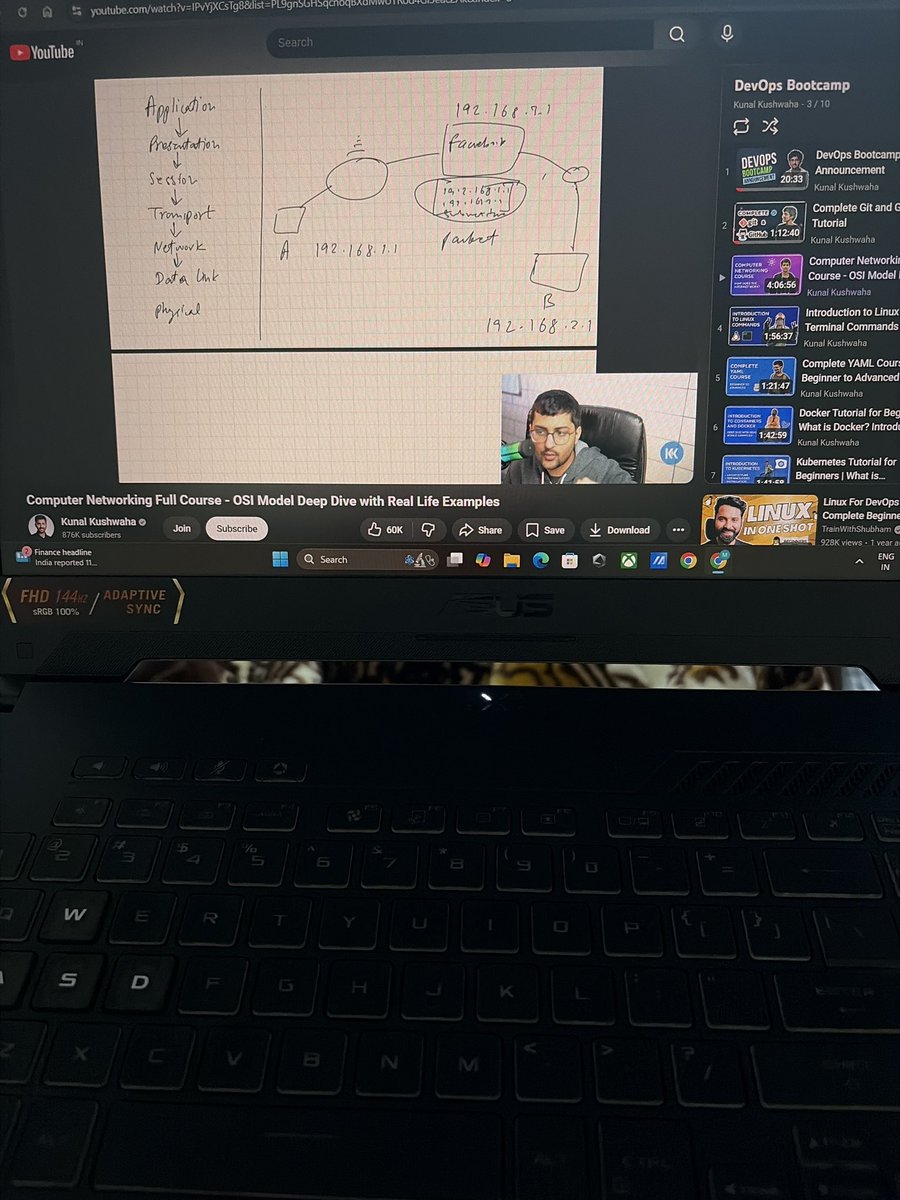
Recently, I came across a Computer Networking session on YouTube by Kunal Kushwaha.
He explains Computer Networking and the OSI Model in a very simple and practical way — especially for people getting started with DevOps.
In the session, he breaks down concepts like:
• What the OSI Model actually means
• How data moves across different layers
• Real-life networking examples
• How systems communicate inside a network
What I liked most is that the explanation is very beginner-friendly and visual, which makes complex networking concepts much easier to understand.
If you’re starting your DevOps or Cloud journey and networking feels confusing, this session can really help build strong fundamentals.
#BuildInPublic
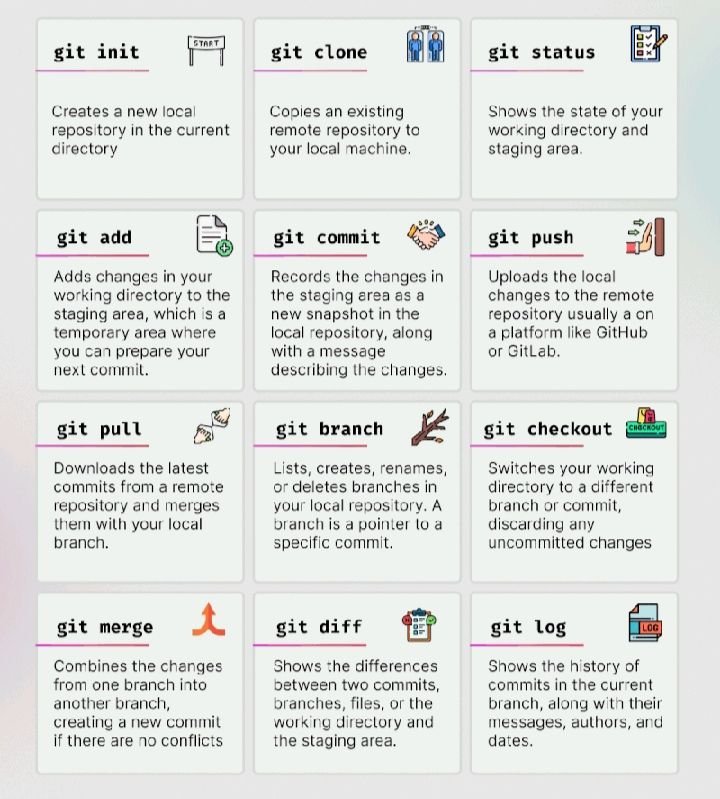
Most Git problems happen because people don’t understand branches.
They know how to create one…But not how to use it properly. 😉
Follow this simple workflow:
→ Create a new branch for every feature.
→ Keep main clean and production-ready.
→ Commit small, meaningful changes.
→ Pull the latest changes before pushing.
→ Resolve merge conflicts instead of avoiding them.
→ Open a Pull Request for code review.
→ Merge only after everything passes.
→ Delete merged branches to keep the repository clean.
Good Git habits make teamwork faster.
Bad Git habits create unnecessary headaches.
Learn the workflow, not just the commands.
Most Git problems happen because people don’t understand branches.
They know how to create one…But not how to use it properly. 😉
Follow this simple workflow:
→ Create a new branch for every feature.
→ Keep main clean and production-ready.
→ Commit small, meaningful changes.
→ Pull the latest changes before pushing.
→ Resolve merge conflicts instead of avoiding them.
→ Open a Pull Request for code review.
→ Merge only after everything passes.
→ Delete merged branches to keep the repository clean.
Good Git habits make teamwork faster.
Bad Git habits create unnecessary headaches.
Learn the workflow, not just the commands.
Most engineers think automation starts with Kubernetes.
It actually starts with small scripts.
You don’t need hundreds of lines of code.
Just automate the tasks you repeat every day.
→ Rename multiple files in seconds.
→ Create project folders automatically.
→ Back up important files.
→ Monitor disk space.
→ Check if a website is online.
→ Clean old log files.
→ Schedule recurring tasks.
→ Generate daily reports.
→ Restart failed services automatically.
→ Send alerts when something goes wrong.
If you do something more than once….Automate it.
That’s how engineers save hours every week.
Most engineers think automation starts with Kubernetes.
It actually starts with small scripts.
You don’t need hundreds of lines of code.
Just automate the tasks you repeat every day.
→ Rename multiple files in seconds.
→ Create project folders automatically.
→ Back up important files.
→ Monitor disk space.
→ Check if a website is online.
→ Clean old log files.
→ Schedule recurring tasks.
→ Generate daily reports.
→ Restart failed services automatically.
→ Send alerts when something goes wrong.
If you do something more than once….Automate it.
That’s how engineers save hours every week.
Docker in Plain English
Most beginners think Docker is complicated…But it’s actually very simple 👇
• Docker → runs apps in isolated environments called containers
• Container → lightweight package with your app + dependencies
(“It works on my machine” problem solved ✅)
• Image → blueprint of your app (used to create containers)
• Dockerfile → step-by-step instructions to build an image
• Docker Hub → place to store & share images
• Volume → keeps data safe even if container is deleted
• Port Mapping → connects container to outside world
• Docker Compose → run multiple containers together
(e.g., app + database + cache)
Docker in Plain English
Most beginners think Docker is complicated…But it’s actually very simple 👇
• Docker → runs apps in isolated environments called containers
• Container → lightweight package with your app + dependencies
(“It works on my machine” problem solved ✅)
• Image → blueprint of your app (used to create containers)
• Dockerfile → step-by-step instructions to build an image
• Docker Hub → place to store & share images
• Volume → keeps data safe even if container is deleted
• Port Mapping → connects container to outside world
• Docker Compose → run multiple containers together
(e.g., app + database + cache)
@boardyai Agree. Tools evolve, but debugging is a timeless skill. The engineers who can quickly identify the root cause are usually the ones everyone relies on.
Everyone wants to learn Kubernetes…But most people ignore what comes before it.
That’s why Kubernetes feels “too hard.” 😉
Learn these in order:
→ Linux — Understand the operating system.
→ Networking — Learn how systems communicate.
→ Git — Version control is a daily skill.
→ Docker — Package applications into containers.
→ YAML — The language Kubernetes speaks.
→ Cloud Basics — Understand VMs, storage, networking, and IAM.
→ Kubernetes — Now everything starts making sense.
Skipping the basics doesn’t save time.
It just makes the advanced topics harder.
Master the foundation first.
The rest becomes much easier.
Everyone wants to learn Kubernetes…But most people ignore what comes before it.
That’s why Kubernetes feels “too hard.” 😉
Learn these in order:
→ Linux — Understand the operating system.
→ Networking — Learn how systems communicate.
→ Git — Version control is a daily skill.
→ Docker — Package applications into containers.
→ YAML — The language Kubernetes speaks.
→ Cloud Basics — Understand VMs, storage, networking, and IAM.
→ Kubernetes — Now everything starts making sense.
Skipping the basics doesn’t save time.
It just makes the advanced topics harder.
Master the foundation first.
The rest becomes much easier.
Most beginners jump straight into tools like Docker, Kubernetes, and CI/CD…
But skip the one thing that everything depends on — Linux fundamentals
You can copy commands… but if something breaks, you’re stuck 😉
If you want to become a real DevOps/Cloud engineer, focus on this first:
→ File System (ls, cd, pwd, find)
Know how to navigate and locate files like a pro.
→ Permissions (chmod, chown)
Understand who can read, write, and execute — critical for security.
→ Processes (ps, top, kill)
See what’s running and control it when things go wrong.
→ Networking (ping, curl, netstat)
Check connectivity and debug network issues quickly.
→ Package Management (apt, yum)
Install, update, and manage software the right way.
→ Logs (cat, less, tail -f)
Logs tell the real story — learn to read them.
→ Disk Usage (df, du)
Know where your storage is going before it becomes a problem.
→ Environment Variables (export, env)
Used everywhere — from apps to pipelines.
→ Shell Basics (bash scripting)
Automate small tasks and save hours of manual work.
→ SSH (secure remote access)
Connect to servers and manage systems from anywhere.
Tools change. Trends change.
But Linux is always there behind the scenes.