Someone on Reddit just built the cleanest solution to a problem every Claude Code user has.
This guy made iPhone widgets that show your Claude Code usage right on your Home Screen and Lock Screen.
One glance and you know whether to start a session or wait.
It is called Limits.
→ Shows your 5-hour rolling window and weekly cap in real time
→ One of the only tools that actually tracks Fable 5 usage
→ Works with Codex and Cursor too
→ Connects entirely on-device. No data leaves your phone
→ Built with Fable 5
Since Claude Code's session window is rolling and depends on when you started, having a glanceable view means you stop guessing and start timing your sessions right.
As an AI Engineer. Please learn security principles.
Your teams are already building AI apps.
The question isn't whether they can ship a “prototype”.
It's whether you can see, govern, and control what reaches production.
This is the gap most consumer AI coding tools leave open:
• Where does the data live?
• Who can access the app?
• Where are the audit logs?
This is where Superblocks comes in...
It's built for enterprise AI app development from day one:
✓ Deploy apps inside your own AWS account & VPC, so sensitive data stays in your control.
✓ Enforce company login, role-based permissions & audit logs automatically across apps.
✓ Scan deployments for vulnerabilities before they reach production.
✓ Build production-ready internal AI applications instead of prototypes that need to be rebuilt later.
i.e., your teams keep the speed of vibe coding.
IT keeps governance and security.
Have you tried Superblocks yet?
Someone turned Claude into an entire company.
42 skills, organised like a real org chart (links below):
Here is every department, and where to get each one.
Developers
Superpowers → https://t.co/pPPxKoPEwD
Context7 → https://t.co/3Kk9U8PG1T
Skill Creator → https://t.co/Lanao7tpOh
MCP Builder → https://t.co/Lanao7tpOh
Webapp Testing → https://t.co/Lanao7tpOh
Claude-Mem → https://t.co/yTb8qxqa7S
Designers
UI UX Pro Max → https://t.co/MQTtS9flwt
Taste → https://t.co/AEq4GZc60x
Frontend Design → https://t.co/AEq4GZc60x
Transitions → https://t.co/Z7JOt7lJb2
Web Artifacts → https://t.co/Lanao7tpOh
Brand Guidelines → https://t.co/Lanao7tpOh
Marketing
45 skills to run your marketing, from copywriting to SEO to lead magnets.
Access them all here → https://t.co/OWo258NM7L
Social Media
17 skills to run your social media, from post writing to Reels to thumbnails.
Access them all here → https://t.co/2qawCgAyQF
Finance
8 skills to run your finances, from statements to reconciliation to audits.
Access them all here → https://t.co/X6dVFcZBIJ
Small Business
31 skills to run your small business, from cash flow to payroll to invoicing.
Access them all here → https://t.co/7Prb2sXVpI
Legal
9 skills to handle your legal work, from contract review to NDAs to compliance.
Access them all here → https://t.co/GKaZzGYPOr
Every skill on the chart is real and installable from the links above.
Same departments. Same output. No payroll.
Bookmark this.
Claude Fable 5 + Higgsfield is a complete cheat code.
This is the future of content creation and marketing.
In 2026, anyone with a laptop + WiFi can print money.
This video teaches you how:
0:00 Intro
1:03 Higgsfield explained
2:17 Claude MCP set up
5:11 Designing a brand
6:40 Writing creative briefs
8:57 Results
11:30 Photo to video
13:05 How I'm using Higgsfield in my business
15:39 Money-making play #1
16:44 Money-making play #2
18:24 Money-making play #3
21:00 Running the math
How to vibe code custom trading indicators with the TradingView MCP + Claude Fable 5.
I'm not technical at all, and I was able to use the TradingView MCP to create wildly effective market indicators.
Every trader should set this up.
Nobody else on the timeline is talking about this. You'll want to save this one:
Set up requirements:
- Claude Code
- TradingView Desktop App
- Node.js v18+
Step 1. Install the TradingView MCP
Open Claude Code and run this prompt:
"Install the TradingView MCP server
https://t.co/k1Ql1o0CYi."
Step 2. Describe your indicator in plain English to Fable (or Opus)
Create a new folder called "Vibe-Coding Indicators" and open it in Claude Code.
Then describe your strategy like you'd explain it to another trader.
Don't think about code - just think about conditions.
Use this structure:
"I'm building a trading indicator for TradingView in Pine Script V6. I want a buy signal that fires when [insert your conditions]."
(you can even have Fable research for you)
Step 3. Deploy to TradingView
Copy the Pine Script Claude generates.
Inside TradingView:
- Click "Indicators" in the top menu
- Go to "My Scripts" → New Script
- Paste the code starting on Line 1
- Click "Add To Chart"
Your indicator is now live.
Pro tips:
- Test on higher timeframes first (HTF signals are cleaner than LTF)
- Add alerts: "Set an alert anytime [x] happens."
- Backtest it: "Turn my indicator into a backtestable strategy."
- Debug with Opus + High Effort if you hit errors
Complete game changer.
Bookmark this and build your first indicator today.
Anthropic engineer:
"You're not supposed to prompt Claude. You're supposed to build a system that prompts itself."
In 45 minutes, she breaks down how Anthropic builds agents that remember, learn from their mistakes, and get smarter with every run.
Worth more than any paid course you'll find on building agents.
Watch this and bookmark
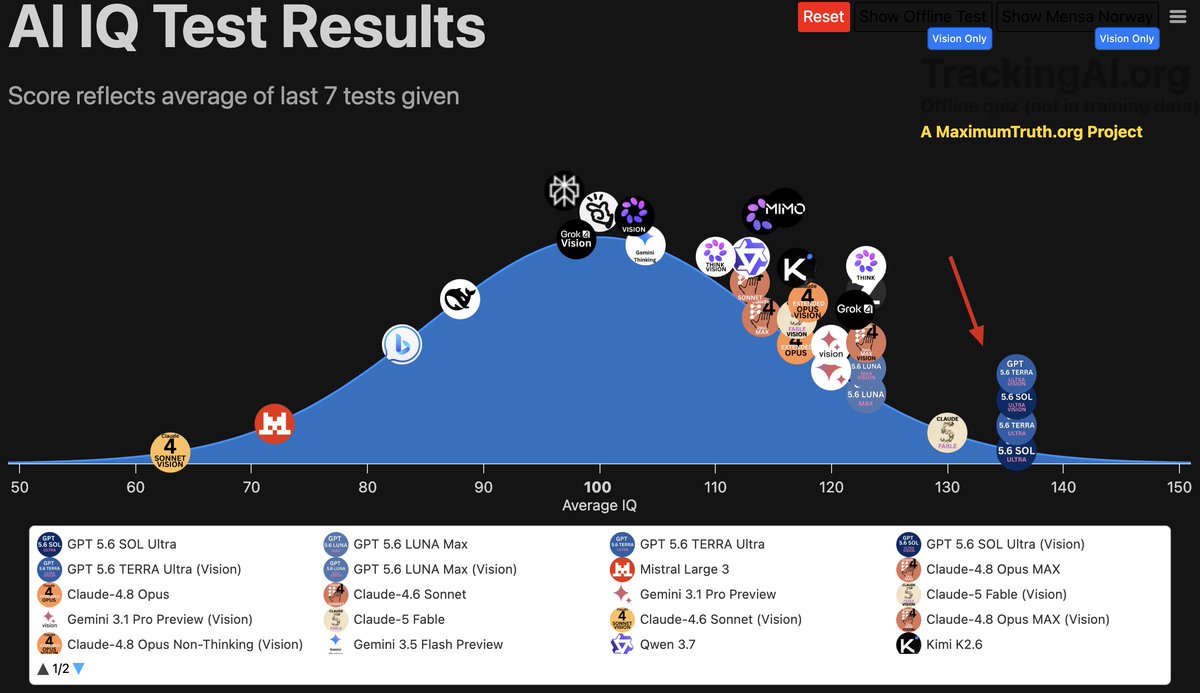
GPT-5.6 (Sol, Terra & Luna) just clocked an initial IQ score of 136.
These models are smarter than 99% of people.
I wouldn't be surprised if in the next ~12 months, LLMs actually become TOO smart for us to communicate with.
Weird reality to think about.
Anthropic dropped a free 59-minute Claude Code course
From autocomplete to real agents:
00:00 - From autocomplete to agents
04:50 - How the agentic loop works
14:07 - CLAUDE.md as project memory
26:53 - Why Plan Mode comes first
33:31 - Live task from brief to commit
54:46 - Skills vs CLAUDE.md
Most people still use Claude Code like a smarter autocomplete
This shows how Anthropic uses it to plan, call tools, test, and ship real work
Worth more than 99% of paid Claude Code tutorials
Bookmark and watch it later





![milesdeutscher's tweet photo. How to vibe code custom trading indicators with the TradingView MCP + Claude Fable 5.
I'm not technical at all, and I was able to use the TradingView MCP to create wildly effective market indicators.
Every trader should set this up.
Nobody else on the timeline is talking about this. You'll want to save this one:
Set up requirements:
- Claude Code
- TradingView Desktop App
- Node.js v18+
Step 1. Install the TradingView MCP
Open Claude Code and run this prompt:
"Install the TradingView MCP server
https://t.co/k1Ql1o0CYi."
Step 2. Describe your indicator in plain English to Fable (or Opus)
Create a new folder called "Vibe-Coding Indicators" and open it in Claude Code.
Then describe your strategy like you'd explain it to another trader.
Don't think about code - just think about conditions.
Use this structure:
"I'm building a trading indicator for TradingView in Pine Script V6. I want a buy signal that fires when [insert your conditions]."
(you can even have Fable research for you)
Step 3. Deploy to TradingView
Copy the Pine Script Claude generates.
Inside TradingView:
- Click "Indicators" in the top menu
- Go to "My Scripts" → New Script
- Paste the code starting on Line 1
- Click "Add To Chart"
Your indicator is now live.
Pro tips:
- Test on higher timeframes first (HTF signals are cleaner than LTF)
- Add alerts: "Set an alert anytime [x] happens."
- Backtest it: "Turn my indicator into a backtestable strategy."
- Debug with Opus + High Effort if you hit errors
Complete game changer.
Bookmark this and build your first indicator today.](https://pbs.twimg.com/media/HNO_MIYbAAAmgUQ.jpg)