@organistic Voicemeeter Remote API and its audio callback are present since years. I am very pleased to see that a developer had the idea and the talent to create a VST plug-ins manager with it. This will surely become a better integrated solution than other VST-Plug-in Host. Let's test it!
Check this out. Awesome! ELKA VOICEMEETER FX HOST: A powerful VST-plug-in Host – especially made for Voicemeeter.
The app is able to insert VST plug-ins on any Input of Voicemeeter. Or any output BUS. Or both!
Check our new Guide: https://t.co/UC20zmLc0E
#vsthost#vstplugin
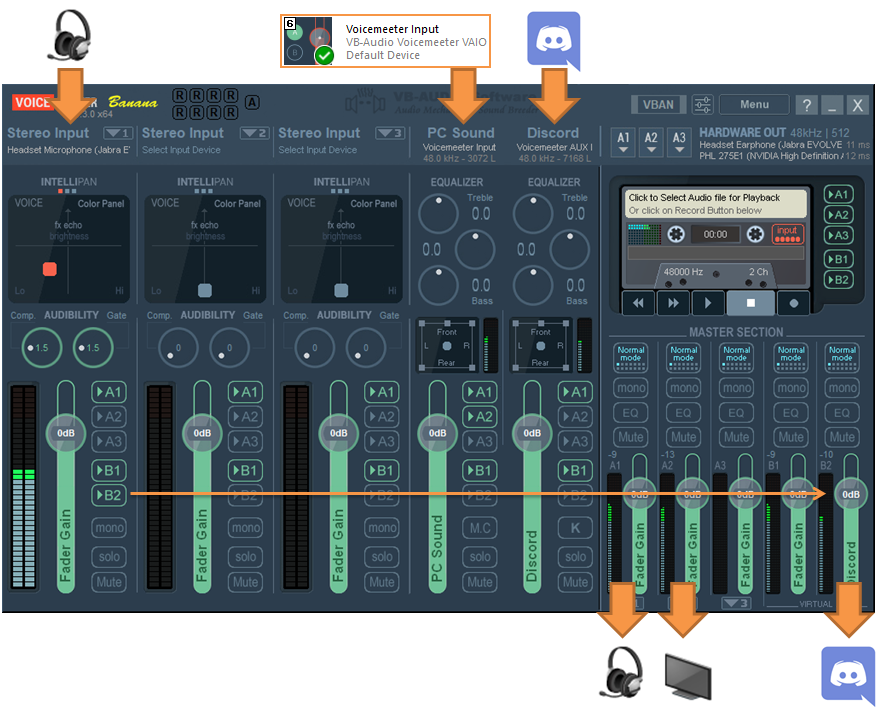
How to Connect Discord to Voicemeeter Banana ? Simply by using Virtual Aux input and out B2. To connect softphone on dedicated Virtual I/O is very handy to manage all other sources because you can decide if you send them to Discord or not, check our guide: https://t.co/gP6d5ogW5n
@itscoffeerun@vixraymusic Voicemeeter, with its built-in effects, is the best option for minimizing latency—especially if you configure it using an ASIO driver! We just made a Guide series on how to improve / process your microphone: https://t.co/KvpnnnnHX5
@LEISH3N Voicemeeter is already offering all what you need to improve your microphone and process your voice in different ways. The advantage is that you don't need plug-in or complex routing, all is is built in! We just made a Guide series on the subject: https://t.co/KvpnnnofMD
The #1 Mixer and Audio Manager for Windows. Plug everything in. Mix Mics, audio interfaces and all installed software! Use effects. Play music, conference audio and movies. Send audio to different outputs and more. Get the new version now and smile again: https://t.co/VYQvAJEDca
NEW GUIDE: How to improve your mic with Voicemeeter Standard ? One of the most original built in Fx in Voicemeeter is the VOICE COLOR PANEL of the INTELLIPAN. Just move the cursor to adjust your mic as you want! Find the right color in less than a minute: https://t.co/T5txOBjoAB
Build your private high-quality audio network at home with VoiceMeeter's built-in VBAN!
Send and receive high resolution, uncompressed audio via LAN/WIFI from your PC to other PCs, Macs, iPad, iPhone, Android phones and Apple TV. https://t.co/VYQvAJEDca
https://t.co/tz003gPD7T
@nael_wynning You may use Voicemeeter Banana and connect all to it.
- Connect Voicemeeter output A1 to your ASIO driver. A2 to your headphone if any.
- Connect FL Studio to Voicemeeter Virtual ASIO insert.
- Set Voicemeeter input as your default playback device.
- Connect Discord to AUX...
@jevvv Basically yes, to update voicemeeter, you have to uninstall it and reboot your computer, then install new version and reboot again your computer. But Voicemeeter setting are usually remaining, you just have to check default playback & recording device: https://t.co/1XBdZi4qgO
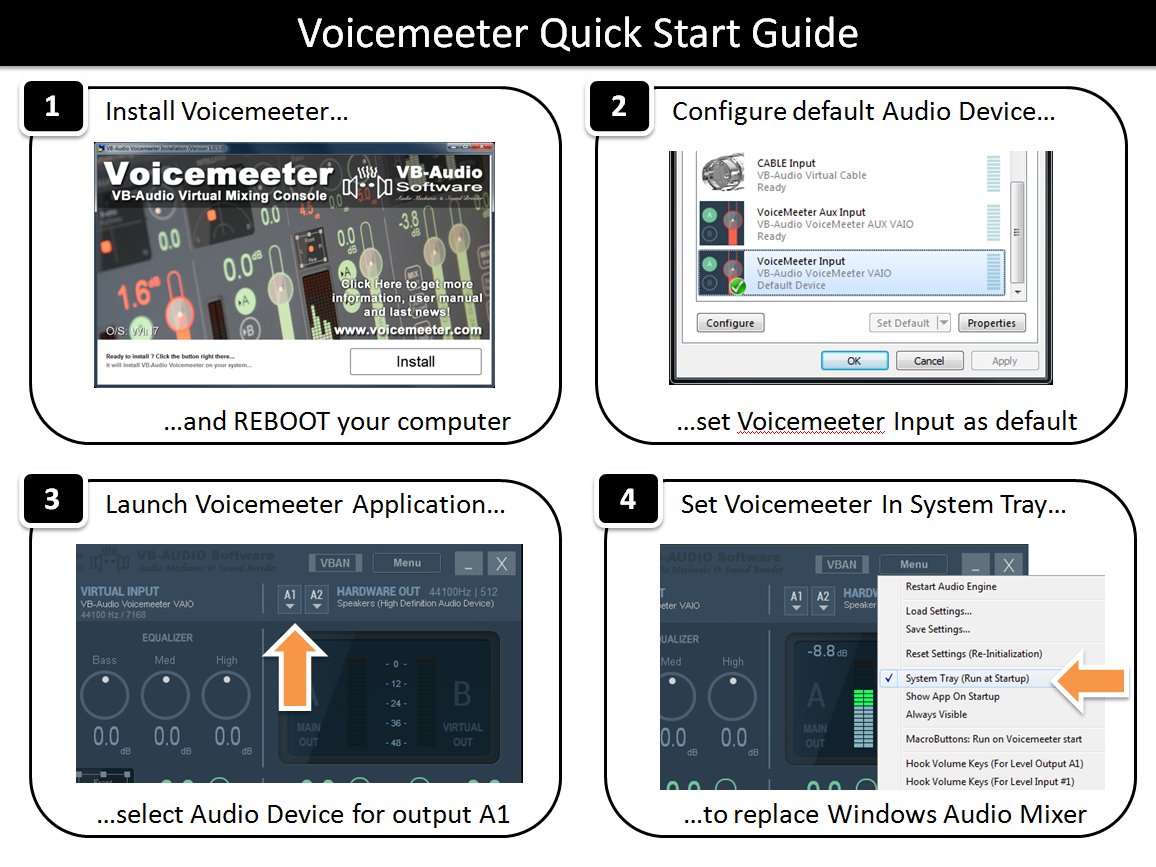
Voicemeeter Quick Startup guide:
1- Install it (Restart your computer).
2- Select Voicemeeter virtual input as your default playback device.
3- Select your main output device (BUS A1).
4- Set option to set it in SysTray and run it on windows startup.
https://t.co/xaiarsERso
How to playback into 2x Output Devices in the same time with Voicemeeter ? Very simple:
1- Just select your first audio output device as A1
2- select your second audio output Device as A2 !
Full guide: https://t.co/zoPXYpDfth
download: https://t.co/VYQvAJE5mC
How to start With Voicemeeter ? By understanding how to manage physical devices and Virtual Audio I/O (VAIO). Setting Voicemeeter input as your default playback device is the key to turn Voicemeeter into your Audio Control Center for Windows: https://t.co/Dd6thOd4MO
@lohipuikko Voicemeeter is not expected to cause such issues, it's expected to work 24/7 without problem. Feel free to come on our Discord server and expose your case to let helper see what's happening with your configuration. https://t.co/Nz7uTMfryV
@PoppaElite@MLozada Feel free to come on our Discord server where some user could help. Voicemeeter is today very stable and reliable but to configure it can become tricky if your setup is complex... https://t.co/ZtXb3IwqYM
@kaylee_dev@fortysevenfx@orcdev There is already many projects using our API/SDK and some of them are dedicated graphic user interface, specific controller, hardware controller bridge... and a good part of the API can be used on network as well (VBAN-TEXT request). See project examples: https://t.co/Nz7uTMfryV