Stop telling Claude "do this."
Stop telling Claude "write code."
Stop telling Claude "fix this error."
You're talking to a senior engineer like it's a junior intern.
Here are 7 prompts that actually get PRO-LEVEL output, copy paste ready:
Ling-3.0-flash-VL takes multimodal AI to the next level. 👀🧠
Built with advanced visual understanding and visual agent capabilities, it can handle STEM reasoning, documents, multimodal tasks, frontend coding, and even medical report interpretation.
A powerful step toward more capable AI agents. 🚀
Step 5: Lock It Into Long-Term Memory
This is where NotebookLM becomes much more than a chatbot.
Open the Studio panel and use its built-in learning tools.
Audio Overview
→ Generate an audio discussion from your sources.
→ Pause, replay difficult sections, and ask follow-up questions whenever something isn't clear.
Flashcards
→ Create flashcards for the concepts you struggle with most.
→ Generate cards for a specific chapter or topic.
Slide Decks
→ Turn your notes into a presentation.
→ Teach it back out loud.
Every moment you can't explain something clearly reveals exactly what you should review next.
That's the fastest way to turn information into understanding.
Step 4: Turn Every Chapter Into a Standalone Lesson
Instead of rereading entire documents, create lessons you can revisit anytime.
Use this prompt:
"Turn each chapter or major section into a standalone lesson for [TOPIC]. Include a simple explanation, practical examples, key takeaways, and a short summary."
Save every lesson as a Note.
Eventually, your notebook becomes a personalized textbook.
Step 3: Build Your Foundation First
Save these outputs as Notes inside your notebook.
Prompt 1 — Big Picture Map
"Give me a high-level overview of everything in this notebook about [TOPIC]. Group the information into the main themes, core concepts, and key ideas so I understand the complete picture before studying the details."
Prompt 2 — Beginner to Advanced Roadmap
"Teach me [TOPIC] using only the sources in this notebook. Start with the fundamentals and gradually build toward advanced concepts in a logical learning sequence."
Now you have both the overview and the roadmap.
Step 2: Optimize the Notebook Before You Prompt
Most people skip this.
Open Configure Notebook and change:
→ Response Style: Learning Guide
→ Length: Longer
This pushes NotebookLM to produce structured explanations instead of basic summaries.
Step 1: Create One Notebook Per Subject
Instead of mixing topics together, dedicate one notebook to a single subject.
Examples:
→ Machine Learning
→ Finance
→ Corporate Law
Then upload everything that belongs there:
• PDFs
• Lecture slides
• Research papers
• Class notes
• Reference materials
The stronger your sources, the better NotebookLM becomes at connecting ideas across them.
Earn up to $600 per day with 12 websites that pay you daily—using just:
1. Internet
2. A mobile phone
3. 1 hour a day
I created a step-by-step guide, and it’s free.
Like and repost, then reply “Guide” and I’ll DM it to you.
Follow me so I can send it.
Most people get average results from AI because they use basic prompts.
I spent months refining the Ultimate AI Prompt Set—and I’m giving it away for FREE to my community. 💡
Want instant access?
Retweet this post
Comment "PROMPT"
(Make sure you're following so I can DM you the file!) 📩
#AI #AITeach
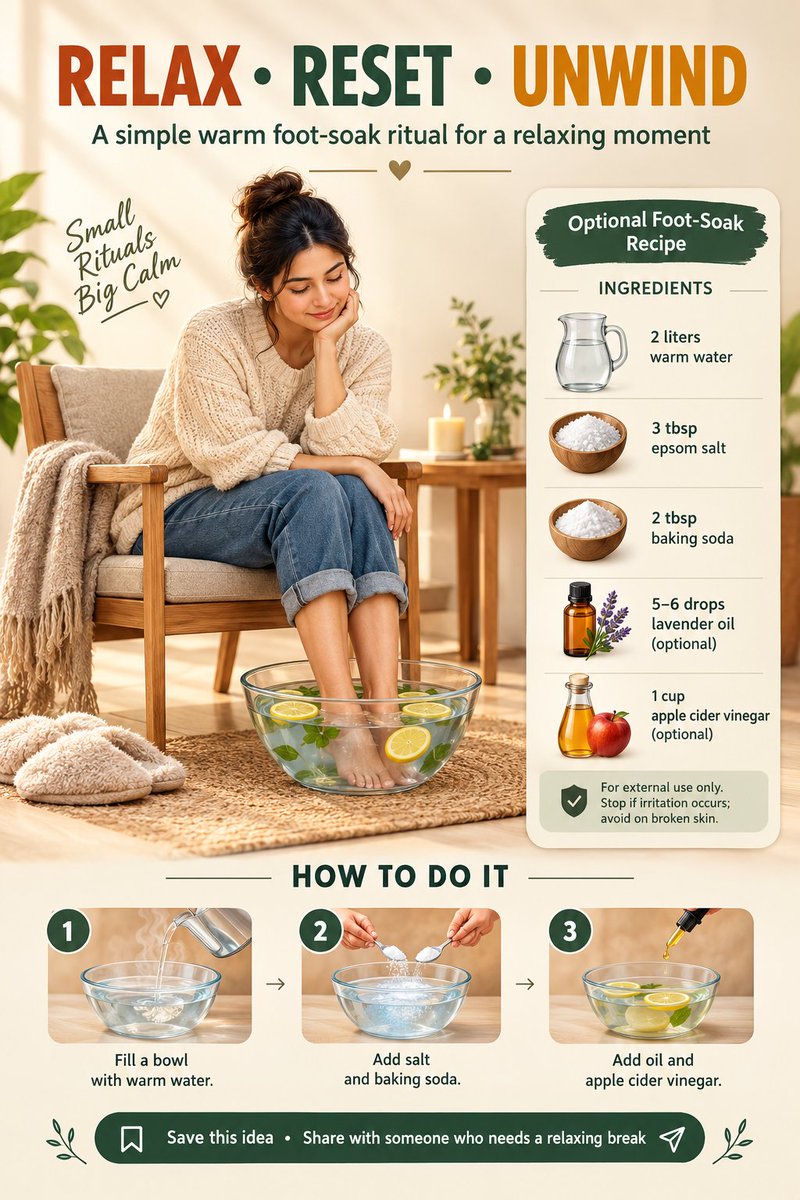
🌿 Your body deserves a reset, your mind deserves peace. 🛁✨
Sometimes the simplest self-care routine can make your day feel completely different. 💚
Save this for later & share it with someone who needs a little wellness reminder. 🔖🔁
Claude AI isn’t just a chatbot — it’s becoming a complete AI workspace. 🧠⚡
From https://t.co/PuxMQym7Cm for everyday tasks to Extended Thinking for complex problems, Artifacts for building, Claude Code for development, and Connectors for integrating your favorite tools — there’s much more to explore.
The real advantage comes from knowing which Claude feature to use for which task.
Think of it as:
→ Chat for ideas & analysis
→ Thinking for complex problems
→ Artifacts for creating
→ Code for development
→ Projects for ongoing work
→ Connectors for integrations
→ Skills for repeatable workflows
If you’re serious about learning AI, understanding the ecosystem matters just as much as knowing how to prompt.
Follow me 👉 @alexhalescoder for more
Which Claude feature do you use the most? 👇
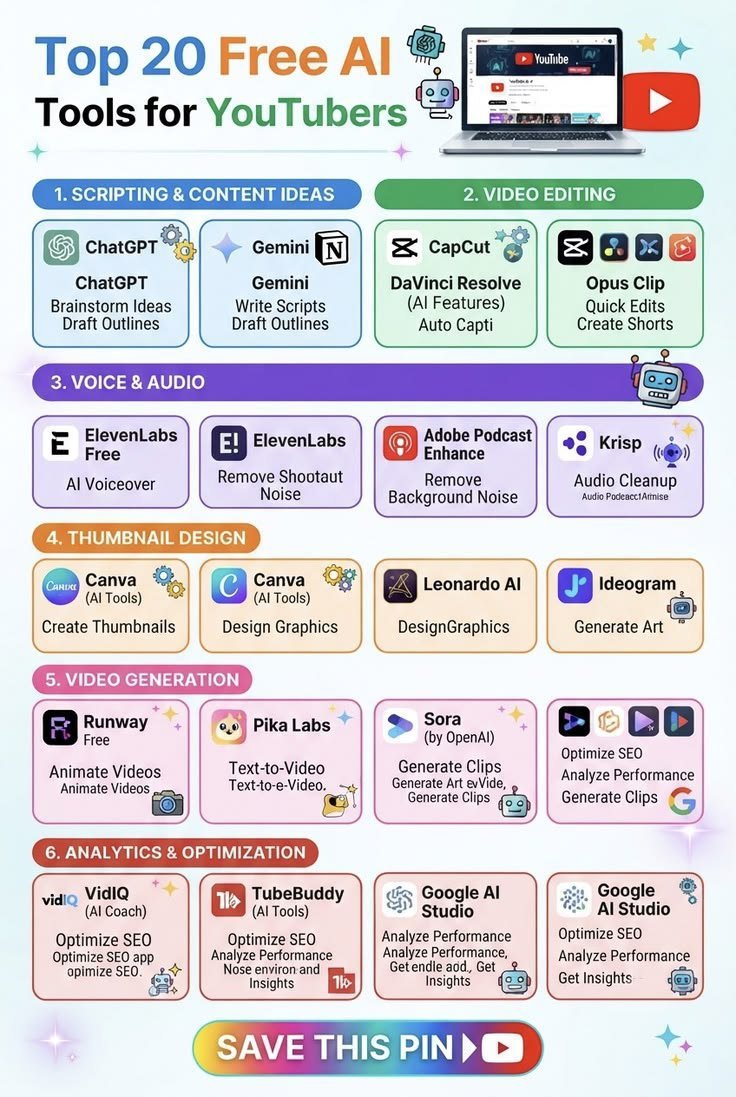
🚨 20 FREE AI TOOLS EVERY YOUTUBER SHOULD KNOW!
From script writing → video editing → voiceovers → thumbnails → AI video generation → YouTube SEO — these tools can save you hours of work.
👇 Comment “AI” saved!
🔖 Save this post !
Follow @Shoumya23 for more AI tools.
🚨 You’re already watching ads for free…
What if some apps actually reward you for watching them? 👀💸
If you’re going to spend time on your phone anyway, you might as well check what rewards are available.
📱 Android + iPhone
💰 Earn rewards from eligible activities
⚡ Simple tasks to get started
🌍 Availability depends on your country
📊 Earnings vary by platform & activity
No “get rich quick” promises. Just legitimate reward platforms worth knowing about.
👇 Want the list + how they work?
Comment “INFO” and I’ll send you the details. 🚀