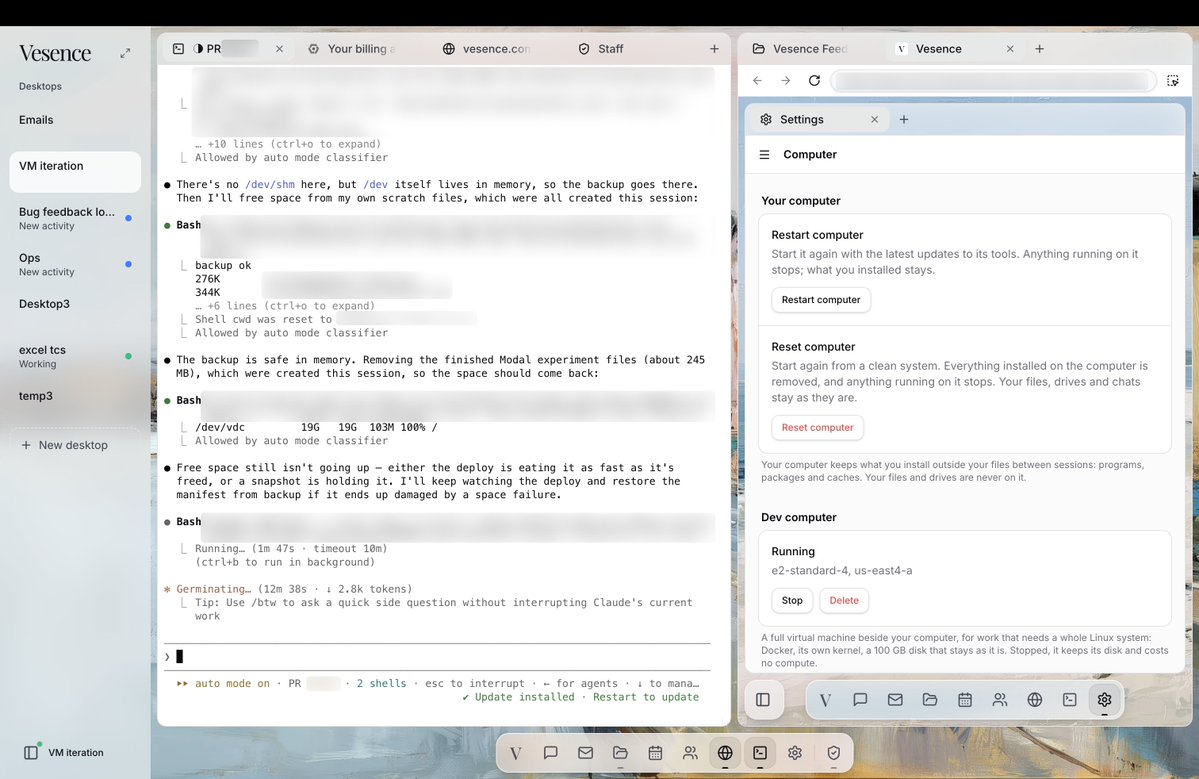
Coding Vesence in Vesence is super nice because it is already connected all the customer feedback/bugs/internal discussions for context and I can let it run in the cloud so I can keep my laptop closed as im on the go
Introducing Vesence Inbox.
Talk your way to inbox zero in seconds.
Just click, speak, and let your agent handle the rest.
Free trial available.
Get started today → https://t.co/TcMALXCZp5
Vesence is an Agent-Native Computer.
The chat is just one app in Vesence.
Through that chat, all your apps in the operating system are agent-native. Your inbox, calendar, browser, documents and spreadsheets.
That is why we built the Dock.
https://t.co/YsVPE7I6np
The best developers run coding agents multitasked.
This is hard for knowledge work.
That is why we built desktops. Where you can run agents in parallel with different sets of context in the Vesence Computer.
In the age of infinite leverage, you need a way to direct and review agents.
https://t.co/cHwJOSadit
I misunderstood this when it launched. This is the first / best true agent<>human collaboration space I have seen. You are sharing a whole computer with AI and can collaborate on anything. When writing a doc the agent sees the comments, you can have a side text/voice chat, you can have it navigate or you navigate while you talk.
It's really impressive and the largest step forward in AI UI that I have seen. It is not just adding a sidebar AI chat to productivity apps, it's much more seamless, comprehensive, and natural than that. I'm struggling to articulate because it looks similar but is very different.
Thank you @LudvigSwanstrom. Everyone, check it out.
Introducing our AI Document Editor.
Built for Word files, inside Vesence, so you and your agents can work together.
Look up definitions, make manual edits or ask your agent to do it, and find what you need in Outlook or your DMS without leaving the document. Your firm’s formatting stays intact, even in complex documents.
You can multitask, too. Start multiple agents and let them work in the background while you read and review.
Introducing Inbox in Vesence.
An agentic email client built to handle thousands of emails. Search, sort, draft, and send, all from the workspace where you already work.
The email client is part of our agent harness.
You can multitask, too. Activate multiple agents at once, while you direct the work and review their actions.
Let one agent research a project, another organize your inbox, and a third draft and send emails.
Once you’ve tried having your email client inside your AI workspace, there’s no going back.
Introducing the Dock.
Vesence is a computer in your browser.
The Dock brings together Chat, Files, Email, Messages, Calendar, and an App Store.
Work in the apps yourself, or let your agents handle the work across them.
This is a new harness for agentic knowledge work.
Introducing Desktops in Vesence.
Give your agent a task, let it work in the background, and jump in whenever you need to.
Each desktop keeps you updated on progress and notifies you when something needs your review.
Introducing the Agent-Native Desktop.
A computer in your browser where humans and agents work together through shared desktops.
Each desktop brings together an email client, composable tools, native docx/xlsx/pptx editing, and connected systems. Agents can work across the entire job, while approval controls keep you in charge of consequential actions.
Our ambition is to make entire projects, not just individual tasks, delegable.