@FabrizioRomano@AmazonHelp I just received a termination of my account just because my book title is the same as a book in the marketplace. This was honest mistake because of an oversight and I didn't research enough before I choose the title, even though other metadata is not the same.
@AmazonHelp I just received a termination of my account just because my book title is the same as a book in the marketplace. This was honest mistake because of an oversight and I didn't research enough before I choose the title, even though other metadata is not the same.
@anna_writes0 And they still uphold their decision of not publishing the book, I'm given 5days to get written agreement from the other publisher, my account has been suspended before, pls what do you think I can do?
@anna_writes0@anna_writes0 l published a book but then I got a mail saying, my book is trying to imitate another book, title, author or a known figure. I reply this mail saying it wasn't intentional and I could bring down the book of which I did. They now said my reply was insufficient
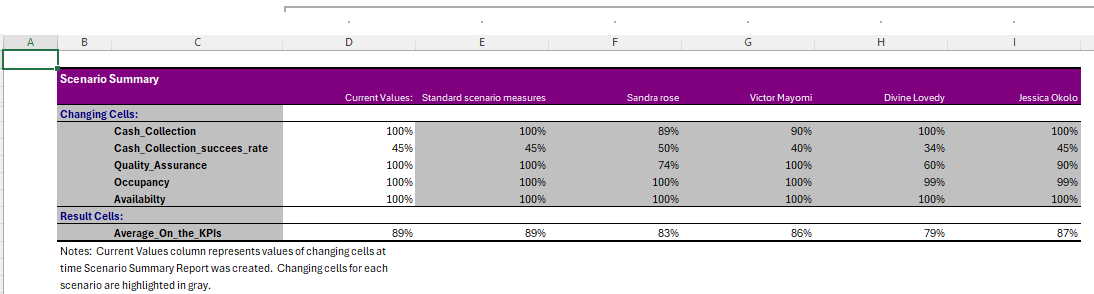
My Data Analytics Journey: Step by Step! From spreadsheets to insights—every small milestone counts. Today, I explored "What-If Analysis using Scenario Manager" in Excel, and it honestly felt like unlocking a superpower. @iam_daniiell@Nike_Smallz
For a very long time, i have not posted anything here, however now, I will be posting my Journey as i embark on the world of Data Analytics. Today was impactful with @iam_daniiell having to introduce us to what is to come and how best we can navigate this.
2/ Keep It Clean & Simple 🧼
Avoid clutter! Remove unnecessary gridlines, borders & 3D effects.
A clean chart = better readability.
3/ Use Colors Wisely ���
Stick to a consistent color scheme
Use contrasting colors to highlight key points
Avoid overloading with too many colors!
1/ Choose the Right Chart Type ✅
Bar, line, pie, scatter—each serves a purpose! 📊
Use bar charts for comparisons
Line charts for trends over time
Pie charts for proportions
Additionally, you can also do a new rule
Using the last option under rule types, we can highlight from H2:H10
P.S; get rid of the dollar sign, then click on format, click on Boarder and select Outline
For example; you can search under column K, either using gmail, yahoo, dundermifflin, which ever one you search with will highlight the files you ��are looking for
When working with a lot of data, highlight cell rules is the best option to help find data that should be removed (data cleaning)
Under highlight cell rules, 'Text that contains can be used to search for particular data sets
HIGHLIGHT CELL RULES
Let's dive in
This helps to filter values whether its duplicate, in the duplicate pop up, you can click on duplicate, you would see 'Unique' this helps highlight files that are not duplicates as well
In conditional formatting, at a very quick glance you can tell who earns below average, averge and above average, it is a simple and fast way to do that in Excel