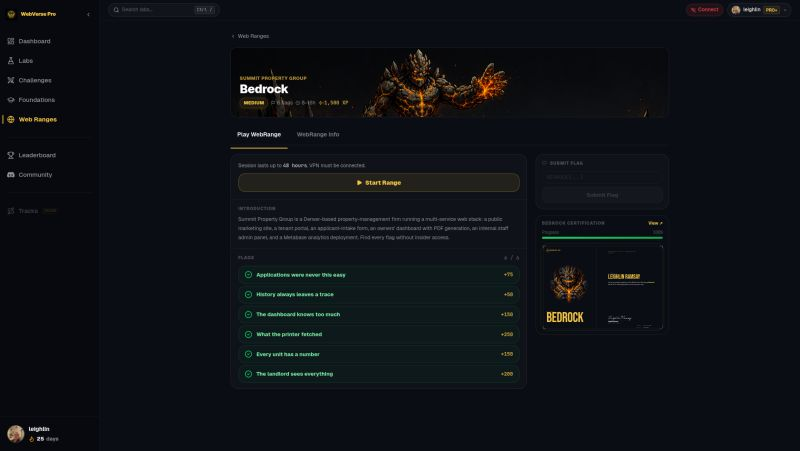
WebVerse Labs has released our first WebRange. This is a beginner friendly Range, great practice for CWES or OSCP.
Oh and BTW we're running a 42% sale right now!!
👉 https://t.co/hDu9re8znu
This is only the start, more ranges are coming?!
An HTTP request is going to be YOUR ASS!!!
Something we do every day.
YouTube
LinkedIn
Claude Code
EVERYTHING WE DO!
All HTTP requests, such a simple thing......
But when combined with other things like access controls and sensitive data, that simple HTTP request becomes your worst nightmare.
Introducing WebVerse Pro!!!!!!!
Yeah that's right, someone has actually built it...
You've all been thinking it.
Wanting it.
Begging for it.
Dreaming about labs that don't feel like CTF puzzles with a flag duct-taped to the end.
Well, dream no more because WebVerse Pro launches April 10th.
No more single-box challenges with one planted vuln.
No more sterile environments that look nothing like a real assessment.
No more labs where the "company" is a login page and a README.
These are full multi-service environments.
Fictional companies with real infrastructure.
Exploit chains that mirror what you'd actually find on an engagement.
Your own isolated lab.
Your own VPN connection.
Your own attack surface to tear apart.
Built solo. Built by a pentester. Built for pentesters.
It is time to HACK.
Introducing WebVerse Pro!!!!!!!
Yeah that's right, someone has actually built it...
You've all been thinking it.
Wanting it.
Begging for it.
Dreaming about labs that don't feel like CTF puzzles with a flag duct-taped to the end.
Well, dream no more because WebVerse Pro launches April 10th.
No more single-box challenges with one planted vuln.
No more sterile environments that look nothing like a real assessment.
No more labs where the "company" is a login page and a README.
These are full multi-service environments.
Fictional companies with real infrastructure.
Exploit chains that mirror what you'd actually find on an engagement.
Your own isolated lab.
Your own VPN connection.
Your own attack surface to tear apart.
Built solo. Built by a pentester. Built for pentesters.
It is time to HACK.
How to avoid getting overwhelmed by too many endpoints
A big app can feel impossible to test at first.
Don’t try to test everything equally.
Prioritize everything.
Quick 5 step workflow:
1. Write down all endpoints first
Even the boring ones.
You need a map before you need payloads.
2. Prioritize endpoints with “interesting inputs”
These are usually higher-value:
• IDs / UIDs / UUIDs
• usernames / emails
• role names / permission fields
• file paths / filenames
• URLs / callback URLs / image URLs
• object references ("projectId", "invoiceId", "teamId")
• state/action fields ("status", "approve", "role", "owner")
3. Prioritize endpoints that change something
Higher signal than read-only pages:
• create
• update
• delete
• invite
• transfer
• reset
• export
• approve/reject
4. De-prioritize endpoints that are mostly static
If it doesn’t take input and doesn’t touch backend logic, move it down the list.
5. Group endpoints by feature
Example:
• auth
• profiles
• files
• billing
• admin
• team/invites
This helps you test workflows instead of random requests.
Best mindset shift:
Don’t ask “Which endpoint looks coolest?”
Ask “Which endpoint handles objects, permissions, paths, or state changes?”
That’s where the good stuff usually lives.
3 signals I look for before testing SQL Injection
Most beginners start with payloads.
Better move: start with signals.
1) The feature clearly talks to a database
If the app is doing any of these, SQL is probably involved:
• search / filters
• sorting
• login
• account lookup
• reports
• admin tables
• exports
If a feature is fetching/changing structured records, it’s worth a look.
2) Your input changes query behavior (not just page text)
Watch for:
• different results when you change filters
• weird sorting behavior
• empty vs partial result sets
• errors when using quotes/special chars
• type confusion (number field acting weird with text)
You’re looking for signs your input affects backend logic, not just UI rendering.
3) The endpoint takes parameters that look query-ish
High-interest inputs:
• "id", "user_id", "order", "sort", "filter", "q", "search", "page", "limit"
• JSON body fields used for filtering/searching
• Any sort of ID, UID, UUID or anything used for identification.
These often sit close to query construction.
Don’t ask “What payload first?”
Ask “Does this input influence how the server queries data?”
That question will save you a lot of time.
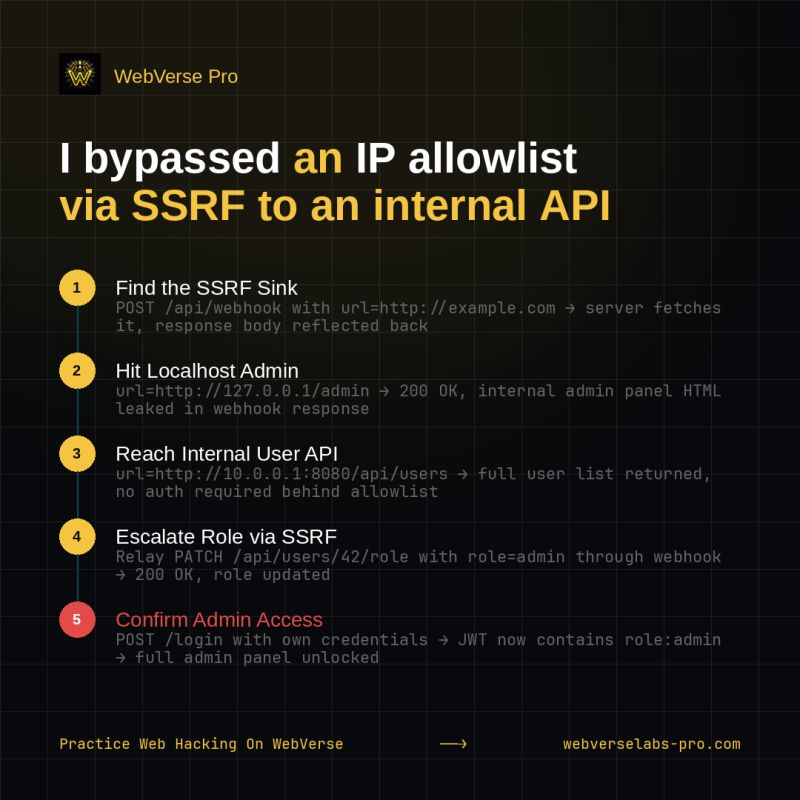
How to recognize server-side fetch behavior during recon (and stop missing SSRF leads):
Most people look for the word "url" and call it a day.
Better approach:
Look for moments where the server is doing the fetching, not the browser.
High-signal features:
• import from URL
• avatar/image by URL
• link preview / Open Graph preview
• PDF/screenshot generation
• webhooks / callbacks / integrations
• file fetch / download proxy
• thumbnail generation
• “scan/check/crawl this URL”
What to watch for in traffic/behavior:
• you send a URL, server returns processed content/result
• response time changes based on target host
• different errors for timeout / DNS fail / connection refused
• internal hostnames/IPs leak in errors/logs
• fetched content appears later (preview, cache, file, metadata)
Fast mindset check:
Ask:
“Did the browser fetch this, or did the app backend fetch it for me?”
If the backend fetched it, you may have a server-side fetch primitive (high-value recon signal).
Pattern to remember:
User-controlled location → server fetches resource → trust boundary risk
That one pattern will help you spot SSRF opportunities way faster.