Meet Zenovay.
See what drives revenue. Understand why users convert.
Analytics, funnels, session replay, heatmaps and monitoring. All in one platform.
https://t.co/cy6YcfySgX
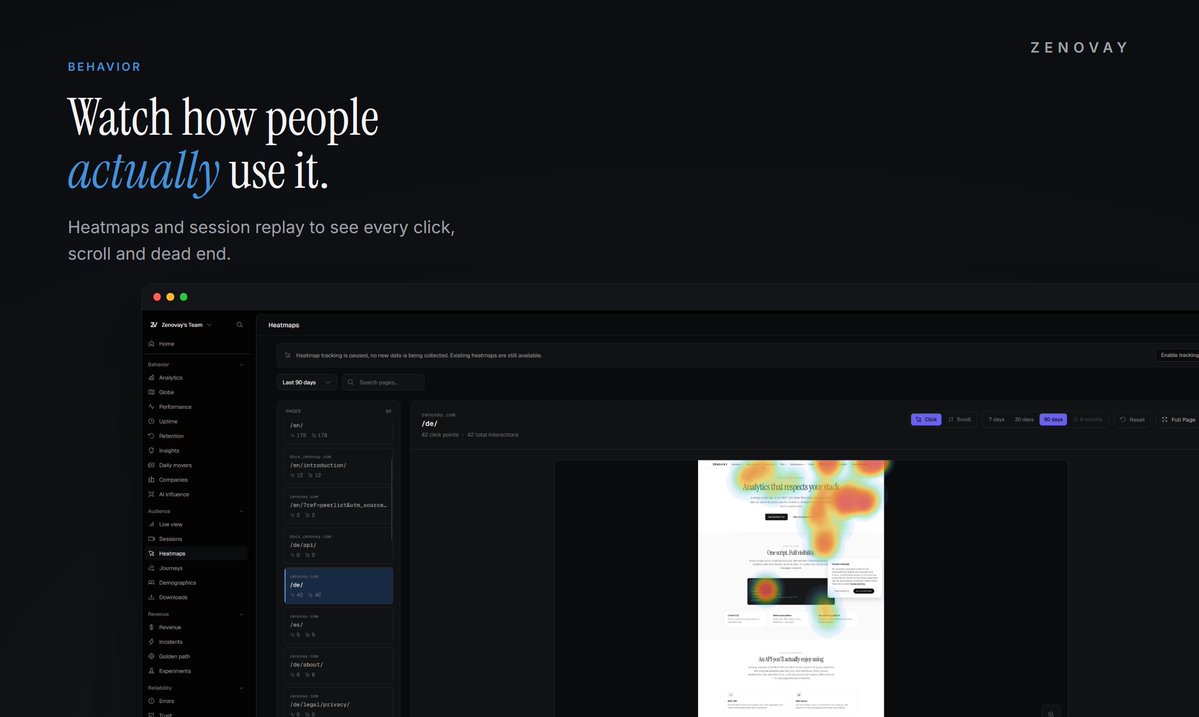
@ZenovayDX helps you understand what people do on your website and where they get stuck. It combines visitor analytics, heatmaps, session recordings, conversion tracking, and technical monitoring in one platform. The main benefit is having this information together instead of switching between several tools.
Based on its website and my experience:
➡️ Easy to start: You completed the onboarding and found the steps clear and easy to follow.
➡️Guidance within the platform: documentation attached on the website
➡️Lots of features need clear direction: The range looks useful, but beginners would benefit from examples explaining which feature to use and what decision it helps them make.
➡️Suggested improvement: Add a visible “Start here” button, a short dashboard tour, and a checklist covering connecting a website, checking the first visitor data, and setting up a conversion goal.
Most teams run four different tabs just to understand their website:
1. GA4 for pageviews
2. Hotjar for heatmaps
3. BetterStack for uptime
4. Sentry for frontend errors
That means four scripts slowing down your site, four monthly invoices, and data that never talks to each other.
Zenovay replaces the entire stack with a single lightweight script:
• Realtime visitor analytics and traffic sources
• Heatmaps and session replay
• Automated uptime monitoring and incident alerts
• Core Web Vitals and client error tracking side by side
• First touch to last touch revenue attribution
Hosted in the EU, cookieless by default.
Make the switch today
Use code SWITCH60 to get two months of Pro free.
Premium does not create distribution.
A useful reply under the right conversation can reach more people than an original post.
The lesson is not to reply more.
Find questions where you have earned a specific answer, then make the answer useful enough to stand on its own.
A channel can bring fewer visitors and still deserve more budget.
If those visitors activate, return, and pay, traffic volume becomes the least interesting number.
The useful question is not where visits came from. It is which source created customers.
Start with 10,000 events per month free.
Connect one site, verify the first events, then add revenue attribution when you are ready. No card is required to evaluate Zenovay.
Start free: https://t.co/iUc9ewiZCc
Zenovay’s cookieless mode uses no cookies, no localStorage and no fingerprinting. Analytics data is hosted in the EU, with retention and deletion controls built into the product.
Privacy details: https://t.co/b7ZZHvnMFx
Most analytics reports end with a number.
The useful ones end with a decision.
Traffic fell is a fact.
Organic search fell after the pricing page changed is a clue.
Revert the change or test a new page is a decision.
A dashboard should shorten that path.
An install assistant should not get unrestricted access to your repo.
Zenovay's assistant keeps its writes in the repo, scrubs secret shaped strings before content reaches the model, and journals each changed file for undo.
Fast setup should still be inspectable and reversible.
Install Zenovay from your terminal:
npx @zenovay/cli@latest init
The CLI detects your framework, guides the tracking setup and verifies the result. Review the changes before you keep them.
CLI docs: https://t.co/XnXr9vCyEZ
If you have five minutes, I would rather have your criticism than your applause.
Product Hunt: https://t.co/xp4oiMn7mf
Zenovay: https://t.co/qix6oEXTte
The same workspace also brings together live visitors, funnels, Core Web Vitals, uptime, and error tracking.
The goal is fewer disconnected tools and one customer journey you can actually investigate.
Tracking is cookieless by default. No cookies and no localStorage.
That is a mechanism, not a slogan. Data is hosted in Frankfurt, and we document what the tracker can and cannot know.