“Most of the time, users prefer list view when they are searching with specific requirements while they love grid view for exploring.” — @Mei_big_eyes https://t.co/3xAZrliv0r
Generative AI is mind boggling.
But right now, it’s a terrible tool for creating specific images.
Why?
The user experience is stunted.
And current tools aren’t considering the full end to end UX.
I’ve spent 20 years designing products that grew to 1B+ users.
It’s time to focus on the user experience.
Here’s what needs to change to bring the future to life:
–––
I’ve often tried to use GenAI tools to create a specific image that’s in my head.
But after several disappointing prompt iterations I get frustrated and give up.
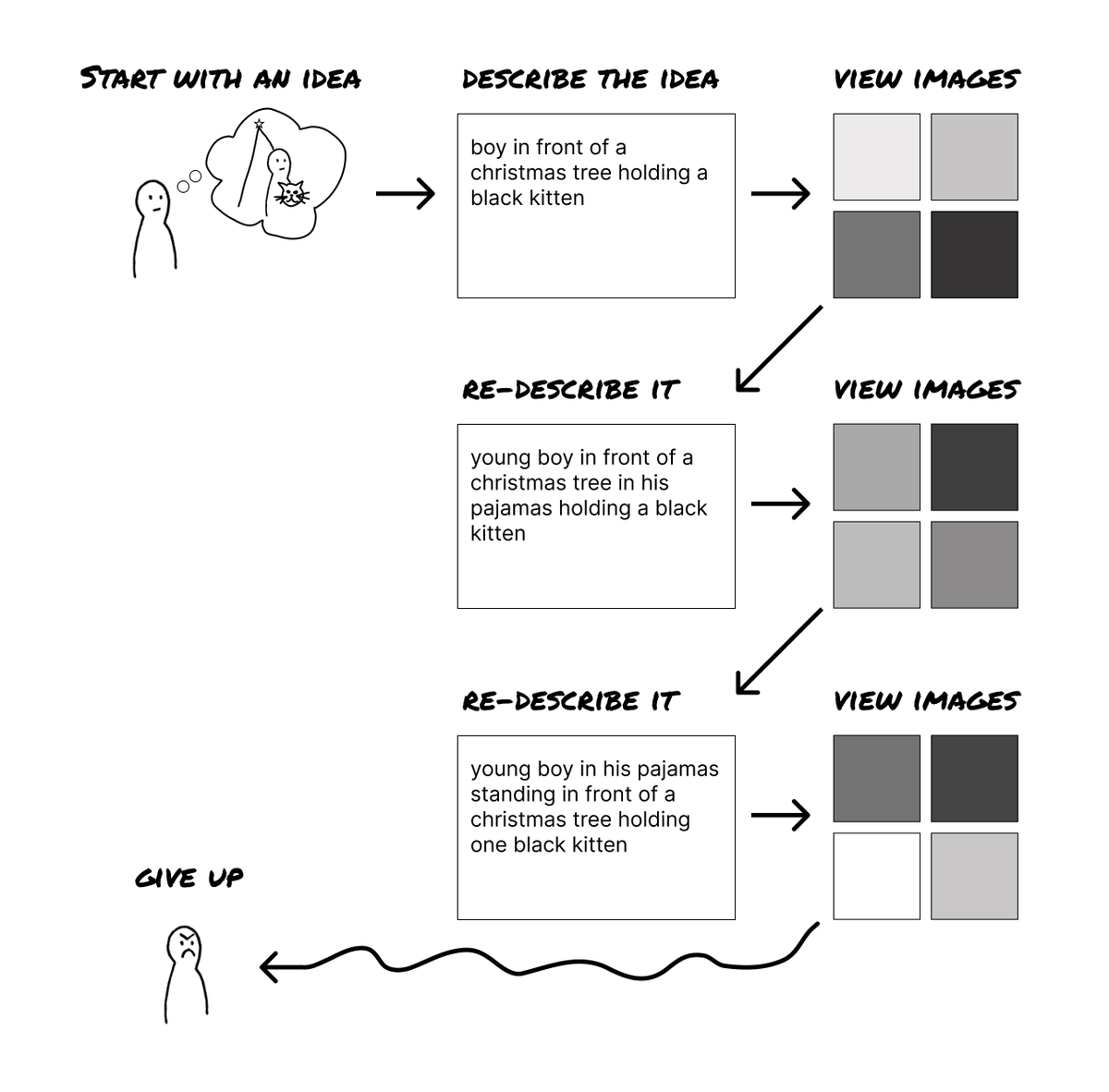
The current workflow is indirect and imprecise.
It looks something like this:
GenAI tools are incredible for exploring the possibilities of this new technology, but currently they fail to provide a great end to end user experience.
And the solution isn’t better prompt writing.
When a person has a specific image in their head they want to create, there are two key aspects:
- Image composition
- Image editing
Currently, GenAI isn’t able to fulfill either successfully.
So what needs to change?
–––
For composition, most products rely on text prompting to generate an image.
This works reasonably well for exploring and experimenting with the capability of the tools.
But text prompting falls short when trying to compose a more specific image because:
- Trying to capture every detail through words is hard.
- Words can be interpreted in different ways – so you usually need to iterate on the prompt.
- Every re-run of the text prompt generates an entirely new image with random and uncontrolled drifts.
- It’s impossible to lock down aspects of an image with text – any edits to the prompt will always lead to an entirely new image.
Recently, some fantastic products have launched that support multi-modal inputs.
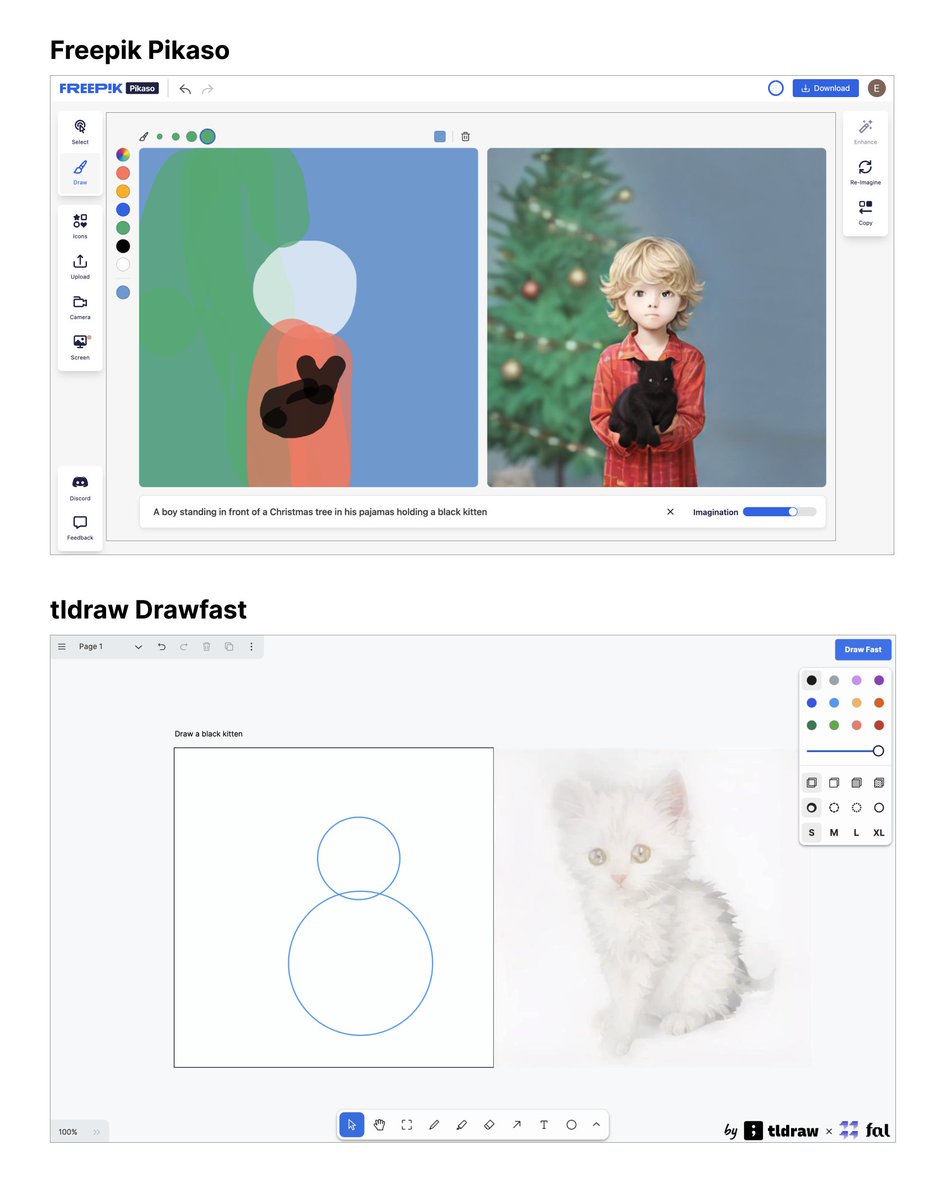
@freepik Pikaso and @tldraw Drawfast combine text prompting with basic drawing tools, allowing users to shape the layout of the image.
While these new products demonstrate the power of GenAI technology, they are far from perfect.
If you were to combine these products with the image styling capabilities of other tools such as Krea, Adobe, Visual Electric, etc you would end up with something that would make image generation pretty seamless.
But even if you’re satisfied with the composition, this doesn’t solve the second core problem:
Image editing.
–––
We’re still unable to successfully edit parts of AI generated images.
From my understanding, this is because of how GenAI works.
It generates images by starting with a random sample of noise – a bit like an old, fuzzy TV screen.
The noise is iteratively refined and composed into something the AI knows resembles (from training) what you described in the text prompt.
Instead of creating individual elements (say, a frog and a lily pad separately) and stacking them on top of each other, it generates a single, flat image that it knows resembles a frog on a lily pad.
Because of this, it’s challenging to select single elements and edit them in isolation.
Some tools like Runway, Visual Electric, and Adobe support editing parts of an image.
But it’s still difficult to control the output of those edits.
–––
One potential solution could be to separate elements into layers during the image generation process.
If the prompt were “A boy in his pajamas standing in front of a Christmas tree holding a black kitten” the AI could break this into:
- Layer 1: Christmas tree
- Layer 2: Boy in his pajamas
- Layer 3: Black kitten
This would require the AI to have a master reference for how these elements should come together.
But each element could be generated independently as a separate layer, referenced against the master image, then combined to form the final image.
The user could then:
- Select and modify layers individually.
- Lock the layers/elements that they liked.
- Adjust other elements through a combination of conventional photo editing tools and text prompts.
Another solution could be to support basic photo editing — tools to select, lock, fill, erase, etc.
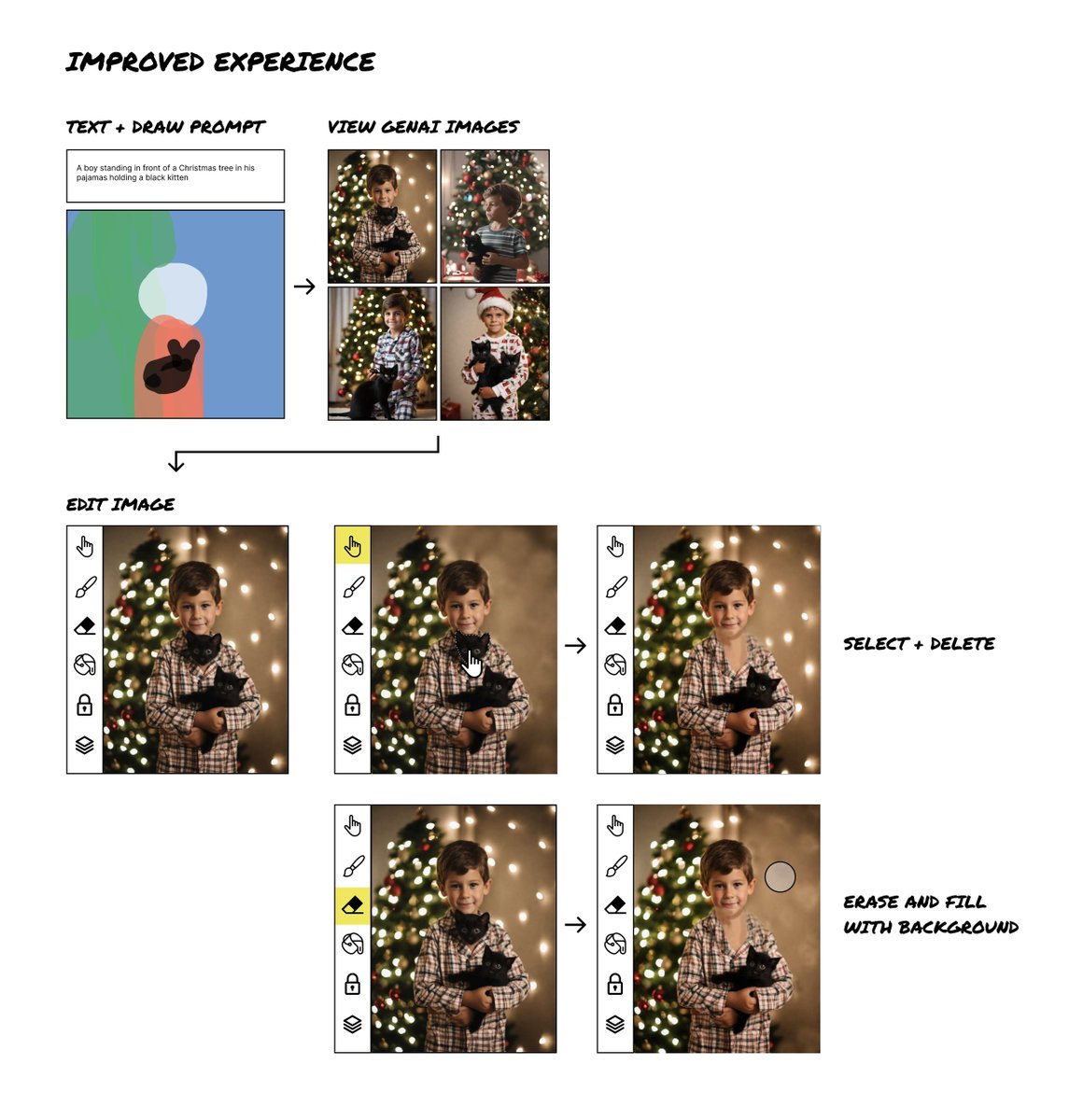
With AI generated images, there are often extra fingers, arms, or other unexpected elements. In this example, there is an extra kitten head on the boy’s chest — which I should be able to remove.
With current tools, selecting and regenerating this area just regenerates and moves the kitten’s head around – leading to a frustrating verbal wrestle with the AI to try and explain why the kitten’s head shouldn’t be there.
Offering some basic photo editing tools would go a long way in supporting image clean up if you could:
- Select — Paint to select an area like @runwayml , long press to select an object like Apple photos, or select a precise area like Photoshop’s magic wand or lasso tool.
- Erase — Remove an element (like an extra finger or kitten head) and fill in from the layer behind.
- Paint or smudge — Smooth imperfections or choose a color to cover up flaws.
- Color fill — Select and fill in a color, similar to Photoshop’s paint bucket.
- Lock elements — Select and lock objects to rebuild images around them. Alternatively, you could lock at the layer level if images were constructed through layers.
–––
Putting this all together…
Today’s products are undeniably awesome.
But they aren’t yet thinking about a person’s end to end experience.
You’d start to move the needle if you could combine tools like Freepik Pikaso or tldraw with Krea, Adobe, or Visual Electric.
But there would still be major gaps around image editing.
If we think of an ideal end to end experience for generating an image that is in someone’s mind, it could go more like this:
- Start with an idea.
- Draw + describe (text prompt) to generate images.
- Choose image style (photograph, line art, water color, etc.)
- Alter or regenerate specific aspects of the image.
- Edit flaws until the image is just as you envisioned.
–––
We are at a super exciting time right now.
The sheer number of projects launching every week is phenomenal.
And the jumps in the capability of new products is incredible.
But to truly leap forward, we must shift from building explorative tools to useful ones.
We need to think about use cases and support them by crafting better end to end user experiences.
It’s early and things are happening so fast. I hope this post is outdated by next week with new launches that support and combine all these elements!
What crazy ideas do you have for user-centric GenAI tools?
What other functionality do you think would provide a better user experience?
–––
For more design ideas on AI + crypto, follow me on X:
@elizlaraki
“Growth design is the idea of helping a business grow while providing a great experience to the customers. It is a much tighter integration between business and UX, than what we have come to learn in traditional product design…” — @booWendyb00 https://t.co/fQNVgLOeVm
In 2006, I was 1 of 4 designers on Google Search.
For 20 years, every search engine has copied Google.
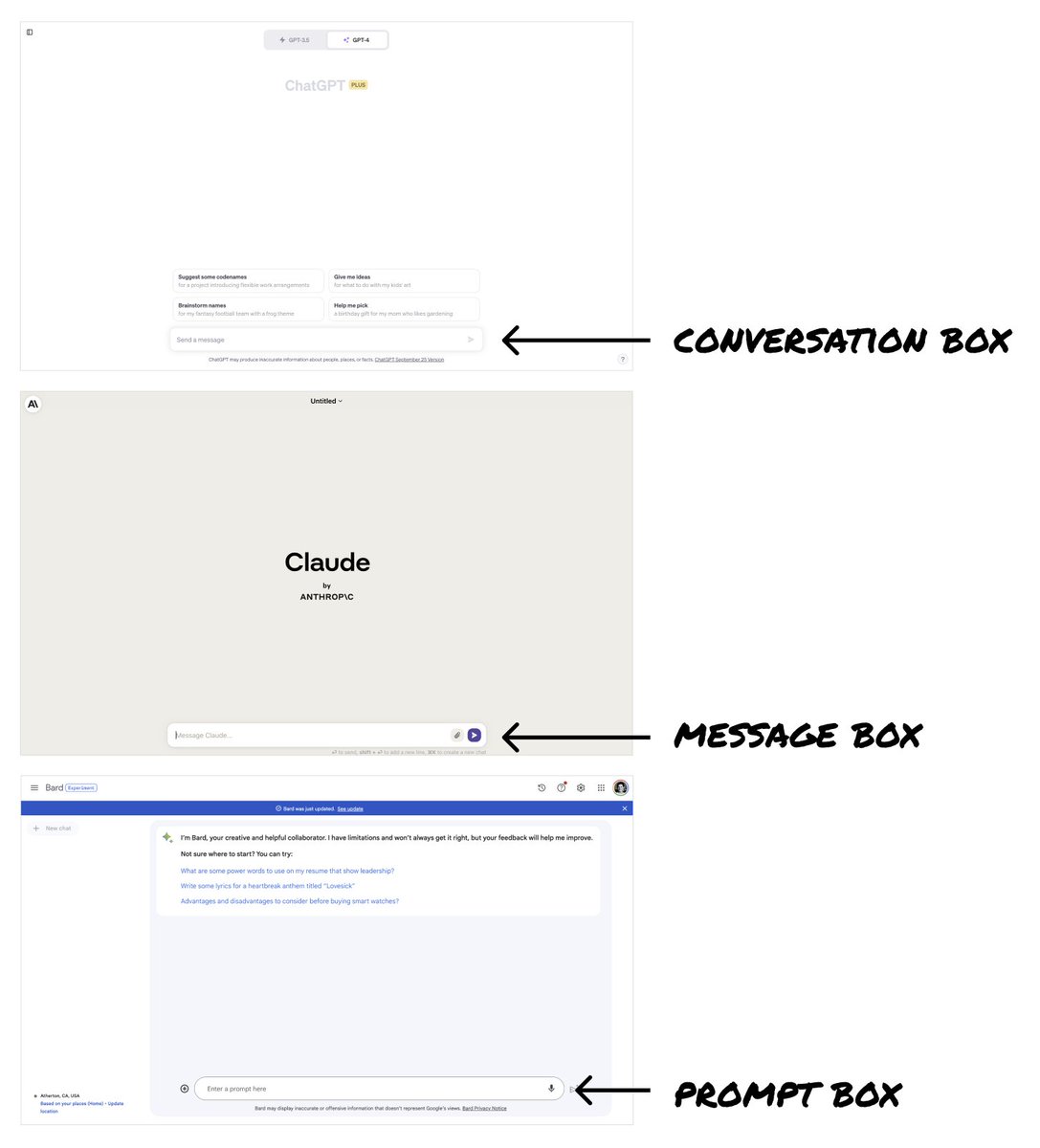
Now ChatGPT, Bard + Claude look like Google's offspring - "better” search engines.
But last week signaled we're on the brink of a design revolution.
ChatGPT unveiled incredible new features.
These could give us the opportunity to completely shift how we interface with AI.
Here's the full story:
–––
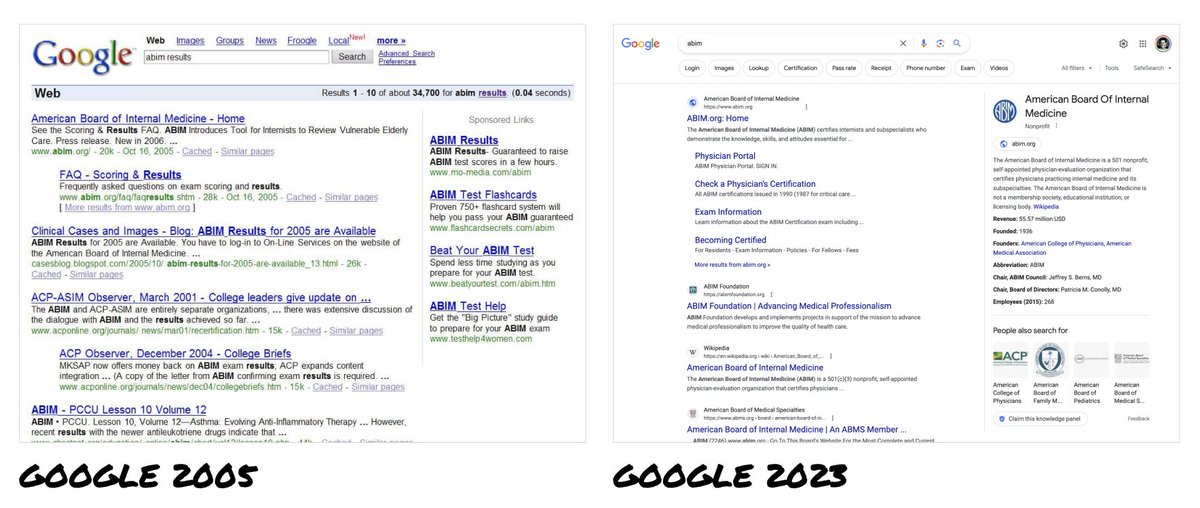
When I was a designer on Google Search, all major search engines looked the same – Google, Yahoo, MSN Bing.
Google was the market leader with a heavily optimized UI that supported billions of dollars in ad revenue.
Naturally, it became THE way to show search results.
Its success made it illogical for Google to consider big UI changes.
And any changes they did make were just mirrored by everyone else.
So 20 years later, we’ve only seen incremental changes to search engine UIs.
–––
Today, we have consumer-ready LLMs (Large Language Models) freshly in our hands.
As consumer products, these are in their infancy.
We’re very early in understanding their capabilities and defining how people interact with them.
These are uncharted waters.
And yet ChatGPT, Bard, Claude etc. all chose a text-based input box — just like Google’s search box — as the core interface.
Why?
The input box is simple, versatile, and familiar.
- It’s simple to understand → you type your questions into the box.
- It’s versatile → the box can handle all sorts of questions/queries.
- The paradigm is super familiar → people immediately know how to use it.
Because of this, LLMs have essentially become “a better Google.”
–––
But last week’s ChatGPT announcements thrust open the doors to new possibilities.
ChatGPT is now multi-modal — it can see, hear, and speak.
These are the recent announcements from @OpenAI :
Voice: https://t.co/hAeXxBTH9l
Photos: https://t.co/X3QbLnwT1V
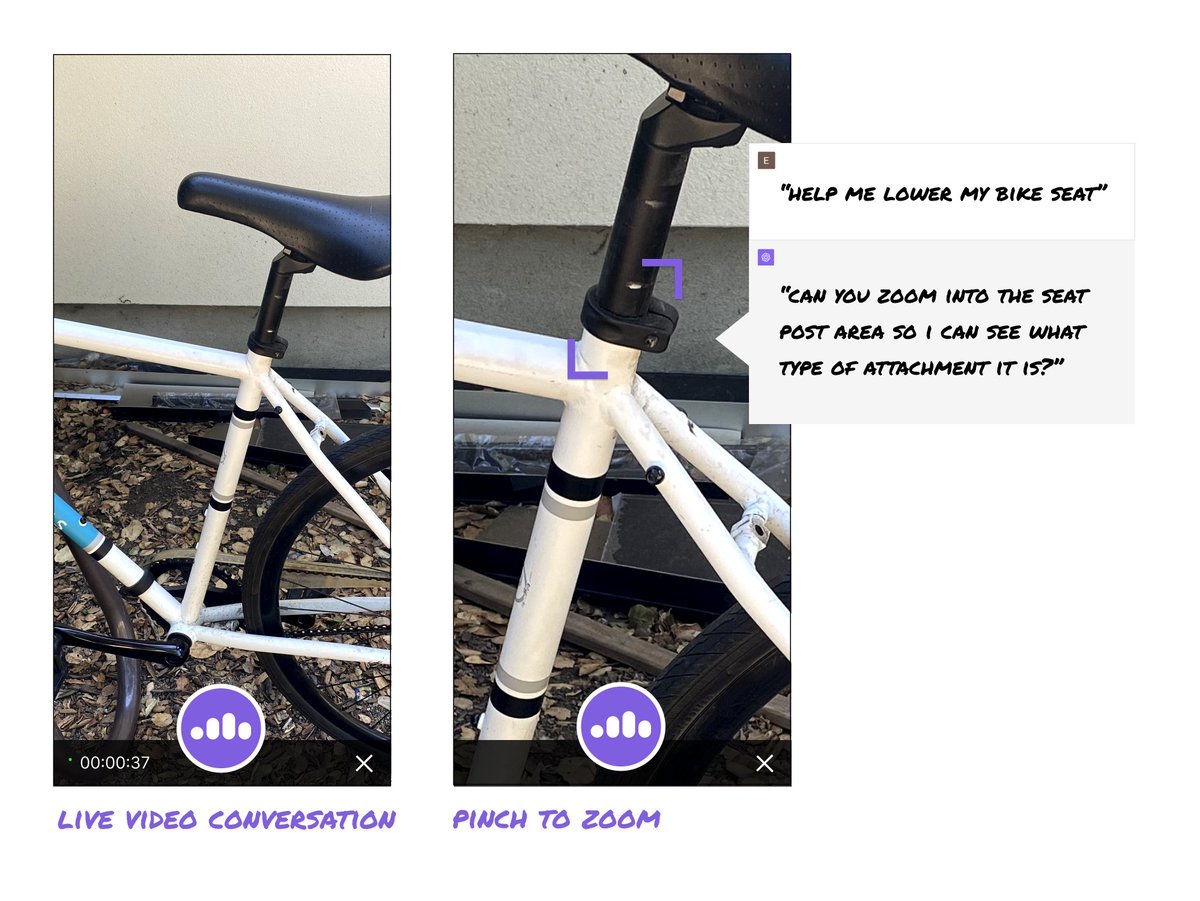
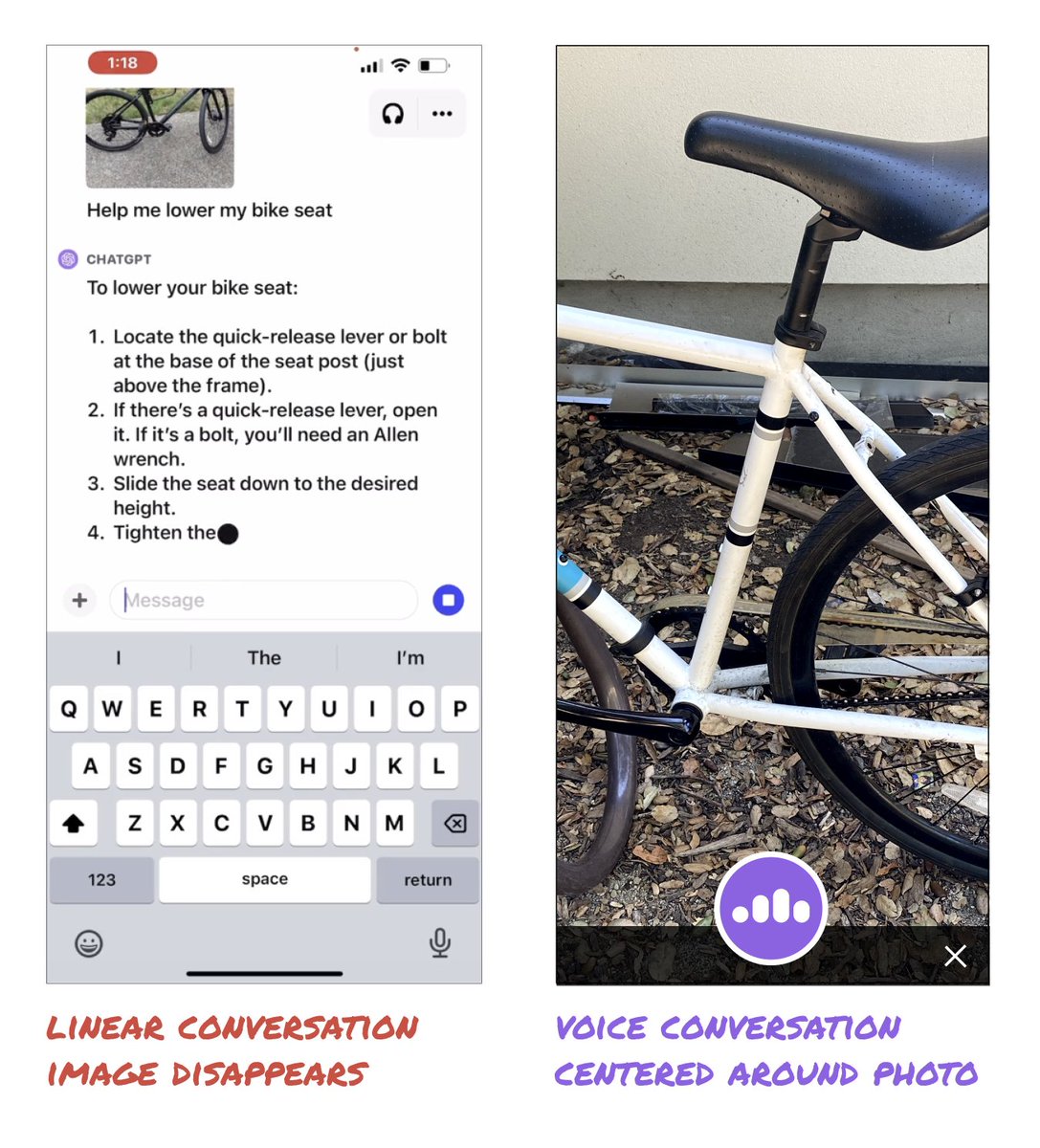
The example of ChatGPT explaining how to lower a bike seat was incredible.
But, it could be so much better!
The video showed you'll have to post multiple new photos to keep adding new information and to progress the conversation.
It was still a linear conversation centered around the text box.
But what if we rethought the interface to center around the image?
What if ChatGPT supported both images AND voice simultaneously?
Could we end up with a more immersive experience?
–––
How else could interacting with LLMs mimic IRL conversations?
Could we (or the AI) pinch to zoom or rotate the image?
Could we interact in real time with video?
What new possibilities open up with context being preserved over time?
–––
There is so much energy and excitement around what AI can do.
But we are limiting the potential by assuming the conversation box is the best interface.
Right now, designers have the chance to create truly novel interactions and bust through the 20+ year old search UI paradigm.
The ideas above are just to illustrate some potential options.
But they are also intended to spark a flame.
Now is the opportunity to be creative and explore divergent UIs.
What are the craziest, coolest, most creative UI ideas we can unleash?
LFG 🚀
Still using our wallet TestFlight? Time to make the switch! 🏃
Download the Uniswap mobile wallet in the app store and all of your information from TestFlight will automatically be ported over 🤝
https://t.co/AbDJspGvlx
1/32 On-canvas preview
Hover over design panel options to preview different settings and properties before committing to them.
(Font preview is in the works!)
We are excited to announce that the SyncSwap Era ∎ Testnet is now live on the #zkSync Era testnet🎉
A huge thank you to the community for the support and patience 💜
Learn about the Future-Proofing Evolution of SyncSwap 👇
https://t.co/AgZWGlD1cL
#zkEVM#DeFi#DEX#L2#L222