Thanks! Small-size readability is exactly what I was checking while making the icon.
It’s a spoken English practice app for working professionals - helping with real speaking confidence in work situations, not just generic language learning.
Still early, so keeping the exact focus a bit high-level for now.
What problem is your utility solving?
Day 3 of building my first iOS app.
Spent today in Icon Composer making the app icon.
Went through a few directions before settling on one that feels clean and clear at small sizes. Still testing how it looks on the home screen.
#BuildInPublic#iOSDev
Thanks. Yeah, the niche feels clear so far.
TestFlight is definitely the plan before a full App Store launch. Want to get a small group of real users in and see how the practice flow actually feels before going wider.
Still early on the build though, so the beta is a bit further out.
Thanks! Appreciate it.
It’s a spoken English practice app for working professionals - focused on real speaking confidence rather than generic language learning.
Still early days, so keeping the exact focus a bit high-level for now.
How was the experience shipping your first few apps?
@routine_genius Thanks. Useful numbers.
Still deciding on the speech stack, but the confabulation point is noted - noisy environments make that tricky.
Day 1 of building my first iOS app. 🚀
A spoken English practice app for working professionals who need real speaking confidence (not just another generic language app).
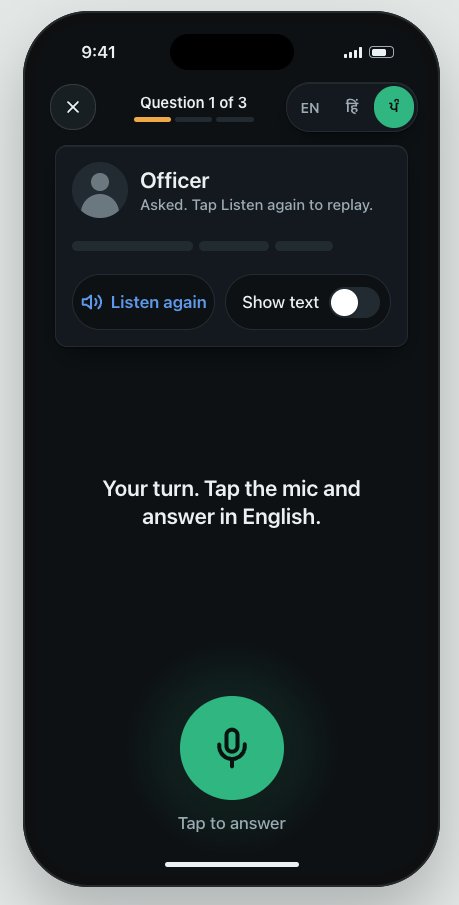
Designs are done - made with Claude Design. Sharing a UI screen below.
Building the entire thing in public for accountability + to find people who want to follow the journey from design → code → App Store.
Idea stays high-level for now. Execution is the real moat.
Follow if you want regular updates on progress, struggles, and learnings.
#BuildInPublic #iOSDev #IndieHacker #SwiftUI
@abolbuild Leaning toward cutting some for v1 😅 core flow + basic retention first. A lot of the edge cases can come after the first users are in. Shipping > perfect screens right now.
Day 2 of building my first iOS app.
Yesterday I had 19 designed screens and thought I was almost done.
Today I audited them against the spec and found 34 missing. Not visual polish - the ones that decide if anyone actually comes back.
The happy path was fully designed. Every unhappy path was missing: loading states, offline states, and what happens when the user stays silent.
Worse, the retention loop was incomplete. Every countdown was designed. Every arrival was missing. Reaching a milestone paid off with nothing.
19 → 62 screens. Day 3 is tokens and contrast.
#BuildInPublic #iOSDev
@not_sacke Thanks! Yeah, most apps stop at listening and reading. Speaking is where people actually struggle in real situations.
That’s the main reason I’m building this. The design-to-App-Store part is definitely going to be the real learning curve.
Appreciate the encouragement 🙏
Your passport application got delayed and nobody told you the real reason? A lot of countries are now auto-rejecting photos that look even slightly AI-touched.
The US State Department is clear: no computer software, phone apps, filters, or artificial intelligence on your photo. They check for skin smoothing, background swaps, and anything that changes how you actually look. Malaysia and the Maldives have issued similar warnings. The UK wants unaltered photos. Biometric systems need your real face, not a cleaned-up version.
A lot of passport photo tools quietly apply those edits. They seem easy until the application gets rejected.
PassportCrop just crops and resizes your regular photo to the exact official specs for 32 countries. Your face stays untouched, no AI retouching or smoothing. Everything runs in your browser so the photo never leaves your device.
Worth running your photo through it before you submit: https://t.co/Yf4aWI2HlN
#PassportPhoto #TravelTips #USPassport #VisaTips #PassportRenewal #TravelHack #ImmigrationTips #DigitalPassport #TravelSmart #PassportApplication
@Sousinr PassportCrop lets you do it right in the browser. Pick your country, line up your head, and download a print-ready file. It checks the size and head position rules for 32 countries and never uploads anything.
https://t.co/UKBz5zIX28
Wondering what dental implants actually cost before you get hit with a quote?
DentalImplantCalc gives a rough range based on number of teeth, material, and extras like bone grafts, using published U.S. market rates. Instant estimate, no email required, and it breaks down the main pieces so you know what drives the price.
https://t.co/FQvu1ahIjY
#DentalImplants #DentalCare #ImplantCost #Teeth
Tired of converting timesheets by hand or guessing what a raise actually means after taxes?
PayTimeHub has free browser tools for hours-to-decimal, hourly-to-salary, paycheck estimates by state, and raise math. It even covers the overtime deduction stuff. All runs locally, nothing gets sent anywhere.
https://t.co/bD3UzVc8Zb
#Payroll #HourlyWage #Paycheck #SmallBusiness #TimeTracking
Discord keeps rejecting your emoji because it’s over 256KB?
CompressGIFs finds the exact size you need without the usual quality slider dance. Drop the GIF in, pick Discord, Slack, WhatsApp, or a custom KB, and it compresses it in your browser. Nothing gets uploaded.
https://t.co/Mr1e58XDW7
#GIF #Discord #Slack #WhatsApp #GIFCompression
Need a passport photo but don’t want to drive to a place or upload your face somewhere?
PassportCrop lets you do it right in the browser. Pick your country, line up your head, and download a print-ready file. It checks the size and head position rules for 32 countries and never uploads anything.
https://t.co/TYYYOum3qN
#PassportPhoto #VisaPhoto #TravelTips #PassportRenewal