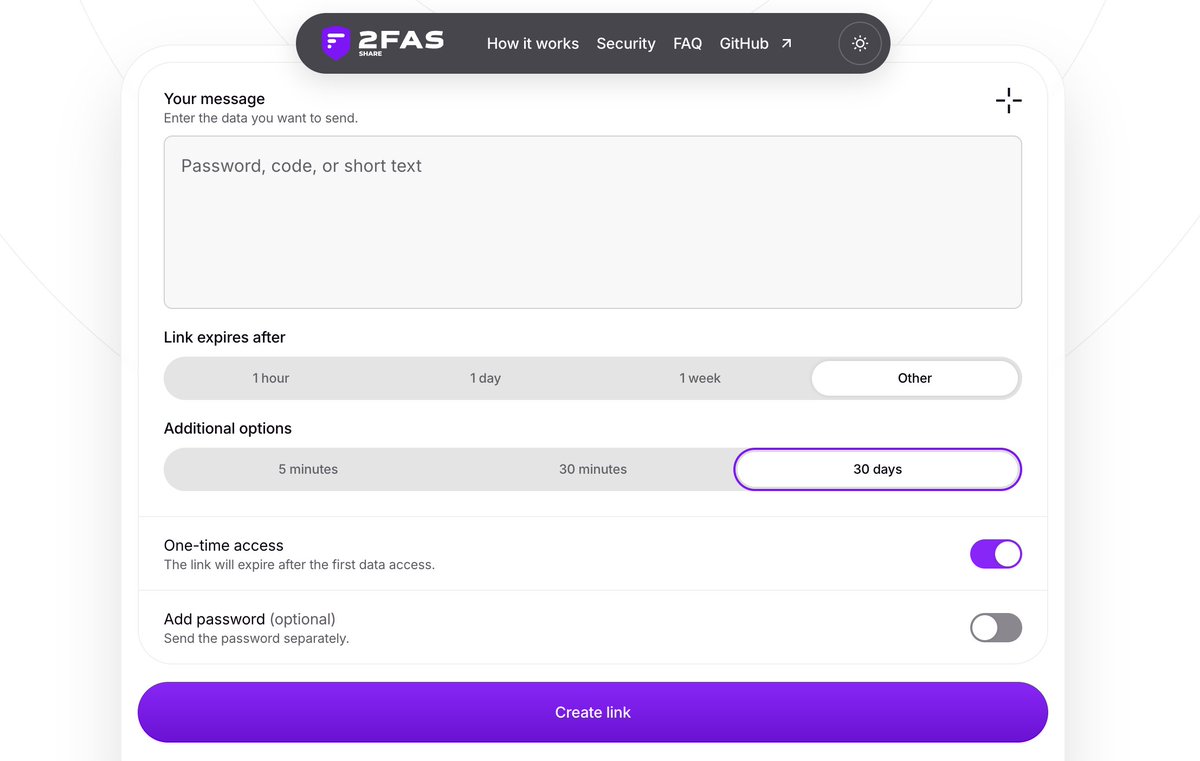
Introducing 2FAS Share!
Need to send someone a password or other sensitive information? Don't send it over chat or email, where it can stay forever. Use a secure link that expires automatically.
With 2FAS Share your messages are end-to-end encrypted. You can set an expiration time, choose between one-time and repeated access, and add a password for extra protection.
It's free for everyone. No accounts or downloads needed for you or the recipient.
Check it out: https://t.co/5mqyp16FEU
For those of you asking why:
1. If someone gets into your email, they can often reset passwords for your other accounts. If your 2FA codes go to that same inbox, they get those too. One hacked inbox can open the door to several accounts.
2. Attackers don't always need your email password. Malware can steal an existing login session letting someone access your inbox as if they were already logged in, without entering your password or a new 2FA code.
3. With a separate authenticator app, getting into your email doesn't give the attacker your codes. Even if they reset your password, 2FA can still stop them.
STOP USING EMAIL FOR 2FA
STOP USING EMAIL FOR 2FA
STOP USING EMAIL FOR 2FA
STOP USING EMAIL FOR 2FA
STOP USING EMAIL FOR 2FA
STOP USING EMAIL FOR 2FA
STOP USING EMAIL FOR 2FA
❗️Two carmakers left admin consoles on their login servers with both the username and password set to "admin."
Researchers used that unchanged default login as part of an attack that let them unlock cars and start their engines remotely.
Sam Curry and Shubham Shah bypassed security filters on the servers behind the carmakers' apps. From there they could change a customer's email and password, sign in as them and use the car's available remote features.
The owner stayed logged into the app and the researchers could redirect notifications so those alerts wouldn't reach the owner's phone.
Both carmakers, unnamed in the report, fixed the issue about two hours after researchers contacted them.
Quick security cleanup: check your screenshots for passwords and recovery codes.
Move those secrets into a password manager, then remove the images including copies in synced storage and recently deleted folders.
A screenshot of a password is still a copy of that password.
Saving it to your photo gallery means it could end up in photo backups, accidentally get added to a shared album, or sync to your tablet and sit there forgotten for years. "Just saving it for a second" can create a very long lived copy.
What does that look like in practice?
Someone who gains access to your photo backups could find the password there, even if you've deleted the screenshot from your phone.
A family member using your tablet could come across it while browsing your photos.
You could accidentally show it while sharing your screen or selecting photos to send.
Every extra copy is another place you need to protect.
Save passwords where they belong: in a password manager, designed to keep them encrypted and protected.
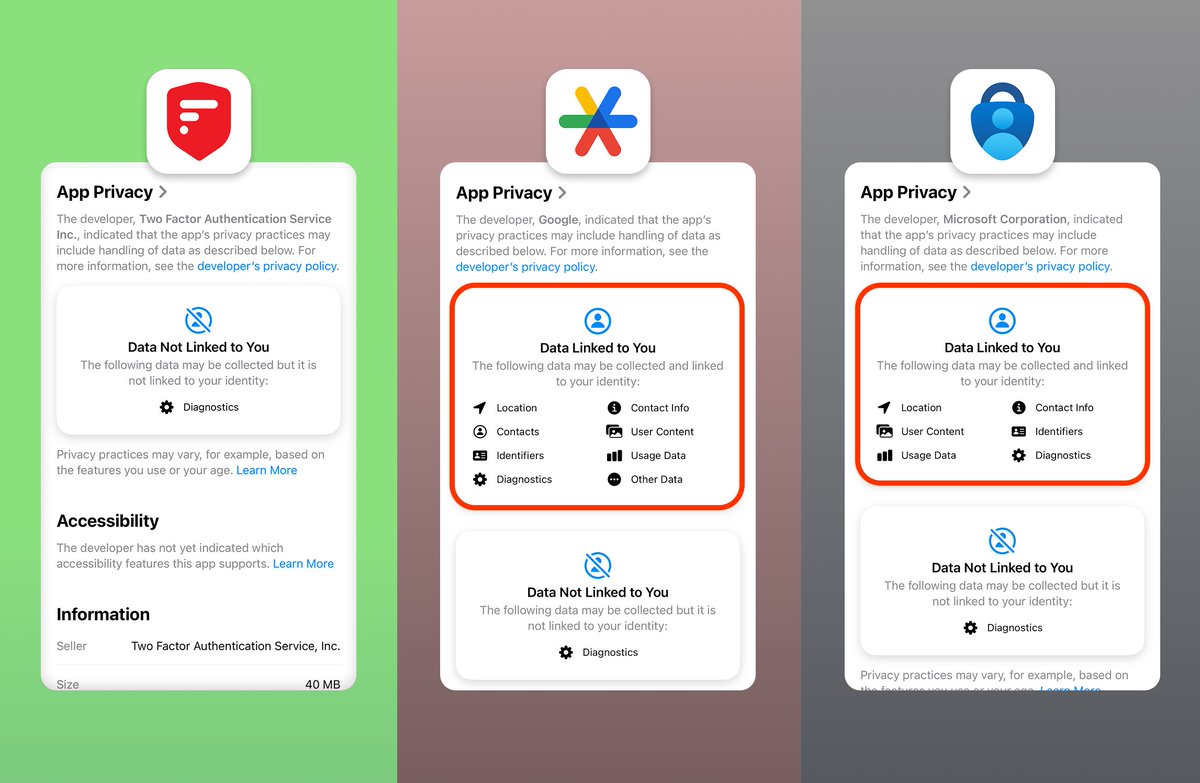
2FAS vs. Big Tech: 2FA Privacy Edition
Your authenticator is part of your security setup. But what does it know about you?
What data does it collect? Is it linked to you? Does your 2FA app really need it?
Choose an authenticator app that protects both your accounts and your privacy.
#2FAS #CybersecurityAwarenessMonth #opensource
A recently disclosed security flaw called PHP2Shell could let attackers run code on vulnerable web servers without logging in. Depending on what those servers can access, attackers could steal customer data, change it or tamper with the service itself.
It's a reminder that where your data lives and who can access it matters.
That's the idea behind 2FAS Pass password manager:
your passwords are encrypted on your phone. We don't hold your vault. There's no account to create and no central collection of our users' vaults to steal from us.
Want a backup? It's encrypted on your device with your keys. You choose where to keep it. Someone who steals that copy can't read anything.
That's what local-first means to us:
your vault stays in your hands.
Hackers can't steal from us what we don't have.
Your passwords. Your device. Your control.
Switching to 2FAS Pass is easier than you think.
Import your saved passwords from your browser or existing password manager without copying them one by one.
Go to Settings → Transfer from other Apps → Choose your source and move your passwords into the local-first, end-to-end encrypted password manager designed with privacy and security as its core.
STOP PUTTING PASSWORDS IN YOUR NOTES APP
STOP PUTTING PASSWORDS IN YOUR NOTES APP
STOP PUTTING PASSWORDS IN YOUR NOTES APP
STOP PUTTING PASSWORDS IN YOUR NOTES APP
STOP PUTTING PASSWORDS IN YOUR NOTES APP
STOP PUTTING PASSWORDS IN YOUR NOTES APP
STOP PUTTING PASSWORDS IN YOUR NOTES APP
BREAKING: Hackers steal personal data of thousands of children after a UK company was breached using the password “Password1" — which had remained unchanged for 12 years.