🎉 Vidu Q3 Pro is now on LartAI!
🗣️ True lip sync — vocals dialogue music
🎥 Director-level camera control — one shot through every scene
✨ 16s Ultra HD — cinematic quality at every frame
Start creating now!
#ViduQ3Pro#lipsync#cinematicvideo#shortfilm#musicvideo
Vidu Style Transfer|One Image, Endless Styles ✨
Turn any image into a wide range of illustration styles with Vidu’s new Style Transfer tool.
Use invite code VIDUQ3BCD to get 200 free credits, then head to the left sidebar and try it for yourself.
#ViduAI#styletransfer #inspiration #illustration #AIGC
@ViduAI_official Love how simple and versatile this is one image, endless creative possibilities. ✨
The results look amazing, and I’d love to collaborate with Vidu AI to create content around it.
@8frame_co This is where AI video is heading beyond generation and into true creative direction. Really impressed by what 8Frame CLIPS is building. 👏
Would love to collaborate and showcase its potential through content.
No script.
No shot list.
No editing plan.
No sound design brief.
Just one raw idea.
We’re testing 8Frame CLIPS - a new cinematic AI system designed to understand rhythm, structure, taste, and the invisible logic behind a scene.
AI video is not only about generation anymore.
It’s about direction.
@Deevid_AI Love this update! Turning a single photo into a lifelike AI avatar is a game-changer for creators. 🔥
Would love to collaborate with Deevid AI and create content around it.
Introducing Deevid AI 2.0-Series 5: AI Avatar Turn one photo into your own on-camera talent.
A compelling story needs a captivating face to tell it. To give you infinite casting capabilities, we’ve fundamentally upgraded how you source and produce on-screen talent.
Here is how AI Avatar evolves your workflow from DeeVid 1.0 to 2.0:
1. Faceless Narration ➔ Engaging Personalities: DeeVid 1.0 relied on stock assets or voiceovers to carry your message. 2.0 puts a face to the brand. AI Avatar takes a single static photo and breathes life into it, giving you a dedicated, lip-synced digital actor that anchors viewer attention and drives up completion rates.
2. Heavy Production ➔ Instant Studio: In 1.0, creating talking-head content meant navigating complex shoots or settling for rigid templates. In 2.0, your talent is always on set. Because the generation is completely in your hands, you can tweak scripts and iterate performances instantly without ever turning on a camera.
You are no longer just writing a script. You are casting the lead. Every word, delivered perfectly. Create without boundaries.
#AI #AIVideo #AIAvatar #DeevidAI
I WALKED INTO THE APPLE STORE LAST WEEK WITH AN IPHONE TOO HOT TO HOLD.
“IS SOMETHING WRONG WITH IT?”
THE TECHNICIAN RAN EVERY TEST. EVERYTHING CAME BACK NORMAL.
THEN HE LEANED IN AND SAID SOMETHING I’LL NEVER FORGET:
“THERE ARE 2 SETTINGS TURNED ON INSIDE YOUR IPHONE RIGHT NOW THAT ARE SLOWLY COOKING IT. APPLE TURNS THEM ON BY DEFAULT. THEY QUIETLY SHORTEN YOUR IPHONE'S LIFESPAN.”
I ASKED THE OBVIOUS QUESTION:
“SO APPLE IS WEARING OUT MY OWN PHONE ON PURPOSE?”
HE DIDN’T ANSWER.
HERE’S EVERYTHING HE SHOWED ME IN THE NEXT 5 MINUTES (SAVE THIS 🔖 YOUR IPHONE WILL THANK YOU):
Everyone is talking about AI tools.
But the real shift is happening somewhere else.
Agentic AI.
Not just models that answer questions…
But systems that plan, decide, act, learn, and improve on their own.
Here’s the bigger picture most people miss 👇
AI evolution looks like this:
AI & ML ➡️ Turn data into predictions
Deep Learning ➡️ Neural networks solve complex tasks
Gen AI ➡️ Create text, images, audio, video
AI Agents ➡️ Execute tasks autonomously
Agentic AI ➡️ Run entire workflows end-to-end
What makes Agentic AI powerful?
• Multi-agent collaboration
• Goal decomposition
• Planning and reasoning
• Tool use and function calling
• Memory systems (short + long term)
• Self-reflection and error recovery
• Feedback loops for improvement
• Long-term autonomy
In simple terms:
Old AI: “Tell me the answer.”
GenAI: “Generate something for me.”
Agents: “Do this task.”
Agentic AI: “Handle the whole process.”
This is how companies will soon automate:
• research
• marketing workflows
• customer operations
• coding pipelines
• data analysis
• decision systems
The future of AI isn’t just smarter models.
It’s autonomous systems working together.
And we’re only at the beginning. 🚀
Follow @MeenakshiYACS for more such posts
#AI #AgenticAI #AIAgents #GenAI #ArtificialIntelligence #Automation
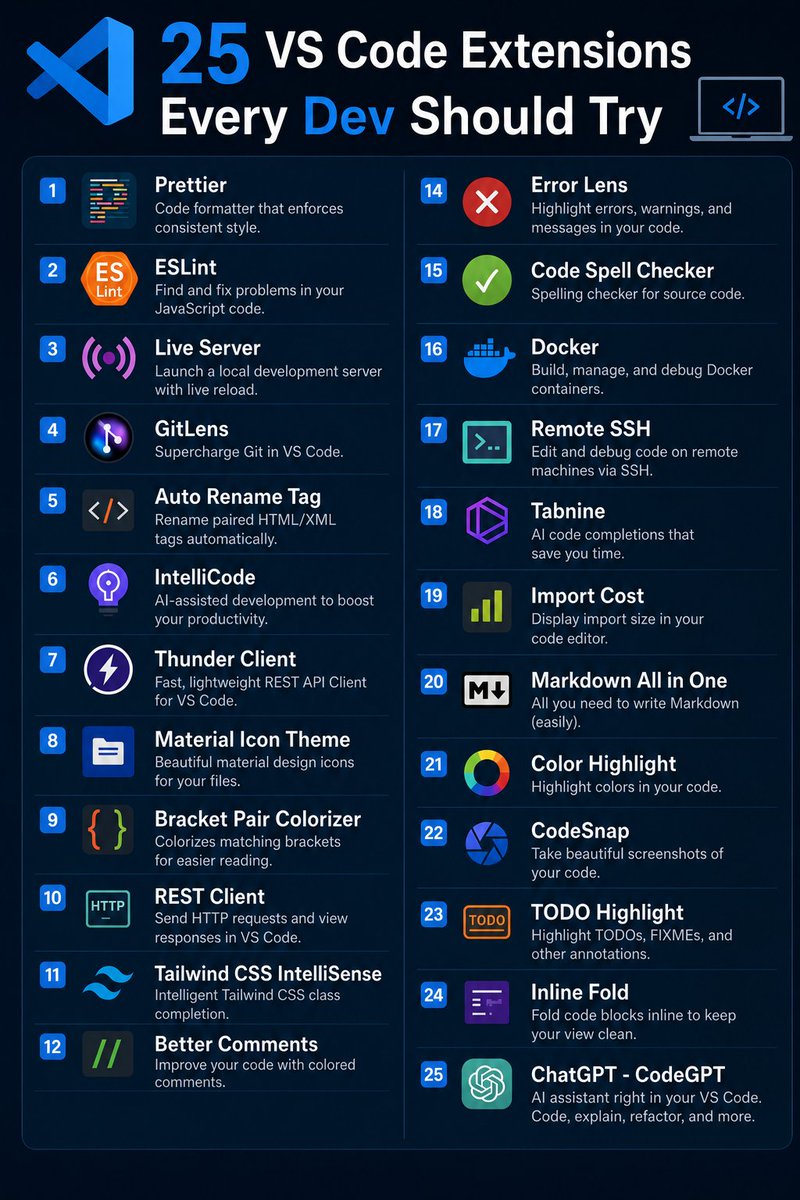
🎯 𝟮𝟱 𝗩𝗦 𝗖𝗼𝗱𝗲 𝗘𝘅𝘁𝗲𝗻𝘀𝗶𝗼𝗻𝘀 𝗘𝘃𝗲𝗿𝘆 𝗗𝗲𝘃𝗲𝗹𝗼𝗽𝗲𝗿 𝗦𝗵𝗼𝘂𝗹𝗱 𝗧𝗿𝘆
The right VS Code extensions can save hours of work, improve code quality, and make development way more productive 🚀
Here are 25 powerful VS Code extensions every developer should definitely try.
1. Prettier
♦ Code formatter that enforces consistent style.
2. ESLint
🔹 Find and fix problems in your JavaScript code.
3. Live Server
♦ Launch a local development server with live reload.
4. GitLens
🔹 Supercharge Git in VS Code.
5. Auto Rename Tag
♦ Rename paired HTML/XML tags automatically.
6. IntelliCode
🔹 AI-assisted development to boost your productivity.
7. Thunder Client
♦ Fast, lightweight REST API Client for VS Code.
8. Material Icon Theme
🔹 Beautiful material design icons for your files.
9. Bracket Pair Colorizer
♦ Colorizes matching brackets for easier reading.
10. REST Client
🔹 Send HTTP requests and view responses in VS Code.
11. Tailwind CSS IntelliSense
♦ Intelligent Tailwind CSS class completion.
12. Better Comments
🔹 Improve your code with colored comments.
13. Path Intellisense
♦ Autocomplete filenames and paths in your project.
14. Error Lens
🔹 Highlight errors, warnings, and messages in your code.
15. Code Spell Checker
♦ Spelling checker for source code.
16. Docker
🔹 Build, manage, and debug Docker containers.
17. Remote SSH
♦ Edit and debug code on remote machines via SSH.
18. Tabnine
🔹 AI code completions that save you time.
19. Import Cost
♦ Display import size in your code editor.
20. Markdown All in One
🔹 All you need to write Markdown easily.
21. Color Highlight
♦ Highlight colors in your code.
22. CodeSnap
🔹 Take beautiful screenshots of your code.
23. TODO Highlight
♦ Highlight TODOs, FIXMEs, and other annotations.
24. Inline Fold
🔹 Fold code blocks inline to keep your view clean.
25. ChatGPT - CodeGPT
♦ AI assistant right in your VS Code. Code, explain, refactor, and more.
❤️ Like
🔁 Retweet
🔖 Bookmark
Follow @Tech_by_Shweta for more such posts
Meet Dreamina Octo at AI on the Lot!
@dreamina_ai#DreaminaOctoAIonthelot#DreaminaSeedance2
We've spent years learning prompts.
Now the focus is shifting to something bigger: Vibe create.
Dreamina Octo makes creation feel more like exploration.
Harvard Business School charges $200K to teach you how to think like a strategist.
I built the same thinking system in one afternoon
Here are the 10 Claude Opus 4.6 prompts behind it: