30+ businesses scaled. 5 figure AI agency before 21
Use my roadmap to scale your business with AI to 30k+ in less than 3 months..Get the free guide in my profil
One Agent Should Not Have Unlimited Power
Giving 1 AI agent access to everything is not sophistication. It is a risk decision you may not have thought through.
Should the agent read customer records?
Maybe.
Should it edit them?
Possibly.
Should it issue refunds, change prices, delete records or send messages without review?
That requires a much stronger justification.
The principle is simple:
Give the system the minimum access required for its job.
For each tool, document:
1. Purpose.
2. Inputs accepted.
3. Output returned.
4. Permissions required.
5. Actions allowed.
6. Actions prohibited.
7. Failure behavior.
8. Logging requirement.
9. Human approval requirement.
Separate reading from writing where possible.
Use approvals for high-impact or irreversible actions.
Never treat text from a customer or retrieved document as permission to ignore system rules.
Do not expose secrets in prompts or logs.
Record enough to investigate failures without collecting data you do not need.
Example:
An appointment agent may check availability and propose open slots.
It should verify the chosen slot through the scheduling tool.
If the tool fails, it should not claim the booking succeeded.
If the request falls outside policy, it should escalate.
Advanced lesson:
Map authority to risk.
Low-risk, reversible actions may be automated after testing.
High-impact, sensitive or irreversible decisions may need explicit approval or human handling.
The boundary depends on the business, applicable requirements and the consequences of error.
Review permissions whenever the workflow changes.
An old approval should not automatically authorize a new action.
Do not start with “How autonomous can we make it?”
Start with “What should it be allowed to do safely and reliably?”
Where would you draw the line between AI autonomy and human approval?
Comment “PLAYBOOK” + follow + repost to receive the free guide.
The Most Dangerous Automation Is One That Looks Fine
1 of the most dangerous automations is the one that looks perfect in the demo.
You test one ideal customer.
The system replies correctly.
The calendar updates.
The CRM looks tidy.
Everyone celebrates.
Then real customers arrive.
One gives incomplete details.
One asks a question outside the knowledge base.
One triggers the workflow twice.
One wants a human.
The calendar tool fails.
The CRM update never happens.
A five-minute demo proves that one path worked once.
It does not prove reliability.
Build a test matrix.
Test at least these categories:
1. Normal request.
2. Missing information.
3. Incorrect or conflicting information.
4. Ambiguous wording.
5. Repeated request.
6. Out-of-scope question.
7. Sensitive or high-risk request.
8. Human escalation.
9. Tool failure.
10. Duplicate trigger.
11. Permission failure.
12. Accurate record-keeping.
For a small workflow, 25–50 thoughtfully designed scenarios can be a useful starting point. Complexity and risk should determine the actual coverage.
Each test needs:
• Input.
• Expected behavior.
• Actual behavior.
• Pass/fail.
• Severity.
• Owner.
• Fix and retest notes.
Don't just check whether the answer sounds good.
Check whether the correct action occurred, the record is accurate and the system stopped when it should.
Advanced lesson:
Use risk-weighted testing.
A misspelled greeting is not the same as an unauthorized booking or an invented price.
Prioritize failures by likelihood, impact and detectability.
Keep rollback and human takeover available for consequential workflows.
A reliable system is not one that never encounters problems.
It is one designed to detect, contain, report and recover from them.
Which failure would worry you most: a wrong answer, a wrong action or a silent failure?
Comment “PLAYBOOK,” follow + repost for my free AI Automation Opportunity Playbook.
A 30-Day Plan Beats Another 30 Tutorials
You can watch AI tutorials for 30 days and still have nothing a client can buy.
Learning matters.
But learning without shipping becomes a hiding place.
Use the next 30 days to create evidence, not just notes.
DAYS 1–3:
Choose three possible niches.
Write down 10 repetitive workflows.
Research how the work is done today.
DAYS 4–7:
Speak with or research five real businesses.
Map three workflows.
Score pain, frequency, value, feasibility and risk.
Choose one problem.
DAYS 8–10:
Write the offer in one sentence.
Define scope and exclusions.
Build a simple ROI model using stated assumptions.
Decide which KPI could prove progress.
DAYS 11–16:
Design the workflow.
Define inputs, rules, AI responsibilities, tools, permissions and human handoff.
Prepare the approved knowledge.
DAYS 17–20:
Build a narrow demo with test data.
Do not integrate every possible tool.
Prove the smallest end-to-end outcome.
DAYS 21–22:
Test normal and failure scenarios.
Record defects.
Fix the important ones before showing the system.
DAYS 23–24:
Create a short demo and one-page offer.
Show the current process, new process, limits and KPI.
DAYS 25–27:
Research qualified prospects.
Start targeted outreach.
Record every stage.
DAYS 28–30:
Review replies, objections and technical blockers.
Improve the offer.
Book discovery conversations.
Document what you learned.
Advanced lesson:
Use stage gates.
Don't advance because the calendar says so.
Advance when the deliverable is good enough: validated problem, scoped offer, functioning demo, passed tests, qualified prospect list.
Your first month is not proof you'll become rich.
It is a structured experiment designed to replace guessing with evidence.
Which day of this roadmap would be hardest for you—and why?
Comment “PLAYBOOK” + follow + repost for the free Opportunity Playbook
10 Thoughtful Prospects Beat 100 Lazy Messages
100 generic cold messages can waste more time than 10 researched, relevant conversations.
The goal is not to send the most messages.
It is to find businesses with a problem you can credibly help solve.
“Hey, I build AI automation. Interested?”
That message asks the prospect to do all the thinking.
What problem?
Why them?
Why now?
Why you?
Make the relevance obvious.
A useful prospect note should fit in a few lines:
Business and decision-maker.
Relevant workflow observed.
Evidence you can cite.
Problem hypothesis—not an accusation.
Question that invites a reply.
Reason you are a credible person to ask.
Next action and follow-up date.
A better prospecting process:
1. Define the niche and role you want to reach.
2. Build a small list of qualified businesses.
3. Review their actual customer journey or public process.
4. Note one specific friction point—without assuming it is definitely broken.
5. Explain the possible impact in plain language.
6. Ask a low-friction question.
7. Track the response and follow up respectfully.
Example:
“I noticed your website routes quote requests through a form. I’m curious what happens after submission—does the team have a reliable way to prioritize urgent requests and follow up on incomplete ones? I’m researching this workflow for service businesses and can share a simple process map if useful.”
That is not a claim that their process is failing.
It is a relevant question that opens a conversation.
Track the funnel:
Prospects researched → messages sent → replies → positive replies → meetings → qualified opportunities → proposals → closed deals.
Do not confuse activity with effectiveness.
If replies are low, inspect relevance and targeting before simply increasing volume.
If meetings happen but no deals close, inspect qualification, urgency, offer, trust and follow-up.
Advanced lesson:
Respect consent, platform rules and privacy requirements.
Personalization should be based on appropriate business information—not invasive personal details or fabricated familiarity.
What gets a reply from you: a generic pitch or a message that proves the sender understands your world?
Comment “PLAYBOOK,” follow + repost, and I’ll send you the free playbook.
ChatGPT Is Free” Is Not the Real Objection
“ChatGPT is free” is the 1 objection that exposes a weak automation offer.
If that question destroys your offer, you may be selling access to a tool instead of solving a business problem.
A business owner can open a chat window.
That does not automatically give them a reliable workflow.
They still need to define the process.
Prepare accurate knowledge.
Connect the right systems.
Set permissions.
Handle exceptions.
Test failures.
Train staff.
Monitor results.
Maintain the solution when the business changes.
That is where a service can create value.
Don't argue that AI is difficult.
Show the work required to turn a tool into a dependable process.
A strong conversation sounds like this:
“I agree that the tool is accessible. The question is whether your current process is producing the result you need. Let's map how the work happens today, identify the bottleneck and estimate the cost. If the problem is small or the workflow is easy for your team to manage, you may not need me.”
That answer earns more trust than pretending every business needs an agent.
Make the comparison concrete:
What does the current manual process cost?
Which parts already work well?
What can existing software handle?
What is still falling through the cracks?
What would your service own that the business cannot reliably do today?
Then demonstrate:
1. The trigger.
2. The information the system uses.
3. The rule or AI decision.
4. The authorized action.
5. The record it creates.
6. The exception path.
7. The KPI to monitor.
Advanced lesson:
Your real competition is not only a free AI model.
It is the status quo, a manual process, existing software, hiring, outsourcing and doing nothing.
Compare your solution against the client's actual alternatives—not against an imaginary world where only you can use AI.
The aim is not to win an argument about AI.
It is to find whether a worthwhile gap remains.
Would you pay for the tool—or for the outcome, integration and accountability around it?
Comment “PLAYBOOK” + follow + repost for the free AI Automation Opportunity Playbook.
Your Price Should Reflect the Outcome and the Risk
2 automation projects can use similar software and deserve very different prices.
Why?
Because tools are not the whole job.
One project may connect a form to a spreadsheet.
Another may handle customer conversations, scheduling, CRM updates, testing, training, monitoring and failure recovery.
Same category of software.
Different scope, consequence and responsibility.
Before pricing, calculate the work.
List:
• Discovery and process mapping.
• Setup and configuration.
• Integrations and data cleanup.
• Knowledge preparation.
• Testing and rework.
• Client review and training.
• Launch support.
• Ongoing monitoring and maintenance.
• Software and operating costs.
• Risk and uncertainty.
Then define what is excluded.
Who updates prices or policies?
Who owns third-party subscriptions?
What counts as a revision?
What support response time is included?
What happens when the client changes the workflow?
A useful offer names the outcome, scope, timeline, responsibilities and measurement plan.
Do not calculate ROI using revenue alone.
Where relevant, use contribution margin or profit impact.
And separate one-time value from recurring operating cost.
Advanced lesson:
Estimate delivery economics before discounting.
If a project takes 30 hours to deliver and 5 hours a month to support, a low implementation fee plus unlimited support can destroy your margin.
Track actual hours, rework, software cost and support load across projects.
Use that data to improve future estimates.
Illustrative pricing exercise:
Set up three scenarios—low, expected and high effort.
If the offer only makes sense under the easiest scenario, the scope is not controlled enough.
Put the assumptions in writing.
A clear boundary protects both the client and your margin.
What is harder for you: choosing a price or explaining why the price is justified?
Comment “PLAYBOOK,” follow + repost, and I’ll share the free guide.
Pick a Niche Before You Pick a Tool
1 niche can beat 10 tool stacks if it gives you a repeatable problem to solve.
Today you sell a chatbot to a dentist.
Tomorrow you sell a CRM to a real estate agent.
Next week you pitch an AI content tool to a gym.
Every project starts from zero.
Every demo is custom.
Every proposal takes hours.
That is exhausting to deliver—and hard to improve.
A niche is not just an industry label.
It is a repeatable set of problems, workflows, language, constraints and buying reasons.
Start by scoring possible niches across:
1. Pain: is the workflow genuinely frustrating or costly?
2. Frequency: how often does it happen?
3. Economic value: what changes if it improves?
4. Access: can you reach the decision-maker?
5. Feasibility: can you build and maintain the solution?
6. Risk: what happens if it makes a mistake?
7. Repeatability: do similar businesses share the workflow?
Then score actual opportunities—not your assumptions about an entire industry.
A dental practice, gym and home-service company may all need appointment handling.
But they may have different policies, data sensitivity, urgency and escalation requirements.
The reusable pattern is not “one bot for everyone.”
It is a common architecture with carefully configured business rules.
Advanced lesson:
Look for a niche where the same problem repeats but the solution still has measurable value.
Too little standardization creates endless custom work.
Too much standardization ignores important exceptions.
The sweet spot is standardized core, configurable edges.
Use a simple validation sprint:
Interview five potential buyers.
Collect real workflow examples.
Ask how often the issue happens.
Ask what they already tried.
Ask who owns the budget and decision.
Look for repeated pain, not just polite enthusiasm.
Track why prospects say no.
A niche is a hypothesis to test, not a permanent identity.
Pick one niche for an experiment—not for life.
Talk to real buyers, learn their workflows, then decide.
Which niche would you investigate first: home services, clinics, real estate, restaurants or another market?
Comment “PLAYBOOK” + follow + repost to get my free opportunity guide.
Stop Giving Demos Before Discovery
A 20-minute demo can be a complete waste of time if you have not diagnosed the problem.
You show the chatbot.
You demonstrate the workflow.
You explain the integrations.
The prospect says, “Interesting. Let me think about it.”
Then silence.
Maybe the demo was not bad.
Maybe it answered a question the prospect never needed solved.
A demo should confirm a diagnosis—not replace one.
Before you show anything, ask:
1. Walk me through what happens when a new inquiry arrives.
2. Where is information copied manually?
3. What happens after the first reply?
4. How do you know who needs follow-up?
5. Where do requests get stuck?
6. Which cases need human judgment?
7. What does the current process cost in time or missed opportunity?
8. What would make a solution successful?
9. What would make automation a bad idea?
Listen for evidence, not just complaints.
“It's annoying” is a starting point.
“We process 300 requests a month and spend 4 minutes entering each one” is a measurable baseline—if verified.
Separate the symptom from the cause.
Slow replies may come from unclear ownership, not slow software.
A low close rate may come from poor qualification, not follow-up timing.
Find the actual constraint before designing the demo.
Ask what evidence would make the prospect confident enough to proceed.
Then build a demo around their actual workflow.
Show the trigger.
Show the decision.
Show the action.
Show the record created.
Show what happens when something fails.
Advanced lesson:
Qualify the deal before investing in custom proof.
Check urgency, ownership, data access, decision process, budget fit and the cost of doing nothing.
A prospect who cannot give access to the required system may not be implementation-ready.
Never build a custom demo to avoid asking difficult questions.
Which question do you find hardest to ask during a sales call?
Comment “PLAYBOOK,” follow + repost, and I’ll send you the free guide.
A Perfect Prompt Cannot Fix a Broken Process
A 10/10 prompt can still produce a 0/10 business result if the workflow is broken.
A prompt cannot create accurate prices from missing data.
It cannot invent calendar availability safely.
It cannot guarantee a CRM update if the integration fails.
It cannot fix unclear ownership.
It cannot decide a policy the business has never defined.
Prompts matter.
But they are one layer in the system.
Build in this order:
1. Business outcome.
2. Current process.
3. Decision points.
4. Approved knowledge.
5. Agent responsibilities.
6. Tools and permissions.
7. Human escalation.
8. Logging and testing.
Then write the prompt.
A useful agent specification includes:
ROLE: Who is the agent?
OBJECTIVE: What measurable outcome should it support?
CONTEXT: Which business facts matter?
KNOWLEDGE: Which sources are authoritative?
RULES: Which constraints must never be broken?
TOOLS: Which actions can it perform?
PERMISSIONS: What is it allowed to change?
ESCALATION: When must a human take over?
ERROR HANDLING: What if a tool fails?
TESTS: How will we evaluate normal and difficult cases?
Example rule:
“Never invent a price. If the current price is unavailable in the approved source, explain that a team member will confirm it.”
That is more useful than saying “be accurate and helpful.”
Specific rules make behavior testable.
Testable behavior can be reviewed after changes.
Advanced lesson:
Treat prompts as versioned operating instructions.
Record what changed, why it changed and which tests passed after the change.
Otherwise, a small edit may quietly break a previously reliable behavior.
If your agent is wrong, investigate the system before blindly adding more prompt text.
What fails more often in your experience: bad instructions, bad data or bad integrations?
Comment “PLAYBOOK” + follow + repost to get my free playbook.
A Chatbot Is Not a Sales System
A chatbot can answer 1 question and still lose the customer 30 seconds later.
That is why “we have a chatbot” does not always mean the business has a working customer journey.
Imagine a prospect asks:
“Can I book for Friday?”
The bot replies with a friendly paragraph.
But it does not check availability.
It does not collect the required details.
It does not create a booking.
It does not notify the team.
It does not record what happened.
The conversation feels automated.
The business process is still broken.
Build the journey, not just the reply.
A useful booking workflow may look like this:
1. Detect booking intent.
2. Ask only for the information needed.
3. Check approved availability.
4. Offer valid options.
5. Confirm the customer's choice.
6. Create the booking through an authorized tool.
7. Verify that the tool succeeded.
8. Send confirmation.
9. Update the CRM.
10. Stop booking follow-ups once the booking is complete.
Notice the distinction:
AI interprets flexible language.
Rules handle predictable conditions.
Tools perform actions.
The CRM records the state.
A human handles exceptions.
Never let the AI claim an appointment is booked just because it attempted to book one.
Confirm the action succeeded first.
Advanced lesson:
Design explicit states.
For example: NEW → QUALIFIED → BOOKING PENDING → BOOKED → COMPLETED.
Define what event moves the record from one state to another.
Add duplicate-event protection so the same webhook cannot create two bookings.
A polished answer is not proof of a successful workflow.
The business outcome is the proof.
What matters more to you: a bot that sounds human or a system that reliably completes the job?
Comment “PLAYBOOK” + follow + repost for the free AI Automation Opportunity Playbook.
The 5-Minute Task That Eats 33 Hours
A 5-minute task repeated 400 times takes more than 33 hours a month.
That “tiny admin task” may be a full workweek hiding in plain sight.
Here is the math:
5 minutes × 400 tasks = 2,000 minutes.
2,000 ÷ 60 = 33.3 hours.
This is an ILLUSTRATIVE CALCULATION.
Use your client's actual task count and time to estimate the real workload.
Now think about the tasks nobody notices:
Copying lead details.
Sending the same appointment reminder.
Updating a CRM stage.
Chasing missing form fields.
Sending a quote template.
Confirming a booking.
Creating a support ticket.
Sorting routine requests.
Each task looks harmless.
Together, they consume capacity.
Here is how to investigate one:
1. Name the task precisely.
2. Count how often it happens per week or month.
3. Time several real examples.
4. Include rework and errors—not just the ideal path.
5. Identify which steps are rules-based.
6. Identify where language or context matters.
7. Estimate the cost of the current process.
8. Test a small redesign.
The rough capacity formula is:
Monthly hours = tasks per month × minutes per task ÷ 60.
But hours saved are not automatically cash saved.
A team might use recovered time to serve more customers rather than reduce payroll.
That can still be valuable—but describe the value honestly.
Advanced lesson:
Look at bottleneck migration.
If intake becomes faster but approvals remain slow, the queue may simply move downstream.
Measure the whole workflow, not just the step you automated.
The goal is not to automate the most tasks.
It is to remove the constraint that limits the result.
What's one repetitive task you think takes “only five minutes” but happens constantly?
Comment “PLAYBOOK,” follow + repost, and I’ll send you the free playbook.
650 Inquiries. Where Did the Money Leak?
650 inquiries a month can hide a serious business problem—and most owners won't see it until you map the workflow.
Let's say a business receives 25 inquiries a day.
It operates 26 days a month.
That is 650 inquiries.
Now imagine 20% are missed or delayed.
That is 130 affected conversations.
Those figures are an ILLUSTRATIVE EXAMPLE, not an industry benchmark.
Your job is to measure the real baseline.
The money leak may not be the number of messages.
It may be what happens after the message arrives.
Does someone reply quickly?
Does the reply answer the question?
Is the lead qualified?
Does anyone record the details?
Is a next step agreed?
Does follow-up happen?
Does the pipeline show the status?
One missed step can break the whole journey.
Use this simple audit:
1. Count inquiries by channel.
2. Measure first-response time.
3. Count how many receive a useful reply.
4. Count qualified opportunities.
5. Count booked appointments or next steps.
6. Count no-shows and lost leads.
7. Record the reason each lead stalled.
Then map the workflow:
INQUIRY → RESPONSE → QUALIFICATION → NEXT STEP → CRM UPDATE → FOLLOW-UP → OUTCOME.
Now calculate what is worth investigating.
Monthly workload = inquiries × minutes spent per inquiry ÷ 60.
Potential contribution at risk = affected opportunities × observed close rate × contribution per customer.
Do not pretend every delayed lead would have become a customer.
Do not use revenue as if it were profit.
Do not promise recovered sales before measuring them.
Advanced lesson:
Separate correlation from causation.
A new automation may improve response coverage without improving close rate.
Track both process metrics and business outcomes.
Keep a baseline so you can compare before versus after.
If you could inspect one number in a business, would you choose response time, follow-up rate or conversion rate?
Comment “PLAYBOOK” + follow + repost for my free AI Automation Opportunity Playbook.
2. Find one repeated workflow.
3. Ask how it works today.
4. Find where it gets delayed, duplicated or forgotten.
5. Estimate frequency and time spent.
6. Ask what a successful outcome looks like.
7. Only then choose the tools.
HYPOTHETICAL EXAMPLE:
A local service company receives 15 quote requests a day.
Staff copy details from messages into a spreadsheet.
Some requests get followed up late.
The opportunity is not “an AI agent.”
It may be faster intake, structured records and reliable follow-up.
Before you build, answer these 5 questions:
• Who has this problem?
• How often does it happen?
• What does it cost in time, money or missed opportunity?
• Which parts require judgment?
• How will we know the system helped?
Advanced lesson:
Validate willingness to pay separately from technical feasibility.
A workflow can be easy to automate and still be a bad offer.
A painful workflow can be valuable but too risky or expensive to automate first.
Score both the business value and the delivery risk.
Your first product is not the bot.
It is a clear promise tied to a real problem.
What business problem have you noticed that people keep doing manually?
I made a free AI Automation Opportunity Playbook to help you find and score these problems.
Comment “PLAYBOOK,” follow + repost, and I’ll send it.
The $0 Mistake: Building Before Selling
1 AI automation mistake can cost you months: BUILDING BEFORE YOU VALIDATE.
You discover a new tool.
You watch 14 tutorials.
You build a clever agent.
You polish the demo.
Then you ask: “Who wants to buy this?”
That question came 4 weeks too late.
A business owner does not wake up wanting a webhook.
They want the phone answered.
The quote sent.
The appointment booked.
The lead followed up.
The admin pile reduced.
Start with the pain, not the platform.
Here is a better sequence:
1. Pick one type of business.
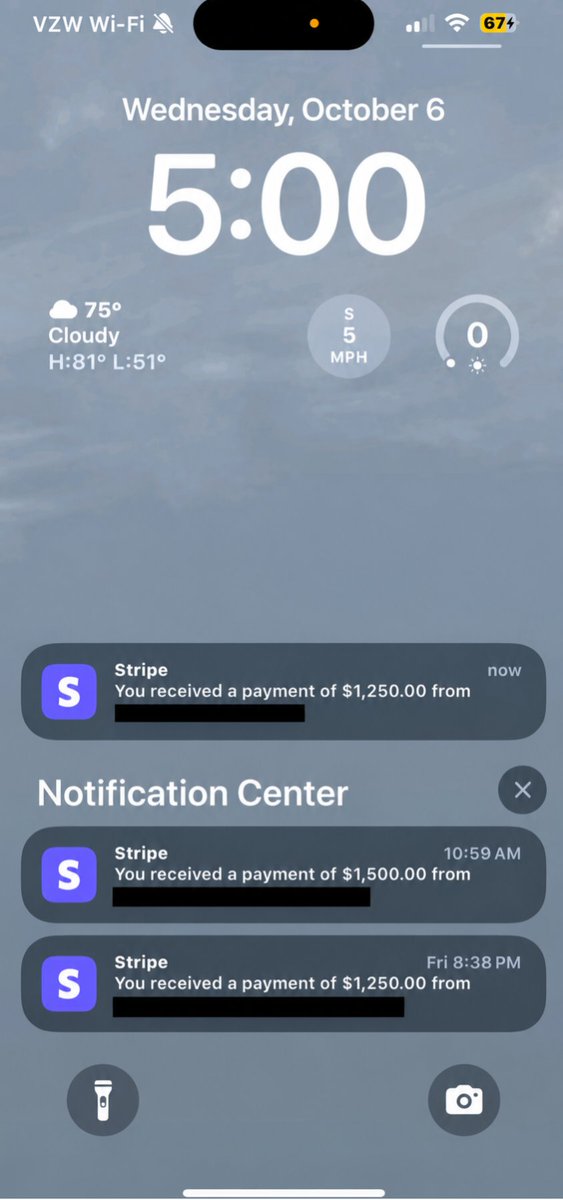
$4,000 IN 3 PAYMENTS.
But the money isn't the part of this screenshot that matters most.
The part that got me was this:
PEOPLE BOUGHT MORE THAN ONE COPY.
That tells me something.
They aren't just buying information.
They believe the information can be used.
Because this isn't another:
“100 AI prompts.”
“10 ChatGPT tricks.”
“Become rich with AI.”
I built the AI Automation Opportunity Playbook around a much bigger problem:
How do you actually find opportunities to use AI inside a real business?
Because most people are looking at AI backwards.
They open ChatGPT.
They look at the newest model.
They learn prompting.
They build a chatbot.
Then they ask:
“Who would pay me for this?”
I wanted to reverse that.
So the Playbook starts with the business.
Not the tool.
You learn how to find:
→ missed leads
→ slow response times
→ repetitive customer questions
→ forgotten follow-ups
→ appointment bottlenecks
→ manual data entry
→ disconnected systems
→ inefficient sales processes
→ unnecessary admin
→ workflows employees repeat every single day
Then we put numbers around them.
Because:
“Employees waste time”
is vague.
But:
40 tasks/day
× 6 minutes
× 26 days
= 6,240 minutes
= 104 hours/month
is a completely different conversation.
Then comes the question:
What part can AI handle?
What part should be normal automation?
What part needs a human?
What information does the system need?
What tools does it need?
What happens when something goes wrong?
How do you test it?
How do you sell it?
How do you price it?
How do you deliver it?
How do you maintain it?
How do you turn one successful implementation into a repeatable service?
That's what the book is built around.
It's why there are sections on:
1. Niche selection
2. Business problem discovery
3. Automation audits
4. ROI calculations
5. Offer creation
6. AI-agent architecture
7. CRM + workflow design
8. Prompt engineering
9. Human handoffs
10. QA + testing
11. Prospecting
12. Sales
13. Client onboarding
14. Deployment
15. Retainers
16. SOPs
17. Productization
18. Scaling
The goal isn't to make someone feel like they “know AI.”
The goal is to make them look at a business and immediately start seeing:
problems → processes → numbers → opportunities.
That's the skill.
Because tools change.
Models change.
Platforms change.
But businesses will always have:
customers.
leads.
employees.
bottlenecks.
repetitive work.
missed opportunities.
and money leaking through inefficient processes.
That's why I care more about teaching people how to think than giving them another list of tools.
And seeing people buy multiple copies?
That's a reminder that people aren't necessarily looking for more information.
They're looking for a map.
A map from:
“I've heard about AI…”
to:
“I can actually use this.”
That's what I wanted this Playbook to become.
Comment PLAYBOOK and I'll send you a preview of what's inside, including the AI Automation Opportunity Framework.
Follow + repost this for someone who keeps saying they want to get into AI but doesn't know where to start.
THE “AI AGENT” TRAP
MOST PEOPLE BUILD AI AGENTS BACKWARDS.
They start with:
“What should the agent say?”
I start somewhere else.
“What should happen?”
Huge difference.
Imagine a real estate company.
A prospect says:
“I want to see a 3-bedroom apartment this weekend.”
Don't start by writing a beautiful prompt.
Map the process.
What information is required?
Location?
Budget?
Preferred date?
Property type?
Contact information?
Then:
Can the AI collect it?
Can the CRM store it?
Can the system check availability?
Can it schedule?
When should a human intervene?
What happens if the customer asks something outside the approved information?
Now you have an agent specification.
The prompt comes later.
This is the sequence:
Business goal.
↓
Current process.
↓
Decision points.
↓
Required information.
↓
Available tools.
↓
Allowed actions.
↓
Human escalation.
↓
AI instructions.
↓
Testing.
↓
Deployment.
That's how I would approach almost every agent.
Don't build the personality before building the job description.
A beautiful AI agent with no useful workflow is basically a very expensive talking parrot.
The workflow is the product.
The AI is part of the machinery.
Comment AGENTMAP and I'll send you the Agent Design Worksheet.
Follow + retweet to receive it.
A business can lose $10,000+ every month without losing a single customer.
It happens through missed conversations.
Here's the simple math.
Imagine a service business gets:
30 leads/day.
× 26 working days.
= 780 leads/month.
Now assume only 15% arrive outside normal working hours.
That's 117 leads.
Now imagine half of those don't receive a meaningful response until the next day.
58.5 delayed conversations.
If just 20% of those were genuinely interested:
11.7 high-intent prospects.
Suppose the business normally makes $800 in gross profit per customer.
11.7 × $800
= $9,360.
That's almost $10k of modeled opportunity.
And nobody stole the money.
The business simply responded too slowly.
This is why I don't start an AI automation project by asking:
“What AI tool should we use?”
I ask:
“How many conversations are currently falling through the cracks?”
Then:
Where does the lead come from?
Who receives it?
How quickly do they respond?
What happens after the first response?
How many follow-ups happen?
When does a human take over?
Where is everything recorded?
Then we build.
The AI might:
→ understand the inquiry
→ answer approved questions
→ collect information
→ qualify the lead
→ update the CRM
→ trigger follow-up
→ notify the salesperson
→ escalate unusual situations
The automation handles the machine-like work.
The human handles judgment.
That's the difference between:
“having AI”
and
“having an AI-powered business process.”
Example numbers above are illustrative, not a claim about any specific business.
Comment LEAK and I’ll send you the Lead Leakage Calculator.
Follow + retweet to get it.
A $3,000 chatbot is useless if it doesn't move a single business metric.
I've seen people obsess over:
GPT models.
Fancy prompts.
Avatars.
Voice.
Animations.
Integrations.
Meanwhile the business owner is asking:
“Did we book more customers?”
That's the real question.
An AI system should have a job.
Not a personality.
For example:
A dental clinic receives 40 inquiries/day.
The old process:
Lead messages.
Receptionist sees it.
Receptionist responds.
Lead asks another question.
Receptionist gets busy.
Lead waits.
Lead forgets.
Nobody follows up.
Now imagine a different system.
Lead messages.
↓
AI identifies intent.
↓
AI answers approved questions.
↓
AI collects name + phone + service.
↓
CRM creates/updates contact.
↓
Lead receives booking options.
↓
Appointment gets scheduled.
↓
Confirmation is sent.
↓
Reminder is triggered.
↓
No-show follow-up happens.
↓
Human receives exceptions.
Now you can measure:
Response time.
Booking rate.
Show rate.
No-show rate.
Qualified leads.
Appointments.
Revenue.
That's an actual business system.
The chatbot is only one component.
Here's the rule I use:
Never sell “AI.”
Sell:
→ faster response
→ more booked appointments
→ less repetitive admin
→ better follow-up
→ fewer missed opportunities
→ cleaner operations
→ more capacity
If an automation costs $2,000 to implement...
but saves 30 hours/month...
and helps recover even a few additional customers...
the conversation becomes completely different.
Because now you're discussing economics.
Not software.
AI isn't valuable because it's impressive.
AI is valuable when it changes what happens inside the business.
Example above is hypothetical.
Comment SYSTEM and I'll send you my AI Automation ROI framework.
Follow + retweet to get it.
If you spend $20 acquiring a lead, don't waste another $20 before fixing your follow-up.
Here's what happens in many businesses.
Marketing generates the lead.
Sales receives the lead.
Nobody responds quickly.
The lead cools down.
Marketing says:
“We need more leads.”
So they spend more money.
$1,000.
$2,000.
$5,000.
But the underlying leak remains.
Imagine:
100 leads.
$20 acquisition cost.
= $2,000 acquisition spend.
If 10 become customers:
CAC = $200.
Now imagine better follow-up helps the business convert 12 instead of 10.
Same $2,000 spend.
Now CAC:
$2,000 ÷ 12
= $166.67.
No additional advertising spend.
That's why automation isn't always about generating more demand.
Sometimes it's about extracting more value from demand you already have.
The automation could:
→ respond immediately
→ qualify
→ personalize follow-up
→ schedule
→ remind
→ reactivate
→ update CRM
→ notify sales
→ track outcomes.
Then you measure:
Lead → response.
Response → qualified.
Qualified → meeting.
Meeting → show.
Show → sale.
Sale → repeat purchase.
That's your funnel.
And every stage has a potential leak.
Don't pour more water into a bucket with holes.
Fix the holes first.
The conversion and CAC numbers are illustrative.
Comment FUNNEL and I'll send you the AI Lead Funnel Audit.
Follow + retweet to get it.