Day 2 of complex use cases that @AdReformers solves for: GAM native ad rendering and screenshots when the creatives have no width/height or preview.
In GAM, most native creatives have no width and no height — those fields don’t exist on the object. You get a raw image asset and a set of template variables. The page assembles the real ad at render time, in the shape of whatever slot it lands in. So there’s nothing on the ad server to render or screenshot.
One of our publisher customers (top 5 news site) has four units it can render into on the page based on targeting info on the line item in GAM. Ad Reform’s agent takes that info, renders the native ad in our proprietary GAM native preview tool, then grabs a screenshot on the correct page, unit and placement on the page.
Same creative, four completely different shapes. Before using Ad Reform you would have to get people to wait around (even on the weekends) for specific native ads to show up in certain unit/placements, and on certain URLs to grab a screenshot. They couldn’t even mock it because they had no way to preview the native ad in GAM. Now they just receive the finished screenshots without lifting a finger.
By the way, we also offer a Ad Preview API (trusted by companies like @AdLibDSP) that allows you to render 3rd party, native, VAST and HTML5 tags and files at scale. No need to keep up with supporting all these pesky ad formats. We’ve got that covered.
Automating proof-of-placement screenshots is a lot more complex than people think. Here's an example:
One of the largest real estate sites in the US runs a native format at the bottom of a listing's photo gallery.
To see it, you search a city, filter to houses, open a listing, click "See all photos," and scroll past every image.
Only then does the ad slot load. Before that, there's nothing on the page to capture.
No URL to point a tool at. The page doesn't exist until someone browses their way to it.
And before @AdReformers, they had to manually do this hundreds of times a month.
So we built an agent that browses through all these clicks and scrolls — and picks a listing that's actually for sale right now, in the geo the campaign is targeting (our GAM agent finds this). It won't show the ad if it's in the wrong geo or the listing already sold.
We've got 9 years of use cases just like this. Hundreds of edge cases that we add to weekly. Nobody goes deeper into ad screenshots than us. I can assure you ;)
Shipping the new @AdReformers website this weekend!
We had two goals:
1. We wanted to pay homage to the "Golden Age of Advertising" since it feels like we're entering a new one (AI/Automation). Think Mad Men, 1960's newspaper/magazine vibes. I feel like we mostly achieved that, all things considered. We are a SaaS product after all 😅
Calling all DSPs! We have lots of customers (and new ones every day) who currently use Xandr and are coming to us to decide what DSP they might transition their spend to. A big part of their decision is to figure out what DSP(s) will cause the least disruption to their current ops workflows (@AdReformers /proof of placement automation being one of those). I'm sure they're doing this with other tech vendors they use as well.
Currently, we integrate with Xandr, TTD, DV360, AdLib and GAM (for pubs), but we're open to more! Some DSPs also use our API to build screenshot automation directly into their platform. Shoot me a DM if you're interested in discussing our API or working with our team build a native integration to your platform.
** New in @AdReformers **
The Trade Desk integration (beta):
Using our new integration with The Trade Desk (TTD), you can automatically import ad data from TTD without lifting a finger. Just connect your TTD account and we'll start syncing advertisers, campaigns, and creatives from TTD every day.
Use third-party integration data in presentations:
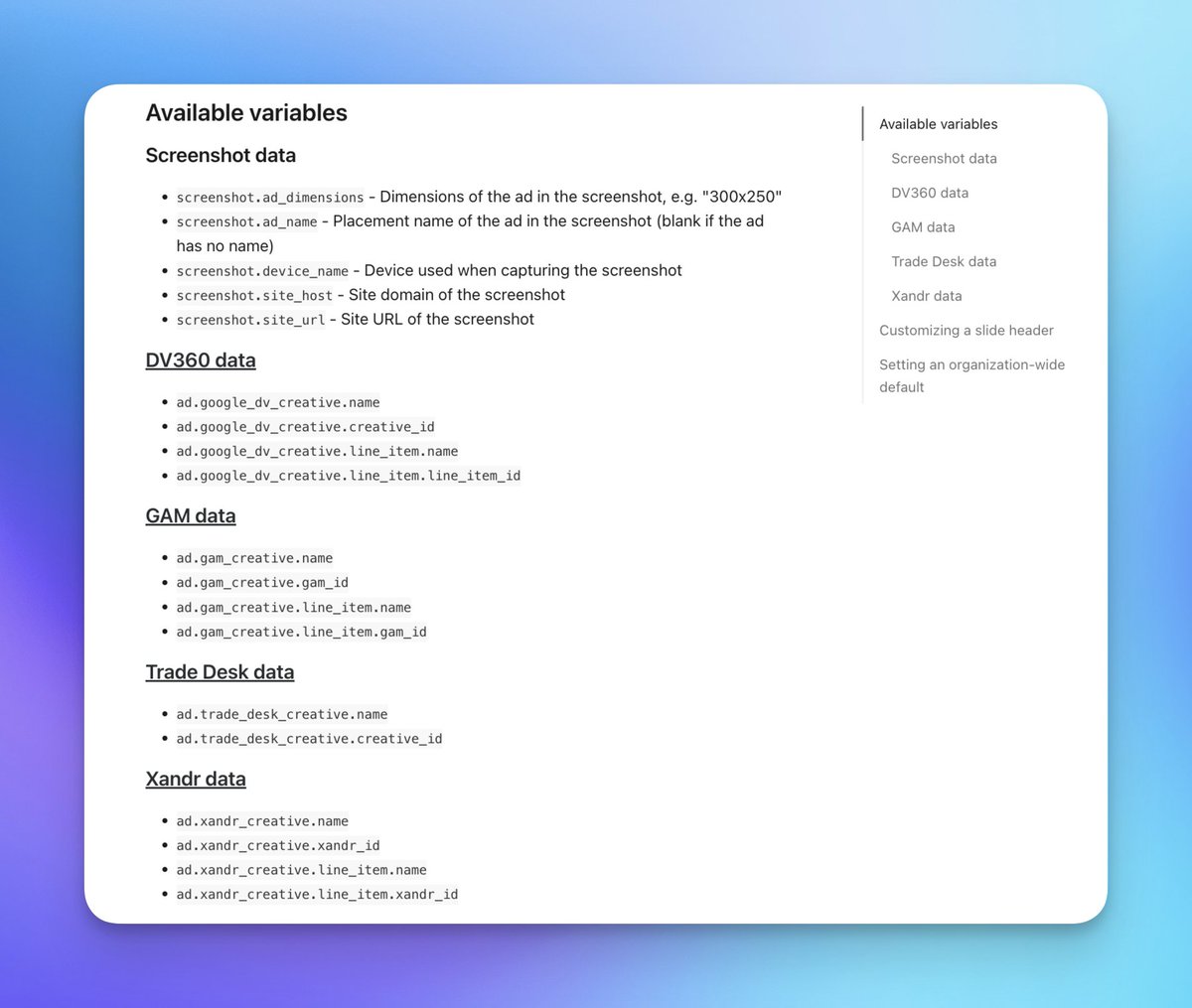
We've added data from DV360, @GoogleAdManager, @xandr/@Microsoft , and TTD into presentation variables. This enables you to display creative and line item information (names and IDs) directly in PowerPoint or PDF presentations reducing the need to do more manual work creating your presentations that you send to your customers.
Are you a GAM (@GoogleAdManager) user? If so, did you know you can connect your GAM account to @AdReformers, setup site mapping, and fully automate screenshots on your newly created line items every day? Well, you can! And now, with our new PowerPoint Template variables, you can further customize your decks with GAM data. Automatically generate branded PowerPoint decks with any these new GAM naming variables on your slides:
ad gam_creative name
ad gam_creative gam_id
ad gam_creative line_item name
ad gam_creative line_item gam_id
You can also use our current variables:
Campaign name (GAM IO name)
Ad name
Ad ID
New layout to ad preview pages in @AdReformers! Laying the groundwork for something new that's coming 👀
*As always, demo coming at you with some good tunes 🔊
We also updated our HTML ad capture to be the last frame by default instead of the first, which is sometimes blank or doesn't include CTAs. Of course, you can still choose different frames after ads are uploaded if you want something different in the screenshot.
New in Ad Reform:
This week we added support for tag sheets from Amazon Ad Server (formerly @sizmek) and @flashtalking by @TeamMediaocean. Amazon will actually be sunsetting Ad Server at the end of 2024, but…at least we have support in the meantime 😅
Coming soon to Ad Reform: Device wrappers!
Our first device wrapper will be for a new device (iPhone 14 pro max), but we will follow that up with wrappers for desktop, tablet, other phones, and TVs for CTV.
If you're a DSP, check out our API. If you're a media buyer using DSPs, ask them build screenshots into the platform and share this with them.
https://t.co/86fjjYRcXa
They've taken the burden of creating screenshot decks off their internal teams and given their customers valuable self-serve features to generate screenshots themselves whenever they want (fully automated). Win-win for everyone!