Check out this video of the tool I created for my 𝗠𝗮𝘀𝘁𝗲𝗿’𝘀 𝗧𝗵𝗲𝘀𝗶𝘀—I tackled one of the oldest challenges in 3D modeling: 𝗿𝗲𝗹𝘆𝗶𝗻𝗴 𝗼𝗻 𝗮 𝟮𝗗 𝘀𝗰𝗿𝗲𝗲𝗻 𝘁𝗼 𝗰𝗿𝗲𝗮𝘁𝗲 𝗮 𝟯𝗗 𝗺𝗼𝗱𝗲𝗹.
@JunnichiSuko That’s cool.
Curious what you’re planning beyond bone posing. For example vertex manipulation or other modeling tasks.
I’ve been exploring similar interaction questions on the streaming side. Happy to exchange notes once things are further along.
@justinryanio MeshyAI is amazing!
Tried it out with street art, paintings and more.
But it also suffers from hallucination sometimes.
See what it did to Charizard 😂
@HoloMotoRanger very cool! this reminds me of the significant work of @Tks_Yoshinaga, who used the point cloud of the Quest 3. Really recommend his work
Also, at what range does the world mesh stop being picked up? And can you scan individual objects with it as well?
Hey @justinryanio, very cool display of spatial preview.
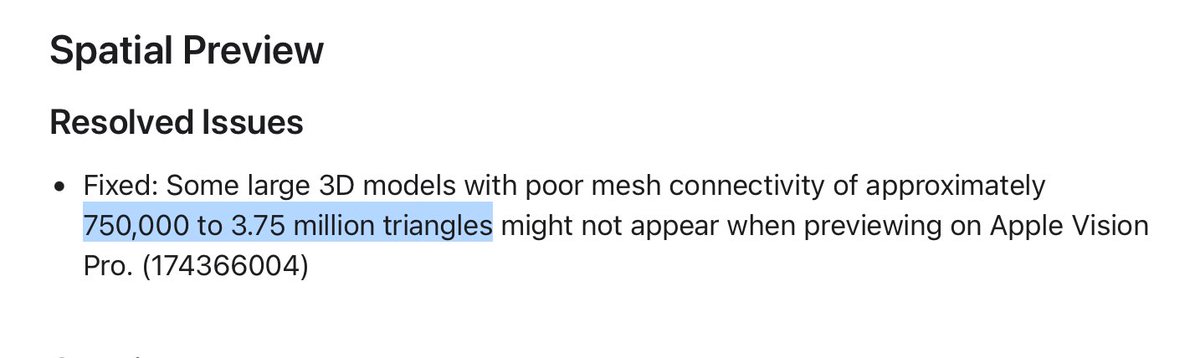
Just dug into the visionOS 27 beta 4 notes: there’s a silent failure window for models with “poor mesh connectivity” in the ~750k–3.75M triangle range.
Curious if you’ve hit anything similar with heavier models or editing in SketchUp/C4D?
It fits though. Spatial Preview isn’t meant for shipped content - it’s whatever is currently sitting in the DCC (e.g. Blender) viewport.
Same thing I keep running into with the Blender → Quest 3 / Vision Pro live link: preview traffic is mid-edit, often unwelded, and a lot heavier than anything that actually ships.
Apple recently published the first concrete triangle numbers I’ve seen for Spatial Preview - buried in a bug fix.
visionOS 27 beta 4: models with “poor mesh connectivity” of roughly 750k to 3.75M triangles could silently fail to appear on Vision Pro.
Not a performance target. A bug window.
750k → 3.75M is exactly 5×.
That spread is the interesting part.
For context, the numbers published in WWDC24 are still roughly:
~250k triangles shared space,
~500k immersive,
~100k in view is comfortable.
750k–3.75M is well past all of that. The top end is 7.5× the immersive figure. And Apple is calling it a bug, not user error.
Been having tons of fun using my MR-tool with AI-generated 3D models from @MeshyAI.
I just took a pic, generated the model and could see it in MR right away.
This one is a graffiti from a wall here in Vienna (pic in the comments)
Live PBR material syncing from Blender to Quest 3 is now working!
Real-time texture updates over the same wireless streaming link, including proper UVs and normal maps.
Quick demo:
Such an interesting angle to approach this! Blender running fully on-device with USDZ export is a real milestone. Congrats!
How limiting is the fact that its runs on AVP?
btw. I share this vision: creating 3D models in 3D.
I'm working on the complementary approach: a Blender plugin that streams full desktop Blender live into MR, on Quest 3 and Vision Pro 👇
Got it, that makes sense! Muse could actually be a great use case for something like this.
I’m building live real-time streaming between Blender and Vision Pro (and Quest 3). So you can model in Blender and see the changes instantly in the headset, and vice versa.
Still early, but happy to share more if you’re curious.