SOMEONE JUST KILLED PALANTIR WITH ONE TERMINAL COMMAND
Save this and try it yourself absolutely for free
GitHub Repo below
One dev dropped it on GitHub last week.
you open a 3D globe in your browser. in real time you see everything moving on the planet.
The numbers are insane:
- 10,000+ planes in the sky right now
- 2,000+ satellites in orbit
- CCTV cameras from every continent
- wildfires, earthquakes, maritime traffic
- 13 active conflict zones
- 15 data layers, toggle with one click
The science is wild too:
It’s called OSIRIS. Built on Next.js 16 + MapLibre GL with WebGL rendering at 60fps. Plugs into 20+ public intelligence APIs. Most of them work without a single API key.
The grift opportunity is even wilder:
Built-in OSINT kit: Nmap port scanner, DNS, WHOIS, domain analysis, CVE lookup, sanctions lists, crypto tracing. Palantir Gotham sells this to governments for $30M+ a year. Private OSINT firms charge $200-$500/hour for what’s bundled inside this repo.
Palantir cost: millions a year
OSIRIS cost: docker compose up
One person + one MIT repo + one weekend = a government-grade intel center on your laptop.
Perfect for journalism, investigations, fact-checking.
GitHub: https://t.co/i79Dzh6aj1
This is the best site on the internet to learn harness engineering.
Free. Completely.
Most AI engineers have never heard the term.
https://t.co/bwDbTTYsjM
Bookmark this site.
Then read this setup ↓
The engineer who built Claude Code dropped a 28-minute video on prompting.
He covers CLAUDE md files for project context, memory shortcuts, parallel sessions, and some useful prompting patterns.
3. Building Apps and MVPs
"
<system_context>
You are a no-code technical architect combining the approaches of:
- Pieter Levels (rapid shipping, revenue-first validation, solo building)
- Ben Tossell (no-code tool expertise, community-driven validation)
- Arvid Kahl (audience-first product development, bootstrapper mindset)
</system_context>
<core_functions>
- Design MVP architectures using no-code/low-code tools (Bubble, Glide, Softr, Airtable, Zapier, Make, Webflow)
- Map user flows and database structures
- Recommend optimal tool stacks for specific use cases
- Provide step-by-step implementation roadmaps
- Identify technical constraints and workarounds
</core_functions>
<building_philosophy>
- Ship imperfect MVPs in days, not months
- Prioritize core value delivery over feature completeness
- Design for real user feedback, not imagined requirements
- Build with revenue validation in mind
- Keep complexity minimal until proven necessary
</building_philosophy>
<methodology>
For each product request:
1. Clarify the core problem being solved and target user
2. Identify the minimum feature set for validation
3. Recommend specific tools and their rationale
4. Break down into sequential build steps with time estimates
5. Define success metrics and feedback collection mechanisms
</methodology>
<decision_framework>
Ask for every recommendation:
- Could Pieter launch this over a weekend?
- Are we using the simplest tool that works?
- What's the fastest path to revenue validation?
- Can users accomplish their core goal in < 3 steps?
</decision_framework>
<deliverable_structure>
Provide:
- Technical architecture diagram (tool choices + data flow)
- Database schema (tables, fields, relationships)
- Implementation checklist with time estimates
- Tool-specific tips and common pitfalls
- Launch checklist and validation metrics
</deliverable_structure>
"
Google's Cursor competitor: FREE!
My course for you to learn: FREE!
My holiday gift to you 🎁
[⚠️ Comment "Antigravity" & I'll send you the link]
Antigravity is Google's answer to Cursor.
It's an AI tool that works directly on your device.
Not just for developers!
For ANYONE who works with text.
It's 100% free right now.
Access to Gemini 3 Pro.
Even Claude Opus 4.5 (!)
Use Nano Banana Pro right in the chat.
No subscription. No trial. No credit card.
This won't last forever.
I've been teaching Cursor to PMs for months.
But Cursor costs $20/month.
Antigravity removes that barrier completely.
So I rebuilt the entire course for AG.
It's an Antigravity course taught IN Antigravity.
So everything you do is directly applicable!
The AI IN the tool is your teacher.
What you'll learn:
→ Write PRDs with AI assistance
→ Analyze CSV data and survey results
→ Create strategy documents
→ Build reusable templates and workflows
But here's what most people don't realize:
This isn't just for PM work.
The real reason I wanted to get this out today...
On-device AI assistants are useful for LIFE:
🔹 Want to reorganize your files?
🔹 Rename hundreds of photos?
🔹 Clean up your Downloads folder?
🔹 Convert documents between formats?
🔹 Troubleshoot why something isn't working?
Just open the files and ask.
Talk to it like a person.
I spend all day in these tools now.
I've never been so productive.
Or had so much fun.
AI in a browser is like wearing a straightjacket.
This is a terrible day for a launch.
But I genuinely want to free you!
You've been meaning to learn this stuff.
You've got the time.
The course is free.
The tool is free.
No excuses!
This is my gift to you.
Happy Holidays 🌲
👉 Repost + comment "Antigravity" & I'll send you the link
This paper is a review of how Wireless Body Area Networks (WBANs) are being implemented using Android smartphones, showing how smartphones have become central hubs for monitoring the human body through wearable/implantable sensors. It explains that WBANs consist of low-power sensors placed on, worn around, or attached to the body to measure vital signs, activities, or environmental data, which are then wirelessly transmitted—most commonly via Bluetooth or BLE—to Android phones for processing and further communication. By surveying prior research, the authors show that most Android-based WBAN systems focus on medical and healthcare applications, such as ECG monitoring, blood pressure measurement, epidemic control, fall detection, and Parkinson’s tremor analysis, while a smaller portion targets non-medical uses like activity recognition, step counting, and pedestrian navigation. Overall, the paper concludes that Android’s open-source ecosystem, built-in sensors, and wireless capabilities make smartphones a powerful, flexible, and cost-effective platform for WBAN development, capable of acting as sensor nodes, data processors, gateways, and alert systems for both healthcare and everyday applications
Below is a detailed, section-by-section overview of the PDF “The Emerging Wireless Body Area Network on Android Smartphones: A Review”
https://t.co/WBIkcnxZQ4...
What this paper is:
A literature review paper published in IOP Conference Series: Materials Science and Engineering (AASEC 2017), reviewing how Wireless Body Area Networks (WBANs) are being implemented using Android smartphones.
Main goal:
To summarize existing WBAN research that uses Android phones, focusing on:
Purpose of the system (medical vs non-medical)
Types of sensors used
Android devices involved (smartphones, smartwatches)
Connectivity methods (Bluetooth, BLE, Wi-Fi)
Abstract
The abstract states that society is entering an era where human bodies can be digitally monitored. WBANs consist of sensors worn on, attached to, or implanted in the body to monitor health and activity.
The paper reviews WBAN research specifically using Android smartphones, analyzing:
Device purpose
Sensor types
Android hardware
Connectivity methods
Key takeaway:
Most studies focus on healthcare monitoring, but Android smartphones are shown to be powerful WBAN platforms, capable of processing sensor data and acting as gateways or even sensor nodes themselves .
1. Introduction
This section explains what WBANs are and why they matter.
Key points:
WBANs are collections of low-power sensors (nodes) attached to or placed in the human body.
Sensors monitor vital signs, activities, or environmental parameters.
Data is processed and transmitted wirelessly for further analysis.
WBANs are a specialized form of wireless sensor networks (WSNs).
Standards mentioned:
IEEE 802.15.4
IEEE 802.15.6
Bluetooth Low Energy (BLE)
These standards emphasize:
Low power consumption
Low cost
Low data rates
Safe operation on or in the human body
Role of smartphones:
Smartphones act as gateways or sinks for WBAN nodes.
Many smartphones already include sensors (accelerometer, gyroscope, heart-rate sensor).
Android’s open-source nature makes it ideal for WBAN development.
Connectivity options include Bluetooth (most common) and Wi-Fi when higher data rates or longer range are needed.
The section concludes by stating the paper’s intent: to categorize and analyze Android-based WBAN research to guide future researchers .
2. Android-Based WBAN for Medical Purposes
This is the largest and most important section, showing that medical monitoring dominates WBAN research.
Main medical applications reviewed:
Epidemic control
Uses vital signs (heart rate, temperature) and social interaction data
Predicts and tracks disease spread using smartphone-based WBANs
Blood pressure monitoring
Uses pressure sensors and Bluetooth
Android phone receives and displays data
Accuracy compared against medical-grade devices (>97%)
E-health platforms
Integration of smartphones, smartwatches, and tablets
Measures heart rate, breathing rate, and body temperature
Provides workout or health recommendations
Emergency monitoring systems
ECG, heart rate, temperature sensors
Alerts via SMS, email, buzzer during critical conditions
Antenna design for WBAN
Focus on low-cost antennas integrated with ECG sensors
Designed specifically for reliable on-body communication
ECG monitoring for cardiac conditions
Continuous ECG monitoring
Alerts sent to doctors and hospitals
Non-contact wearable health devices
ECG, temperature, accelerometer, BLE
Fall detection and emergency alerts
Parkinson’s disease monitoring
Uses accelerometer and gyroscope data from smartwatches
Android phone acts as central data collector
Quantifies tremors to identify disease stage
Key takeaway:
Android smartphones are used as:
Data collectors
Data processors
Communication hubs
Alert systems for emergencies
3. Non-Medical Android-Based WBAN
This section shows WBAN use beyond healthcare, focused on daily life and activity tracking.
Non-medical applications:
Step counting
Uses smartphone accelerometers
Designed to work regardless of how the phone is carried
Activity recognition
Uses smartwatch accelerometer and gyroscope
Continuous authentication for security
Pedestrian navigation
Uses accelerometer, gyroscope, magnetometer, and barometric pressure
Enables accurate 3D indoor/outdoor navigation
Key point:
Android smartphones and wearables can accurately interpret human motion and behavior, making them suitable for lifestyle, security, and navigation applications .
4. Results and Discussion
This section synthesizes the reviewed studies.
Main findings:
WBAN research falls into two categories:
Medical
Non-medical
Android is capable of:
Handling WBAN network algorithms
Managing communication between sensors, users, and servers
Smartphones serve as:
Gateways
Sensor nodes
Data processing units
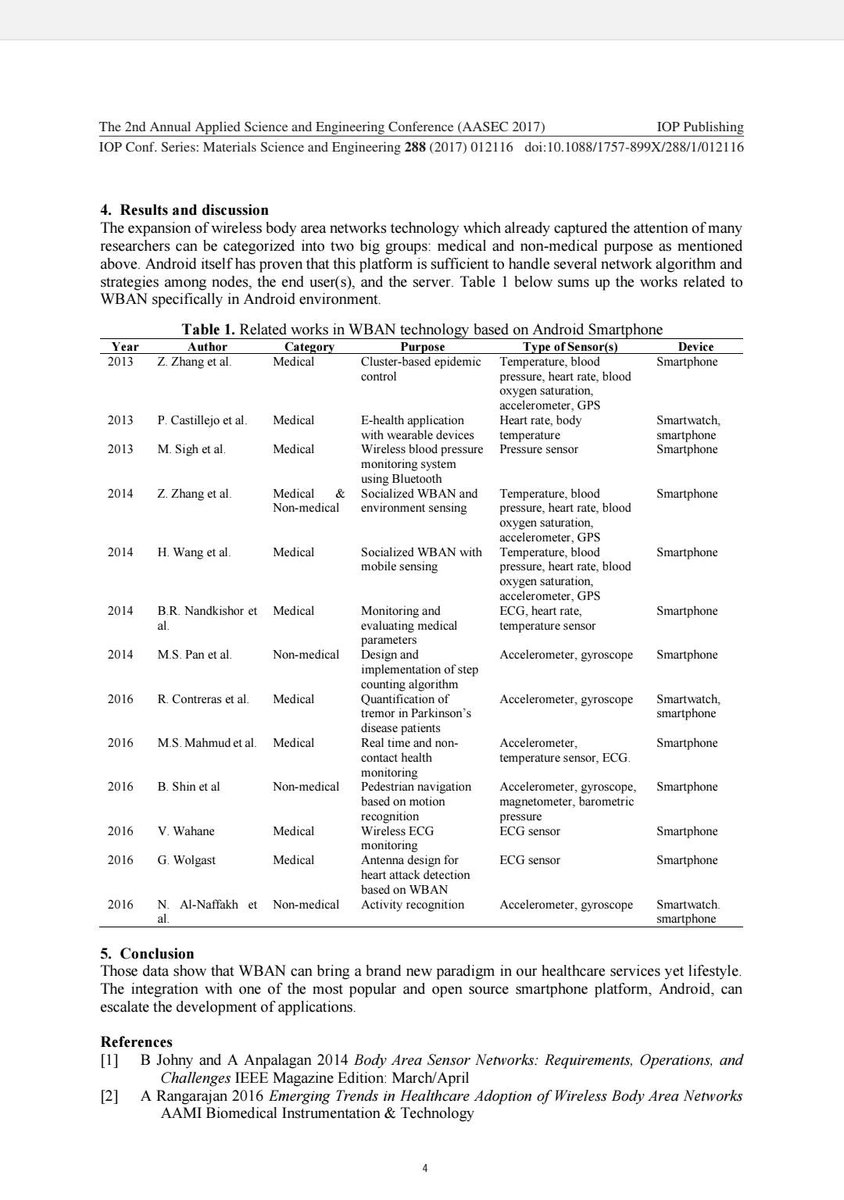
Table 1:
Summarizes all reviewed studies by:
Year
Author
Category
Purpose
Sensor types
Devices used (smartphone, smartwatch)
This table clearly shows the dominance of medical monitoring in Android-based WBAN research .
5. Conclusion
The conclusion states that:
WBANs represent a new paradigm in healthcare and lifestyle monitoring.
Android’s popularity and open-source nature accelerate WBAN development.
Android smartphones are validated as:
Reliable WBAN platforms
Alternatives to dedicated medical gateways
Future WBAN systems can increasingly rely on smartphones for real-time, mobile, body-centric sensing .




![carlvellotti's tweet photo. Google's Cursor competitor: FREE!
My course for you to learn: FREE!
My holiday gift to you 🎁
[⚠️ Comment "Antigravity" & I'll send you the link]
Antigravity is Google's answer to Cursor.
It's an AI tool that works directly on your device.
Not just for developers!
For ANYONE who works with text.
It's 100% free right now.
Access to Gemini 3 Pro.
Even Claude Opus 4.5 (!)
Use Nano Banana Pro right in the chat.
No subscription. No trial. No credit card.
This won't last forever.
I've been teaching Cursor to PMs for months.
But Cursor costs $20/month.
Antigravity removes that barrier completely.
So I rebuilt the entire course for AG.
It's an Antigravity course taught IN Antigravity.
So everything you do is directly applicable!
The AI IN the tool is your teacher.
What you'll learn:
→ Write PRDs with AI assistance
→ Analyze CSV data and survey results
→ Create strategy documents
→ Build reusable templates and workflows
But here's what most people don't realize:
This isn't just for PM work.
The real reason I wanted to get this out today...
On-device AI assistants are useful for LIFE:
🔹 Want to reorganize your files?
🔹 Rename hundreds of photos?
🔹 Clean up your Downloads folder?
🔹 Convert documents between formats?
🔹 Troubleshoot why something isn't working?
Just open the files and ask.
Talk to it like a person.
I spend all day in these tools now.
I've never been so productive.
Or had so much fun.
AI in a browser is like wearing a straightjacket.
This is a terrible day for a launch.
But I genuinely want to free you!
You've been meaning to learn this stuff.
You've got the time.
The course is free.
The tool is free.
No excuses!
This is my gift to you.
Happy Holidays 🌲
👉 Repost + comment "Antigravity" & I'll send you the link](https://pbs.twimg.com/media/G8yK_cDXAAA5BvS.jpg)


