“Building the network for agentic AI: The foundation for autonomous enterprise operations” Click here to find out more: https://t.co/tHnFKD9RMu #AI#network#technology
@AmazonHelp@amazonIN could not be delivered since last 1 week as ur delivery associate never try to contact and always mark it customer not reachable .. such shameful act and pathetic services @callmate_india that’s ur order .
*Package Details*:
*Tracking ID*: 368302626190
The interview is over. The recruiter asks: "Do you have any questions for us?"
You say: "What’s the culture like?" or "When will I hear back?"
The recruiter’s brain: Standard. Forgettable. Just like the last five people.
You just missed your biggest chance to close the deal. Say this instead:
Stop building Istio configs that only work with Istio.
We just published, a practical walkthrough that shows how Istio is evolving.
Here is what we covered:
- The difference between north-south (external) and east-west (internal) traffic, and why Gateway API is becoming the default for Istio ingress/egress management.
- The complete setup process.
- Installing Gateway API CRDs,
- Leveraging Istio's built in GatewayClass,
- Deploying test applications, and
- Creating Gateway and HTTPRoute resources for traffic routing.
𝗦𝘁𝗲𝗽-𝗯𝘆-𝗦𝘁𝗲𝗽 𝗚𝘂𝗶𝗱𝗲: https://t.co/xiTl5v7gAI
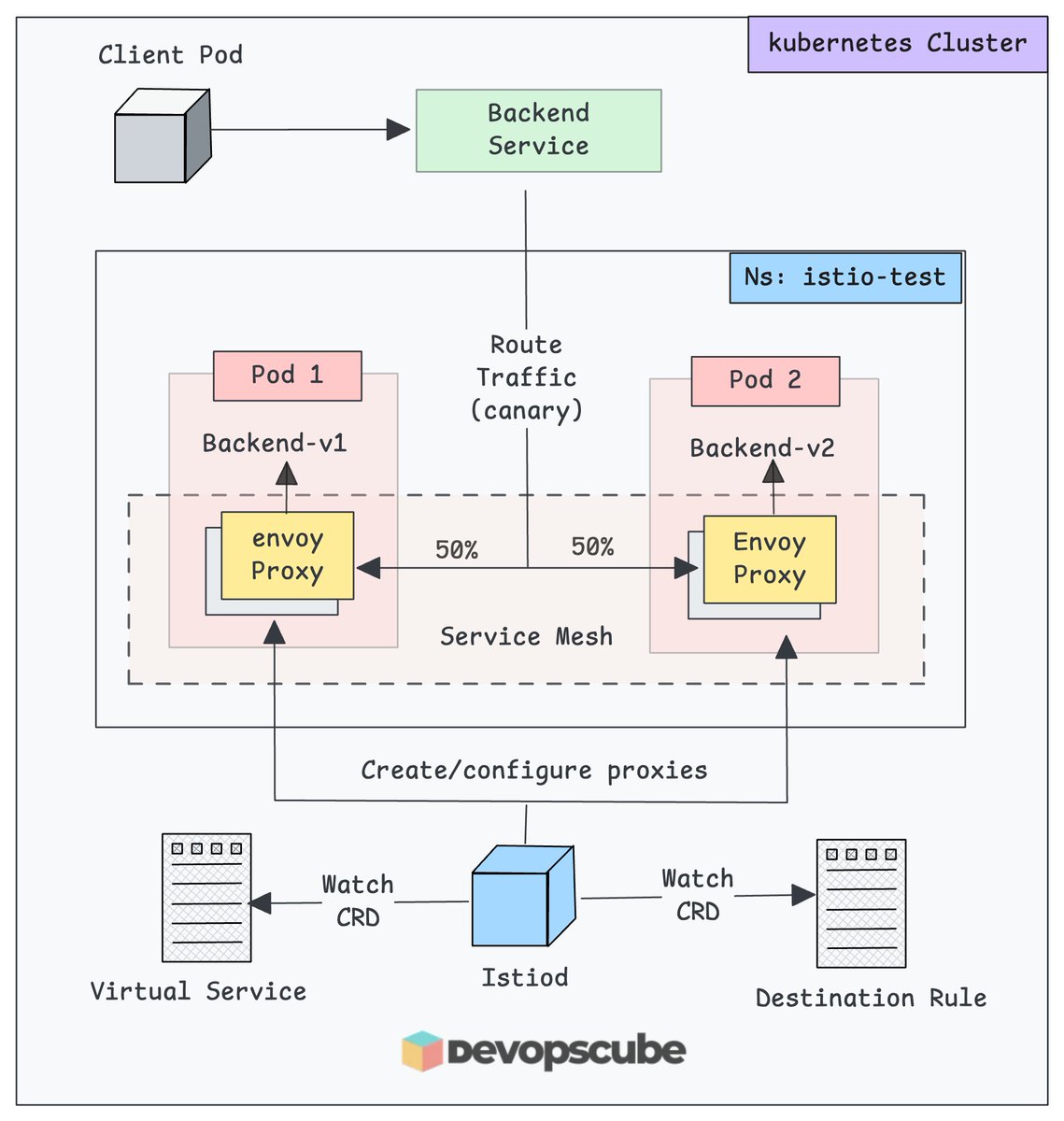
Also we have covered advanced configurations like Canary Splits (90/10) and
Fine tuned traffic with `DestinationRules` for circuit breaking and load balancing
𝗣𝗦. Are you using the Gateway API with Istio?
Drop your thoughts in the comments below.
#istio #devops
Learn Kubernetes (K8s) - Step by Step (byte size videos) 🔥🔥
1. What is Container - https://t.co/Qz0kE6J99n
2. Container Orchestration - https://t.co/LnRheZ2Y2y
3. What is Kubernetes - https://t.co/RMfBNyP3pl
4. Core Concepts of Kubernetes (K8s) - https://t.co/MNkyNeZEwy
5. Kubernetes Architecture - https://t.co/Unyi0kpFk8
6. Kube API Server - https://t.co/bu626EXSBT
7. What is ETCD in Kubernetes (K8s) - https://t.co/7lNrfcJo9q
8. What is Kube Controller Manager in Kubernetes - https://t.co/txLMrljuy1
9. What is Kube Scheduler in Kubernetes - https://t.co/1aiKbGanHS
10. What is Kubelet in Kubernetes? - https://t.co/91k65AfLoc
11. What is Kube Proxy in Kubernetes? - https://t.co/CEDTnhXafd
12. What is Pods in Kubernetes - https://t.co/t7B6AflbTF
13. What is Yaml in Kubernetes - https://t.co/U0jF6NVxnO
14. What is Replica Set in Kubenetes? - https://t.co/DlkfXvPexG
15. What is Deployment in Kubenetes? - https://t.co/DBvyukGIdh
16. What is Services in Kubernetes? - https://t.co/X5AuX04J5w
Kubernetes solves infrastructure orchestration.
But Kubernetes does not solve service-to-service problems.
That is where Istio helps you.
By default, Kubernetes will not:
- Enforce mTLS between services
- Provide retries, timeouts, or circuit breaking
- Help you understand why requests are slow or failing
- Control traffic behavior without modifying application code
To address these gaps, Istio adds:
- Automatic mTLS with strong service identity
- Fine grained traffic control such as canary releases and fault injection
- Deep, request-level observability
- Access policies
If your setup is small, Kubernetes alone is usually enough.
But as your system grows and traffic becomes more complex,
You will need Istio or another service mesh.
𝗚𝘂𝗶𝗱𝗲: https://t.co/SoRJSUOgWs
Do you want to add anything?
Drop them in the comments!
#istio #kubernetes #devops
Explaining these with top level points and small examples.
1. Event-Driven Architecture
Top points: publish/subscribe, async, loose coupling, retries + duplicates happen.
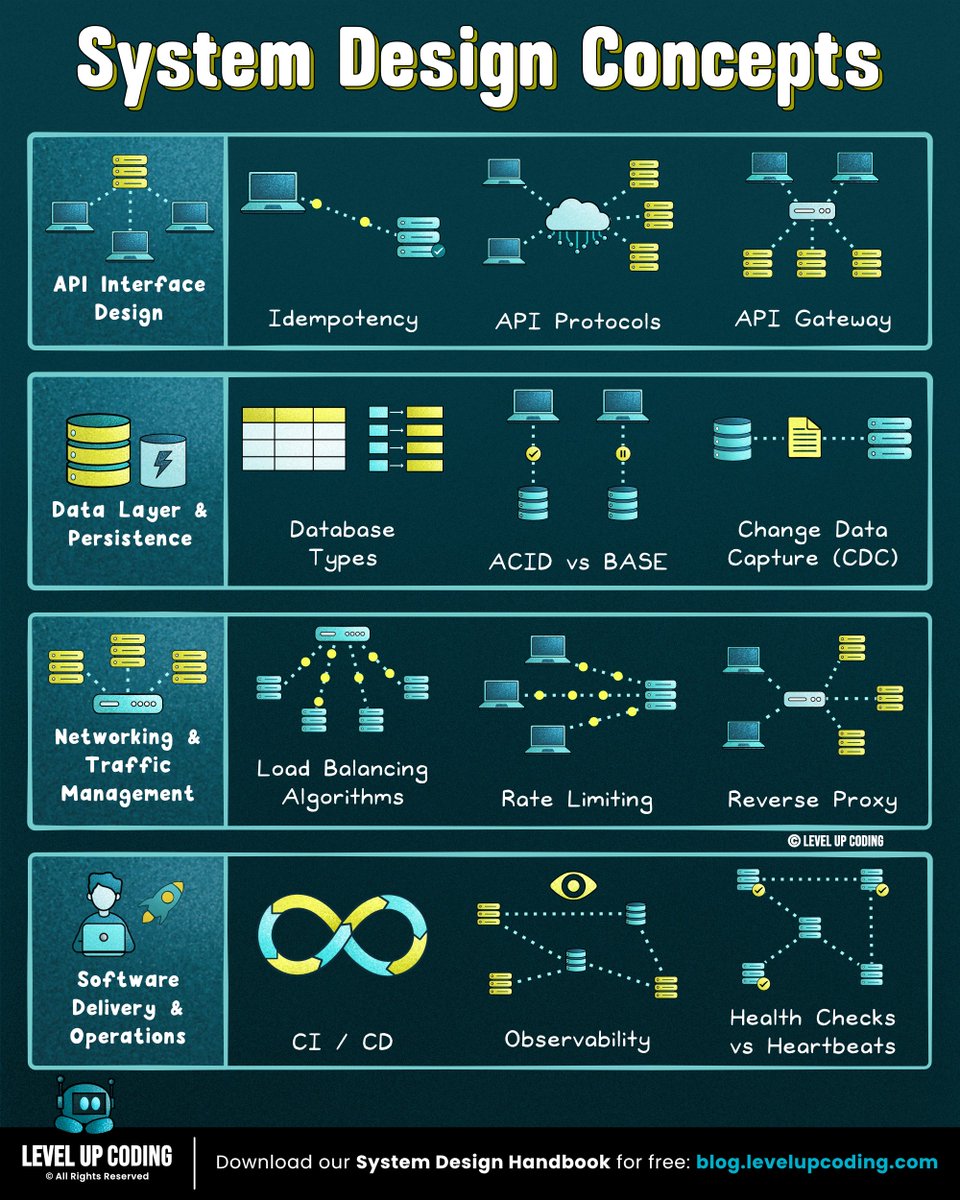
Mini example: OrderService emits OrderPlaced to a broker. InventoryService consumes it and reserves stock. If InventoryService is down, the event is retried later, so your consumer must handle duplicates (same order might be processed twice) using an idempotency key like order_id.
2. Saga Pattern
Top points: distributed transaction without 2PC, step-by-step workflow, compensations, orchestration vs choreography.
Mini example: “Place order” = (1) CreateOrder (2) ChargePayment (3) ReserveInventory. If ReserveInventory fails after payment succeeded, saga runs compensation: RefundPayment and marks order as cancelled.
3. CQRS
Top points: separate write model and read model, reads optimized for queries, writes enforce rules, eventual consistency is common.
Mini example: Commands write to the Order aggregate in Postgres. Separately, a read model “OrderSummary” is built in Redis/Elastic/another table for fast UI queries like “show my last 50 orders with status”, without joining 8 tables on every request.
4. Event Sourcing
Top points: store events as source of truth, rebuild state by replay, perfect audit trail, harder migrations.
Mini example: Instead of storing balance=120, you store events: Deposited(200), Withdrawn(50), Withdrawn(30). Current balance is replay sum = 120. If a bug happens, you can re-run projections from the event log to rebuild correct read models.
5. Circuit Breaker
Top points: stop hammering a failing dependency, closed/open/half-open, prevents cascading failures, improves tail latency.
Mini example: Your service calls Payments API. If 50% calls fail in 10 seconds, breaker opens and you instantly return “payment provider unavailable” (fast fail). After 30 seconds it half-opens, allows a few test requests, and if they succeed it closes again.
6. Distributed Tracing
Top points: trace_id across services, spans for each hop, shows latency breakdown, needs propagation headers.
Mini example: A request hits API -> Auth -> Orders -> DB. With tracing you see Auth took 5ms, Orders handler 12ms, but DB query 900ms. Without tracing you just know “API is slow” and you start guessing like a madman.
7. CAP Theorem
Top points: under network partition you pick C or A, CP vs AP tradeoff, real systems tune per operation.
Mini example: During a partition, a CP system might reject writes to avoid split-brain (“cannot confirm leader, try later”). An AP system might accept writes on both sides and reconcile later, which can show stale data temporarily (like two devices both updating profile name).
8. Idempotency
Top points: safe retries, same request should not double-create, use idempotency keys + dedupe, critical for at-least-once delivery.
Mini example: Client calls POST /payments with Idempotency-Key: abc123. If network times out and client retries, server returns the same payment result instead of charging twice, because it stored abc123 -> payment_id mapping.
9. Data Sharding
Top points: split data by shard key, scale writes/storage, avoid hot shards, cross-shard queries are painful.
Mini example: Users table is sharded by user_id % 32 across 32 DBs. Reads/writes for one user are fast and local. But “top 100 users by spend” now needs aggregation across shards, so you typically build that via analytics pipeline or a separate OLAP store.
10. API Gateway
Top points: single entry for clients, auth/rate limit/routing, hides internal services, can be a bottleneck if misused.
Mini example: Mobile app only talks to gateway. Gateway validates JWT, rate limits, then routes /orders to OrdersService and /profile to UserService. If you later split Orders into multiple internal services, the app does not change, only gateway routing does.
Container Security 101
I wrote a complete Docker security hardening guide covering:
- Running as non-root user
- Using minimal base images
- Scanning for vulnerabilities
- Handling secrets properly
- Read-only filesystems
- Dropping unnecessary capabilities
- Setting resource limits
- Network isolation
- Security profiles (Seccomp, AppArmor)
- Docker Content Trust
- Complete hardened Dockerfile example
None of this is complicated.
It's just skipped because "the container works."
Until it doesn't.
Full guide with code examples:
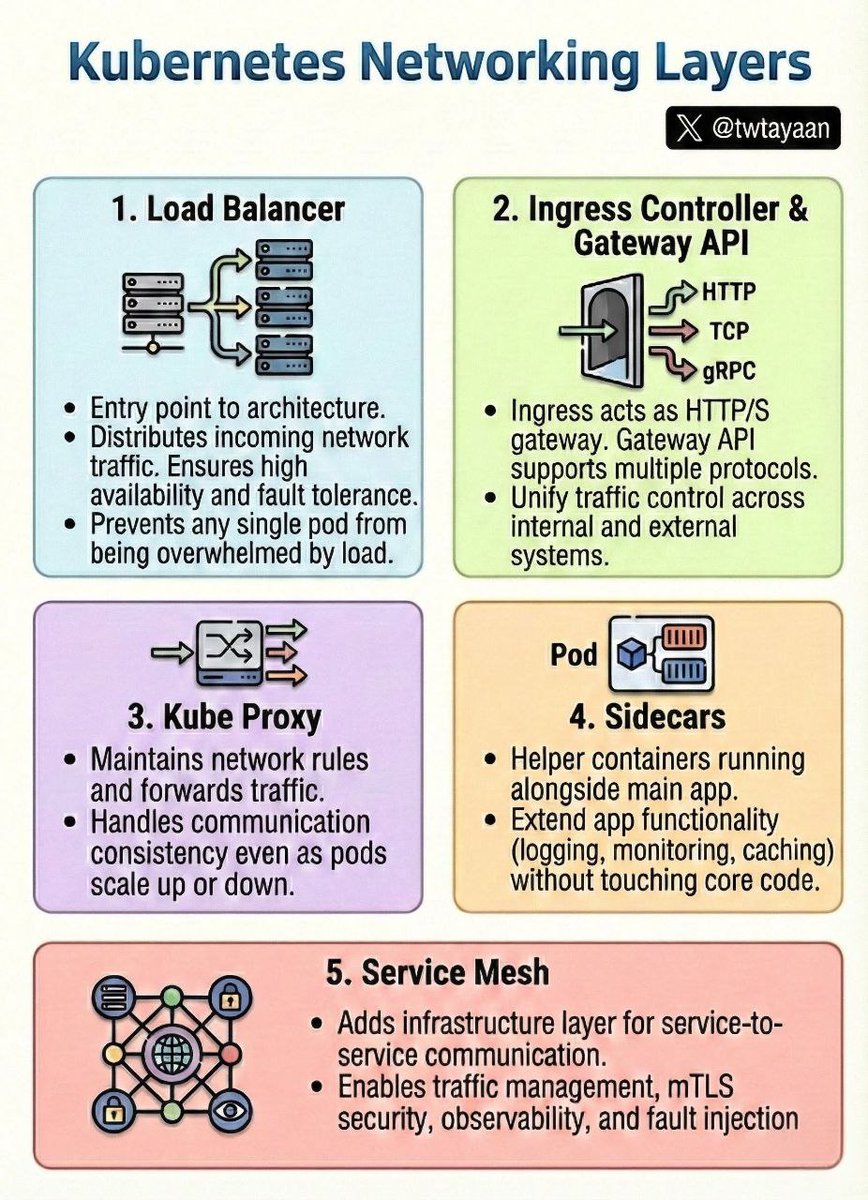
Kubernetes Networking Layers 🛜
1. Load Balancer: Distributes external traffic across nodes to ensure high availability and prevent overload.
2. Ingress & Gateway API: Manages external access (HTTP/S, TCP, gRPC) and advanced routing rules into the cluster.
3. Kube Proxy: Maintains network rules on every node to handle dynamic Pod communication as they scale.
4. Sidecars: Helper containers that extend application functionality (logging, security, caching) without touching code.
5. Service Mesh: A dedicated infrastructure layer for secure (mTLS), observable service-to-service communication.
Istio Ingress With Kubernetes Gateway API 🚀
You can use the Gateway API to expose services running inside the mesh.
Infact, it is intended to become the default API in the future for managing ingress/egress traffic.
Our latest blog in the Istio learning series is now live.
It covers the following.
Here is what you will learn by the end of this blog.
- How to use the Kubernetes Gateway API with Istio
- Configure canary traffic splitting using HTTPRoute weights.
- Adding Istio traffic policies like circuit breaking using DestinationRule.
- Validate end-to-end traffic flow from an external client.
- Understand how GAMMA extends this to internal (east-west) traffic
𝗥𝗲𝗮𝗱 𝘁𝗵𝗲 𝗳𝘂𝗹𝗹 𝗯𝗹𝗼𝗴: https://t.co/xiTl5v7gAI
More deep-dive Istio posts are coming soon.
If you want updates when they go live, subscribe to the DevOpsCube newsletter.
#Istio #Kubernetes #DevOps
Kubernetes Auto-Scaling.
→Kubernetes Auto-Scaling automatically adjusts application and infrastructure resources based on workload demand. It ensures optimal performance, cost efficiency, and high availability by scaling Pods, nodes, or workloads up and down without manual intervention.
→ Why Auto-Scaling Is Important
→ Handles traffic spikes automatically.
→ Improves application availability and performance.
→ Optimizes resource usage and reduces infrastructure costs.
→ Eliminates manual scaling operations.
→ Types of Auto-Scaling in Kubernetes
→ Horizontal Pod Autoscaler (HPA)
→ Scales the number of Pod replicas automatically.
→ Based on metrics such as CPU utilization, memory usage, or custom metrics.
→ Commonly used for web applications and APIs.
→ Workflow
→ Metrics Server collects resource metrics.
→ HPA evaluates metrics against defined thresholds.
→ Kubernetes increases or decreases Pod replicas accordingly.
→ Vertical Pod Autoscaler (VPA)
→ Adjusts CPU and memory requests and limits for Pods.
→ Optimizes resource allocation for workloads with unpredictable usage.
→ Requires Pod restart to apply new resource values.
→ Use Case
→ Background jobs or services with changing resource needs.
→ Cluster Autoscaler (CA)
→ Scales the number of worker nodes in the cluster.
→ Adds nodes when Pods cannot be scheduled due to insufficient resources.
→ Removes underutilized nodes to save costs.
→ Commonly used in cloud-based Kubernetes clusters.
→ Metrics Used for Auto-Scaling
→ CPU utilization
→ Memory usage
→ Custom application metrics (requests per second, queue length)
→ External metrics (cloud services, message queues)
→ Auto-Scaling Workflow
→ Application load increases.
→ Metrics exceed defined thresholds.
→ HPA scales Pods horizontally.
→ If nodes become insufficient, Cluster Autoscaler adds new nodes.
→ When load decreases, Pods and nodes are scaled down automatically.
→ Best Practices
→ Always define resource requests and limits for Pods.
→ Use HPA for stateless applications.
→ Combine HPA with Cluster Autoscaler for full automation.
→ Monitor scaling behavior to avoid over-scaling or thrashing.
→ Test auto-scaling under simulated load conditions.
→ Common Auto-Scaling Use Cases
→ Web applications with variable traffic.
→ Microservices architectures.
→ Event-driven and API-based systems.
→ Cloud-native, cost-sensitive deployments.
→ Quick Tip!
Kubernetes Auto-Scaling provides a powerful mechanism to dynamically adjust application and infrastructure capacity. By combining HPA, VPA, and Cluster Autoscaler, Kubernetes ensures applications remain responsive, resilient, and cost-efficient under changing workloads.
Grab this Ebook to Master Kubernetes: https://t.co/1JQaCCc17i
How AWS Handles DNS Management
→ AWS handles Domain Name System (DNS) management using Amazon Route 53.
→ Route 53 is a highly available, scalable, and fully managed DNS service.
→ It translates human-readable domain names into IP addresses so users can reach applications reliably.
Amazon Route 53 Overview
→ Route 53 is both a domain registrar and a DNS routing service.
→ It integrates deeply with other AWS services like EC2, ELB, CloudFront, and S3.
→ AWS operates Route 53 on a global, fault-tolerant infrastructure.
Domain Registration
→ AWS allows you to register domains directly through Route 53.
→ AWS automatically configures name servers and DNS records.
→ Eliminates manual DNS setup and reduces misconfiguration risks.
Hosted Zones
→ Route 53 uses hosted zones to manage DNS records for a domain.
→ Public hosted zones → for internet-facing applications.
→ Private hosted zones → for internal VPC-based services.
→ AWS stores and replicates hosted zone data globally for durability.
DNS Record Types
→ Route 53 supports all major DNS records:
→ A and AAAA records for IPv4 and IPv6
→ CNAME for domain aliases
→ MX for email routing
→ TXT for verification and security
→ Alias records for AWS resources without extra DNS queries
Intelligent Traffic Routing
→ AWS provides advanced routing policies:
→ Simple routing → single resource mapping
→ Weighted routing → traffic split across resources
→ Latency-based routing → lowest latency endpoint
→ Geolocation routing → route users by country or region
→ Failover routing → automatic disaster recovery
→ Multi-value routing → improved availability
→ AWS evaluates routing decisions in real time.
Health Checks & Failover
→ Route 53 performs continuous health checks on endpoints.
→ If an endpoint fails, traffic is automatically redirected to healthy resources.
→ Works seamlessly with ELB, EC2, and on-prem servers.
High Availability & Performance
→ Route 53 uses a global anycast network.
→ DNS queries are answered from the nearest available location.
→ Designed to survive data center or regional failures without downtime.
Security & Access Control
→ IAM controls who can manage DNS records.
→ Supports DNSSEC for protecting against DNS spoofing attacks.
→ Private hosted zones isolate internal DNS traffic within VPCs.
Integration with AWS Services
→ Route 53 integrates natively with:
→ Elastic Load Balancers
→ CloudFront distributions
→ S3 static websites
→ API Gateway endpoints
→ Auto Scaling resources
→ This enables fully automated infrastructure routing.
Monitoring & Logging
→ AWS provides DNS query logging for visibility and auditing.
→ CloudWatch metrics track health checks and query performance.
→ Helps detect routing issues and traffic anomalies.
Tip
→ AWS handles DNS management through Route 53 using global infrastructure, intelligent routing, automated failover, and deep service integration.
→ This ensures fast, reliable, and secure domain resolution for applications of any scale.
Grab the AWS Handbook
https://t.co/cZQIvhf99z