Możesz sobie podejrzeć strategię marketingową dowolnej firmy.
Dostaniesz informację w jaki sposób firma zdobywa klientów, zobaczysz ich kanały pozyskiwania klientów, zobaczysz trochę więcej o ich social mediach i dostaniesz jeszcze kilka innych rzeczy.
Every vibe coder's security prompt:
Your app might look secure. That doesn't mean your users' data is safe.
Before launching your next SaaS, paste this into Claude Code, Cursor, or your preferred AI coding agent.
PROMPT:
"My web application is live. Act as a Senior Application Security Engineer and perform a thorough security audit.
Don't give me generic security advice. Inspect the actual codebase, trace important code paths, and identify vulnerabilities that could put user accounts, data, or business operations at risk.
1. Authentication & Authorization
Review login, signup, logout, and session handling.
Verify that permissions are checked on the server.
Check whether users can access other users' private data.
Look for IDOR and Broken Object Level Authorization (BOLA).
Test whether normal users can access admin-only endpoints.
Review password reset and email verification flows.
Check session expiration and token handling.
2. API & Backend Security
Inspect every important API endpoint.
Check for SQL injection and unsafe database queries.
Look for XSS, CSRF, and SSRF vulnerabilities.
Check for mass assignment and privilege escalation.
Validate all user-controlled input on the server.
Review file uploads, downloads, and access permissions.
Check whether sensitive endpoints have proper rate limits.
Verify webhook signatures and prevent replay or duplicate processing where applicable.
3. Database & Secrets
Review database permissions and Row Level Security policies.
Check whether RLS is enabled and correctly enforced where required.
Look for exposed API keys, credentials, and private environment variables.
Check whether frontend code exposes sensitive backend information.
Verify that users can only read and modify records they're authorised to access.
Review database functions and privileged operations.
4. Configuration & Infrastructure
Review CORS configuration.
Check security headers and cookie settings.
Look for insecure redirects and exposed internal endpoints.
Review dependency vulnerabilities.
Check production and development environment separation.
Inspect error handling for leaked stack traces or sensitive information.
Make sure application logs don't contain passwords, tokens, or private user data.
5. Business Logic
Check whether users can bypass payment or subscription restrictions.
Look for ways to manipulate prices, quantities, or account privileges.
Test whether users can repeat actions that should only happen once.
Check whether ownership is verified before modifying or deleting records.
Review invitation, referral, and account management flows where applicable.
IMPORTANT INSTRUCTIONS:
Start with a read-only audit.
Only test systems I own or am explicitly authorised to assess.
Use local or staging environments and test accounts wherever possible.
Never expose actual secrets in your report.
Don't delete data or change production configuration.
Don't disable existing security protections.
Don't claim a vulnerability exists without evidence.
Don't automatically change code during the audit.
For every confirmed issue, provide:
Severity: Critical, High, Medium, or Low.
Exact file and code location.
What the vulnerability is.
How it could be exploited.
What data or functionality is at risk.
The recommended fix.
A test to verify that the fix works.
Finally, rank the issues by priority and give me a practical remediation plan.
After I approve the fixes, implement them in a separate development branch, add regression tests, and show me the changes. Never deploy without explicit approval."
A login page doesn't make your application secure.
A hidden admin button doesn't stop someone from calling the admin API directly.
The real security check happens on the server.
Bookmark this before shipping your next SaaS. 🔖
I still don't think people understand how CRACKED Fable 5.2 is at app animations.
I gave it my gym app and it designed a full Dynamic Island, lock screen and home screen widget. Then it wrote the native code too. I didn't touch a single line of Swift.
Most builders ask for "a Dynamic Island", take the first design and wonder why their app looks like a template.
This 3-step workflow fixes it:
1. Design 3 options first, in all 3 sizes
2. Pick ONE and build everything around it
3. Only then let it write the native code
(full breakdown in the article below)
Andrej Karpathy put his whole AI course on GitHub for free.
7 repos, in the order to learn them
→ nn-zero-to-hero, his video course that builds neural networks from scratch
https://t.co/bUbJjjJtup
→ micrograd, the math that makes AI learn, in a tiny amount of code
https://t.co/fa2H6dHRx2
→ makemore, a small model that learns to invent new names
https://t.co/ILWge5cDuv
→ minbpe, how AI chops your words into tokens
https://t.co/OnazNRnxZI
→ nanoGPT, train your own GPT model
https://t.co/a9aIZtuqw7
→ nanochat, "the best ChatGPT that $100 can buy"
https://t.co/Ws1gcb9J4l
→ autoresearch, AI agents that run AI experiments on one GPU by themselves
https://t.co/wEoFLqoL9d
284,000 GitHub stars between them.
Everything you need to understand how ChatGPT works is free and open source.
Claude może uczyć Cię angielskiego jak prywatny korepetytor: na Twoim poziomie, o dowolnej porze i bez umawiania terminów.
Otwórz nowy czat i użyj tych 7 promptów 👇
BREAKING: A 10-second video of a vibecoded dashboard losing its AI look just passed 1.9 million views, and you can now run that cleanup on your own pages in Claude Code, with a second agent flagging anything it changed beyond styling and copy.
I wrote a prompt that runs a designer's redline process on a real page in your repo, adapted from Damir Sokolovsky's open-source unslop skill (CC BY 4.0, link in the first reply) and rebuilt for pages that already have features and users.
Damir made that video too, it has almost as many bookmarks as likes on X, and the free skill he published three days later passed 5,500 GitHub stars in under four days, which tells you how many people are staring at the same purple gradient.
What it does:
→ Before screenshots at desktop and phone width through Chrome DevTools MCP, plus a build, test and Lighthouse accessibility baseline
→ A numbered slop list, a three-line direction and a table of proposed copy edits, and then it stops for your OK
→ Nine passes on a branch with one commit each: spacing, color, icons, copy, type, layout, details, visuals, motion
→ A WCAG AA text contrast rule, checked once at the end with Lighthouse, which can't score text over images or gradients, so those get listed as unchecked
→ A fresh judge subagent, not a fork, handed only the screenshots and slop list, marks what's still there, and says can't tell for what stills can't show
→ A second fresh subagent that sees only the rules, the approved copy rows and the diff lists every change that isn't styling or approved copy
Two limits you should know about: the stop for your OK is an instruction rather than a lock, because Claude Code starts in auto mode, and if your page has no tests it clicks only the controls that can't write, send, delete or pay and tells you that's weaker proof instead of claiming nothing broke.
[ALEX: run it first and add one true line here]
Paste this into Claude Code:
<task>
Strip the AI look from [PAGE: local dev URL]. Change the craft only: features, behavior, facts and section order stay. No new sections or components.
</task>
<before>
Read-only until I approve. Use Chrome DevTools MCP. Leave any login to me and never read credentials.
- Save before shots outside the repo, emulating 1440x900 and 390x844, in screen-height pieces.
- Record the build and test results and lighthouse_audit accessibility failures on desktop and mobile.
</before>
<plan>
1. Slop list: number every sign of AI slop and where it shows: purple gradients, glows, gradient text, emoji labels, sparkle badges, wide-tracked caps, endless loops, drifting spacing. If the page is mostly fine, say so and fix only these.
2. Direction, three lines.
World: its setting or material.
Focus: 1-2 spots get rich color and detail, the rest stays quiet.
Signature: one small detail only this product would have.
Real brand colors, logos and fonts stay (a purple gradient isn't one).
3. Copy table, current vs proposed, tone only: exclamation marks, "Welcome back" greetings, hype words. No claim, number, price, name or legal line changes.
Show me all three, then stop and wait for my OK.
</plan>
<passes>
After my OK, on a new branch, one commit per pass across the whole page:
1. Spacing: 4px grid, same things same size
2. Color: one neutral scale tinted toward World, three text levels, one accent saved for Focus spots, no hue gradients or glows
3. Icons: the project's line icons replace emoji, one size and stroke
4. Copy: approved rows only
5. Type: weights 400 and 500, sentence case, the project's font
6. Layout: alignment and proportions inside sections only
7. Details: consistent radii, quiet badges, the Signature
8. Visuals: remove decorative filler, generate nothing
9. Motion: remove loops, transition-all, hover scale-ups
</passes>
<rules>
- Only styling and approved copy change. Anything else (logic, data, config, a new package or font) goes on an approval list, unbuilt.
- Theme files count as styling; name any other pages a change reaches.
- Keep every id, data- and aria- attribute. Never edit a test to pass it: copy-only breaks go on the approval list.
- Text stays at WCAG AA: 4.5:1, or 3:1 for large text. Every control keeps a visible focus state.
- Never push or merge.
</rules>
<check>
After the last commit, retake the same shots, then:
- Build and tests: no new failures. No tests? Click only controls that can't write, send, delete or pay, and call that weaker proof.
- Rerun lighthouse_audit: no new failures. It can't score text over images or gradients, so list those as unchecked. Tab through to see focus states. Grep for motion items stills can't show.
- Judge, a fresh subagent, not a fork: gets only the before and after shots and slop list, edits nothing. Marks each item gone, still there or can't tell, citing the screenshot. Flags anything broken at phone width. Swap test: would this page still make sense with another company's name?
- Guard, same terms: gets only the rules above, approved copy rows and full branch diff. Lists every change that isn't styling or approved copy.
</check>
<stop>
Wait for both reports, fix what they find, then retake shots and rerun the check with a new judge and guard, 2 rounds max, then stop even if items remain. Failed swap test: push World and Signature, styling only. If frozen copy causes it, just report it.
</stop>
<output>
Final slop marks, test and Lighthouse results, approval list. End with what you need from me: merge, revert, or a call on each approval.
</output>
Adapted from unslop by Damir Sokolovsky, CC BY 4.0.
Ukryte kamery w wynajętych mieszkaniach i hotelach zwykle siedzą w tym samym WiFi co Ty. Claude Code pomoże Ci je wyłapać, zanim się rozpakujesz 👇
Połącz laptopa z WiFi obiektu, otwórz Claude Code i wklej:
„Sprawdź tę sieć WiFi pod kątem ukrytych kamer. Tylko skanuj, niczego nie zmieniaj i z niczym się nie łącz.
1. Zainstaluj nmap, jeśli go nie ma, i wypisz wszystkie urządzenia w sieci.
2. Po adresie MAC ustal producenta każdego urządzenia.
3. Oznacz urządzenia od producentów kamer i te z otwartymi portami do wideo (np. 554, czyli RTSP).
4. Oznacz urządzenia bez nazwy i bez znanego producenta.
5. Na koniec daj krótką listę: czym prawdopodobnie jest każde podejrzane urządzenie i gdzie go szukać w pokoju.”
Skanuj tylko sieć, na której skanowanie masz zgodę właściciela. Kamera, która nagrywa na samą kartę pamięci, bez WiFi, w takim skanie się nie pokaże.
If you're a UI/UX designer, bookmark this.
1. https://t.co/RlChWqggj8 - 600+ design Prompts and 200+ components with full source code for 3D and scroll-driven sites.
2. https://t.co/75zV2ioDNu - navbar inspiration
3. https://t.co/XPn2VgZBdJ - better footers
4. https://t.co/NDaj9DThhe - CTA inspiration
5. https://t.co/bhB2GfGIix - Real product design styles
What did I miss?
Mocny ekesperyment lata po necie:, wrzucasz do swojego modelu AI taki obrazek i komendę: „Wypełnij ten pokój tym, co o mnie wiesz”
Przyznam, że mój wynik mnie zaskoczył, to znaczy zawsze byłem świadomy, że oni zbierają informacje o nas… ale co innego być świadomym a co innego zobaczyć to na takim obrazku, trochę mrozi krew w żyłach ;)
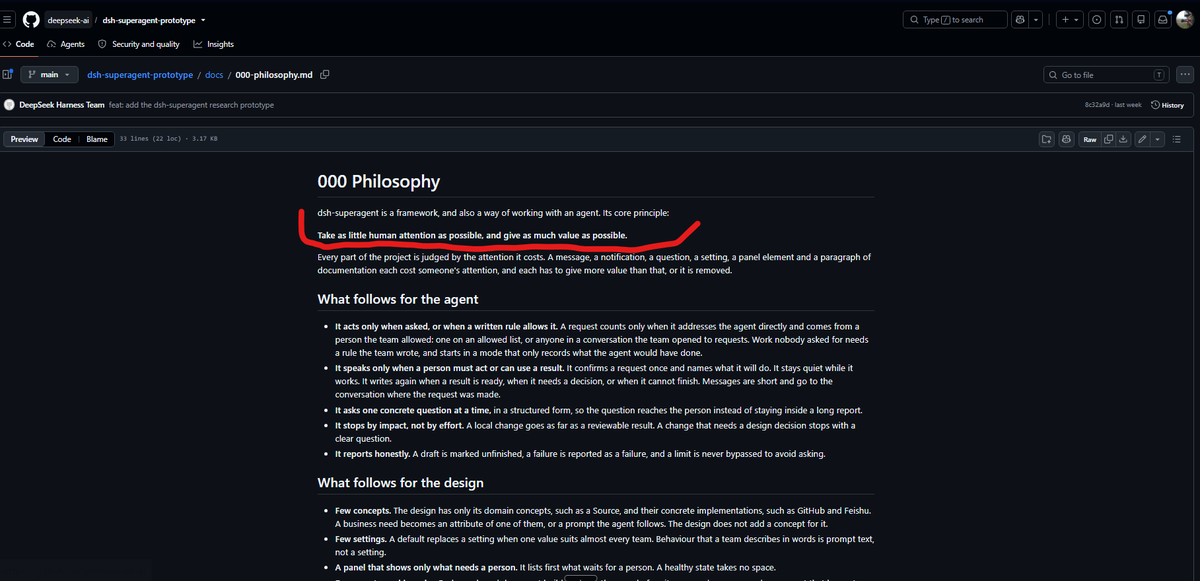
DeepSeek opublikował na GitHubie open-source'owy prototyp Superagenta. Projekt w niecały tydzień zdobył już prawie 20 tys. gwiazdek.
Chodzi o system, który potrafi samodzielnie zarządzać zadaniami, uruchamiać agentów, reagować na zdarzenia na GitHubie i angażować człowieka tylko wtedy, kiedy jest to potrzebne.
W części swoich projektów pracuję już w podobny sposób. Zbudowałem sobie system, który pod wieloma względami pokrywa się z tym podejściem. Dlatego sama koncepcja nie jest dla mnie szczególnie nowa, ale spodobało mi się, jak DeepSeek opisał filozofię stojącą za tym rozwiązaniem.
Najbardziej zaciekawiło mnie podejście, że uwaga człowieka jest najdroższym zasobem.
I w sumie to ciekawy kierunek myślenia. Dochodzimy do momentu, w którym agenci mają nie tylko wykonywać za nas pracę, ale też dbać o to, żebyśmy nie musieli się nimi za bardzo zajmować :)
Ich filozofia sprowadza się mniej więcej do kilku zasad:
Minimum komunikacji. Agent pracuje sam i odzywa się, gdy ma wynik albo faktycznie czegoś potrzebuje.
Autonomia zależna od konsekwencji. Nie pyta dlatego, że zadanie jest trudne, tylko dlatego, że decyzja może mieć istotne skutki.
Proaktywność, ale w ustalonych granicach. Może sam wykrywać problemy i podejmować działania.
Minimum zbędnej konfiguracji, raportów i powiadomień.
Liczy się wartość wykonanej pracy, a nie liczba uruchomionych agentów czy wygenerowanych PR-ów.
Właściwie chodzi o to, żeby człowiek przestał być kierownikiem, który musi wszystkiego pilnować, a coraz bardziej zajmował się tylko wyznaczaniem kierunku i podejmowaniem ważnych decyzji.
Myślę, że warto zajrzeć, szczególnie jeśli eksperymentujecie z autonomicznymi agentami.
W jaki sposób ogarnąłem @OpenBot_ na VPS? Poniżej odpowiedź dla osób, które mnie o to pytają.
1. Znalazłem serwer. Wybrałem od OVH, najtańszy (2 vCore, 4 GB RAM, 40 GB SSD NVMe). Wybór padł akurat na tego dostawcę, ponieważ mam tam kilka innych usług.
2. Zapytałem Groka, jaką dystrybucję Linuxa wybrać. Zweryfikował, że w moim wypadku najlepiej będzie Ubuntu 24.04. Taką zainstalowałem.
3. Poprosiłem go o pełną instalację i zabezpieczenie serwera. Zaproponował stworzenie użytkownika i dodanie go do sudo. Dodatkowo dodałem podstawowe zaproponowane zabezpieczenia.
4. Następnie ogarnąłem Docker + Docker Compose.
5. Postawiłem OpenBota w Dockerze (izolowany od reszty przyszłych projektów).
W zasadzie tyle. Na koniec Grok przedstawił mi konfigurację. Dodałem maila, pobrałem aplikację na telefon i na Maca. Teraz czas na testy i feedback, który dam wkrótce.
Jak się przydało, to zapisujcie do zakładek i 👀 👋.
PS. Pisane z perspektywy laika, nie programisty. Rób na własną odpowiedzialność. 😉
DeepSeek udostępnił open source DeepSeek Harness z trybem Creator Mode, który pozwala AI rozbudowywać własne środowisko pracy
I moim zdaniem to jeden z ciekawszych kierunków rozwoju agentów AI
🔗 github(.)com/deepseek-ai/deepseek-harness
Sam jakiś czas temu pisałem o tym, jak ważny jest dobrze zaprojektowany Harness, czyli całe środowisko, w którym pracuje model AI
Mam wrażenie, że za bardzo skupiamy się na wybieraniu coraz mocniejszych modeli, a za mało na tym, co dzieje się wokół nich
Dobry Harness potrafi znacząco wpłynąć na jakość generowanego kodu, liczbę błędów, wykorzystanie kontekstu i zużycie tokenów
Czasem nawet słabszy model w dobrze przygotowanym środowisku może poradzić sobie lepiej niż znacznie mocniejszy, któremu daliśmy chaotyczny zestaw instrukcji i narzędzi
Z kolei źle zaprojektowany Harness potrafi zmarnować możliwości najlepszego modelu
Agent czyta niepotrzebne pliki, przepełnia kontekst, zapomina wcześniejsze ustalenia, zapętla się w poprawkach, wykonuje zbędne operacje i zużywa kolejne tysiące tokenów, często nie zbliżając się do rozwiązania problemu
I właśnie dlatego tak zainteresował mnie projekt DeepSeek
Twórcy postawili na filozofię Everything is a plugin, czyli wszystko jest wtyczką
Nawet podstawowe elementy środowiska, takie jak obsługa modeli, narzędzi, historia sesji czy sama pętla działania agenta, są zbudowane w sposób umożliwiający ich rozszerzanie i wymianę
Ale najciekawszy jest właśnie Creator Mode
Zamiast dostosowywać się do funkcji, które przygotował producent, możemy zwykłym językiem poprosić agenta o stworzenie nowych możliwości jego własnego środowiska
Chcesz panel do zarządzania agentami? Własny interfejs do analizy danych? Narzędzie do pracy z dokumentami? Integrację z innym systemem?
Opisujesz, czego potrzebujesz, a agent może przygotować odpowiednią wtyczkę, napisać jej kod, zainstalować ją i sprawdzić działanie
DeepSeek pokazał między innymi edytor wideo, interaktywne wizualizacje 3D, czytnik prac naukowych i dashboard statystyk pracy agenta
Co ciekawe, agent może też korzystać z narzędzi pozwalających sprawdzić rzeczywiste API własnego środowiska, zamiast zgadywać, jak ono działa
Oczywiście to nadal wersja eksperymentalna, a część demonstracji wymagała kilku iteracji
Ale sama idea jest bardzo ciekawa
AI nie tylko wykonuje zadania, ale może również rozbudowywać narzędzia, dzięki którym wykonuje je skuteczniej
Nie chodzi tutaj o samodoskonalenie modelu poprzez zmianę jego wag, tylko o rozwijanie całego środowiska, w którym działa
I moim zdaniem właśnie tutaj jest ogromny potencjał
Ten temat poruszałem ostatnio w Mumro Academy, gdzie przygotowałem obszerną lekcję o Harness Engineering, od instrukcji i skilli po zarządzanie kontekstem, testowanie i kontrolę pracy agentów
Teraz zaktualizowałem ją również o DeepSeek Harness, Creator Mode i praktyczne przykłady tego, jak oba podejścia mogą się uzupełniać
Dodałem też interaktywne ćwiczenie pokazujące, kiedy wystarczy zwykła instrukcja, kiedy skill, kiedy MCP, a kiedy potrzebujemy już wtyczki środowiska
🔗 Lekcja w Mumro Academy:
academy(.)mumro(.)io/pl/lessons/ai-agent-harness-engineering/
Przygotowałem też własne otwartoźródłowe narzędzie Agent Harness Kit
Skanuje repozytorium, wykrywa używane technologie i dostępne komendy, pomaga zaprojektować odpowiedni Harness, generuje instrukcje i skille dla agentów, a następnie sprawdza, czy wszystko pozostaje spójne
Działa między innymi z Codexem, Claude Code i Cursorem, a przygotowane instrukcje i skille można również wykorzystać w DeepSeek Harness przy odpowiedniej konfiguracji
🔗 Agent Harness Kit, open source:
github(.)com/RolePlayingTech/agent-harness-kit
Nie jest to konkurencja dla DeepSeek, bo nasze narzędzia rozwiązują problemy na innych poziomach
I właśnie dlatego mogą się dobrze uzupełniać
Coraz bardziej jestem przekonany, że przyszłość pracy z agentami to nie tylko coraz inteligentniejsze modele, ale też coraz lepiej zaprojektowane środowiska, w których pozwalamy im działać
Bo nawet najlepszy model niewiele pomoże, jeśli całe środowisko wokół niego będzie źle zaprojektowane