AI literacy training that fits in your schedule. The Google AI Educator Series is here!
✅ Aligned to @ISTE_ASCD Standards
✅ Snackable: 15–45 min sessions
✅ Stackable: Build your own learning path
✅ Practical: Created for K-12 & higher ed
Get started: https://t.co/fcnQktGZkW
💎 New EduGem: https://t.co/a8A9CVI9tZ
🎨 Career Caricature - Create a colorful caricature of a student as their future adult self in their dream career based on the details they share.
#edtech#GoogleEDU@GeminiApp@GoogleForEdu
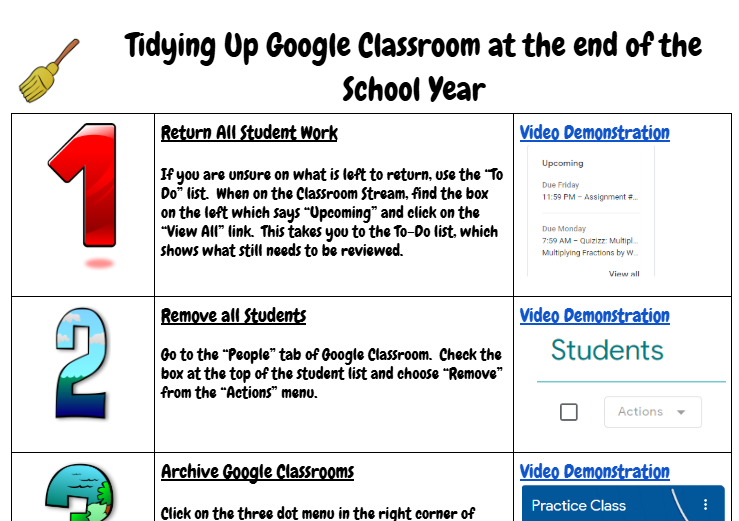
Wrap up your Google Classroom the right way! 🎓 Clean, organize, return work, and prep for next year with this quick guide. https://t.co/hvalvWeKae #EdTech#GoogleClassroom
Let's take a moment to highlight and celebrate the amazing educators at Meriden Public Schools! Great teachers don’t just teach, they inspire, encourage, and change lives. 🍎 Your efforts go far beyond the classroom, and we are so grateful for all you do! #herestudentssucceed
Today we launched the Youth AI Safety Institute, an independent research organization dedicated to ensuring the AI children use is safe and appropriate. The goal is to empower families and educators with the information they need, and create a race to the top for the AI industry.
Mind Maps are getting a major glow up 💅
These new features are rolling out today:
🚗Customization: Steer your map with specific user prompts
��Organization: Rename and Share your maps instantly
🗺️ Navigation: Silky smooth transitions between nodes
Let us know what you think!
20 NotebookLM Prompts
To Learn Faster, Think Deeper & Research Smarter
01. Instant Summary
Turn long documents into digestible insights.
👉 Prompt:
“Summarize this source into the 10 most important ideas, key arguments, and practical takeaways in plain English.”
02. Beginner Explanation
Make complex topics easy to understand.
👉 Prompt:
“Explain this material as if I am a complete beginner. Use simple analogies, step-by-step logic, and avoid jargon.”
03. Deep Dive Breakdown
Understand the topic layer by layer.
👉 Prompt:
“Break this source into core concepts, hidden assumptions, expert-level nuances, and what most readers usually miss.”
04. Compare Sources
Spot agreements and contradictions.
👉 Prompt:
“Compare all uploaded sources. Show where they agree, where they conflict, and what unique insights each source contributes.”
05. Study Notes Builder
Create clean notes instantly.
👉 Prompt:
“Turn this content into structured study notes with headings, bullet points, definitions, and memorable examples.”
06. Flashcards Generator
Convert information into active recall.
👉 Prompt:
“Generate 25 high-quality flashcards from this material with question on front and concise answer on back.”
07. Quiz Me
Test your understanding.
👉 Prompt:
“Create a progressive quiz from easy to difficult based only on this source. Wait for my answers and grade me.”
08. Memory Hooks
Make information stick.
👉 Prompt:
“Create mnemonics, analogies, and memory anchors that help me retain the most important parts of this content.”
09. Timeline Extraction
Organize events chronologically.
👉 Prompt:
“Extract every important event, milestone, or development from these sources and arrange them into a clean timeline.”
10. Key Quotes Finder
Find the strongest supporting evidence.
👉 Prompt:
“Pull out the most impactful quotes, data points, and evidence from these sources that I can cite in writing or presentations.”
11. Research Gaps
See what’s missing.
👉 Prompt:
“Identify unanswered questions, weak arguments, missing evidence, and research gaps across these materials.”
12. Debate Both Sides
Sharpen critical thinking.
👉 Prompt:
“Present the strongest arguments for and against the main thesis of these sources as if two experts were debating.”
13. Turn Into Framework
Extract repeatable systems.
👉 Prompt:
“Convert the ideas in these sources into a practical framework, checklist, or repeatable system I can apply.”
14. Content Repurposing
Turn research into publishable content.
👉 Prompt:
“Use these sources to generate a LinkedIn post, article outline, tweet thread, and newsletter idea.”
15. Expert Interview Mode
Ask the notebook questions.
👉 Prompt:
“Act as the world’s top expert on these uploaded materials. I will ask questions answer only from the sources.”
16. Executive Briefing
Condense for busy decision making.
👉 Prompt:
“Create a 5-minute executive briefing with only the most strategic insights, implications, and action points.”
17. Lesson Plan Creator
Transform notes into a curriculum.
👉 Prompt:
“Turn this notebook into a 7-day learning plan with daily lessons, exercises, and checkpoints.”
18. Idea Generator
Use sources for new thinking.
👉 Prompt:
“Generate 20 original ideas, opportunities, or applications inspired by the uploaded materials.”
19. Simplify for Teaching
Prepare to explain to others.
👉 Prompt:
“Rewrite the key ideas from these sources into a teaching script that I can explain to someone in 5 minutes.”
20. Action Plan
Move from knowledge to execution.
👉 Prompt:
“Based on everything in these sources, create a practical action plan with first steps, priorities, and deadlines.”
❤️ Like
🔁 Retweet
🔖 Bookmark
Follow @sonalshukla3377 for more such posts
@NotebookLM It would be great to see drag-and-drop questions added, and being able to edit individual flashcards directly would be such a huge help for teachers’ workflow. Thanks for all the work on this incredible tool! 🏆🙌🏼
Mo sources mo problems? Not anymore:
Rolling out now, NotebookLM can auto-label & categorize sources (when you have 5+), so you can spend less time scrolling and more time thinking/learning/philosophizing, etc.
Rename, reorganize, & personalize (emojis!) to your ❤️'s content.
Quizzes & Flashcards in @NotebookLM got a big upgrade based on YOUR feedback.
Now you (and your students) can:
✅ Save your progress & pick up where you left off
✅ Shuffle or delete cards
✅ Track what you’ve mastered vs what needs review
Give it a try: https://t.co/0hMDIByi6m
We’re introducing a new Search experience in @GoogleChrome that lets you open webpages side-by-side with AI Mode – no tab switching required.
Now, you’ll be able to compare details and ask follow-up questions while still maintaining the context of your search, whether you’re shopping for a new coffee maker or studying for a statistics midterm.
You can now add custom cover art and descriptions to any of your notebooks 🥳
This is perfect for curating an aesthetic grid or putting a personalized touch on your notebook before sharing it with the world.
(We recommend uploading a 16x9 image, specifically of your hero)
Google has introduced improved #LaTeX rendering and PDF export.
#Math teachers: this means your complex math equations and scientific formulas display perfectly every time. Less work for you!
Learn more: https://t.co/zNhmYCUSgw
#googleEDU#MathChat
Keep tabs on our latest Chrome feature, coming soon: Skills! Save your go-to Gemini in Chrome prompts to reuse them later, or choose from a library of premade prompts.