Anda Bot v0.11: structured human-in-the-loop workflows for local AI agents
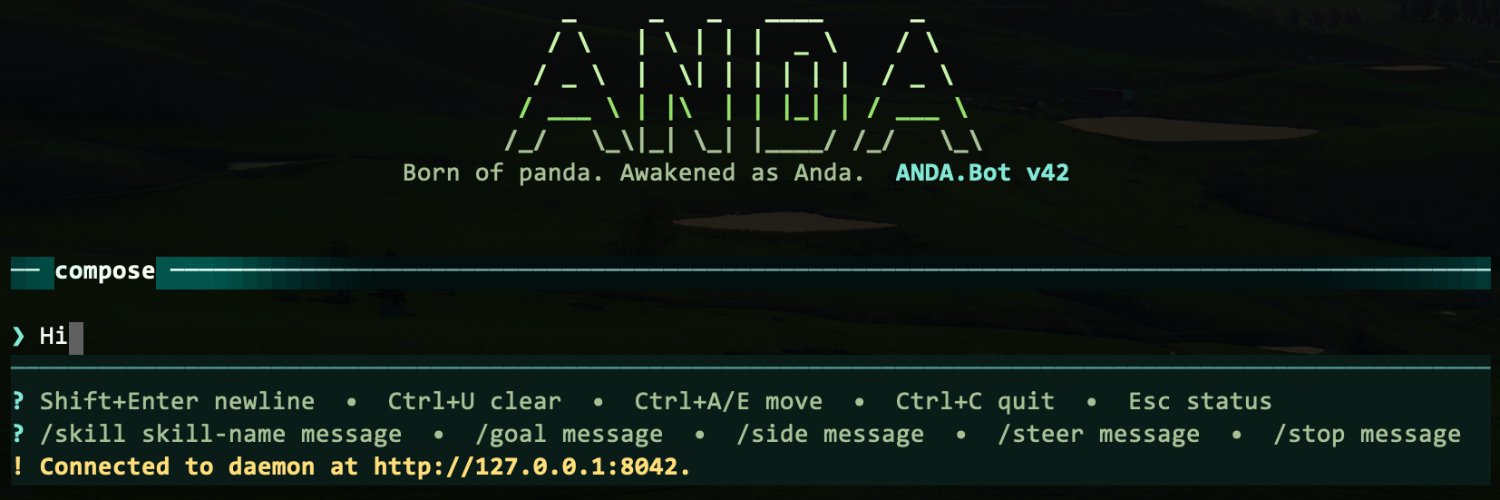
This release turns human-agent coordination into a first-class runtime feature: agents can now ask for approvals, choices, and typed input through structured action cards instead of plain chat prompts. Shell commands get clearer approval flows, and the same interaction model works across the browser extension and TUI.
Highlights:
Structured approvals and choices — agents can request approval, offer selectable options, or collect typed input.
Consistent browser + terminal interaction — action responses work in both the browser chat UI and keyboard-friendly TUI.
Secure identity storage by default — daemon, owner, and trusted-user private keys use the OS credential store by default, with migration from legacy key files.
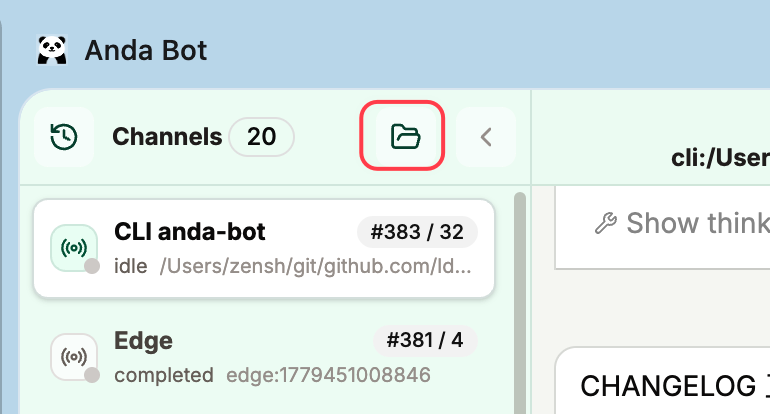
Channel search — the browser extension sidebar can filter conversation channels.
Try the latest patch release: https://t.co/uJ3FCIEHmz v0.11.2.
Thanks! The main flow is still: just ask the agent — users shouldn’t have to click around a graph to retrieve memory.
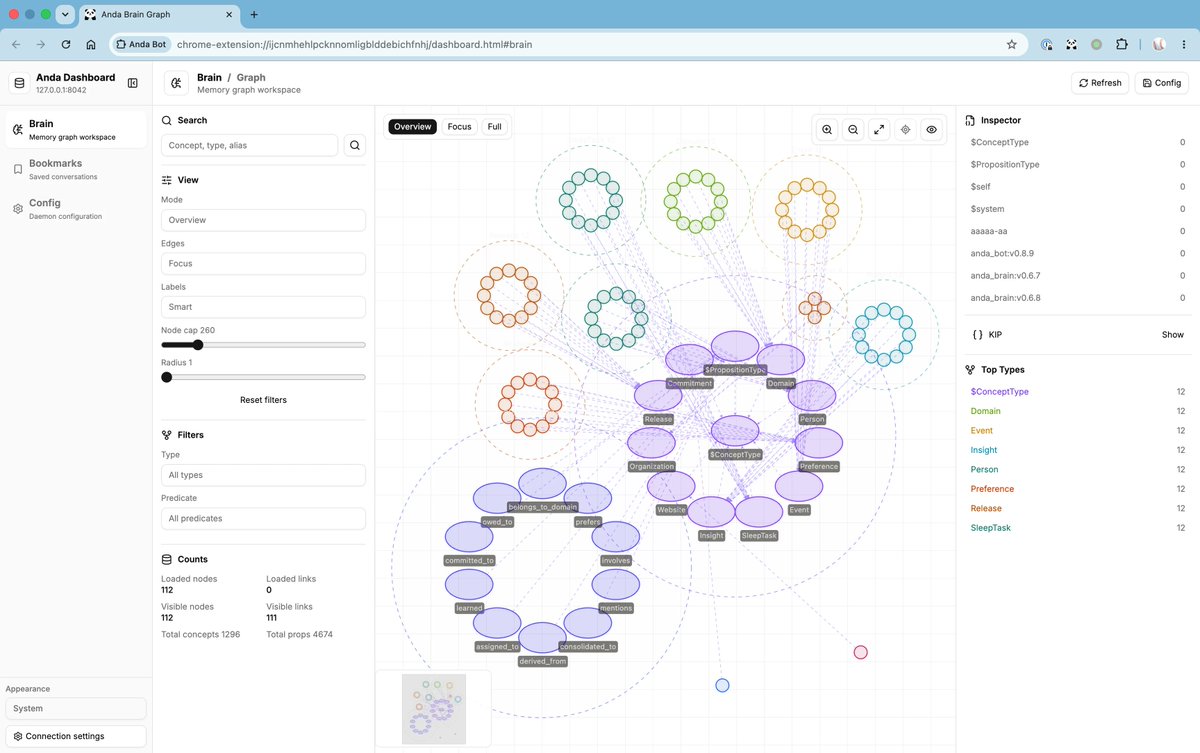
Brain graph navigation is more like memory observability: see what the agent remembers, inspect related people/projects/events, trace why something surfaced, and steer or clean memory when needed.
Anda Bot v0.10.5 is out.
The v0.10 series turns the browser extension into a real dashboard for local-first agents: Skills management, bookmarked messages, reusable quick prompts, Brain graph navigation, and right-click page capture.
Skills are now first-class: browse personal, bundled, and shared skills; inspect files; clone, enable, disable, validate, delete, reload, and optimize them from chat.
The new context-menu flow lets you right-click page content and attach it to the composer as structured context — cleaner than copy-paste, and much easier for agents to use.
Local-first agents need more than a chat box. They need a workspace.
https://t.co/bxuf8C8si1
Anda Bot v0.10 is out.
This release turns the browser extension into a real dashboard for local-first agents: bookmarked messages, reusable quick prompts, Brain/config access, and a smoother workspace for managing your AI memory.
Under the hood: runtime model reloads, MCP server tools, capability groups, first-class /loop, trusted users, stronger session compaction, better launcher updates, and lots of reliability fixes.
Local-first agents need memory you can see, organize, and control.
Own your memory. Own your agent.
👉 https://t.co/bxuf8C8si1
Can your agent run LongDS-Bench by itself?
We built longds-bench for exactly that: point your agent at SKILL.md and see if it can finish the challenge with its own tools.
AndaBot + GPT-5.5 completed all 2,225 judged turns in 7+ hours: 39.37% overall.
https://t.co/1znR4niNBL
Can AI agents really handle long-horizon data analysis tasks? 🧐📊
Most benchmarks test data analysis as isolated episodes:
start fresh → analyze → answer → reset.
But real-world data analysis tasks are continuous.
Later requests are rarely self-contained: they depend on definitions, filters, assumptions, and intermediate results established many turns earlier.
Introducing our latest work:
"LongDS-Bench: On the Failure of Long-Horizon Agentic Data Analysis"
📖 Paper: https://t.co/6rNdvyoiKm
💻 Code: https://t.co/tzr1iMSQWa
📊 Data: https://t.co/MYkRqjdSxW
🛠️ What is LongDS?
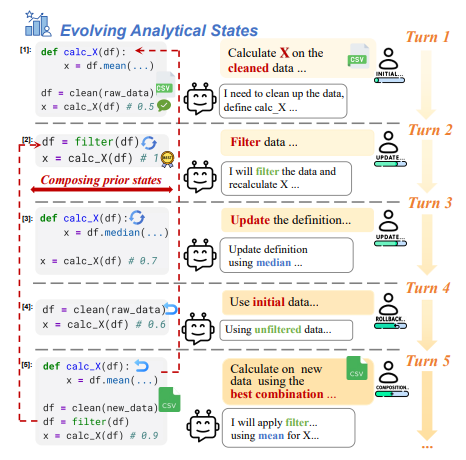
LongDS is a benchmark designed to evaluate whether AI agents can maintain, update, restore, and compose evolving analytical states across long-horizon multi-turn data-analysis tasks.
🧠 Key Design: Long-Horizon Data Analysis as State Management
Data analysis is not just code execution.
It is long-horizon analytical state management.
🔍 We abstract long-horizon data-analysis tasks into 6 key state-evolution patterns:
1️⃣ Initial state construction
2️⃣ State inheritance
3️⃣ State update
4️⃣ Counterfactual perturbation
5️⃣ Rollback
6️⃣ Multi-state composition
📊 Built from realistic Kaggle notebook workflows, LongDS covers:
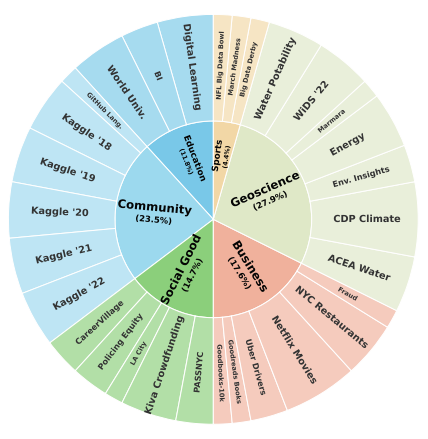
- 6 domains: Education, Community, Social Good, Business, Geoscience, Sports
- 68 tasks
- 2225 turns
- 11.3-turn average dependency span
🔬 Results:
Even the best model reaches only 48.45% average accuracy.
Accuracy drops by nearly 47% from the first 10% to the last 10% of task progress.
Long-horizon errors dominate failures, ranging from 52% for GPT-5.4 to 69% for Kimi-K2.6.
🔎 Interestingly, we find:
More agent steps do not necessarily improve performance.
The bottleneck is not simply interaction budget, but whether the agent can preserve the correct analytical state over time.
🚀 Why it matters?
LongDS shows that data analysis agents fail not only because of local coding or reasoning mistakes.
They fail because analytical states drift, propagate, and compound across long trajectories.
Future data analysis agents need more than better code generation.
They need reliable long-horizon state management.
Would love to hear thoughts and feedback from the community! 💬
#LLM #Agent #DataScience #Benchmark #AI #LongContext #DataAnalysis #NLP
From 0.9.1 to 0.9.9, Anda Bot gets a visible memory graph and a Fable 5-powered core upgrade across KIP, Anda DB, Runtime, and Brain.
Local-first agents need memory you can see, own, and control.
Not your memory, not your agent.
Anda Bot v0.9 is out.
This release is about one simple thing:
making Anda Bot much easier to install, launch, and keep running — especially on Windows.
Until now, Anda Bot has been powerful, but still too “developer-shaped” in the first few minutes. You often had to touch the terminal, understand background processes, copy tokens manually, and deal with platform-specific edge cases.
v0.9 starts changing that.
What’s new
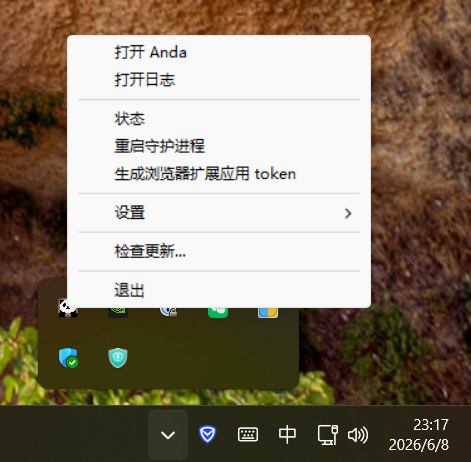
1. A new desktop launcher
Anda Bot now ships with anda_launcher on Windows and macOS.
It gives you a normal desktop entry point for the local agent:
start and restart the Anda daemon
check daemon status
open logs
edit model settings
pair the browser extension by generating and copying the local Gateway URL / Bearer token
toggle launch at login
check for updates
keep Anda running in the background
In other words: you no longer need to treat Anda Bot as “just a CLI process” to use it day to day.
2. A Windows graphical installer
Windows users can now install Anda Bot through a normal setup wizard.
The installer bundles the CLI, launcher, curated skills, Start Menu shortcuts, login autostart, uninstall support, and first-run setup flow.
Before v0.9, getting Anda Bot running on Windows could still feel like installing developer infrastructure.
After v0.9, it starts to feel like installing a real local assistant.
3. Better Windows text handling
We also fixed important Windows text encoding problems.
Local text files and text-like attachments now use a shared platform-aware decoding path, so legacy encodings such as GBK can work properly instead of assuming everything is strict UTF-8.
This matters because a local assistant should work with the files and environments people actually have — not only the clean UTF-8 world developers wish existed.
4. Background daemon + launch-at-login
Anda Bot can now be installed as a resident local process.
That means your assistant can stay available across sessions, and restart automatically after reboot when launch-at-login is enabled.
This is important for Anda Bot’s core direction:
not just an AI chat window, but a local memory-first assistant that is present across browser, launcher, terminal, files, and daily workflows.
Why this release matters
There are many AI agent apps now.
Some are great coding agents.
Some are broad tool platforms.
Some are hosted chat products with plugins.
Anda Bot is trying to be something different:
a durable local assistant with memory, tools, and continuity under your control.
For that to matter, people must first be able to install it, start it, pair it with the browser, and keep it running without fighting the operating system.
That is what v0.9 is about.
It is not the flashiest release.
But it is one of the most important ones.
Because before an agent can become part of your workflow, it has to survive the boring parts:
installation, startup, background processes, updates, encodings, autostart, logs, and recovery.
v0.9 lays that foundation.
You can install the latest Anda Bot from:
https://t.co/BAnjQjueBy
Feedback from Windows users is especially welcome.
Your model can change. Your memory should not.
We refreshed https://t.co/BAnjQjueBy to explain why Anda Bot exists in a world full of AI agents.
Code agents are great for code.
Anda Bot is for continuity: local graph memory, daily surfaces, and a Brain that survives models and sessions.
Install v0.9.0 now.
AI 发展到今天,真正可怕的不是“账号被封”,而是你的记忆、上下文、偏好和长期关系都被封在别人的平台里。
我现在用两个智能体:Codex 做主力写代码,不要求记忆;Anda Bot 做助理干杂活,负责提交代码、分析文章、搜集资料等。
后者看似琐碎,却最能体现真实的我,所以必须有长期记忆。
Anda Bot 的记忆不依赖任何大模型厂家,而是以知识图谱形式存储在本地。
模型可以换,记忆不能丢。
Anda Bot 才是我的额叶。@AndaBotHQ
Anda Bot v0.8.12 is now live on the Chrome Web Store
✨ Since v0.8.9: queued follow-up prompts, clearer external-user/runtime message rendering, safer service-worker behavior, scoped IM participant identity, and broader Agent Skills loading. A steadier browser companion for real work.
https://t.co/d7DmTeKvF4
Got lots of Codex quota?
You can plug it into Anda Bot.
Set a stronger model like GPT-5.5, and your bot immediately becomes a more powerful partner.
Your quota. Your workflow. Your stronger agent.
@mickael_808080 In v0.8.9, you can now actively add project folder-based conversation channels in the Chrome extension. This update is currently pending review by the Chrome Web Store.
@mickael_808080 In v0.8.9, you can now actively add project folder-based conversation channels in the Chrome extension. This update is currently pending review by the Chrome Web Store.
Hey @mickael_808080 — great question, and thank you for using Anda Bot! 🙏
This already works through channels. Each browser (Chrome, Edge, Brave…), each messaging app (Telegram, WeChat), and each folder automatically creates its own channel with independent scene memory. Even in the CLI: launch Anda from different project directories, and you’ll see different channels.
But here’s the design philosophy: behind the scenes, Anda Bot has one unified long-term brain. All channels consolidate into it. Discuss coding in Chrome, and your Telegram conversation might later recall that you’re a developer.
So:
📂 Channels = separate conversation contexts
🧠 Brain = shared knowledge across all channels
You don’t need to manually create separate conversations — channels handle that automatically. And you can’t (and shouldn’t need to) fully isolate memories. Just talk naturally. The bot gets smarter the more you use it, everywhere.
Different rooms, same house. 🏠
@AndaBotHQ great work, i am using the bot a lot. Also I want to know when would it be possible to add multiple conversation where each conversation holds a different memory. Thanks
💡 /new — Start fresh in any channel. Prefix your prompt with /new and Anda Bot ignores the scene memory, treating it as a brand new conversation. Handy when you switch topics completely.
🤫 /side — Private, ephemeral mode. Use /side when you need the bot to handle something and then forget it. The task gets done, but nothing lingers in the channel’s context afterward.
Anda Bot v0.8.8 just got a whole lot better.
Here’s what changed:
🧠 Smarter — The AI now remembers twice as much of your conversation. Longer chats, better answers. Drop in any document (PDF, Word, Excel, screenshots) and it reads them instantly.
🌐 Every browser — Chrome, Edge, Brave, Vivaldi, Arc. It knows which one you’re on and keeps your work and personal sessions separate.
✨ Polished — We rebuilt the interface to be lighter and faster. Typing feels native. Attachments print and download properly. Rich text copy-paste works.
🛡️ Reliable — 300+ automated tests. Every bug we could catch, fixed.
Free. Open source. Always getting better.
https://t.co/d7DmTeKvF4
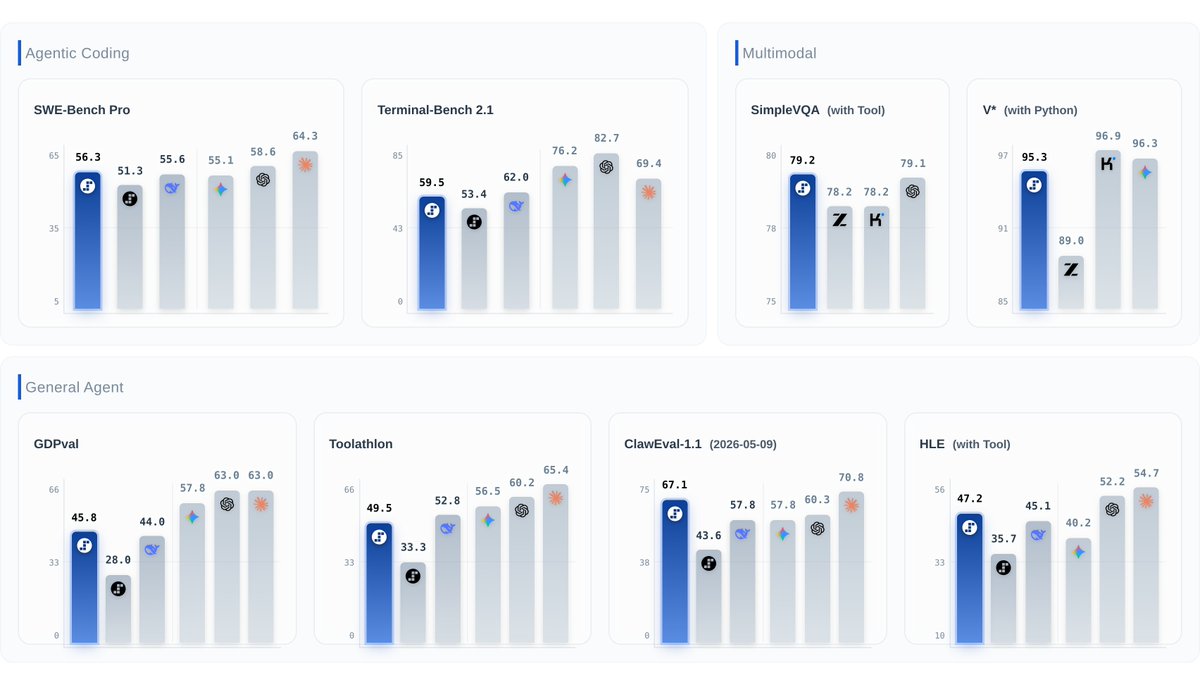
⚡️ Step 3.7 Flash is here: The new frontier is agent efficiency.
#1 ClawEval-1.1 (67.1), #1 SimpleVQA Search (79.2), #2 SWE-PRO (56.3), 95.3 on V* Python. Open weights under Apache 2.0.
Built for agentic, coding, search, and multimodal workflows — balancing speed, cost, and reliable execution.
- 400 TPS. 198B sparse MoE, ~11B active. 256K context, 3 reasoning levels.
- Understands UIs, charts, docs, images — then writes code or calls tools to act on what it sees.
- Web + visual search reaches further: more sources, deeper follow-up.
- Reliable tool use — less drift, fewer broken toolcalls. 98%+ on τ²-bench across all difficulty levels.
- Works with Claude Code, KiloCode, Hermes Agent, OpenClaw, and protocols like MCP.
- Runs locally on Mac Studio M4 Max, DGX Spark, AMD AI Max+ 395.
GitHub: https://t.co/kqlZkVIRHv
HuggingFace: https://t.co/qqceCrgPiw
GGUF: https://t.co/rR6XrnymWG
ModelScope: https://t.co/wney6Tzvqy
API: https://t.co/RvHWzRG7Fu
Blog: https://t.co/BxDiajiQ5G